Understanding Secondary Outlets
In this concise guide, we’ll take a closer look at secondary outlets—also referred to as named router outlets—and examine their function within the routing system. After reading, you’ll be familiar with:
- the process of defining secondary outlets
- the reasons for utilizing secondary outlets
- their impact on URL formatting
- the mechanics of their routing and activation
Setting Up Secondary Outlets
As outlined in this post, the router relies on a router outlet directive to display the components it has navigated to. In the absence of a specified name, the default outlet comes into play:
<router-outlet></router-outlet>
<ng-component>Routed components go here</ng-component>
In practice, the router inserts the routed components immediately after the router-outlet, wrapped inside an <ng-component> element. This insertion is handled automatically—there’s no need to manually include the <ng-component> tag. You just add a <router-outlet></router-outlet> to your template, and the router manages the rest.
You’ll notice the router-outlet directive doesn’t carry a name attribute. Internally, this unnamed outlet is labeled as the [PRIMARY_OUTLET](https://github.com/angular/angular/blob/master/packages/router/src/shared.ts#L20), serving as the destination for all routed content by default.
However, there are scenarios where you might need multiple outlets to render distinct routable content in separate areas of your application. For instance, consider building a social media platform. You might want to showcase a user’s main feed in one section while presenting a chat widget elsewhere on the screen. Additionally, you’d want the navigation within the main content and the chat widget to operate independently. The primary outlet would handle the main content, while a secondary outlet would manage the chat widget’s components.
<router-outlet name="sidebar"></router-outlet>
<ng-component>Chat components go here</ng-component>
As you can see, we’ve added a name attribute to this router outlet. This name must also be reflected in the router configuration for the app:
const ROUTES = [
  { path: 'home', component: HomeComponent },
  { path: 'chat', component: ChatComponent, outlet: 'sidebar' }
]
Here, we’ve defined an outlet property set to sidebar for the chat route. This instructs the router to display the ChatComponent through the sidebar outlet whenever it encounters the chat URL segment.
But the router needs a method to tell outlets apart in the URL. Let’s dive into how secondary routes are represented within a URL.
Secondary Outlets and URL Structure
As we’ll discover, primary and secondary outlets are routed separately and can both be active at the same time. In a URL, secondary outlets are wrapped in parentheses:
localhost:4200/home(sidebar:chat)
Take these examples from our simple social app. In Case 1, only the primary outlet is active, with the URL localhost:4200/home. In Case 2, both outlets are engaged, using the URL
localhost:4200/home(sidebar:chat)
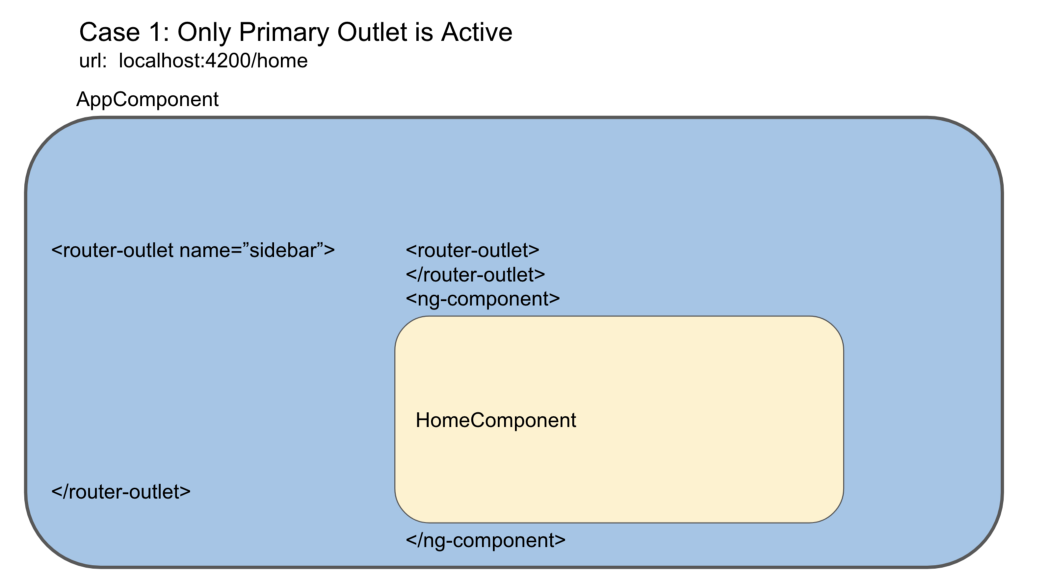
When only the primary outlet is active, the HomeComponent appears as a sibling to the primary outlet. The sidebar outlet remains empty at this point.
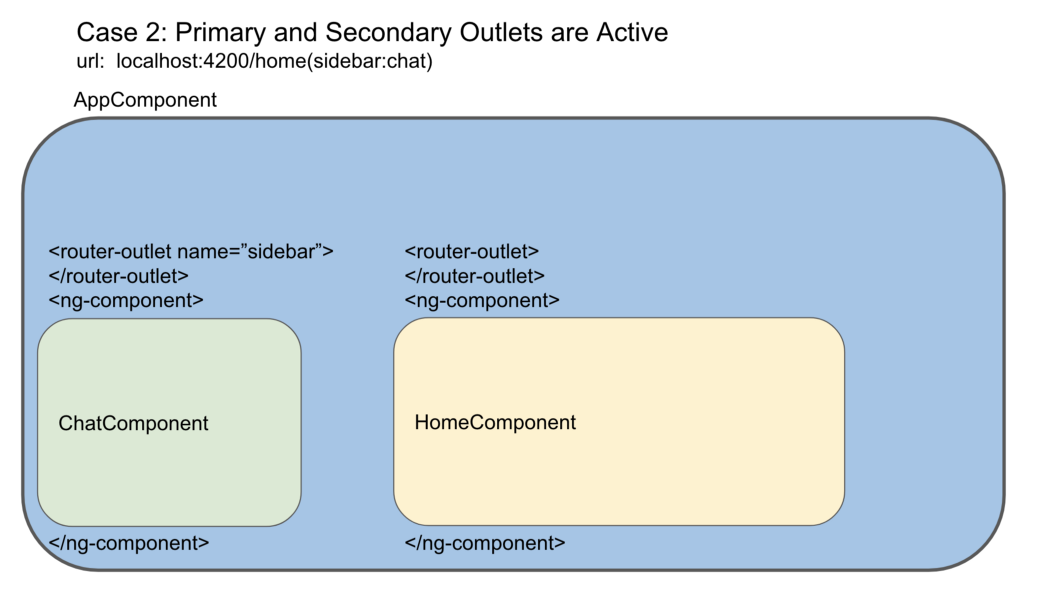
When both outlets are activated, the ChatComponent is rendered within the sidebar outlet.
Those who’ve gone through the article on URLs and redirects might remember that outlets are depicted as UrlSegmentGroups inside a UrlTree. These outlets can show up at various levels of a UrlTree, not only at the root.
Secondary Outlets, Routing, and ActivatedRoutes
As the router aligns URL segments with the route configurations supplied to RouterModule.forRoot(), it consistently monitors the active outlet by passing it as a parameter.
processSegmentAgainstRoute(
      route: Route, rawSegment: UrlSegmentGroup, segments: UrlSegment[],
      outlet: string): TreeNode<ActivatedRouteSnapshot>[]
Pay attention to the outlet: string parameter
So, routing happens independently across different outlets, unless an absolute redirect is in play.
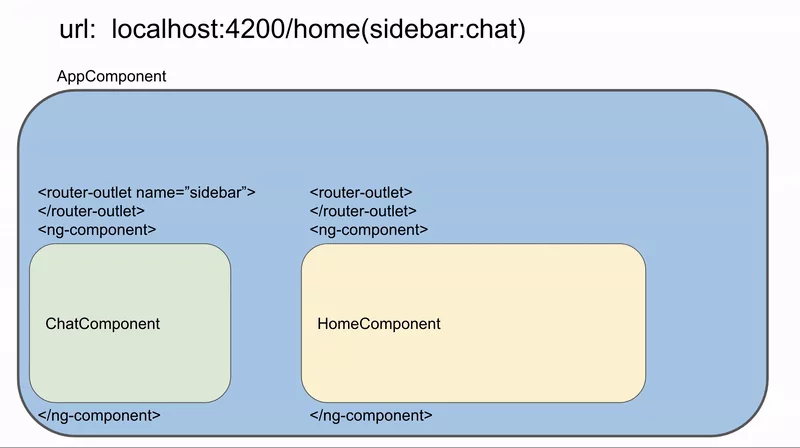
Updating either the primary or secondary part of a URL leaves the other outlet unaffected—they operate autonomously.
This independence implies that the Router service can hold multiple ActivatedRoutes at once—one for each outlet that’s currently active. You can explore a hands-on demonstration of secondary outlets and router states using the example configuration provided in this stackblitz.

For the URL /home(sidebar:chat), the RouterState contains two ActivatedRoutes, matching each active outlet
This setup allows you to pull parameters and route data from multiple outlets simultaneously via the Router service.
As your projects expand, you may find yourself needing to route to various parts of your application without them affecting each other—secondary outlets offer an effective solution for this.