Welcome back. In the preceding piece, we examined how RxJS implements the Observer pattern and constructed our own simplified Observable class. Along the way, we added utility functions like of, from, and fromEvent to generate observables from various data sources. If this series is new to you, it would be helpful to look at the earlier entries first:
Now we turn our attention to fundamental operators such as map, filter, and take. These tools allow us to combine and transform data streams, which is a core aspect of RxJS because they enable the creation of new observables from existing ones, giving us greater control over asynchronous information flowing through our systems.
As we'll discover, a guiding principle in RxJS is that any problem or data flow can be represented as a stream — including the very solution to our async challenges. By chaining streams together, we can arrive at our intended outcome through composition.
Operators
Note that the code examples here rely on the RxJS v5 chaining style. A later article will dive into the v6 pipeable approach.
Operators are essentially functions that accept one or more input streams, establish a fresh output stream, apply a transformation to each item that arrives from the input, and push the resulting value down the new output stream. These are frequently visualized with marble diagrams:
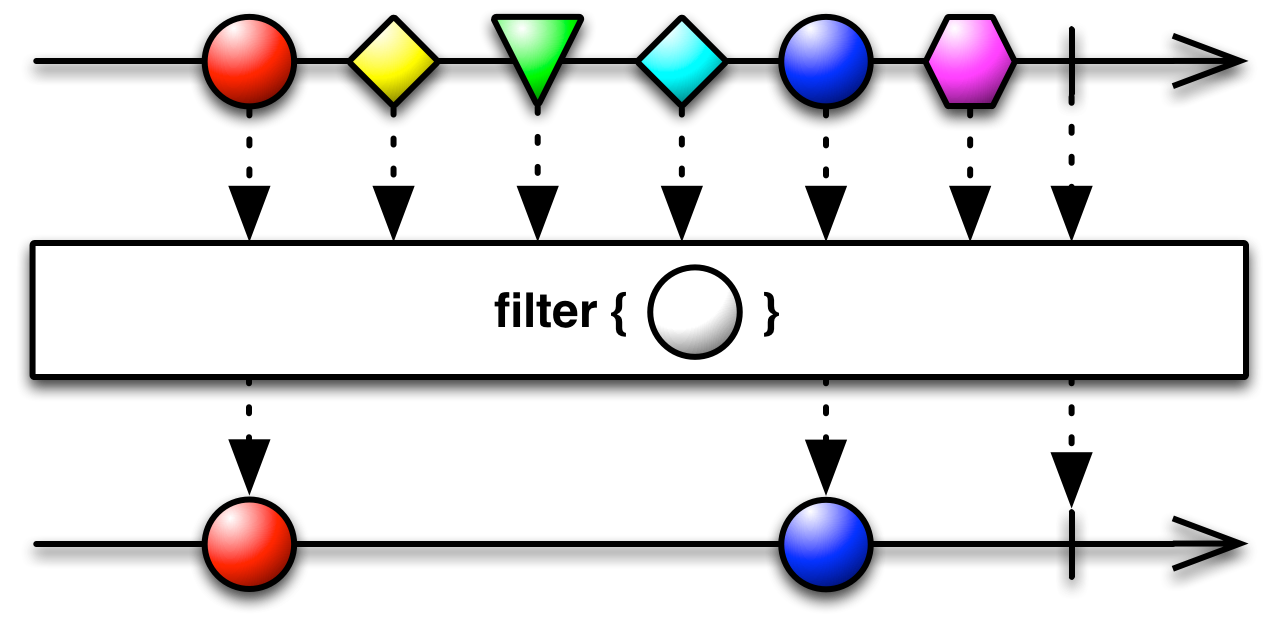
Marble diagram for the filter operator. Here, we only pass circles along to our output stream.
The top horizontal line with various shapes represents the source stream, where each shape might stand for a piece of data that arrives over time, such as a DOM event. The bottom line shows the result after applying the filter operator to that same source. When an emission occurs on the input, the filter checks whether it matches the condition (e.g., is a circle), and if it passes, that item is re-emitted on the output stream. **Streams are immutable, meaning the original source remains unchanged throughout this process.**
Let’s take a step back and build an intuition for why this matters. **Why is the term composing so central to RxJS?** What makes chaining things together so important?
Composing streams simply means taking a source observable, applying an operator to it to get a new observable, and then perhaps feeding that new observable into yet another operator to produce another one, and so forth. Imagine it as piping data from one stage to the next.
But…again…**why bother** with all of this?
**Because the first rule of RxJS tells us that any situation can be conceptually modeled as a stream.** So when you're facing an async challenge, the solution itself can also be framed as a stream of events or values.
This becomes our mission: figure out what the stream representing our solution should look like, determine which input streams we have available, and then compose operations over those inputs until we finally generate the desired output stream.
That might sound vague and high-level, right? Let’s ground it with the simple marble diagram above. Our aim is to have a stream that only emits circles. That’s the target (silly as it may seem). Our input stream produces many shapes, some of which are circles. So we search for an operation that can map our input to an output containing only circles. In this instance, that operation is a straightforward filter. By applying filter to our input, we get the output we want, and the task is done.
Still need more? Fine, let’s take a more tangible case: the classic drag event example.
How would we characterize a drag? Think of it as a mousedown event, followed by a series of mousemove events, and finally a mouseup that ends it. So we outline our input and output:
- Inputs:
mousedown,mousemove, andmouseupstreams - Output wanted: a stream that emits drag events
First, we set up our inputs using fromEvent.
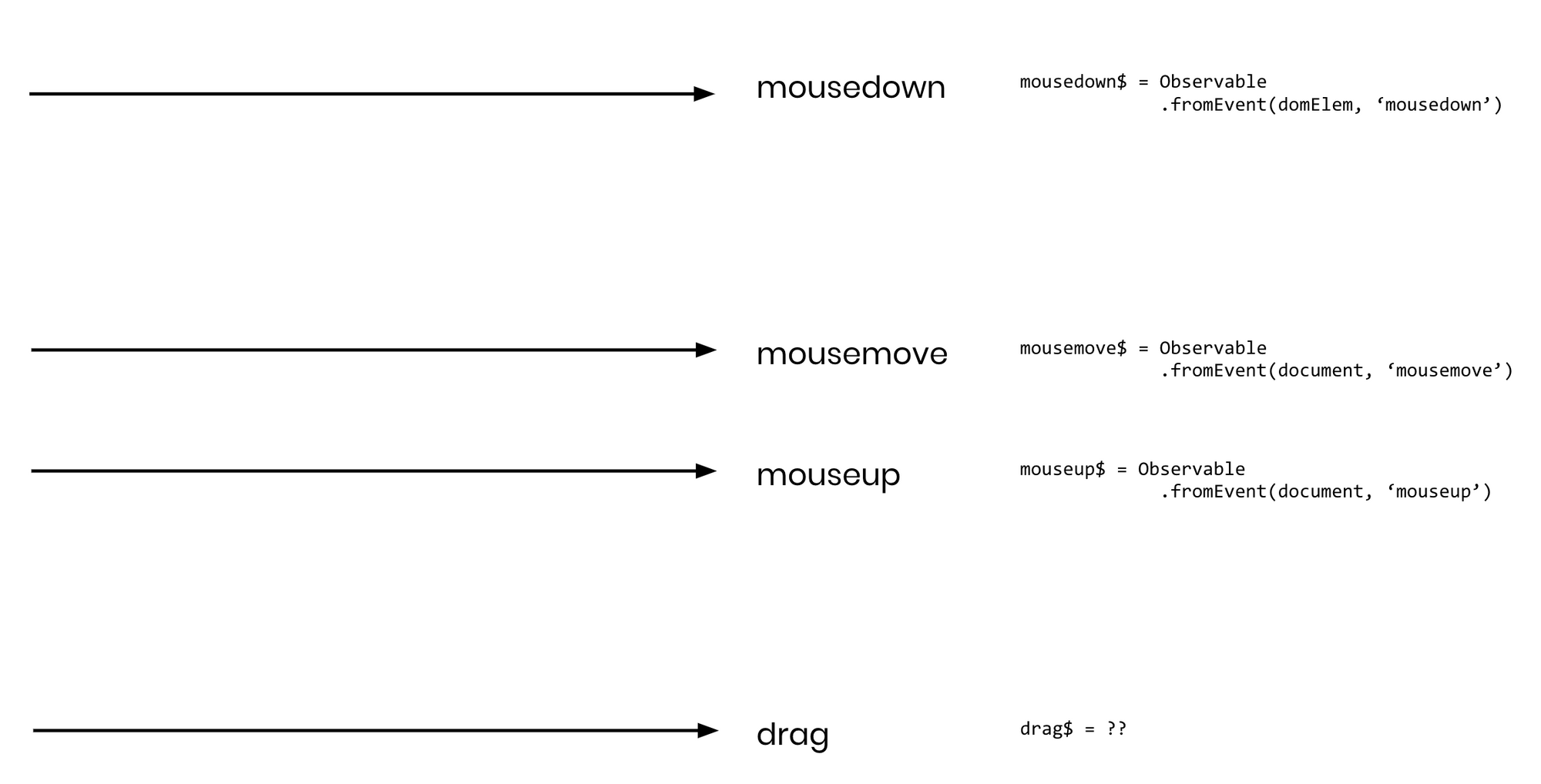
The three inputs (mousedown, mousemove, mouseup) plus the output stream we plan to produce for drag events.
We know a drag event begins when a mousedown arrives:
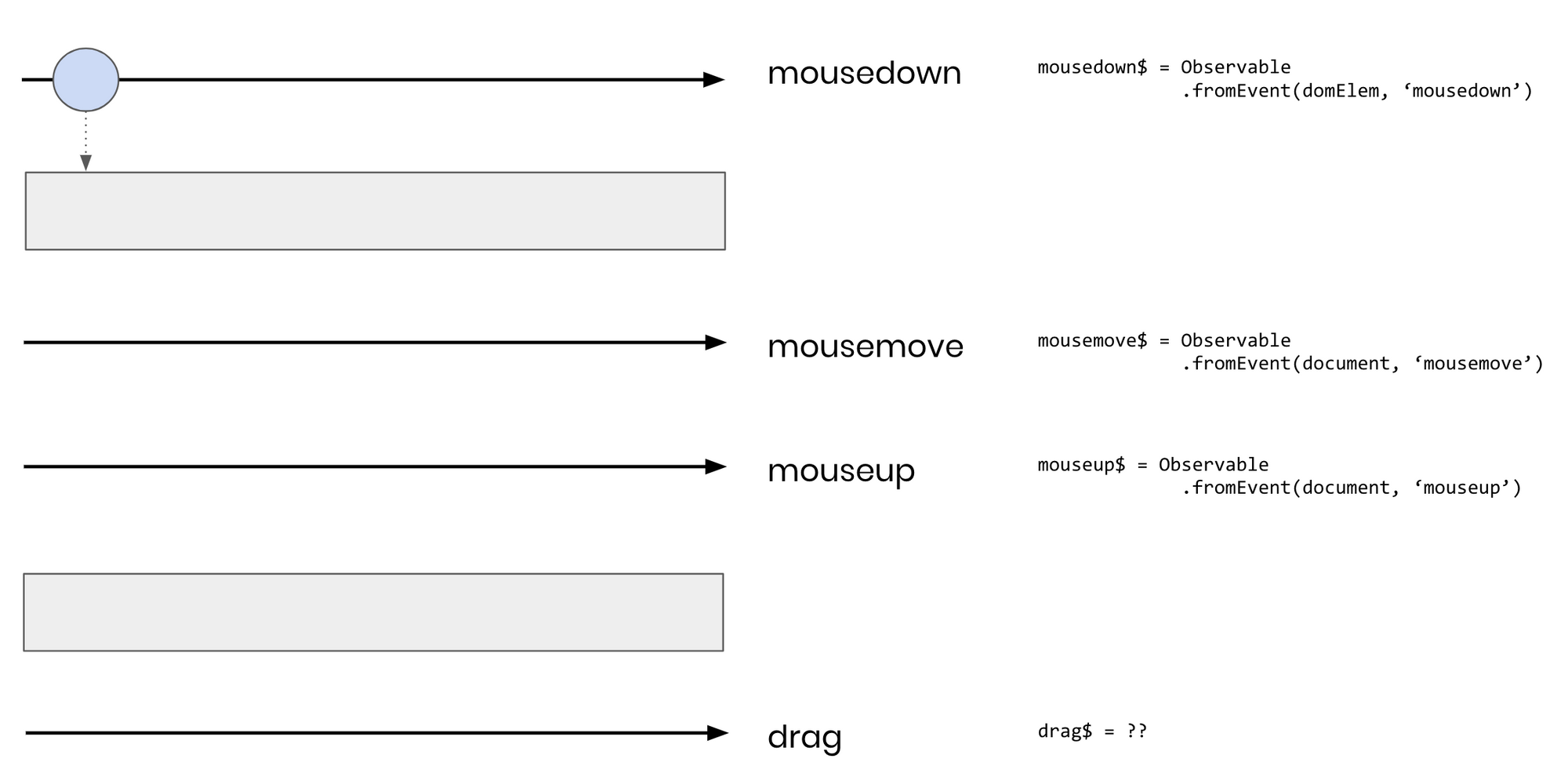
We got a mousedown, but which operator comes next?
Once we have a mousedown, we want to subscribe to mousemove and mouseup only at that moment — not any earlier, since a drag begins precisely with a mousedown. Several operators could serve here; we'll go with concatMap. Its internal mechanics are not our focus right now, as we'll build it ourselves in an upcoming article:
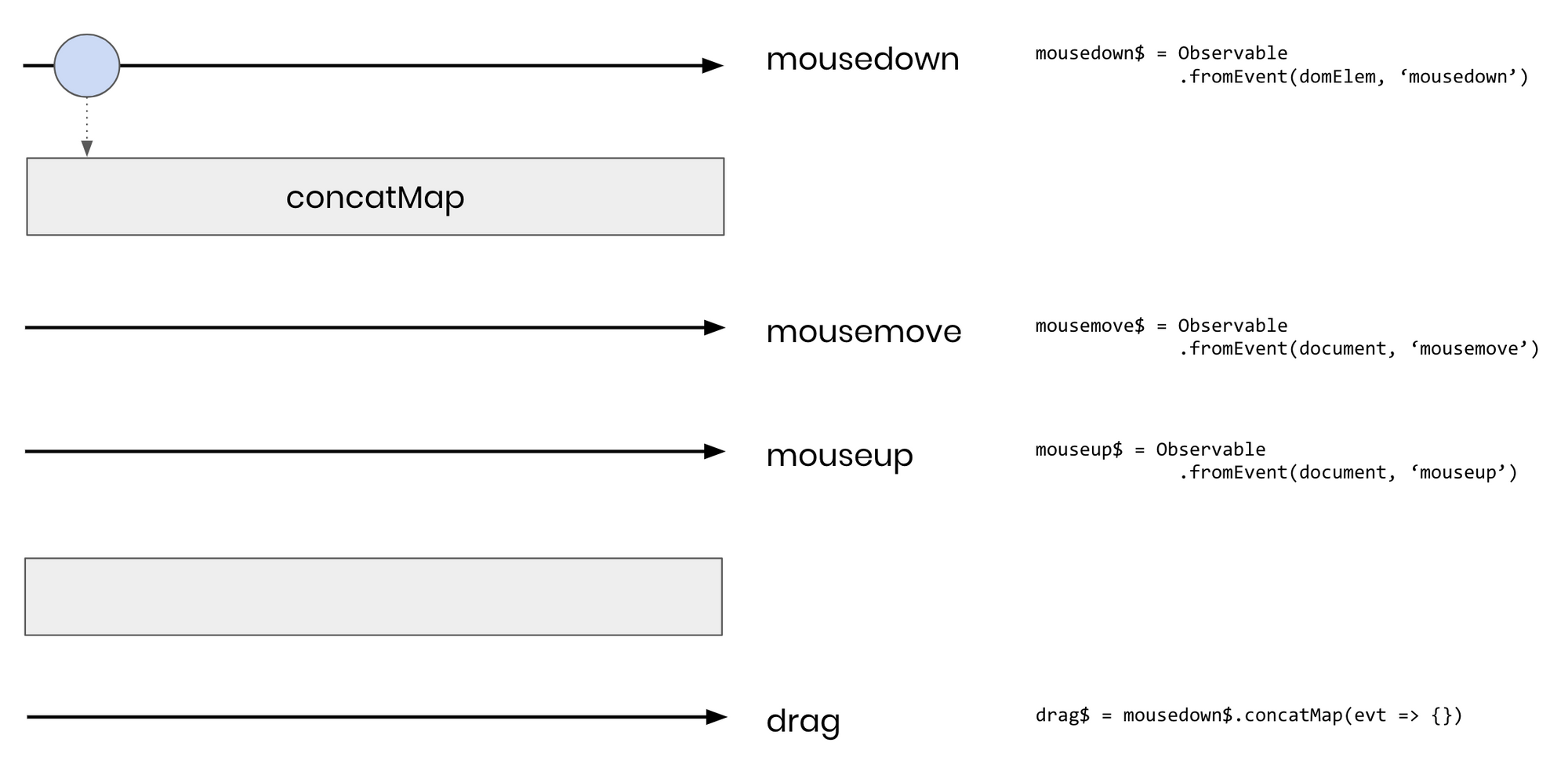
concatMap begins listening to mousemove and mouseup only after a mousedown arrives.
We then need to keep tracking mousemove events until the mouseup fires. The takeUntil operator is exactly suited for this. Again, no need to dig into its internals; just follow the overall logic:
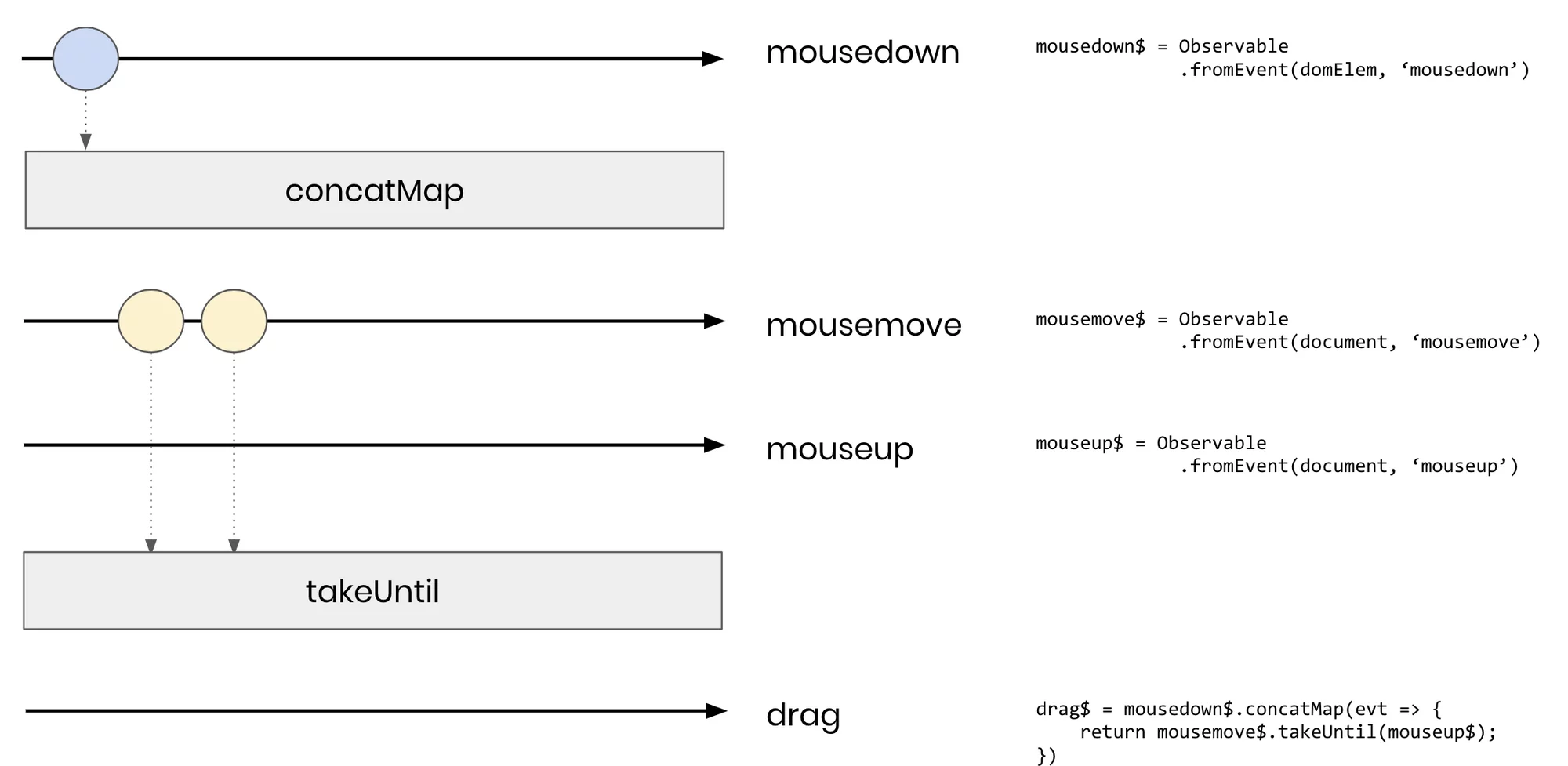
we capture mousemove events, but stop as soon as a mouseup appears.
This looks solid now. We are receiving all the mousemove events. When a mouseup eventually occurs, it closes out the drag sequence:
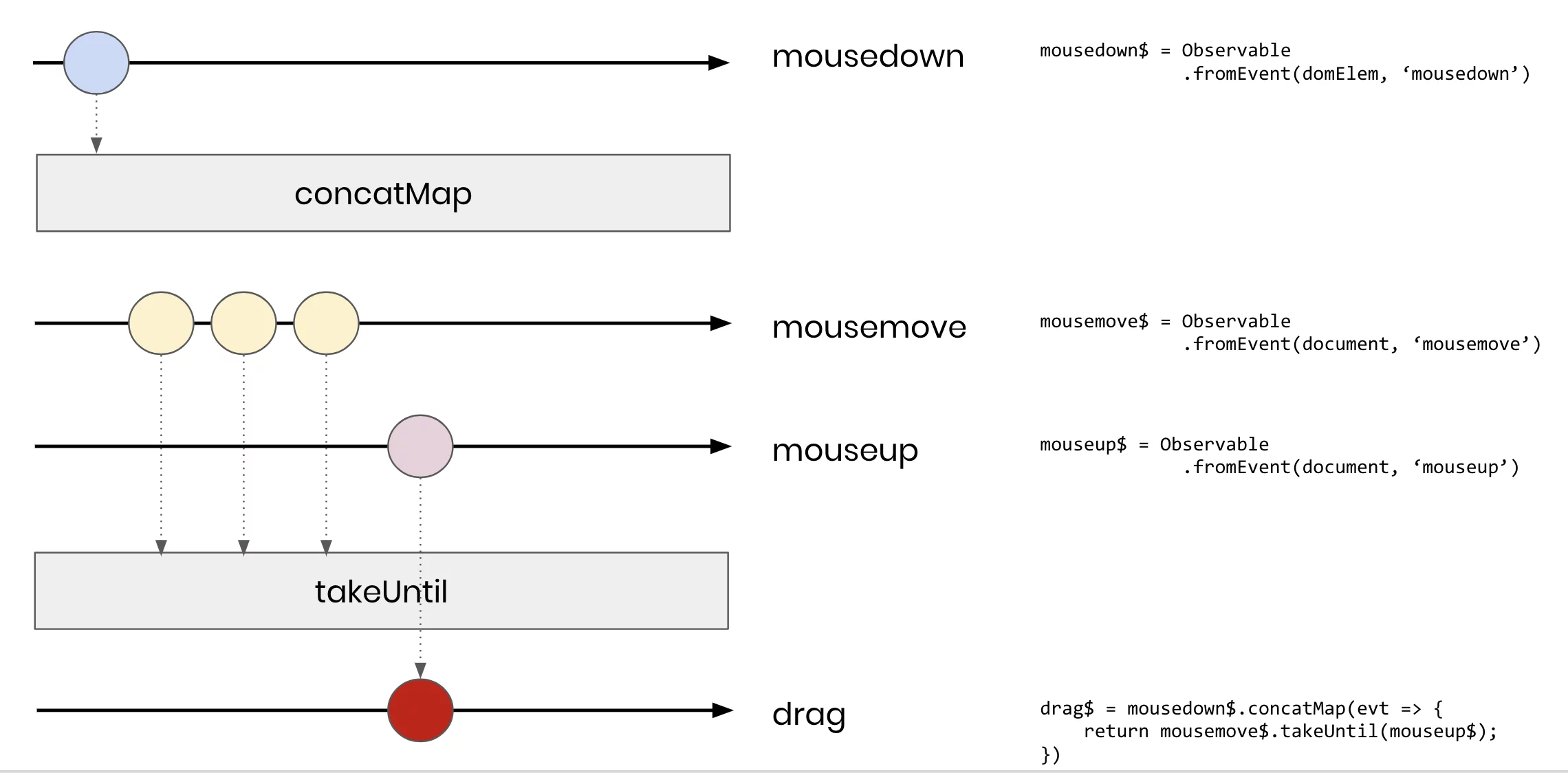
An emission of mouseup ends the drag, so a value is sent out on our drag stream.
To sum up: we identified what we wanted (a drag event stream) and what we had (the three event streams), then pieced them together via operators to obtain the final output.
Keep this mindset in mind when tackling problems “The Rx way”.
**By the way, the idea of composing is a recurring theme in software engineering, especially as you get deeper into functional programming.** If you feel like exploring it further, check out Eric Elliott’s well-regarded article series. It's not required reading for this article, but it adds helpful context.
Now that the groundwork is set, let’s start implementing some operators.
Working with Operators
As we move through this collection of operators, a recognizable structure begins to take shape. Let's consider what an operator should accomplish. In an ideal scenario, we'd want to write code along these lines:
Observable.fromEvent(document, 'click')
          .map(click => console.log('Got a click!'));
In the earlier article, we examined the implementation of fromEvent. Now, our goal is to attach operator functions to the Observable prototype that can be chained together, routing events through the pipeline. The concept becomes clearer when we examine some code and then dissect it.
For those interested in experimenting with the operators discussed here, they're available on Stackblitz:
map
The map function accepts a projectionFunction, applies it to every item from the source stream as it arrives, and outputs the transformed results into a fresh stream. Here's the standard marble diagram:
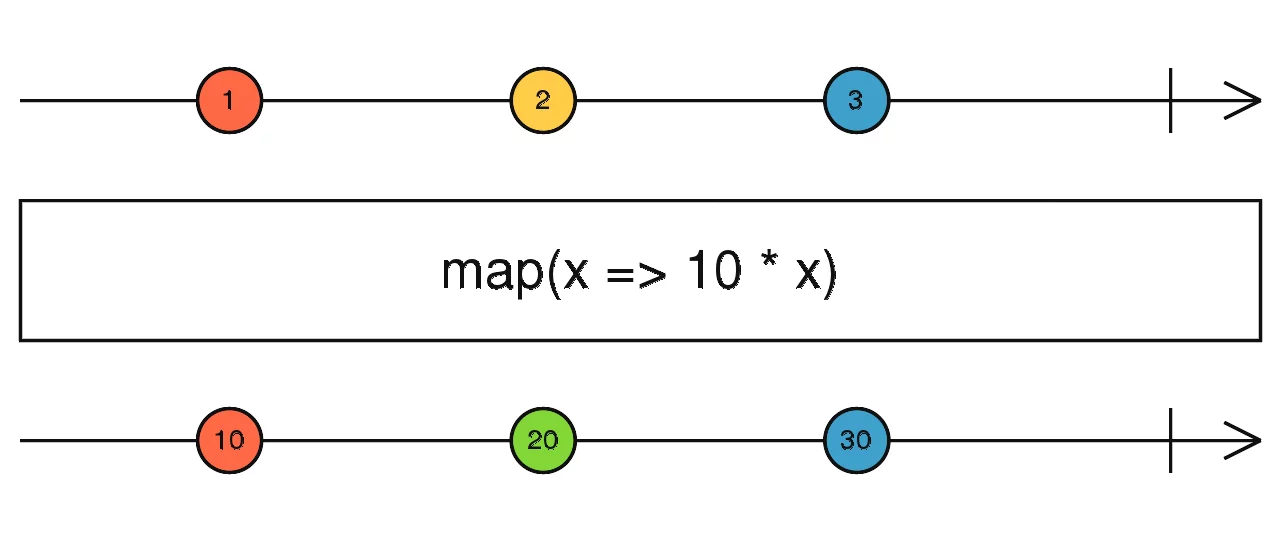
Map takes each value from the source and runs it through a projection function. In this instance, it multiplies inputs by 10, pushing the results into a new output stream.
Remember how we implemented map on arrays in the first installment of this series?
// overriding properties on Array.prototype is a bad idea. This is given for educational purposes only :D
Array.prototype.map = function(projectionFn) {
 let retVal = [];

 for (let i = 0; i < this.length; i++) {
   retVal.push(projectionFn(this[i]));
 }

  return retVal;
}
Here's its equivalent as a method on our observable class:
map(projFn): Observable {
  return new Observable((observer) => {
    return this.subscribe(
      (val) => observer.onNext(projFn(val)),
      (e) => observer.onError(e),
      () => observer.onCompleted()
    );
  });
}
Let's examine this step by step.
- On line 2, we return a fresh Observable that accepts an observer object. This pattern will appear repeatedly. Returning a new Observable is essential—without it, operator composition would fall apart.
- That's essentially all this function does when called. The newly created observable remains inert until its
****subscribe****method is triggered later on. This behavior is why we describe observables as lazy. - When subscribe gets invoked on the returned observable, things start happening. Specifically,
thison line 3 points to whichever observable calledmap, notmapitself (thanks to the arrow function on line 2, which preserves the value ofthis). So we're subscribing to the observable that appears directly beforemapin the chain. This approach enables us to push data through our sequence of operators.
Take a look at this example
let obs = Observable.fromEvent(document, 'click')
                    .map(event => event.clientX);

// our three observer functions
obs.subscribe(console.log, (e) => {}, () => {});
When we invoke map on the first line, it returns an observable, which gets stored in our obs variable. No event listening has begun at this stage. Then, on the following line, calling obs.subscribe() kicks everything into motion.
As noted earlier, the this reference on line 3 of our map implementation points to the observable produced by fromEvent. So inside map, we subscribe to that observable, supplying it with next, error, and completed handlers (in effect, map is observing the fromEvent).
Consequently, when an event fires, our map catches it, runs the projFn on it, and then invokes the next method of the observer passed into map's subscribe. In this case, that's the three functions from our obs.subscribe(...) call. If another operator like filter followed map in the pipeline, the observer would be the one supplied by filter.
Here's a visual representation of how subscribes and events flow through an observable pipeline:

When subscribe gets called on line 2 [1], it prompts map to subscribe to fromEvent [2], which establishes the observable [3]. When an event arrives [4], it triggers a series of next() calls [5,6]
On line 1, the only outcome is that sub now holds the observable returned by map(x => x.clientX). No observation has been initiated. So any clicks on document would go unnoticed.
On line 2, when subscribed is triggered, the diagram's steps unfold:
- subscribe is called, which effectively invokes subscribe on the observable returned by
map - This leads
mapto call subscribe on the observable it references viathis. In this scenario, that'sfromEvent. - This prompts
fromEventto establish an observation for click events on the document. See the previous article for the full details. - A click event occurs, causing
fromEventto call its observer'snextmethod. - This forwards the event to
map.mapapplies its projection function to the event (here, extracting its clientX value), thenmapinvokes its observer'snextmethod. In this case, that's the observer passed intosubscribe, which is a straightforward console log - Our
console.logfunction executes.
This mechanism can extend to any number of chained operators. Let's build another one.
filter
Filter follows a pattern quite similar to map. The key distinction is that filter uses a predicateFn rather than a projectionFn. Don't get caught up on the terminology—a predicateFn simply means a function that returns either true or false. Whenever the source emits a value, it passes through filter's predicateFn. If the function yields true, the value advances to the next observer. Otherwise, it doesn't.

The filter operator only emits values that return true when passed into its predicate function. Here, only the odd numbers get through.
Here's the Array.prototype version we wrote in part 1:
Array.prototype.filter = function(predicateFn) {
 let retVal = [];

 for (let i = 0; i < this.length; i++) {
   if (predicateFn(this[i]) {
     retVal.push(this[i]);
   }
 }

 return retVal;
}
and here it is as a method on the Observable class:
filter(predicateFn): Observable {
    return new Observable((observer) => {
        return this.subscribe(
            (val) => {
                // only emit the value if it passes the filter function
                if (predicateFn(val)) {
                    observer.onNext(val);
                }
            },
            (e) => observer.onError(e),
            () => observer.onCompleted()
        );
    });
}
take
Finally, we arrive at the take operator, which might seem familiar if you've worked with something like Haskell. The take operator takes a single number as its argument, harvesting up to that many values from a source stream and emitting them in a new stream. Picture observing some endless stream and saying, "I only want at most 5 values from this." That would be take(5).
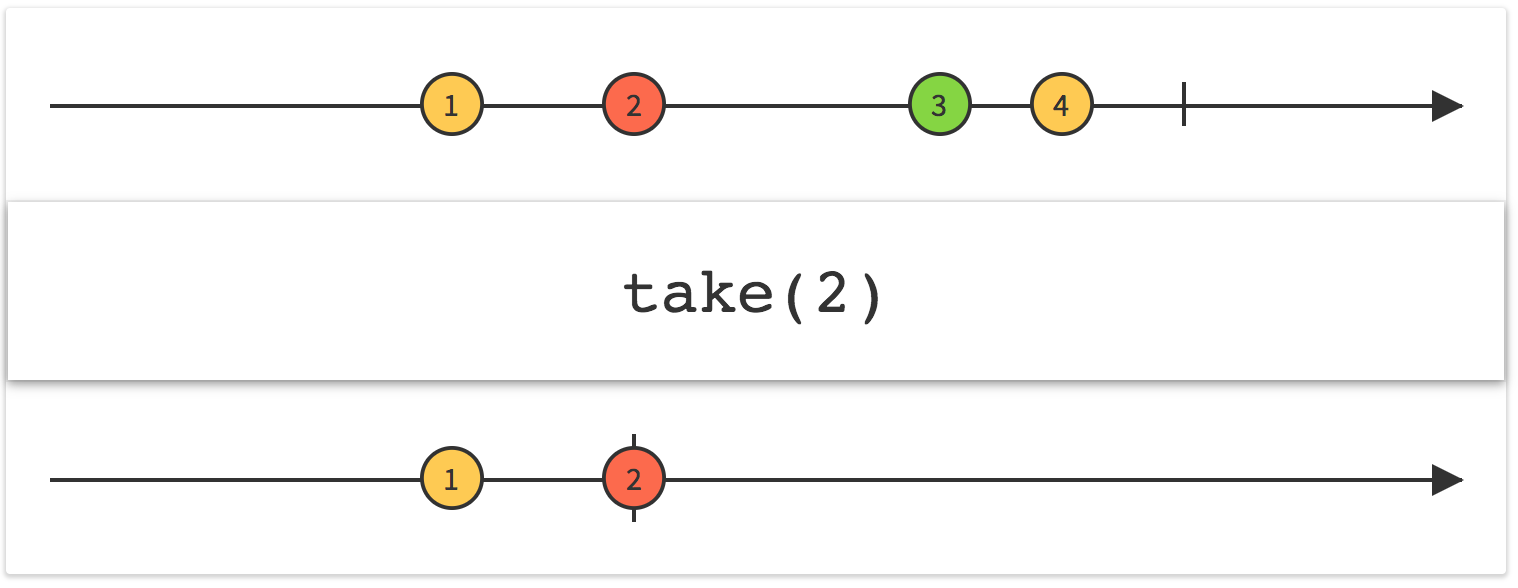
With take, only the first (2) values are captured, after which the output stream completes.
Let's construct it:
take(count: number): Observable {
    return new Observable((observer) => {
        let currentCount = 0;
        return this.subscribe(
            (val) => {
                if (currentCount < count) {
                    observer.onNext(val);
                    currentCount++
                } else if (currentCount === count){
                  observer.onCompleted();
                  currentCount++
                }
            },
            (e) => observer.onError(e),
            () => observer.onCompleted()
        );
    });
}
We track a counter internally, emitting values only while currentCount stays below the count parameter. Once we hit the count parameter, we call the observer's onCompleted method to indicate that no further data is coming.
In a proper implementation, we'd also unsubscribe at this juncture and tidy up resources.
Wrap-Up
That covers everything for now. We've built a basic Observable class complete with some operators. In the upcoming article, we'll shift focus to creating operators capable of handling multiple input observables and higher-order observables (observables nested within observables). Stay tuned!