The Observer Pattern in RxJS
This is the third entry in our series on observables. Today, we'll examine how RxJS applies the Observer pattern and begin constructing our own observable from the ground up. Our implementation will be far simpler than what RxJS uses internally, but it should provide enough insight to make exploring the RxJS source code more approachable.
Understanding the Observer Pattern
A solid grasp of the Observer Pattern is essential before diving into observables.
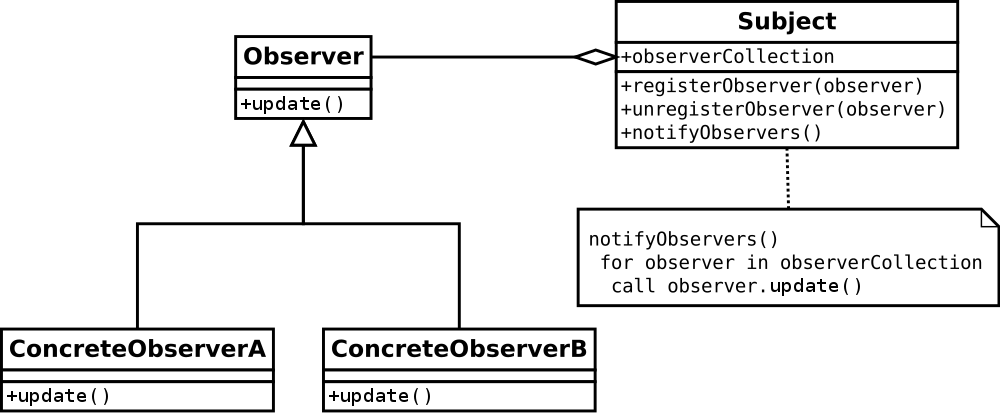
The classic Observer Pattern, as illustrated in the Gang of Four Design Patterns book.
The idea is simple enough. There's an object holding state that changes over time. In the traditional Observer Pattern, this object is the subject. Its only job is to collect callback functions from observers—objects that wish to be alerted whenever the subject's state shifts. When that state does change, the subject iterates through all registered callbacks and invokes each one, passing the new state along.
class Subject {
  constructor() {
    this.callbacks = [];
  }

  subscribe(fn) {
     this.callbacks.push(fn);
  }

  publish(data) {
     this.callbacks.forEach(fn => fn(data));
  }
}

// usage
const subject = new Subject();
const observer1 = (data) => console.log(`Observer1 received data: ${data}`);

subject.subscribe(observer1);

setTimeout(() => {
  subject.publish('test data');
}, 1000);
The web development world has relied on the classic observer pattern for ages. Yet it's not without flaws, and it has had its detractors.
For our purposes, the main issue is that it offers no way to encapsulate events, which prevents us from creating composed streams from subject events.
RxJS refines the classical observer pattern by offering a richer observer interface—one that includes not just a method for emitting data (onNext), but also methods for signaling completion and errors to observers.
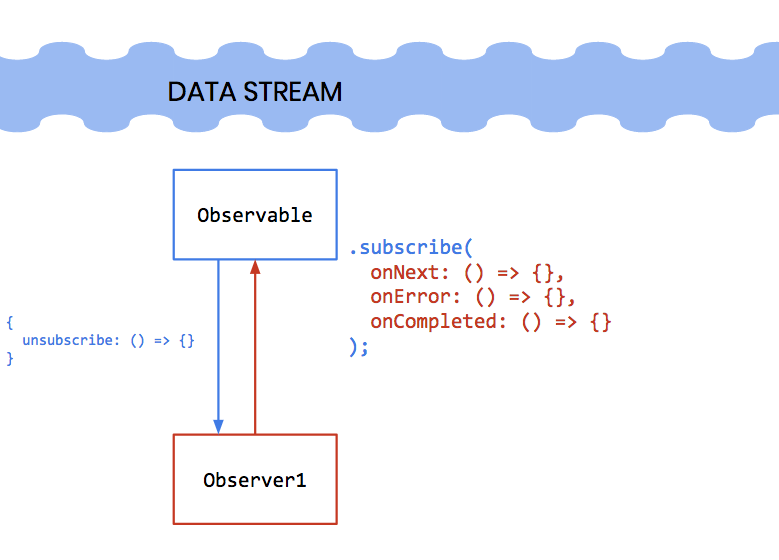
The Observable hides the details of the underlying data stream and presents a simple interface that observers can use to consume it.
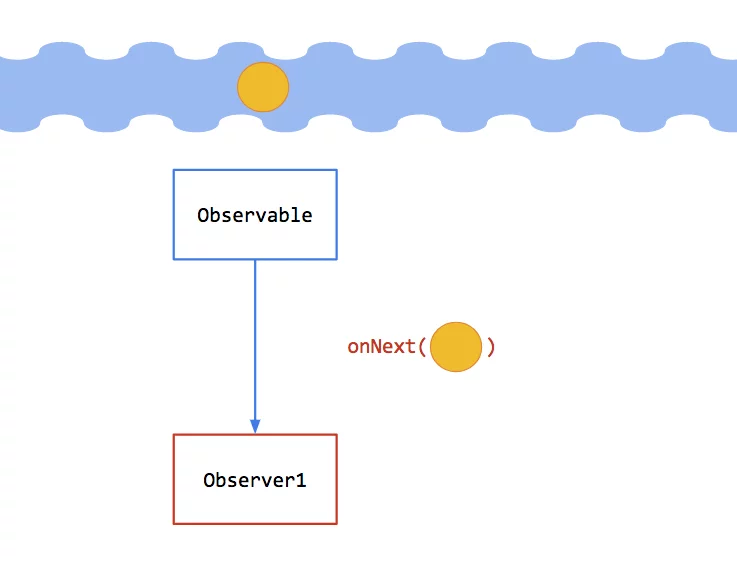
Whenever data arrives on the event stream (shown as a circle), the Observable invokes the observer's onNext method.
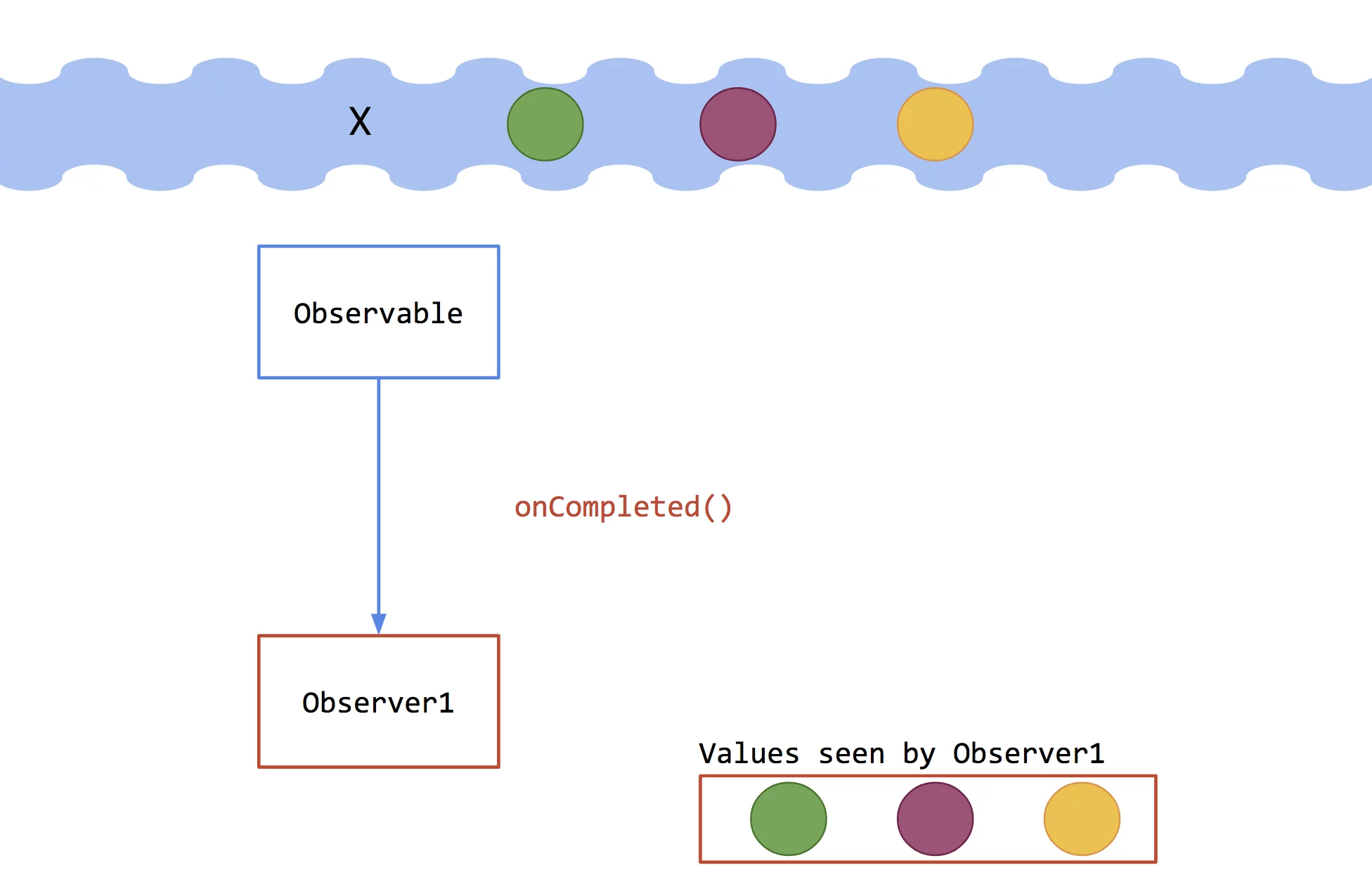
If the stream has no more data to provide, the Observable triggers the observer's onCompleted method.
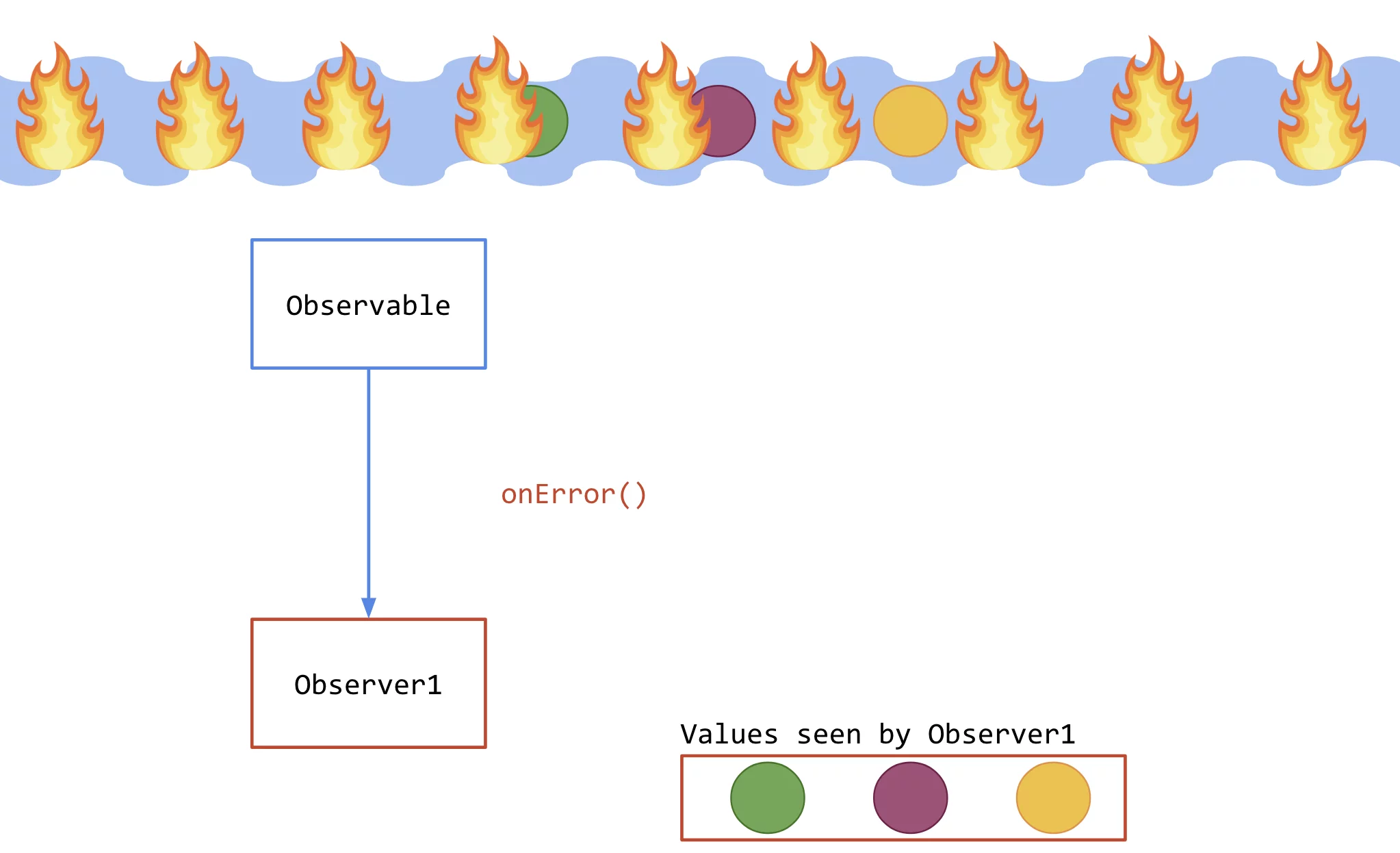
If an error occurs on the stream, the Observable calls the observer's onError method.
It's worth noting that onNext might be called any number of times, whereas onError and onCompleted signal that the observable will send no further data.
One quick clarification: observables and subjects are distinct concepts. In RxJS, subjects maintain state—they keep a list of subscribers and broadcast data to all of them, much like the subject from the classical pattern. Observables, in contrast, are essentially just functions that establish an observation context without holding any state. Each observer gets its own execution of the observable. This distinction isn't critical right now, but we'll revisit it in a future article.
Our basic class needs to honor the Observer interface, meaning every observer that subscribes must supply these three methods:
onNext, invoked each time our observable produces dataonError, invoked if an error occurs within our observableonCompleted, invoked when our observable has finished generating data
For reference, you can find the official Observer interface here.
A basic example would look like this:
const obs = new Observable.of(1,2,3); // creates an synchronous Observable which will emit the values 1,2,3, then complete.

// Observables are lazy, so nothing has been emitted yet. obs just holds a reference to an Observable which will emit 1,2,3 and then complete each time it is subscribed to.

const observer = {
  onNext: (val) => { console.log(`onNext: ${val}`); },
  onError: (err) => { console.log(`onError: ${err}`); },
  onCompleted: () => { console.log(`onCompleted`); }
};

obs.subscribe(observer);

// as soon as obs.subscribe(observer) is executed, the observable will emit its data:
// onNext: 1
// onNext: 2
// onNext: 3
// onCompleted
Observe that line 11 returns a subscription object, which an observer can use to unsubscribe from the observable.
There's no need to worry about every detail just yet—we'll manually implement all of this example's components soon enough.
You can think of the Observer interface as a counterpart to the Iterator interface. Where iterators allow a consumer to pull data from a source, observers let a source push data to an observer via ****onNext****. Just as iterators can signal errors or completion, our Observer has onError and onCompleted. In many respects, these two patterns are mirror images. Jafar Husain has an excellent talk on this symmetry, and also discusses it here.
For reactive programming and observable concepts, Jafar Husain is a highly recommended resource. He's also supporting the TC39 proposal to bring observables to JavaScript.
Our first step is to define the Observable class.
export class Observable<T> {
    /** Internal implementation detail */
    private _subscribe: any;

    /**
      * @constructor
      * @param {Function} subscribe is the function that is called when the
      * observable is subscribed to. This function is given a subscriber/observer
      * which provides the three methods on the Observer interface:
      * onNext, onError, and onCompleted
    */
    constructor(subscribe?: any) {
        if (subscribe) {
            this._subscribe = subscribe;
        }
    }

    // public api for registering an observer
    subscribe(onNext: any, onError?: any, onCompleted?: any) {
        if (typeof onNext === 'function') {
            return this._subscribe({
                onNext: onNext,
                onError: onError || (() => {}),
                onCompleted: onCompleted || (() => {})
            });
        } else {
            return this._subscribe(onNext);
        }
    }
 }
This class contains two methods: a public subscribe and an internal _subscribe. This structure closely mirrors how Observable is actually built in RxJS. The public method is the standard entry point for observers, who provide onNext, onError, and onCompleted functions. The internal _subscribe method determines when to invoke those functions, and its behavior depends on the specifics of the underlying stream—as we'll see when we create from and fromEvent.
On its own, this Observable does nothing. It merely supplies the framework for observers to register their onNext, onError, and onComplete handlers. To give it purpose, we need to add creational methods. We'll build three: of, from, and fromEvent.
But first… A brief note on RxJS 6 and pipeable operators
In RxJS version 5 and earlier, creational methods and operators all lived on the Observable prototype. With RxJS 6, this approach was abandoned. Operators are no longer attached to the Observable prototype, which improves tree-shaking, reduces bundle size, and enhances compatibility with third-party libraries. The old chaining syntax for composition, like this:
Observable.of(1,2,3).map(x => x + 1).filter(x => x > 2);
has been replaced by the pipe operator for composing operations:
of(1,2,3).pipe(map(x => x + 1), filter(x => x > 2));
Conceptually, nothing has fundamentally changed, so for simplicity we'll keep the RxJS 5 style of chaining operators on the Observable prototype. In a later article, we'll refactor and implement a pipe operator in the RxJS 6 style.
If you're curious about RxJS 6 and pipeable (lettable) operators, check out the RxJS section of AngularInDepth.
Now, let's implement a creational method and write tests for it. You can follow along with this repository.
Observable.of
This method accepts arguments and returns an observable that emits each value sequentially and then completes. Here's the code:
class Observable {
  ...
  // add as a static method on Observable so it can be used as
  // Observable.of()
    static of(...args): Observable {
      return new Observable((obs) => {
        args.forEach(val => obs.onNext(val));
        obs.onCompleted();

        return {
          unsubscribe: () => {
            // just make sure none of the original subscriber's methods are never called.
            obs = {
              onNext: () => {},
              onError: () => {},
              onCompleted: () => {}
            };
          }
        };
      });
    }

  ...
}
Observable.of() invokes onNext for every argument it receives, then completes.
Notice in line 6 that we begin by returning a new Observable. This is a recurring pattern we'll see throughout our Observable implementation. Any operation on an Observable must return a new Observable; otherwise, composition breaks down. For example, if Observable.of didn't return an Observable, we couldn't write Observable.of(5).map(x => x * 2) since map requires an Observable to be called on. It would be like if Array.prototype.filter returned something other than an array, breaking chains like [1,2,3].filter(x => x > 1).map(x => x * 2) because you'd be calling map on a non-array.
Let's write some unit tests for of to check how it performs. For reference, here are the official RxJS 5 tests.
describe('Observable of', () => {
    it('should emit each input separately and complete', (done: MochaDone) => {
      const x = { foo: 'bar' };
      const expected = [1, 'a', x];
      let i = 0;

      Observable.of(1, 'a', x)
        .subscribe((val) => {
          expect(val).to.equal(expected[i++]);
        }, (err) => {
          done(new Error('should not be called'));
        }, () => {
          done();
      });
    });

    it('should emit one value', (done: MochaDone) => {
      let calls = 0;

      Observable.of(42).subscribe((x: number) => {
        expect(++calls).to.equal(1);
        expect(x).to.equal(42);
      }, (err: any) => {
        done(new Error('should not be called'));
      }, () => {
        done();
      });
    });
  });
Of is straightforward. By default, once subscribed, it executes synchronously, so the unsubscribe method will rarely be needed. Still, we provide one as a safety measure.
Let's look at a similar method, from, which works with iterables.
Observable.from
from takes an iterable and fires onNext for each item in it.
static from(iterable): Observable {
    return new Observable((observer) => {
        for (let item of iterable) {
            observer.onNext(item);
        }

        observer.onCompleted();

        return {
            unsubscribe: () => {
                // just make sure none of the original subscriber's methods are never called.
                observer = {
                    onNext: () => {},
                    onError: () => {},
                    onCompleted: () => {}
                };
            }
        };
    });
}
There's nothing complicated going on. A for...of loop is used to iterate over the iterable. Here are some tests:
describe('Observable fron', () => {
  it('should consume an iterable and complete', (done: MochaDone) => {
    const x = [1, 2, 'three'];
    const expected = [1, 2, 'three'];
    let i = 0;

    Observable.from(x)
      .subscribe((val) => {
        expect(val).to.equal(expected[i++]);
      }, (err) => {
        done(new Error('should not be called'));
      }, () => {
        done();
    });
  });

  it('should consume any iterable, including one from a generator', (done: MochaDone) => {
    function* foo(){
      yield 1;
      yield 2;
    };

    const expected = [1,2];
    let i = 0;

    Observable.from(foo()).subscribe((x: number) => {
      expect(x).to.equal(expected[i++]);
    }, (err: any) => {
      done(new Error('should not be called'));
    }, () => {
      done();
    });
  });
});
Finally, let's tackle fromEvent.
Observable.fromEvent
fromEvent is intriguing because it will be our first asynchronous stream. We'll create a simplified version that only works with DOM events, even though RxJS's implementation supports any event source with addListener and removeListener methods.
static fromEvent(source, event): Observable {
    return new Observable((observer) => {
        const callbackFn = (e) => observer.onNext(e);

        source.addEventListener(event, callbackFn);

        return {
            unsubscribe: () => source.removeEventListener(event, callbackFn)
        };
    });
}
We receive a DOM element and an event name. Then we use the browser's native addEventListener and removeEventListener functions to handle the subscription.
Summary
- Observables are lazy—they don't emit until subscribed to (unless they're hot observables. We'll explore that later__).__
- RxJS enhances the classical Observer pattern by incorporating error and completion handling, as well as enabling composition.
- Observers must provide
onNext,onError,andonCompletemethods.
That wraps up this installment. In the next article, we'll explore operators like map and filter. Proceed to part 4: Operators.