
The Core of Angular Navigation
This article focuses on navigation within Angular and its underlying mechanisms. Navigation in Single Page Applications (SPAs) follows a different model than traditional web browsing.
In the classic web model, each URL change triggers a request to the server, which responds with a new HTML page. This cycle repeats with every navigation step.
SPAs, in contrast, load a single index.html file. This raises the question: how is navigation managed within this paradigm?
Angular provides a robust answer. When a user attempts to change the URL, the client-side router intercepts the action and updates the view directly, bypassing a full page reload.
The Declarative Approach: HTML Templates
The RouterLink directive offers a declarative method for handling navigation. It integrates seamlessly with standard <a> tags.
Using routerLink
To employ this declarative method, the classic href attribute is replaced with the routerLink directive, specifying the target path.
<!-- Classic approach —->
<a href="https://angular.love/roadmap">Roadmap</a>
This directive must be imported from the @angular/router package.
<!-- Declarative approach -->
import {RouterLink} from '@angular/router';
…
<a routerLink="roadmap">Roadmap</a>
It is worth noting that routerLink is restricted to internal application routes and cannot be used for external URLs.
Benefits of the Declarative Directive
This approach offers several advantages. A primary benefit is its support for relative URLs, which helps avoid static links that cause full page reloads and a loss of application state. This ensures the application remains adaptable to different base URL configurations.
// absolute url
<a href="https://www.angular.love/roadmap">Roadmap</a>
// relative url
<a href="/roadmap">Roadmap</a>
Angular provides two valid methods for managing relative URLs.
 <a routerLink="roadmap">Roadmap</a>
 <a [routerLink]="['roadmap']">Roadmap</a>
Using an Array Parameter
The second method leverages an array to construct dynamic URL segments. Each segment can be a string or a number, and they are passed as separate elements in the array. An example clarifies this concept.
<!--  If we assume the id variable is a string with the value “router-link” the resulting URL would be https://angular.love/roadmap/router-link –->
<a [routerLink]="['roadmap', id]">Roadmap</a>
You can choose whether the path is relative to the current URL or absolute, starting from the root. Examples illustrate this distinction.
<!-- We assume that user is currently at /settings and wants to visit /settings/notifications -->


<!-- Relative link -->
<a routerLink="notifications">
Notifications
</a>


<!-- Absolute link – works no matter of our localization in app -->
<a routerLink="/settings/notifications">
Notifications
</a>


<!-- RouterLink utilizing string -->
<a [routerLink]="'/settings' + '/notifications'">Notifications</a>


<!-- RouterLink utilizing an array -->
<a [routerLink]="['/settings', 'notifications']"> Notifications </a>


<!-- Static path -->
<a routerLink="/team/123/user/456">
User 456</a>


<!-- Dynamic path segments -->
<a [routerLink]="['/team', teamId, 'user', userId]">
Current User
</a>
Additional Parameters: Query Params and Fragments
Links can also include query parameters and fragments. Query parameters are useful for managing application state without altering the route structure. Fragments, or anchors, facilitate navigation to a specific element on a page by its ID. The following examples demonstrate these features.
<!-- After navigating it will look like this: /notifications?debug=true&message=new -->
<a routerLink="notifications" [queryParams]="{ debug: true, message: 'new' }">Notifications</a>


<!-- After navigating it will look like this: /notifications#desktop -->
<a routerLink="notifications" fragment="desktop">Notifications</a>
Styling Active Links with RouterLinkActive
It is often necessary to dynamically style links based on the active route. Angular's RouterLinkActive directive handles this, requiring an import from @angular/router.
Beyond toggling classes, the ariaCurrentWhenActive attribute can be set to improve accessibility. It automatically adds the aria-current attribute, notifying screen reader users of their location. An example from the documentation is shown below.
<nav>
 <a
   class="button"
   routerLink="/about"
   routerLinkActive="active-button"
   ariaCurrentWhenActive="page"
 >
   About
 </a>
 |
 <a
   class="button"
   routerLink="/settings"
   routerLinkActive="active-button"
   ariaCurrentWhenActive="page"
 >
   Settings
 </a>
</nav>
/* The active link will have red text */
.active-button{
   color: red;
}
Multiple classes can be applied by using an array in the routerLinkActive directive.
<a routerLink="/user/bob" [routerLinkActive]="['class1', 'class2']">Bob</a>By default, RouterLinkActive is active for child or more deeply nested routes. This behavior can be overridden using the routerLinkActiveOptions directive with a configuration object for an exact match. Without this, a link to /user would be active for sub-pages such as /user/setting.
<!-- If we assume that user is currently at:
/user/jane/role/admin -->


<!-- Will be active -->
<a
 [routerLink]="['/user/jane']"
 routerLinkActive="active-link"
>
 User
</a>


<!-- Will be active -->
<a
 [routerLink]="['/user/jane/role/admin']"
 routerLinkActive="active-link"
>
 Role
</a>


<!-- Will not be active -->
<a
 [routerLink]="['/user']"
 routerLinkActive="active-link"
 [routerLinkActiveOptions]="{ exact: true }"
>
 User
</a>
The directive can also be applied to a parent element, which is useful for styling the correct container. Another example from the official documentation is provided.
<div routerLinkActive="active-link" [routerLinkActiveOptions]="{exact: true}">
 <a routerLink="/user/jim">Jim</a>
 <a routerLink="/user/bob">Bob</a>
</div>
Programmatic Navigation with Router
While the declarative approach is for templates, programmatic navigation is needed when redirects depend on logic or component state. The Router class provides the necessary methods for this in TypeScript.
import {Router} from '@angular/router';
@Component({
…
})
export class AppDashboard {
private router = inject(Router);
…
}
The Navigate Method
By injecting the Router, the navigate method can be used:
navigateToSettings(): void {
   this.router.navigate(['/settings']);
}
The navigate method accepts route, query, and matrix parameters.
navigateToCategory(category: string): void {
  // route parameters
  this.router.navigate(['/category', category]);
  // query parameters
  this.router.navigate(['/category'], {
    queryParams: { category: category, sort: 'quantity' },
  });
  // matrix parameters
  this.router.navigate(['/category', { category: category, sort: 'quantity' }]);
Using RelativeTo
While router.navigate() is useful for various tasks, its strength is in creating dynamic relative paths with the relativeTo property. This allows navigation based on the current component's position in the route tree. A clear example from the documentation is shown.
import { Router, ActivatedRoute } from '@angular/router';
@Component({
 selector: 'app-user-detail',
 template: `
   <button (click)="navigateToEdit()">Edit User</button>
   <button (click)="navigateToParent()">Back to List</button>
 `,
})
export class UserDetail {
 private route = inject(ActivatedRoute);
 private router = inject(Router);
 // to parent
 navigateToEdit() {
   // from: /users/123
   // to:   /users/123/edit
   this.router.navigate(['edit'], { relativeTo: this.route });
 }
 // to parent
navigateToParent() {
   // from: /users/123
   // to:   /users
   this.router.navigate(['..'], { relativeTo: this.route });
 }
}
Navigating with navigateByUrl
Injecting Router also provides access to navigateByUrl(), which navigates using a complete URL string. This is useful for deep links or when a full path is provided by an external source.
router.navigateByUrl('/search?category=books&sortBy=price');Controlling Router Behavior
Angular's NavigationBehaviorOptions interface allows control over navigation behavior, usable with both navigate() and navigateByUrl(). The onSameUrlNavigation option defines what happens when navigating to the current URL. By default, Angular ignores it, but the 'reload' option re-runs the full lifecycle—executing Guards and Resolvers again. However, it does not recreate the component itself.
// Default behavior: does nothing if we are already on the 'stocks' page
this.router.navigate(['stocks'], { onSameUrlNavigation: 'ignore' });
// Re-runs guards and resolvers for the 'stocks' page
this.router.navigate(['stocks'], { onSameUrlNavigation: 'reload' });
The skipLocationChange option accepts a boolean. When set to true, navigation occurs without updating the browser history or the URL in the address bar. This is useful for preventing a user from navigating "back" to a specific transient state.
this.router.navigate(['/stocks'], { skipLocationChange: true });
The related replaceUrl option overwrites the current entry in the browser's history and address bar. A typical use case is preventing a user from returning to a login page after successful authentication.
this.router.navigate(['/stocks'], { replaceUrl: true });
Checking Active URLs with isActive
The isActive function from the Angular Router returns a computed signal with a boolean value, indicating if a specific URL is active. It is commonly used to apply classes dynamically in templates, similar to RouterLinkActive. An example from the docs is shown.
import {Component, inject} from '@angular/core';
import {isActive, Router} from '@angular/router';
@Component({
 template: `
   <div [class.active]="isSettingsActive()">
     <h2>Settings</h2>
   </div>
 `,
})
export class Panel {
 private router = inject(Router);
 isSettingsActive = isActive('/settings', this.router, {
   paths: 'subset',
   queryParams: 'ignored',
   fragment: 'ignored',
   matrixParams: 'ignored',
 });
}
Understanding UrlTree
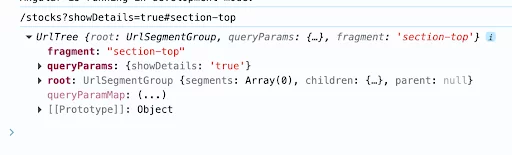
When exploring navigation basics, the UrlTree is a fundamental concept. Angular parses a URL into a structured tree composed of segments, parameters, and children, rather than treating it as a flat string.
// /stocks?showDetails=true#section-top
const urlTree: UrlTree = this.router.parseUrl(this.router.url);
console.log(this.router.url);
console.log(urlTree);
The code above shows this representation, with the console output visible below.
Creating URL structures is possible with the createUrlTree method, which reduces the risk of manually constructing complex strings. It accepts an array and Angular builds the final URL accordingly.
// create /team/33/user/11
router.createUrlTree(['/team', 33, 'user', 11]);
// create /team/33;expand=true/user/11
router.createUrlTree(['/team', 33, {expand: true}, 'user', 11]);
The RouterLink directive also accepts a UrlTree object. This is especially useful for separating URL construction logic from templates by moving it into the component class.
<a [routerLink]="targetUrlTree">
 Url Tree
</a>
Summary
Navigation is essential to any application. A solid grasp of routing mechanics is fundamental for creating reliable and maintainable software.
This article covered various navigation techniques, from declarative directives in templates to programmatic methods in TypeScript. A deeper understanding of these concepts will improve your future projects.