What Angular 20 Delivers
Angular 20 is now available, bringing fresh APIs, smoother developer workflows, stronger type safety, smarter CLI feedback, and the graduation of features previously marked as experimental. The update is broken down below into four main areas:
Fresh APIs: A look at what Angular 20 introduces for the first time
Workflow Improvements: Enhancements to the CLI, diagnostic messages, and error handling utilities
Stability Status: Which features are now considered stable and which are still in flux
Upgrade Considerations: Important points to review before moving your project to Angular 20

Fresh APIs
A summary of the new capabilities introduced in Angular 20.
Template compiler enhancements
Angular 20 adds several new features to its template compiler, aiming to make templates behave more like native TypeScript. The ultimate objective is for every template expression to work identically to its TypeScript counterpart. Looking ahead, expect support for arrow functions and full adherence to the optional chaining specification in upcoming releases – details can be found in this GitHub issue.
Key additions in Angular 20 include template literals, the exponentiation operator, the in keyword, and the void operator. Each is explored below.
Template literals
String concatenation in templates used to require verbose syntax. Now, you can use familiar JavaScript-style template literals directly within your component templates.
Keep in mind that these template literals are not supported if your template is written as an inline HTML string within a TypeScript template literal. See this issue for further details.
Untagged template literals:
user-avatar.ts
@Component({
 selector: 'app-user-avatar',
 imports: [NgOptimizedImage],
 templateUrl: './user-avatar.html',
})
export class UserAvatar {
 readonly userId = input.required<string>();
}
user-avatar.html
<img
 [ngSrc]="`https://i.pravatar.cc/150?u=${userId()}`"
 width="100"
 height="100"
/>
<p>{{ `User id: ${userId()}` }}</p>
Output:

Tagged template literals:
@Component({
 selector: 'app-user-details',
 template: '<p>{{ greet`Hello, ${name()}` }}</p>',
})
export class UserDetails {
 readonly name = input<string>('John');


 greet(strings: TemplateStringsArray, name: string) {
   return strings[0] + name + strings[1] + '!';
 }
}
Output:

Complex interpolations are now far easier to read and maintain with this syntax.

Exponentiation operator
The exponentiation operator (**) is now supported in templates, enabling power calculations without the need for custom pipes.
Consider this example:
@Component({
 template: '{{2 ** 3}}'
})
export class AppComponent {}
The output will be 8, as 2 to the power of 3 equals 8.
In keyword
With the in operator, you can test for the existence of a property on an object before using its value. This is particularly useful for type narrowing or conditionally displaying data.
Example:
combat-logs.ts
@Component({
 selector: 'app-combat-logs',
 templateUrl: './combat-logs.html',
})
export class CombatLog {
 readonly attacks = [
   { magicDamage: 10 },
   { physicalDamage: 10 },
   { magicDamage: 10, physicalDamage: 10 },
 ];
}
combat-logs.html
@for (attack of attacks; track attack) {
 @let hasMagicDamage = 'magicDamage' in attack;
 @if (hasMagicDamage) {
   <p>{{ `Dealt ${attack.magicDamage} points of magic damage.` }}</p>
 }
 @let hasPhysicalDamage = 'physicalDamage' in attack;
 @if (hasPhysicalDamage) {
   <p>{{ `Dealt ${attack.physicalDamage} points of physical damage.` }}</p>
 }
}
Output:

Void operator
The void operator is the last new addition. It lets you intentionally disregard the return value from an event listener, thereby avoiding unintended calls to event.preventDefault() if your handler happens to return false.
Example:
@Directive({
 host: { '(mousedown)': 'void handleMousedown()' },
})
export class MouseDownDirective {
 handleMousedown(): boolean {
   // Business logic...
   return false;
 }
}
Asynchronous redirect functions
Redirect functions can now operate asynchronously. The redirectTo property is allowed to return a Promise or an Observable that resolves to string | UrlTree. This enables redirect logic that depends on data fetched at runtime before deciding on the destination.
Example:
export const ROUTES: Routes = [
 …,
 {
   path: '**',
   redirectTo: () => {
     const router = inject(Router);
     const authService = inject(AuthService);


     return authService.isAuthorized$.pipe(
       map((isAuthorized) =>
         router.createUrlTree([`/${isAuthorized ? 'home' : 'login'}`]),
       ),
     );
   },
 },
];
Abort redirection
A new method, Router.getCurrentNavigation()?.abort(), is available in Angular 20. It provides a way to cancel in-progress navigations, which can be tied into the browser’s Navigation API—for instance, stopping a route change when the user hits the browser’s Stop button.
NgComponentOutlet enhancements
NgComponentOutlet offers a way to dynamically create and display components within templates. It functions similarly to RouterOutlet but without requiring router configuration, making it a good fit for loading components on the fly. Despite its utility, it often demanded a significant amount of manual setup in the past.
NgComponentOutlet before Angular 20:
@Component({
 template: `<ng-container #container />`
})
export class AppComponent {
 private _cmpRef?: ComponentRef<MyComponent>;
 private readonly _container = viewChild('container', {
    read: ViewContainerRef
 });


 createComponent(title: string): void {
    this.destroyComponent(); // Otherwise it would create second instance


    this._cmpRef = this._container()?.createComponent(MyComponent);
    this._cmpRef?.setInput('title', title);
 }


 destroyComponent(): void {
    this._container()?.clear();
 }
}
Angular 20 introduces a revised API for NgComponentOutlet, simplifying usage by managing configuration internally. The ngComponentOutlet directive now accepts these inputs:
ngComponentOutlet: Specifies the component type to instantiate.ngComponentOutletInputs: Passes input values directly to the component.ngComponentOutletContent: Defines the content nodes used for content projection.ngComponentOutletInjector: Supplies a custom injector for the dynamically created component.
This revised API makes dynamic component code significantly more readable.
New NgComponentOutlet API in Angular 20+:
@Component({
 selector: 'app-root',
 imports: [NgComponentOutlet],
 template: `
   <ng-container
     [ngComponentOutlet]="myComponent"
     [ngComponentOutletInputs]="myComponentInput()"
     [ngComponentOutletContent]="contentNodes()"
     [ngComponentOutletInjector]="myInjector"
     #outlet="ngComponentOutlet"
   />


   <ng-template #emptyState>
     <p>Empty State</p>
   </ng-template>


   <button (click)="createComponent()">Create Component</button>
   <button (click)="destroyComponent()">Destroy Component</button>
 `,
})
export class App {
 private readonly _vcr = inject(ViewContainerRef);
 private readonly _injector = inject(Injector);


 protected myComponent: Type<DynamicComponent> | null = null;
 protected readonly myComponentInput = signal({ title: 'Example Title' });


 private readonly _emptyStateTemplate =
   viewChild<TemplateRef<unknown>>('emptyState');


 readonly contentNodes = computed(() => {
   if (!this._emptyStateTemplate()) return [];


   return [
     this._vcr.createEmbeddedView(this._emptyStateTemplate()!).rootNodes,
   ];
 });


 readonly myInjector = Injector.create({
   providers: [{ provide: MyService, deps: [] }],
   parent: this._injector,
 });


 createComponent(): void {
   this.myComponent = DynamicComponent;
 }


 destroyComponent(): void {
   this.myComponent = null;
 }
}
Bindings and directives for dynamic components
Angular now allows you to attach inputs, outputs, two-way bindings, and host directives directly when creating components dynamically.
Using helpers such as inputBinding, twoWayBinding, and outputBinding in combination with a directives array, you can instantiate a component with binding syntax similar to templates and any associated directives, all in a single call to ViewContainerRef.createComponent.
This change significantly expands the power of the dynamic component API.
Example:
@Component({
...
})
export class AppWarningComponent {
 readonly canClose = input.required<boolean>();
 readonly isExpanded = model<boolean>();
 readonly close = output<boolean>();
}
@Component({
 template: ` <ng-container #container></ng-container> `,
})
export class AppComponent {
 readonly vcr = viewChild.required('container', { read: ViewContainerRef });
 readonly canClose = signal(true)
 readonly isExpanded = signal(true)


 createWarningComponent(): void {
   this.vcr().createComponent(AppWarningComponent, {
       bindings: [
           inputBinding('canClose', this.canClose),
           twoWayBinding('isExpanded', this.isExpanded),
           outputBinding<boolean>('close', (isConfirmed) => console.log(isConfirmed))
       ],
       directives: [
           FocusTrap,
           {
               type: ThemeDirective,
               bindings: [inputBinding('theme', () => 'warning')]
           }
       ]
   })
 }
}
Expose Injector.destroy on Injector created with Injector.create
Angular 20 makes the destroy() method available on injectors created with Injector.create(), allowing you to manually dispose of user-managed injectors:
const injector = Injector.create({
 providers: [{ provide: LOCALE_ID, useValue: 'en-US' }],
});


// API exposed in Angular 20
injector.destroy();
Add keepalive support for fetch requests
The Fetch API's keepalive flag is now supported in HttpClient requests, enabling you to run tasks like analytics tracking during page unload.
By setting { keepalive: true } in your fetch requests, Angular ensures they complete even as the page tears down.
@Injectable({ providedIn: 'root' })
export class AnalyticsService {
 private readonly _http = inject(HttpClient);


 sendAnalyticsData(data: AnalyticsData): Observable<unknown> {
   return this._http.post('/api/analytics', data, { keepalive: true });
 }
}
Scroll options in ViewportScroller
The ViewportScroller service now accepts ScrollOptions in its scrollToAnchor and scrollToPosition methods.
Signal forms and selectorless components
Angular 20 does not include:
- Signal Forms – a proposed signal-centric approach to building forms.
- Selectorless Components – a revised usage model for components and directives in Angular templates.
Both features remain under active development and are not part of this release.
Workflow Improvements
Updates to the CLI, diagnostics, and error-handling utilities.
Type-checking for host bindings
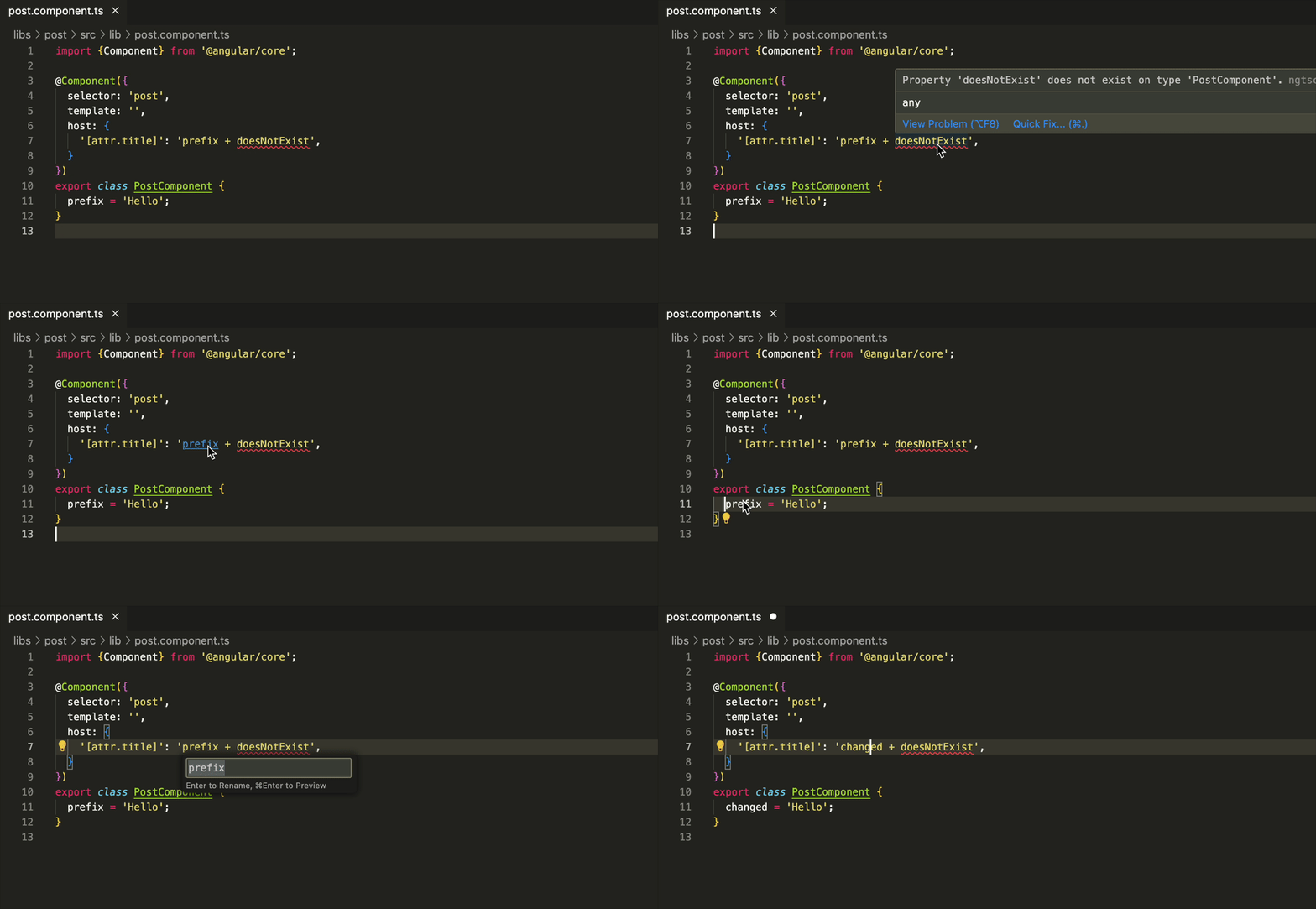
Angular 20 introduces type checking for host bindings. Any expression found in a component’s or directive’s host metadata, or used with @HostBinding or @HostListener, is now verified.
The Angular Language Service is enhanced to:
- Display hover-tooltips showing the types of bound variables or functions
- Keep host-binding references in sync during variable or method renames
These improvements are set to cut down on runtime errors and make refactoring host bindings straightforward.
Diagnostic for invalid nullish coalescing
In TypeScript, mixing the nullish coalescing operator (??) with logical OR (||) or logical AND (&&) without parentheses is flagged as an error. Angular templates previously permitted this without any complaint.
As of Angular 20, the compiler warns you when these operators are mixed without parentheses and recommends adding grouping. For example:
@Component({
 template: `
   <button [disabled]="hasPermission() && (task()?.disabled ?? true)">
     Run
   </button>
 `,
})
class MyComponent {
 hasPermission = input(false);
 task = input<Task|undefined>(undefined);
}
Diagnostic for uninvoked track functions
When moving from *ngFor to the control-flow @for, passing a track function without calling it (like track trackByName) means the list gets rebuilt on every change detection cycle.
Angular 20 adds a new diagnostic to flag any @for block where a track function is referenced but not executed. This helps you avoid performance hits by keeping list updates efficient.
Incorrect (will trigger a warning):
@for (item of items; track trackByName) {}
Correct (no warning):
@for (item of items; track trackByName(item)) {}Missing structural directive import detection
Before Angular 20, the compiler only reported missing imports for built-in structural directives like *ngIf or *ngFor. It did not suggest importing custom structural directives, which was a common oversight during migrations to standalone components.
Now, Angular 20 will alert you when a custom structural directive is used but not imported.
Example:
@Component({
 selector: 'app-root',
 template: `<div *appFeatureFlag="true"></div>`,
})
export class App {}
The following warning will be shown:

API Stability Changes
Signal related APIs
Angular 20 continues to advance its signal-based API surface:
toSignal and toObservable
These conversion utilities have now reached stable status, allowing you to seamlessly bridge signals and observables in production environments without concern for future breaking changes.
linkedSignal
This API, which creates a writable signal that derives its value from another signal, has likewise been elevated to stable in v20.
effect
The effect API, designed to execute side-effect logic whenever a signal changes, is now stable. It underwent several iterations during its developer-preview phase, making its stabilization a significant milestone.
afterRender → afterEveryRender
To clarify its intent, the former afterRender hook has been renamed to afterEveryRender. In Angular 20, both afterEveryRender and its counterpart afterNextRender are officially stable.
Next Step Towards Zoneless Angular
Eliminating zone.js has been a primary objective for the Angular team over the last year, and substantial progress has been made. In Angular 20, the zoneless change detection API has transitioned from experimental to developer preview.
As part of this change, the provider has been renamed from
provideExperimentalZonelessChangeDetection
to
provideZonelessChangeDetection
Several community members have observed that adopting zoneless change detection has improved their Lighthouse scores by a few points. Google is also expanding its usage across more applications – for instance, the Google Fonts app has operated without zone.js for seven months as of this writing.
When generating new Angular applications with ng new using Angular CLI version 20, you'll be asked whether you'd like to create a zoneless application.

If you're considering migrating your app to zoneless change detection, take a look at the former provideExperimentalCheckNoChangesForDebug function. In Angular 20, it's now named provideCheckNoChangesConfig and is also in developer preview. This provider helps identify updates that didn't trigger change detection – an excellent way to verify your application's readiness for a zoneless change detection setup.
Pending Tasks in Angular SSR
For those using server-side rendering (SSR), the PendingTasks API is now stable in Angular 20. This API allows you to control your application's stability by postponing the SSR response until designated tasks are complete.
Additionally, the custom RxJS operator pendingUntilEvent, which leverages PendingTasks internally, has been upgraded from experimental to developer preview.
Breaking Changes
Things to be mindful of when upgrading your project to Angular 20.
Angular Peer Dependencies
In Angular 20, the required peer dependencies are:
- Node: ^20.11.1 || ^22.11.0 || ^24.0.0
- TypeScript: >=5.8.0 <5.9.0
- RxJs: ^6.5.3 || ^7.4.0
Support for Node 18 and TypeScript versions below 5.8 has been discontinued.
Ng-Reflect Attributes
Starting with Angular 20, the framework no longer emits ng-reflect-* attributes in development mode. Following an upgrade, any tests that depend on these attributes will begin to fail. To see the impact in the DOM, let's examine the app-child component.
@Component({
 selector: 'app-child',
 template: ` <h2>Child Component property: {{ property() }}</h2> `,
})
export class AppChildComponent {
 readonly property = input('');
}
Before the upgrade, the DOM appeared as follows (in dev mode):

After upgrading to Angular 20, the DOM will look like this (in dev mode):

If you need to temporarily restore ng-reflect-* attributes, you can add the provideNgReflectAttributes() provider to your main app provider. However, I highly recommend refactoring your tests to rely on stable, custom attributes – such as data-cy or data-test-id – which won't be affected by changes to Angular internals.

InjectFlags Removal
In Angular 20, the previously deprecated InjectFlags API has been eliminated. To ease the transition, Angular provides a migration schematic.
The schematic will automatically convert your code from:
import { inject, InjectFlags, Directive, ElementRef } from '@angular/core';
@Directive()
export class Dir {
 el = inject(ElementRef, InjectFlags.Optional | InjectFlags.Host | InjectFlags.SkipSelf);
}
to the options-object syntax:
import { inject, Directive, ElementRef } from '@angular/core';
@Directive()
export class Dir {
 el = inject(ElementRef, { optional: true, host: true, skipSelf: true });
}
Hammer JS Deprecation
Official support for HammerJS is now deprecated and will be removed in a future major release – angular 21. Plan for your own custom implementation if your application depends on touch gestures and hammer js.
Conclusions
Angular 20 brings a host of new template capabilities, stabilizes key signal-rxjs based APIs, and enhances the developer experience with improved diagnostics and CLI improvements.
It also marks a significant advancement toward a zoneless future and improved SSR integration. While signal-driven forms and selectorless components are still in development, Angular 20 offers a seamless upgrade path.
Don't overlook the minor releases that came between Angular 19 and 20:
- Angular 19.1 – HMR for templates, subPath in Multilingual Applications and more
- Angular 19.2 – experimental httpResource, untagged template literals in expressions and more
What's your favorite Angular 20 feature? Share your thoughts below!