Infinite scroll in Angular an RxJS
 •
•
About this article
In this piece, we’ll see how adopting a “reactive-programming” mindset lets us build a powerful infinite-scroll-list with very little code. We’ll rely on RxJS and Angular for the implementation. If RxJS feels unfamiliar, going through its documentation beforehand would be wise. Whether you pick Angular or a different library, such as React, the core ideas here should stay just as relevant.
Reactive programming
Reactive programming has been around for a while, yet it remains a remarkably effective way to tackle problems. That said, fully committing to a reactive mindset can be tricky. It requires a substantial shift in how we think about code — a genuine mental leap before we can embrace this “new” style comfortably. The notion that “our app simply responds to something like a state-management layer” — for instance redux — is easy to pick up (and it is reactive programming in its own right), but truly grasping thinking in streams can feel overwhelming at first.
Why go reactive?
Reactive programming clearly beats imperative programming in several respects.
- No more “if this, then that” scenario’s
- We can forget about a ton of edge-cases<
- It’s simple to keep presentation logic separated from other logic (the UI layer simply observes the streams)
- It’s a well-established pattern supported across numerous languages
- Once the concepts click, we can express sophisticated logic in just a few concise lines
Not long ago, a colleague of mine hit a wall while trying to implement an infinite-scroll in Angular with imperative techniques. This turned out to be an ideal illustration of how a reactive approach can lead to cleaner and more robust code.
The infinite scroll
Defining the goal
An infinite-scroll-list loads data asynchronously as the user moves further down the page. This removes the need for traditional paging (where users have to click repeatedly), keeps the app responsive, and helps conserve bandwidth while improving the overall experience.
In our example, imagine each page gives us 10 items, and all items from all pages appear together as one unbroken scrollable list — that’s the infinite-scroll-list.
Here’s a rundown of the behaviors our infinite-scroll-list must demonstrate:
- It should load the first page by default
- If the initial results don’t fill the viewport, it should load page 2, and keep going until the screen is covered
- As the user scrolls down, it should load page 3, then the next, and so on…
- When the user adjusts the window size, freeing up more space, it should pull in the subsequent page
- It should prevent loading any page twice (caching)
Sketching it out
As with most technical choices, putting your thoughts on a whiteboard first tends to pay off. It’s a habit some may skip, but sketching helps steer clear of code that ends up being scrapped or rewritten later.
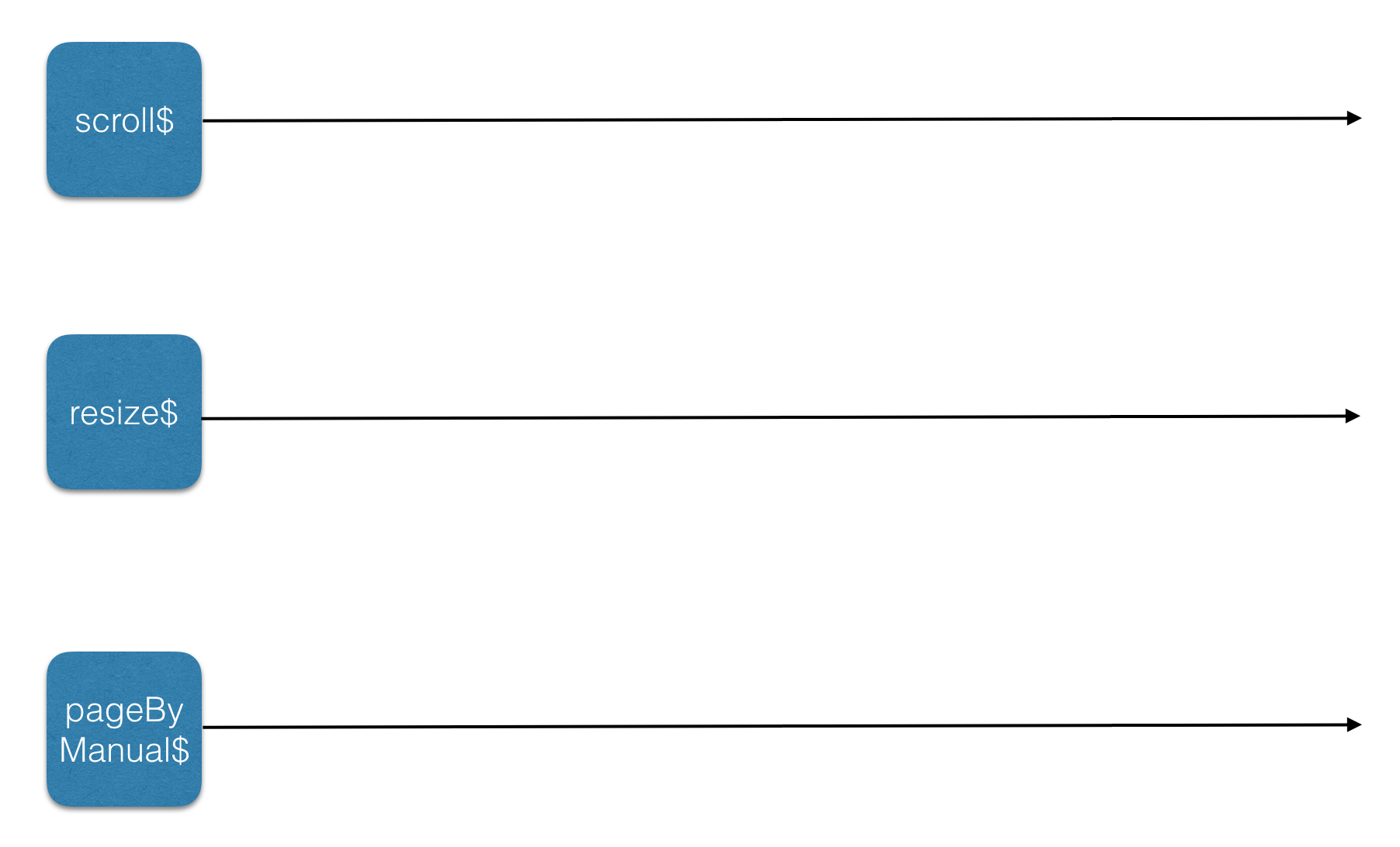
Looking at the list of requirements, we find three triggers that should cause the app to fetch data: scrolling, resizing, and a manual command for loading pages by hand. In reactive terms, these are three distinct sources of events, or streams:
- A stream of scroll events: scroll$
- A stream of resize events: resize$
- A manual stream where we control which page to fetch: pageByManual$
Note: We’ll tag our streams with $ to mark them as such — a naming convention (purely a matter of taste)
Let’s draw these streams on a whiteboard:
These streams would contain certain values over time:
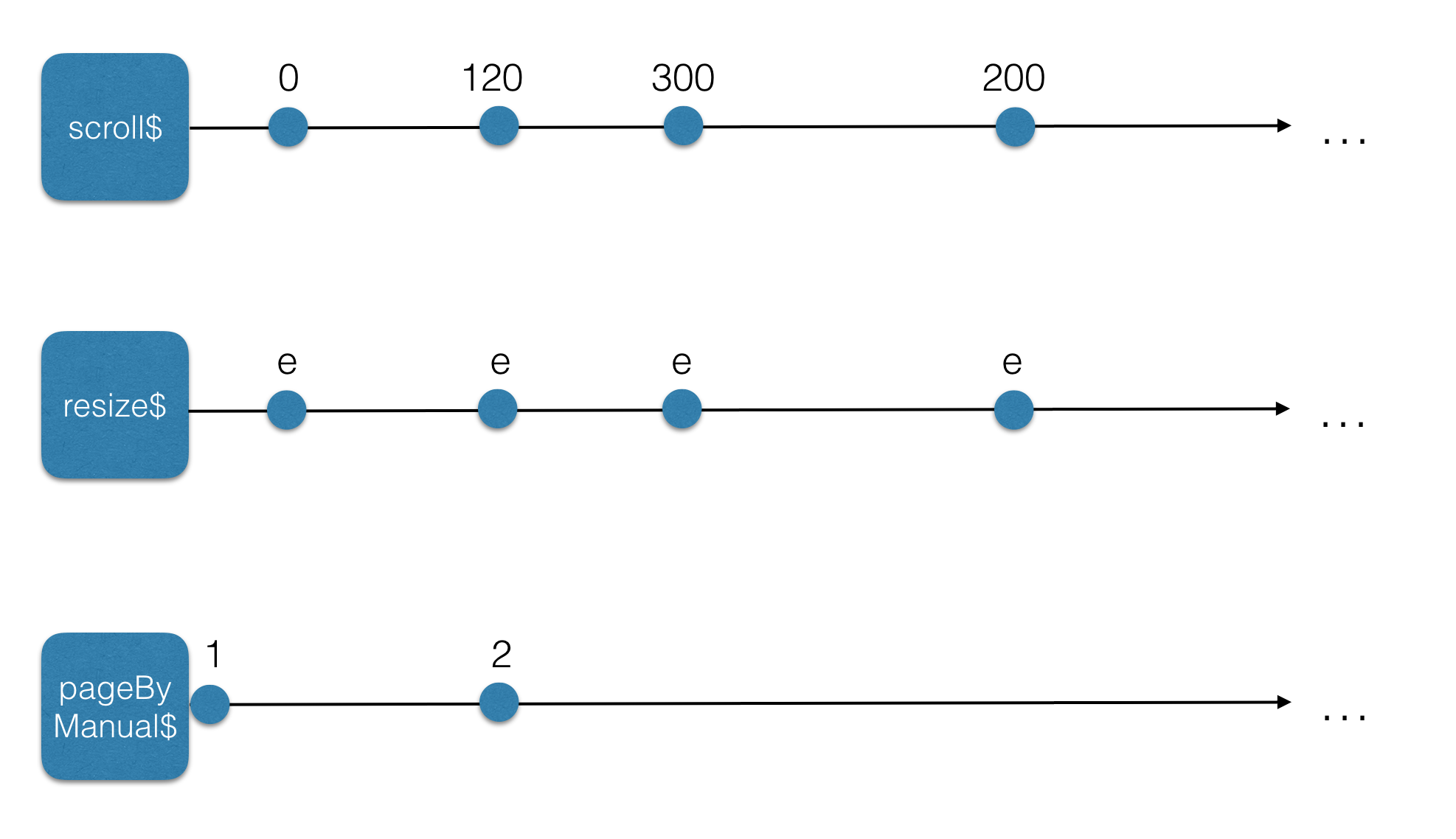
The scroll$ source exposes Y coordinate values, which in turn allow us to determine the current page number.
As for resize$, it carries event objects. Those payloads are irrelevant here, but what matters is being notified whenever the user changes the window dimensions.
Meanwhile, pageByManual$ holds page numbers that we can assign directly, given that it is implemented as a subject (this will be discussed further ahead).
Now, suppose we could transform each of those inputs into a distinct stream that emits page numbers. That would be quite compelling — since a page number would let us fetch the corresponding page. The precise conversion logic from these raw streams to page-number streams doesn't require our attention at this moment (our focus is on the high-level design, right?). The updated diagram could be represented as follows:
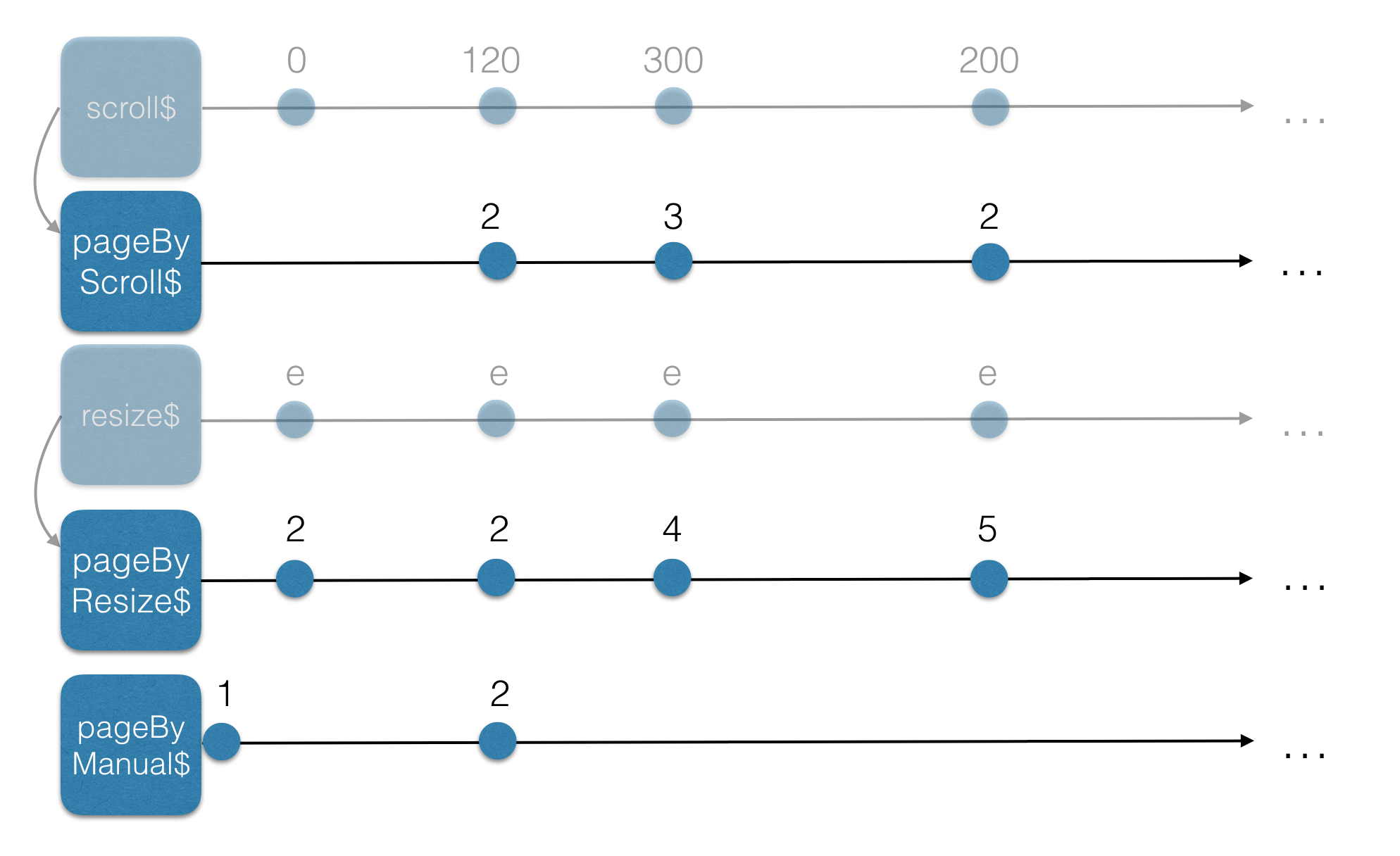
Our initial streams give rise to several derived streams, as illustrated below:
- pageByScroll$: this one supplies page numbers derived from scroll-events
- pageByResize$: this one supplies page numbers derived from resize-events
- pageByManual$: this one supplies page numbers derived from manual events (for example, loading the next page when the screen has leftover whitespace)
Suppose we combine these 3 page-number streams in an optimal way—the result would be a fresh stream, pageToLoad$, carrying page numbers produced by scrolling-events, resize-events, and manual events together.
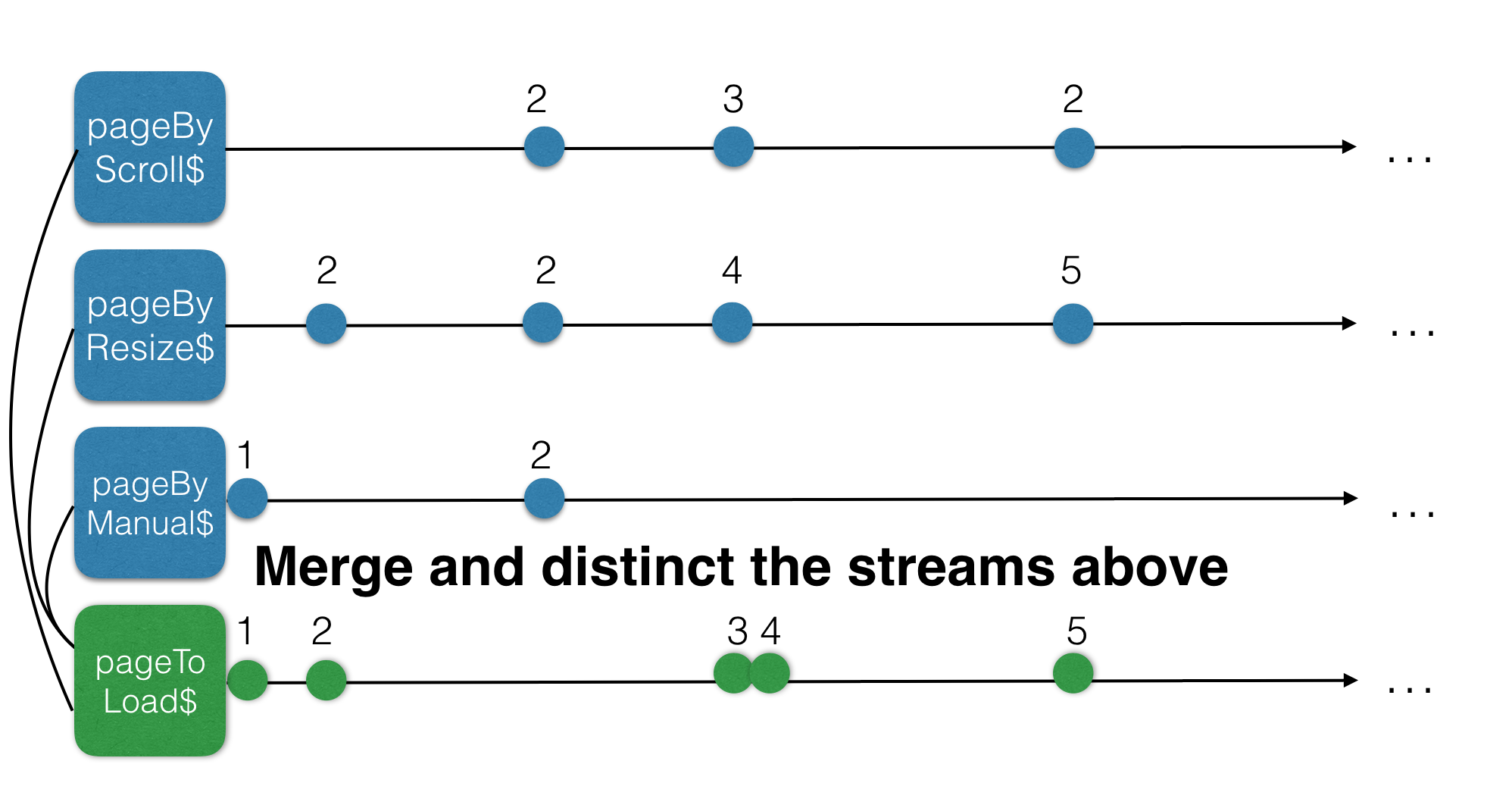
Subscribing to the pageToLoad$ stream and then pulling data from the service gets part of our infinite scroll working. Yet, our goal was to stay reactive, which means minimizing subscriptions as much as we can…
What we really want is a separate stream, derived from pageToLoad$, that carries the results of our infinite scroll list…
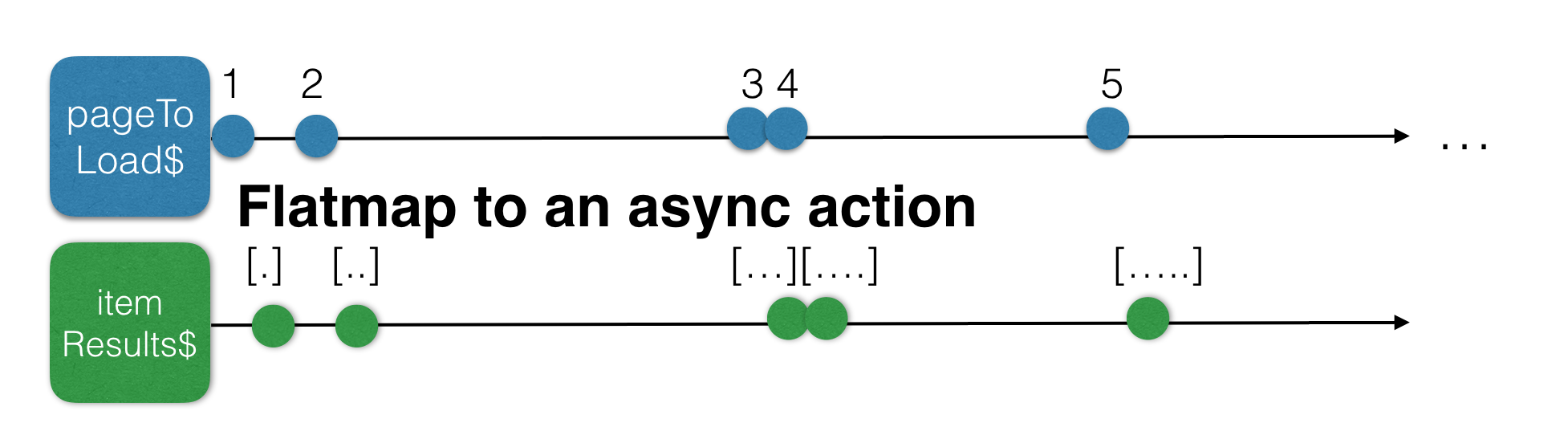
Now let’s throw this in one big schema.
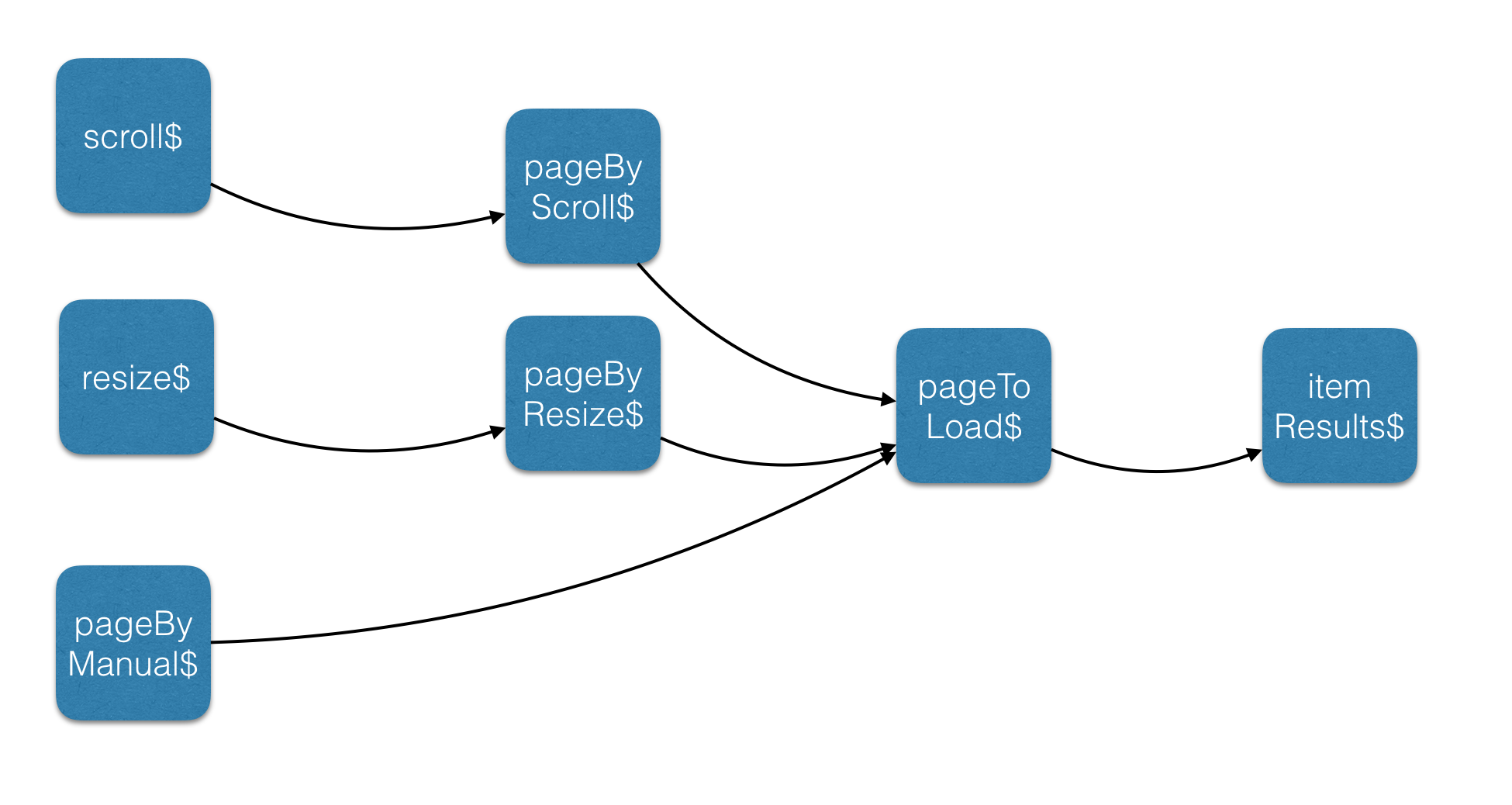
There are three input streams in the diagram: one tied to scrolling, one to resizing, and a manual trigger. These feed into three corresponding page streams, and when combined, they produce a pageToLoad$ stream. Data fetching will then be driven by that pageToLoad$ stream.
Let’s code
We have covered the theory thoroughly, and the behavior of our infinite-scroll-list is now well defined—time to write some actual code, don’t you think?
Determining the page to load requires two properties:
private itemHeight = 40;
private numberOfItems = 10;// number of items in a page
pageByScroll$
Here’s a possible implementation of the pageByScroll$ observable:
 private pageByScroll$ =
 	// first of all, we want to create a stream that contains
 	// all the scroll events that are happening in the window object
	Observable.fromEvent(window, "scroll")
	// we are only interested in the scrollY value of these events
	// let's create a stream with only these values
	.map(() => window.scrollY)
	// create a stream with the filtered values
	// we only need the values from when we are scrolling outside
	// our viewport
	.filter(current => current >=  document.body.clientHeight - window.innerHeight)
	// Only when the user stops scrolling for 200 ms, we can continue
	// so let's debounce this stream for 200 ms
	.debounceTime(200)
	// filter out double values
	.distinct()
	// calculate the page number
	.map(y => Math.ceil((y + window.innerHeight)/ (this.itemHeight * this.numberOfItems)));

	// --------1---2----3------2...
note: In real applications you might want to use injected services for window and document
pageByResize$
Here is what pageByResize$ actually entails:
  private pageByResize$ =
  	// Now, we want to create a new stream that contains
 	// all the resize events that are happening in the window object
	Observable.fromEvent(window, "resize")
	// when the user stops resizing for 200 ms, then we can continue
	.debounceTime(200)
	// calculate the page number based on the window
   .map(_ => Math.ceil(
	   	(window.innerHeight + document.body.scrollTop) /
	   	(this.itemHeight * this.numberOfItems)
   	));

	// --------1---2----3------2...
pageByManual$
Here, pageByManual$ serves two roles: it supplies the starting page number and remains open to manual pushes. A Behavior subject fits this perfectly, since it comes with a predefined seed value and lets us emit new values at will. In essence, a behavior subject is merely a stream that begins with an initial value and stays mutable throughout its lifetime.
private pageByManual$ = new BehaviorSubject(1);

// 1---2----3------...
pageToLoad$
Great, the three streams for page inputs are ready. Now we move on to building the pageToLoad$ stream.
private pageToLoad$ =
	// merge all the page streams and create a new stream of those
	Observable.merge(this.pageByManual$, this.pageByScroll$, this.pageByResize$)
	// create a new stream where the double values are filtered out
	.distinct()
	// check if the page is already in the cache (just an array property in our component)
	.filter(page => this.cache[page-1] === undefined);
itemResults$
The challenging part is done. You now have a stream containing the page to load, which is extremely handy. There’s no need to worry about edge cases or extra logic anymore. Any new value pushed into that stream just triggers a data load. Simple as that!
Here, flatmap comes into play, since the fetch-data-call yields another stream. FlatMap (or MergeMap) combines both streams into a single one.
itemResults$ = this.pageToLoad$
	// based on that stream, load our asynchronosly data
	// flatmap is an alias for mergemap
	.flatMap((page: number) => {
		// load me some starwars characters
		return this.http.get(`https://swapi.co/api/people?page=${page}`)
			// create a stream that contains the results
			.map(resp => resp.json().results)
			.do(resp => {
				// add the page to the cache
				this.cache[page -1] = resp;
				// if the page contains enough white space, load some more data :)
				if((this.itemHeight * this.numberOfItems * page) < window.innerHeight){
					this.pageByManual$.next(page + 1);
				}
			})
		})
	// eventually, just return a stream that contains the cache
	.map(_ => flatMap(this.cache));
The outcome
Here’s what the full implementation could resemble: Notice how the async pipe drives the entire subscription lifecycle
@Component({
  selector: 'infinite-scroll-list',
  template: `
  <table>
   <tbody>
    <tr *ngFor="let item of itemResults$|async" [style.height]="itemHeight + 'px'">
      <td></td>
    </tr>
   </tbody>
   </table>
  `
})
export class InfiniteScrollListComponent {
  private cache = [];
  private pageByManual$ = new BehaviorSubject(1);
  private itemHeight = 40;
  private numberOfItems = 10;
  private pageByScroll$ = Observable.fromEvent(window, "scroll")
      .map(() => window.scrollY)
      .filter(current => current >=  document.body.clientHeight - window.innerHeight)
      .debounceTime(200)
      .distinct()
      .map(y => Math.ceil((y + window.innerHeight)/ (this.itemHeight * this.numberOfItems)));

  private pageByResize$ =
	Observable.fromEvent(window, "resize")
	.debounceTime(200)
	.map(_ => Math.ceil(
	   	(window.innerHeight + document.body.scrollTop) /
	   	(this.itemHeight * this.numberOfItems)
   	));


  private pageToLoad$ = Observable
    .merge(this.pageByManual$, this.pageByScroll$, this.pageByResize$)
    .distinct()
    .filter(page => this.cache[page-1] === undefined);

  itemResults$ = this.pageToLoad$
    .do(_ => this.loading = true)
    .flatMap((page: number) => {
      return this.http.get(`https://swapi.co/api/people?page=${page}`)
          .map(resp => resp.json().results)
      		.do(resp => {
				this.cache[page -1] = resp;
				if((this.itemHeight * this.numberOfItems * page) < window.innerHeight){
					this.pageByManual$.next(page + 1);
				}
          })
    })
    .map(_ => flatMap(this.cache));

  constructor(private http: Http){
  }
}
Here is a working plunk
Once again, as I attempt to show in earlier posts, third-party libraries aren’t necessary for every problem. The infinite-scroll-list implementation is compact and highly adaptable. If, for example, we wanted to release DOM nodes and work with just 100 elements simultaneously, that would merely be a matter of creating a new stream.
Thank you for your time — I trust this was enjoyable.