
Signals arrived in Angular v16 on May 3, 2023, as a reactive primitive meant to handle application state. At the time, it was a novel concept, but by v19.2, the API has matured considerably. Even if legacy enterprise codebases haven't fully migrated, most developers now have at least a working familiarity with signals—some welcome it, others remain skeptical.
In the current release (v19.2), the signal ecosystem has expanded to include httpResource, rxResource / resource, and linkedSignal. This piece shares my perspective on these tools: how I interpret signals, the contexts in which I actually reach for them, and how they stack up against alternative solutions like RxJS for the same class of problems.
Fundamental Signal Types
Per the official documentation, signal() wraps any primitive or complex data structure, notifying subscribers whenever the stored value changes.
My own rule of thumb is to use signal() in any scenario where a variable is rendered into the DOM and is expected to change over time. A representative example is a toggle between two views, driven by button clicks to switch between displaying a card and a grid layout.
@Component({
  selector: 'app-test',
  template: `
      <button (click)="onViewChange('card')" type="button">
        Card View
      </button>
      <button (click)="onViewChange('grid')" type="button">
        Grid View
      </button>

      @if(viewControl() === 'grid') { <app-grid-view /> }
      @else if(viewControl() === 'card') { <app-card-view /> }
  `,
  changeDetection: ChangeDetectionStrategy.OnPush,
  standalone: true,
})
export class TestComponent {
  viewControl = signal<'grid' | 'card'>('grid');

  onViewChange(view: 'grid' | 'card'): void {
    this.viewControl.update(() => view);
  }
}
But is signal() the only way forward? Certainly not. An alternative would involve creating a child component that implements ControlValueAccessor, with the parent managing state through reactive forms to dictate which view appears.
@Component({
  selector: 'app-test',
  template: `
      <app-button-grid-card-view-change [formControl]="viewControl" />

      @if(viewControl.value === 'grid') {  <app-grid-view /> }
      @else if(viewControl.value === 'card') { <app-card-view />}
  `,
  imports: [ReactiveFormsModule],
  changeDetection: ChangeDetectionStrategy.OnPush,
  standalone: true,
})
export class TestComponent {
  viewControl = new FormControl<'grid' | 'card'>('grid');
}
Factoring out a dedicated component for the buttons is a legitimate tactic, particularly with multiple buttons and more intricate logic. It's worth noting the caveat that this specific setup won't function in zoneless applications, since viewControl.value carries no reactivity—the framework won't detect the update. In zone.js-powered apps it might still work, but only because the "click" event gets patched by zone.
To sidestep reactive forms entirely, we can elevate the pattern by using the model() signal inside the child component. This approach lets the child own the toggle behavior, notifying the parent of each button press, thereby shifting the responsibility of switching between card and grid views down to the child. The child's signal is declared as viewModel = model<'grid' | 'card'>('grid').
@Component({
  selector: 'app-test',
  template: `
      <app-button-grid-card-view-change [(viewModel)]="viewControl" />

      @if(viewControl() === 'grid') {  <app-grid-view /> }
      @else if(viewControl() === 'card') { <app-card-view />}
  `,
  changeDetection: ChangeDetectionStrategy.OnPush,
  standalone: true,
})
export class TestComponent {
  viewControl = signal<'grid' | 'card'>('grid');
}
All things considered, we've now got at least three (and potentially more) viable solutions to the same problem, with no clear winner in terms of superiority. The practical differences are subtle. Given the options, my preference leans toward the third variant. Still, as a devoted RxJS enthusiast, I want to scrutinize effect, httpResource, rxResource, and linkedSignal—examining how they cut down boilerplate while still carrying some limitations, at least currently, when it comes to refining the resulting value.
The Verdict On Effect
When effect() first appeared alongside Angular signals, it's fair to say overuse was rampant. For a time, a persistently popular search query was:
How to fix: Writing to signals is not allowed in a computed or an effect by default. Use allowSignalWrites ….
Discovering how quickly one could spiral into infinite loops was a rite of passage. A textbook case would be something along these lines:
effect(() => {
  const user = authUser();
  this.methodReadsAndUpdatedSignals(a);
})
Eventually, untracked() came to the rescue, allowing us to wrap the bulk of our code inside effect() to avoid reactive feedback loops. Interestingly enough, even though effect() is a core part of the signal API, the Angular team officially advises against its use, reserving it for infrequent situations.
While building ggfinance.io (a subtle plug 😏), a moderately sized application, I noticed my own usage of effect() was confined to these specific areas:
- DOM – Chart initialization
- DOM – Populating data in Angular Material tables
- DOM – Structural directives that depend on signal store changes to alter the view
- LOG – Monitoring and logging signal updates
@Component({
  selector: 'app-test',
  standalone: true,
  imports: [MatTableModule, MatPaginatorModule, MatSortModule],
  template: `
    <table mat-table mat-sort [dataSource]="dataSource">
      <!-- display columns -->
    </table>
    <mat-paginator />
  `,
})
export class TestComponent {
  data = input<unknown[]>();

  paginator = viewChild(MatPaginator);
  sort = viewChild(MatSort);

  displayedColumns = ['col1', 'col2'];
  dataSource = new MatTableDataSource<unknown>([]);

  tableEffect = effect(() => {
    const data = this.data();

    untracked(() => {
      this.dataSource.data = data;
      this.dataSource.paginator = this.paginator() ?? null;
      this.dataSource.sort = this.sort() ?? null;
      this.dataSource._updateChangeSubscription();
    });
  });
}
As a primitive, effect serves mainly to spawn side-effect operations or run isolated computations when one or more input signals change. That said, for generating a fresh reactive data structure to be displayed in the DOM, you're usually better off looking elsewhere. During the drafting of this article, I came to realize that several of the mentioned issues could be addressed with computed(), such as restructuring how mat-table data is sourced.
@Component({
  selector: 'app-test',
  standalone: true,
  imports: [MatTableModule, MatPaginatorModule, MatSortModule],
  template: `
    <table mat-table mat-sort [dataSource]="tableData()">
      <!-- display columns -->
    </table>
    <mat-paginator />
  `,
})
export class TestComponent {
  data = input<unknown[]>();

  paginator = viewChild(MatPaginator);
  sort = viewChild(MatSort);

  displayedColumns = ['col1', 'col2'];

  tableData = computed(() => {
    const data = this.data();
    const dataSource = new MatTableDataSource<unknown>([]);

    dataSource.data = data;
    dataSource.paginator = this.paginator() ?? null;
    dataSource.sort = this.sort() ?? null;

    return dataSource
  });
}
The Verdict On linkedSignal
The computed() signal is derived from other signals and behaves as a readonly source by design. Yet, there are circumstances where you need a signal that computes its value, allows updates over time, and can be reverted to a starting point when one of its dependencies changes.
Consider an e-commerce platform, order management, or a typical SaaS. A user picks an item, the initial quantity defaults to 1, but they have the freedom to increase it. Switch to a different item, and the quantity should snap back to 1.
Here are two approaches—one pre-linkedSignal() and one employing it—that achieve this behavior.
 // EXAMPLE BEFORE linkedSignal()
 itemSelected = signal<unknown>(null);
 itemUnits = signal(1);

 // everytime a new item is selected, reset units to 0
 itemUnitsEffect = effect(() => {
   const selected = this.itemSelected();

   untracked(() => {
     this.itemUnits.set(1);
   })
 })
// EXAMPLE USING linkedSignal()
itemSelected = signal<unknown>(null);

itemUnits = linkedSignal({
    source: this.itemSelected,
    computation: () => 1
});
In my view, linkedSignal() comes into its own in situations like:
- Dependency-driven state resets, such as zeroing out quantities when a different product is chosen in an online checkout.
- Conditional state management, where you tie one signal's state to another and retain the ability to reset or tweak the value based on the other signal's context.
- Sophisticated UI flows—wizards or multi-step forms where one step's state is contingent on a prior one, necessitating either persistence or reset based on the progression.
That being stated, linkedSignal() isn't a universal requirement. It shines when the demands exceed what a plain computed signal offers, but you want to skip the drudgery of manually resetting or syncing state.
The Verdict On httpResource & rxResource/resource
Recent Angular iterations have brought two new signal-centric APIs for asynchronous data:
httpResource– shipped with version 19.2rxResource/resource– available since version 19.0
My initial reaction to these functions was lukewarm, partly because RxJS already covers similar ground. However, it quickly became clear that the Angular team has a grander ambition to reduce reliance on RxJS. The description for httpResource states:
Uses HttpClient to make requests and supports interceptors, testing, and other features of the HttpClient API. Data is parsed as JSON by default.
 data1 = toSignal(this.http.get<unknown>('...').pipe(map((d) => d.data)
 ), { initialValue: [] });

 data2 = httpResource<unknown[]>(
    () => ({
      method: 'GET',
      url: '',
  }), { defaultValue: [], parse: (d): unknown[] => d.data });
In the beginning, I was under the impression these methods were nearly interchangeable. But that assumption didn't hold up. The httpResource API affords built-in state management through isLoading and error, which makes tracking a request's lifecycle considerably more straightforward.
Additionally, given that httpResource is a WritableResource, it opens the door to not just observing but also altering the state directly, such as data2.set([]). This is a notable departure from the toSignal API, which yields a readonly signal.
The httpResource function also exposes request progress, and you can call reload() to trigger a fresh HTTP call.
Take the following scenario: a search bar filtering items by prefix and selected genres, with a dismissal of the search results upon item selection.
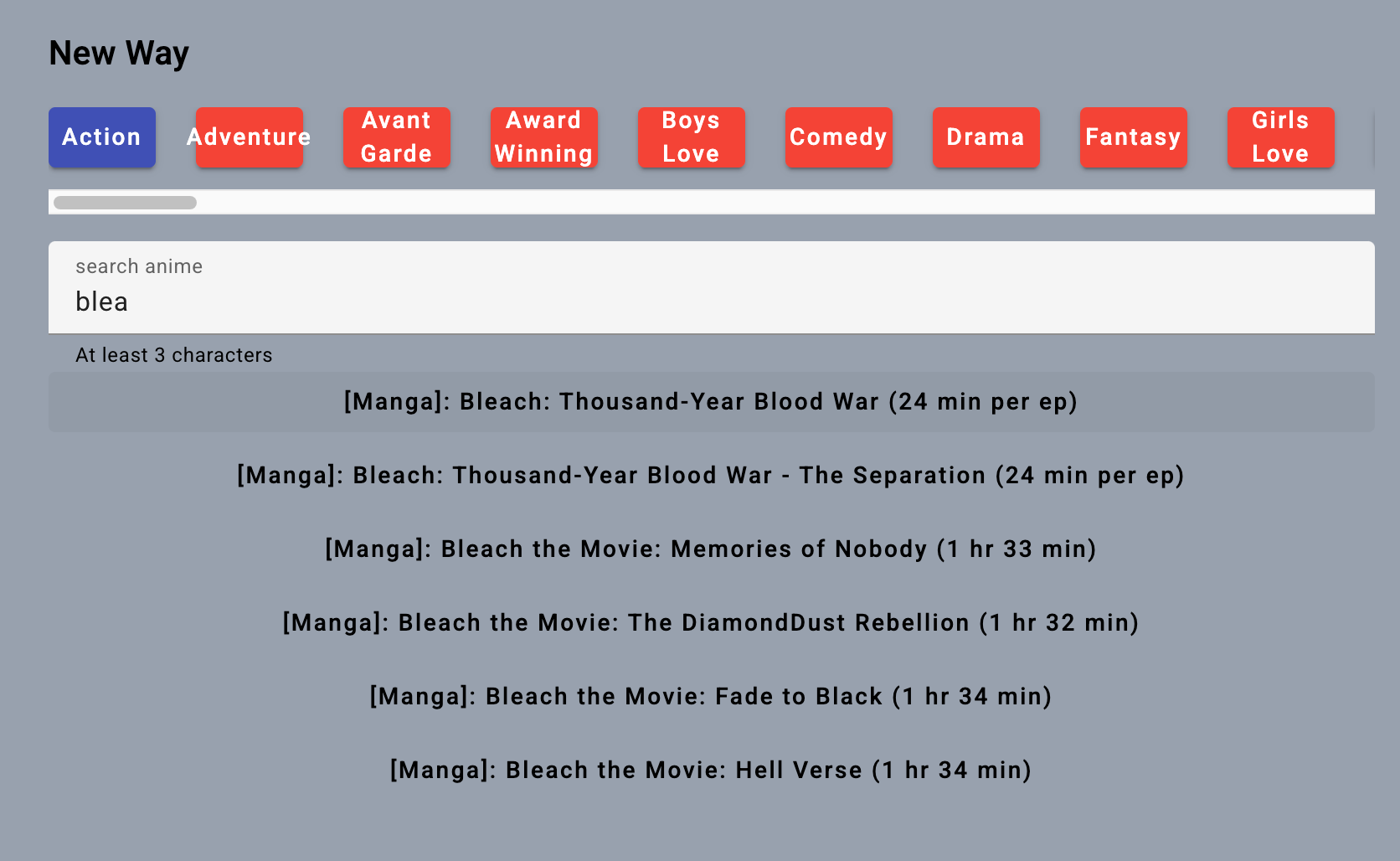
To emulate this behavior using the new signal APIs, a possible implementation is shown below. The code reads well and doesn't rely on RxJS.
The input events are captured in the searchControl signal as you type, while a genre change is recorded in the selectedGenresId signal. I'll omit the HTML template, as it's not central to the discussion.
export class SearchComponent {
  private apiService = inject(AnimeApiService);

  selectedData = output<AnimeData>();

  // control signal to select a genre and item prefix
  searchControl = signal('');
  selectedGenresId = signal<number>(1);

  // load options if genre or prefix changes
  searchedDataResource = rxResource({
    request: () => ({
      genresId: this.selectedGenresId(),
      prefix: this.searchControl(),
    }),
    loader: ({ request }) =>
      this.apiService.searchAnime(request.prefix, request.genresId),
	    defaultValue: [],
  });

  onGenresClick(id: number): void {
    this.selectedGenresId.set(id);
  }

  onClick(animeData: AnimeData): void {
    // emit to parent
    this.selectedData.emit(animeData)
    // reset displayed data
    this.searchedDataResource.value.set([]);
  }
}
A point worth emphasizing with this setup is the contrast between declarative and imperative coding.
In the searchedDataResource, we hold the fetched items. But once an item is chosen, an imperative action resets searchedDataResource to an empty array, effectively hiding the results.
This raises an inquiry: how would one write the RxJS counterpart, preserving both the loading and error states for network operations?
export class SearchComponent {
  private apiService = inject(AnimeApiService);

  // control for item prefix
  searchControl = new FormControl<string>('', {
    nonNullable: true,
  });

  // control to select a genre
  selectedGenresIdControl = new FormControl<number>(1, {
    nonNullable: true,
  });

  selectedData$ = new Subject<AnimeData>();

  // notifies parent when item is selected
  selectedAnime = outputFromObservable(this.selectedAnime$);

  searchedData = toSignal(
    this.selectedGenresIdControl.valueChanges.pipe(
      switchMap((genderId) =>
        this.searchControl.valueChanges.pipe(
          // search immediatelly with new genres
          startWith(this.searchControl.value),
          // load from API
          switchMap((name) =>
            this.apiService.searchAnime(name, genderId).pipe(
              map((data) => ({ data, isLoading: false })),
              startWith({ data: [], isLoading: true }),
              catchError((e) =>
	              of({ data: [], error: e, isLoading: false })
	            ),
            ),
          ),
          // listen on select and reset the data
          switchMap((result) =>
            this.selectedData$.pipe(
              map(() => ({ data: [], isLoading: false })),
              startWith(result),
            ),
          ),
        ),
      ),
    ),
    { initialValue: { data: [] as AnimeData[], isLoading: false } },
  );

  onClick(data: AnimeData): void {
    this.selectedData$.next(data);
  }
}
It's plausible to claim that the rxResource rendition is terser and more legible, thus more appealing. While readability is a clear win, what I find lacking in the signal alternatives are the utility functions RxJS ships, like distinctUntilChanged(), debounceTime(), and various helpers for data manipulation.
For RxJS, which usually takes on the burden of managing loading and error states, you can lessen complexity by designing custom operators to abstract that logic.
If your goal is to curtail RxJS dependency but you still require debouncing, you have the option of utilizing Lodash or blending RxJS with rxResource in a pattern like this:
export class AnimeSearchNewComponent {
  private readonly apiService = inject(AnimeApiService);

  // control signal to select a genre and item prefix
  readonly searchControl = signal('');
  readonly searchControlSignal = toSignal(
    toObservable(this.searchControl).pipe(
      distinctUntilChanged(),
      debounceTime(300),
    )
  )

  // load options if genre or prefix changes
  readonly searchedDataResource = rxResource({
    request: () => ({
      prefix: this.searchControlUsed(),
    }),
    loader: ({ request }) =>
      this.apiService.searchAnime(request.prefix),
	    defaultValue: [],
  });
  }
A key distinction to bear in mind is that while signals offer a streamlined API for state, RxJS retains its relevance in complex settings that demand substantial data shaping or interactions with higher-order observables. Signals win when the goal is straightforward tracking of a value and its updates; RxJS is superior when orchestrating multiple streams via operators like combineLatest or switchMap, or engaging in complex transformations.
Wrap-Up
There's no disputing that the Angular team keeps introducing substantive features. Maybe it's my years in the ecosystem or my deep familiarity with RxJS that prompts a discussion like this. It's also relevant to mention the RFCs about resource architecture:
These resource-related RFCs are set to influence Angular's approach to handling asynchronous data in the times ahead.
When I embarked on this article, I didn't fully grasp the rationale behind rxResource or httpResource, assuming signals could replicate similar outcomes. Yet after constructing a modest search box—the code is on GitHub—I've gained a greater appreciation for having multiple paths to the same destination. Picking between RxJS and signals boils down to your team's preferences and the demands of the project; both hold a valid place in Angular development.
In closing, I'd strongly suggest checking out HttpResource in Angular 19.2 from Decoded Frontend, as it covers a wide array of HttpResource capabilities. I trust you found my reflections worthwhile. For more of my writing, visit dev.to, and you can reach me on LinkedIn.