Handling errors is a core requirement in RxJs, needed in nearly every reactive application we build.
While error handling in RxJS is often misunderstood, it becomes straightforward once you internalize the Observable contract.
This guide walks through the most frequently used error handling strategies, from the foundational Observable contract to advanced operators like retryWhen.
Table Of Contents
Here is what we will explore:
- The Observable contract and Error Handling
- RxJs subscribe and error callbacks
- The catchError Operator
- The Catch and Replace Strategy
- throwError and the Catch and Rethrow Strategy
- Using catchError multiple times in an Observable chain
- The finalize Operator
- The Retry Strategy
- Then retryWhen Operator
- Creating a Notification Observable
- Immediate Retry Strategy
- Delayed Retry Strategy
- The delayWhen Operator
- The timer Observable creation function
- Running Github repository (with code samples)
- Conclusions
Let's start our deep dive into RxJs error handling.
The Observable Contract and Error Handling
To grasp error handling in RxJs, you must first accept that a single stream can error out only once. This is dictated by the Observable contract, which allows a stream to emit zero or more values.
This contract mirrors real-world scenarios, such as network requests that may fail.
A stream may also complete, which signals that:
- its lifecycle ended without any errors
- it will not emit further values after completion
Alternatively, a stream can error out, which means:
- its lifecycle ended with an error
- it will not emit more values after the error is thrown
Steams cannot both complete and error out:
- a completed stream cannot later error out
- an errored stream cannot later complete
Neither completion nor erroring out is mandatory; they are optional terminal states. At most, one of the two can occur.
This means that once a stream errors, it becomes unusable per the Observable contract. So, how can we recover from errors?
RxJs subscribe and error callbacks
Let's see RxJs error handling in practice by creating a stream and subscribing to it. The subscribe method accepts three optional arguments:
- a success handler, invoked on each emitted value
- an error handler, called only if an error occurs, receiving the error as its argument
- a completion handler, called only if the stream completes
Completion Behavior Example
If the stream does not error out, this is what appears in the console:
HTTP response {payload: Array(9)}
HTTP request completed.
Here, the HTTP stream emits a single value and then completes, indicating no errors occurred.
But when the stream throws an error instead, the console shows this:

Notice that the stream emitted no values and immediately errored out. No completion follows the error.
Limitations of the subscribe error handler
Handling errors solely via the subscribe callback is sometimes sufficient, but it has limitations. This approach prevents us from recovering from the error or emitting an alternative value as a substitute for the expected backend response.
Let's explore operators that enable more sophisticated error handling strategies.
The catchError Operator
In synchronous programming, we can wrap code in a try clause, catch errors with a catch block, and handle them appropriately.
Here is the synchronous catch syntax:
This mechanism is powerful because it allows handling any error within the try/catch block in one place.
However, JavaScript operations are often asynchronous, like HTTP calls.
RxJs offers a similar functionality through the catchError operator.
How does catchError work?
Like any RxJs operator, catchError is a function that accepts an input Observable and outputs an Observable.
Each call to catchError requires an error handling function.
catchError takes an Observable that might error and emits its values through its output Observable.
If no error occurs, the output Observable behaves identically to the input Observable.
What happens when an error is thrown?
When an error occurs, catchError steps in. It passes the error to the error handling function.
This function must return an Observable, which serves as a replacement for the errored stream.
Since the input stream has errored out, it's no longer usable per the Observable contract.
The replacement Observable is then subscribed to, and its values are used in place of the errored input.
The Catch and Replace Strategy
Let's see how catchError can provide a replacement Observable emitting fallback values:
Let's break down this strategy:
- we pass an error handling function to catchError
- this function is not called immediately; in most cases, it's never called
- it's invoked only when the input Observable of catchError errors out
- upon error, the function returns an Observable built with
of([]) - the
of()function creates an Observable that emits a single value ([]) and completes - the error handling function returns this recovery Observable (
of([])), which catchError subscribes to - the recovery Observable's values are then emitted as replacements in catchError's output
As a result, the http$ Observable will not error out anymore! Here is the console output:
HTTP response []
HTTP request completed.
The error callback in subscribe() is no longer invoked. Instead:
- the empty array
[]is emitted - the
http$Observable then completes
The replacement Observable provided a fallback value ([]) to http$ subscribers, despite the original stream erroring out.
We could also add local error handling before returning the replacement Observable.
This covers the Catch and Replace Strategy. Now, let's explore how to rethrow the error using catchError.
The Catch and Rethrow Strategy
The replacement Observable provided via catchError can itself error out, like any other Observable.
If that happens, the error propagates to the subscribers of catchError's output Observable.
This behavior enables us to rethrow the caught error after handling it locally. Here's how:
Catch and Rethrow breakdown
Let's examine the Catch and Rethrow Strategy step by step:
- as before, we catch the error and return a replacement Observable
- but this time, instead of a fallback value like
[], we handle the error locally within the catchError function - here, we simply log the error, but we could add any local handling, like showing an error message
- we then return a replacement Observable created with throwError
- throwError creates an Observable that emits no values, erroring out immediately with the same error caught by catchError
- this causes catchError's output Observable to error out with the same error as its input
- thus, we have successfully rethrown the error from catchError's input to its output
- the error can now be handled further down the Observable chain, if needed
Running the code yields the following console output:

As expected, the same error is logged both in the catchError block and in the subscription error handler.
Using catchError multiple times in an Observable chain
We can use catchError at various points in an Observable chain, adopting different strategies at each point.
For instance, we can catch an error upstream, handle it locally, rethrow it, then catch it again downstream and provide a fallback value (instead of rethrowing):
Here is the output from running this code:
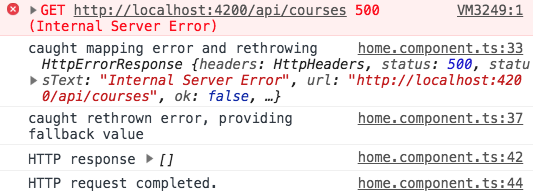
The error was indeed rethrown initially, but it never reached the subscribe error handler. Instead, the fallback [] value was emitted.
The Finalize Operator
Besides a catch block, synchronous JavaScript offers a finally block for code that should always execute.
The finally block is typically used to release expensive resources like network connections or memory.
Unlike the catch block, the finally block executes regardless of whether an error was thrown:
RxJs provides an operator similar to finally, called finalize.
Note: it can't be named "finally" because that's a reserved keyword in JavaScript
Finalize Operator Example
Like catchError, we can add multiple finalize calls at different places in the Observable chain to ensure multiple resources are released properly:
Running this code shows how the multiple finalize blocks execute:

Notice that the last finalize block runs after the subscribe value and completion handlers.
The Retry Strategy
Instead of rethrowing or providing a fallback, we can retry subscribing to the errored Observable.
Remember, once a stream errors, we can't recover it, but we can subscribe again to the originating Observable to create a new stream.
Here's the process:
- we subscribe to the input Observable, creating a stream
- if it doesn't error, we pass values through to the output
- if it errors, we subscribe again to the input Observable, creating a fresh stream
When to retry?
The big question is when to resubscribe and retry.
- should we retry immediately?
- should we wait for a delay, hoping the problem resolves?
- should we limit retry attempts and then error the output stream?
To answer these, we need a second auxiliary Observable called the Notifier Observable. It determines when a retry occurs.
The Notifier Observable is used by the retryWhen Operator, the core of the Retry Strategy.
RxJs retryWhen Operator Marble Diagram
To understand retryWhen, let's examine its marble diagram:

Notice that the Observable being retried is the 1-2 Observable (second line from the top), not the first line.
The first line, with values r-r, is the Notification Observable, which controls when retries occur.
Breaking down how retryWhen works
Let's analyze the diagram:
- The Observable 1-2 is subscribed to, and its values reflect immediately in retryWhen's output
- even after 1-2 completes, it can still be retried
- the notification Observable emits
r, long after 1-2 completes - the value of
ritself is irrelevant; what matters is when it's emitted, as that triggers a retry - 1-2 is then resubscribed, and its values again appear in the output
- the notification Observable emits another
r, and the same happens again - then, the notification Observable completes
- at that moment, the ongoing retry is cut short, so only 1 is emitted, not 2
In essence, retryWhen retries the input Observable each time the Notification Observable emits a value.
Now that we understand retryWhen, let's create a Notification Observable.
Creating a Notification Observable
The Notification Observable is created inside the function passed to retryWhen. This function receives an Errors Observable that emits the input Observable's errors.
By subscribing to this Errors Observable, we know exactly when errors occur. Let's implement an immediate retry strategy using this.
Immediate Retry Strategy
To retry immediately after an error, we return the Errors Observable unchanged.
We simply pipe the tap operator for logging, leaving the Errors Observable as is:
Remember, the Observable returned from the retryWhen function is the Notification Observable.
Its emitted value is irrelevant; only when it emits matters, as that triggers a retry.
Immediate Retry Console Output
Running this program produces the following console output:

The HTTP request failed initially, then a retry succeeded on the second attempt.
Inspecting the network log reveals the delay between attempts:

The second attempt occurred immediately after the error, as expected.
Delayed Retry Strategy
Now, let's implement a strategy that waits, for example, 2 seconds after an error before retrying.
This is useful for recovering from intermittent errors like network failures due to high server load.
With short delays, the retried request may succeed on the second try.
The timer Observable creation function
To implement the Delayed Retry Strategy, we need a Notification Observable that emits values 2 seconds after each error.
We can use the timer creation function, which accepts:
- an initial delay before the first emission
- a periodic interval for subsequent emissions
Here's the marble diagram for the timer function:

The first value 0 is emitted after 3 seconds, then a new value each second.
The second argument is optional; omitting it results in a single emission (0) after 3 seconds, followed by completion.
This Observable is a good foundation for delaying retries. Let's combine it with retryWhen and delayWhen.
The delayWhen Operator
A key point: the function defining the Notification Observable in retryWhen is called once.
We get a single chance to define the Notification Observable that triggers retries.
We define it by applying the delayWhen Operator to the Errors Observable.
In this diagram, the source a-b-c is the Errors Observable emitting failed HTTP errors over time:

delayWhen Operator breakdown
Let's follow the diagram to understand delayWhen:
- each input value is delayed before appearing in the output
- the delay per value can vary, determined flexibly
- for each input value, delayWhen calls its duration selector function
- that function returns an Observable, which determines when the delay ends
- each value a-b-c has its own duration selector Observable
- when a duration selector emits, the corresponding input value appears in the output
- notice
bappears afterc; this is normal - this happens because
b's duration selector (third line) emitted afterc's, explaining the order
Delayed Retry Strategy implementation
Let's put this together to retry a failing HTTP request 2 seconds after each error:
Here's what happens:
- the function passed to retryWhen is called only once
- we return an Observable that emits when a retry is needed
- for each error, delayWhen creates a duration selector via the timer function
- this duration selector emits 0 after 2 seconds, then completes
- once that occurs, delayWhen considers the error's delay elapsed
- only after that delay, the error appears in the notification Observable's output
- when the notification Observable emits, retryWhen triggers a retry
Retry Strategy Console Output
Here's an example where a request was retried 5 times, with the first 4 attempts failing:

And here's the network log for the same sequence:

Retries only happened 2 seconds after each error, as expected.
With this, we've covered the most common RxJs error handling strategies. Let's wrap up with some runnable sample code.
Running Github repository (with code samples)
To experiment with these strategies, a working playground is essential for testing failing HTTP requests.
This playground includes a small application with a backend that simulates random or systematic HTTP errors. Here's the app:

Conclusions
As we've seen, RxJs error handling hinges on understanding the Observable contract.
Remember: a stream can error out only once, and erroring out is mutually exclusive with completion; only one can happen.
To recover from an error, we must create a replacement stream, as seen with catchError or retryWhen.
We hope this post was helpful. For deeper RxJs insights, consider the RxJs In Practice Course, covering many useful patterns and operators in detail.
If you have questions or comments, please share them in the comments below, and we'll get back to you.
To stay updated on RxJs and Angular topics, subscribe to our newsletter:
If you're new to Angular, check out the Angular for Beginners Course:
