
General Questions
These are the first questions I typically reach for when opening an interview. They aren't designed to have a single correct answer. Instead, the goal is to get a read on the candidate's temperament and approach to problem-solving. Since this person will be collaborating with me and the rest of the team on a daily basis, it's important to determine whether our technical philosophies are aligned.
How do you define a senior developer?
This opening question sets the tone for how I will engage with the candidate for the rest of the session. Given that developers often fall somewhere on a spectrum between being a generalist or a specialist, it's useful to hear how the interviewee defines seniority. The most common answer I hear goes something like:
"Having a deep mastery of the framework, along with the ability to mentor those who are more junior."
That answer is fairly typical, so I usually continue with a follow-up:
"If being a senior means knowing the framework inside and out, would it be fair for me to pose some challenging questions and expect you to be able to work through them?"
Ultimately, I'm trying to find out how the candidate perceives their own level of expertise. I want to know if they feel they've already achieved a senior role and whether they've encountered and solved problems that are genuinely complex. This creates shared expectations for the discussion that come from the candidate, rather than being solely imposed by me.
In my own experience, being a senior goes beyond a thorough understanding of the framework. I would also look for someone who can:
- Proactively suggest and drive technical improvements, including paying down technical debt, while being able to persuade management to support those initiatives.
- Respectfully challenge product decisions that could be shortsighted or detrimental to the product's future.
- Demonstrate the ability to both provide and accept constructive criticism during the code review process.
- Know which problems to research online, which to ask a colleague about, and which warrant pulling a team together for a quick design session.
- Show genuine interest in the product and a willingness to work closely with product managers.
Declarative or imperative programming: which do you choose?
Granted, this is a somewhat esoteric question. However, it's quite good at revealing how a candidate arranges their thoughts around code clarity and long-term upkeep. When I pose this, a significant number of candidates admit they can't tell the difference.
A quick search will give you a standard definition: “Declarative programming describes what you want to accomplish, while imperative programming details the exact steps to get there.”
Looking at this through an Angular lens, imperative code often means mutating shared variables in various parts of the application, frequently with separate logic to keep track of side effects. A declarative style, on the other hand, typically involves defining a piece of state in a single location, often through mechanisms like computed, signal, or an RxJS pipeline. For a deeper dive, I recommend looking at Joshua Morony's video covering this very subject. To illustrate, let's consider a code example:
// Imperative Programming
@Component({ template: ` ... ` })
export class ChildComponent {
  private readonly wsService = inject(WsService);
  private readonly apiService = inject(ApiService);

  displayedData = signal<string[]>([]);

  constructor(){
    // load existing data
    this.apiService.existingData$.subscribe((data: string[]) => {
      this.displayedData.set(data);
    });

    // listen on WS new data push
    this.wsService.newData$.subscribe((data: string) => {
      this.displayedData.update((current) => [...current, data]);
    });
  }
}
// Declarative Programming
@Component({ template: ` ... ` })
export class ChildComponent {
  private readonly wsService = inject(WsService);
  private readonly apiService = inject(ApiService);

  displayedData = toSignal(
    merge(this.apiService.existingData$, this.wsService.newData$).pipe(
      scan((acc: string[], curr: string) => [...acc, curr], [] as string[])
    ),
    { initialValue: [] });
}
The imperative snippet sets up individual subscriptions to both existingData$ and newData$. In separate steps, the code assigns the result to the displayedData signal. This treats each data stream independently, which can lead to repetitive patterns and a codebase that becomes harder to manage as the requirements grow.
On the other hand, the declarative snippet takes both streams and combines them, using the scan operator to define displayedData in one cohesive, declarative statement. This eliminates the need for manual subscription management and centralizes the logic. The result is code that is more predictable, less prone to bugs, and generally easier to test. The declarative method outlines the intended outcome, whereas the imperative one dictates the process. Given the choice, the declarative approach is usually more robust.
Would you pick a state management library or build your own?
This isn't about testing a specific piece of knowledge. It's a great opportunity for a discussion. Some candidates have a strong affinity for comprehensive libraries like NgRx, Akita, or NGXS. Others lean towards a lighter, hand-rolled approach using services, RxJS, or signals. Both are legitimate strategies. My primary interest lies in the reasoning. I want to hear a candidate walk through the pros and cons, and show they can think about the downside of the solution they are not picking.
At a senior level, a developer should be able to lay out their reasoning clearly, even if their preferred solution differs from mine or from the current tech stack of the team. While the answer itself doesn't change my overall assessment, the ability to formulate a convincing argument for a specific approach is a strong indicator of senior-level thinking.
Note: The following sections address Angular's state management and change detection mechanisms from a senior developer's perspective, focusing on real-world application and the reasoning behind architectural decisions.
Angular Questions - General
How would you achieve a parent - child component communication ?
This question seems straightforward on the surface, yet it often trips up experienced developers. Most interviewees immediately point to @Input()/@Output() decorators or propose a shared service backed by a Subject or a signal for cross-component data flow.
// Input/Output example
@Component({ selector: 'app-child', template: ` ... ` })
export class ChildComponent<T> {
  cSelected = output<T>();
  cData = input<T[]>();
}

@Component({
  imports: [ChildComponent],
  template: `<app-child
      [cData]="pData()"
      (cSelected)="pSelected.set($event)" />`
})
export class ParentComponent {
  pData = signal<string[]>(['a', 'b', 'c']);
  pSelected = signal<string>('');
}
// Shared Service example
@Injectable({ providedIn: 'root' })
export class SharedService<T> {
  store = signal<T | undefined>(undefined);
}

@Component({ selector: 'app-child', template: ` ... ` })
export class ChildComponent {
  service = inject(SharedService<string[]>);

  onPushData(){
    this.service.store.set(['a', 'b', 'c']);
  }
}

@Component({ imports: [ChildComponent], template: `<app-child />` })
export class ParentComponent {
  storedData = inject(SharedService<string[]>).store
}
While these responses are technically correct, they only scrape the surface of what a senior engineer should know. I'm looking for additional depth covering:
- Custom two-way binding patterns
- Model inputs introduced in recent Angular versions
- Control Value Accessor for form integration
Custom two-way binding relies on matching an input with an output that shares the same base name, where the output appends the Change suffix. This setup enables the familiar "banana-in-a-box" syntax [(data)] within templates. When the child calls cDataChange.emit('something'), the parent's pData — whether it's a signal or a standard property — receives the update immediately.
@Component({ selector: 'app-child', template: ` ... ` })
export class ChildComponent {
  cData = input<string>('');
  cDataChange = output<string>();

  onDataChange(){
    this.cDataChange.emit('something');
  }
}

@Component({
	imports: [ChildComponent],
	template: `<app-child [(cData)]="pData" />`
})
export class ParentComponent {
  pData = signal('Hello World');
}
Model inputs streamline the two-way binding process by removing boilerplate. Rather than writing separate @Input and @Output declarations plus manual emit calls, the model() function handles both sides in one declaration. This approach works seamlessly whether the parent passes a signal or a regular property down.
The typical scenario for model inputs appears in custom form controls. Consider a child component rendering an enhanced input field — perhaps with autocomplete or validation logic. As the user types, the ngModel inside the child pushes values through cData, which, because it's backed by model(), automatically propagates those changes upward to the parent's pData.
@Component({
  selector: 'app-child',
  imports: [FormsModule],
  template: `<input [(ngModel)]="cData" />  `
})
export class ChildComponent {
  cData = model<string>('');
}

@Component({
  imports: [ChildComponent],
  template: `<app-child [(cData)]="pData" />`,
})
export class ParentComponent {
  pData = signal('Hello World');
}
Control Value Accessor (CVA) becomes the right tool when you're building a reusable form field. By implementing ControlValueAccessor, your component plugs directly into Angular's forms ecosystem, whether the surrounding form uses reactive or template-driven styles.
In practice, I reach for control value accessor when constructing UI library components or a specialized search-select widget. Picture an e-commerce product search: as you type a prefix, the component triggers an API call and presents matching options in a dropdown.
@Component({
  selector: 'app-custom-input',
  imports: [FormsModule],
  template: `<input [ngModel]="value" (ngModelChange)="onInput($event)"/>`,
  providers: [{
    provide: NG_VALUE_ACCESSOR,
    useExisting: forwardRef(() => CustomInputComponent),
    multi: true
  }]
})
export class CustomInputComponent implements ControlValueAccessor {
  value = '';

  // callbacks for the ControlValueAccessor
  private onChange = (value: string) => {};
  private onTouched = () => {};

  // called when input changes
  onInput(value: string): void {
    this.value = value;
    this.onChange(this.value);   // propagate change
    this.onTouched();            // mark as touched
  }

  // required from ControlValueAccessor
  writeValue(value: string): void {
    this.value = value;
  }

  // required from ControlValueAccessor
  registerOnChange(fn: (value: string) => void): void {
    this.onChange = fn;
  }

  // required from ControlValueAccessor
  registerOnTouched(fn: () => void): void {
    this.onTouched = fn;
  }
}
@Component({
  selector: 'app-parent',
  imports: [ReactiveFormsModule, CustomInputComponent],
  template: `
    <app-custom-input [formControl]="pDataControl" />
    <p>Parent value: {{ pDataControl.value }}</p>
  `
})
export class ParentComponent {
  pDataControl = new FormControl('Hello World');
}
The Control Value Accessor path requires more upfront work and careful implementation, particularly for intricate form sections. But that investment pays off with deep integration into both reactive and template-driven forms.
It's worth noting that candidates sometimes suggest viewChild() for direct parent-child references, or even localStorage/cookies for data exchange. While valid, I'd steer clear of those approaches in production code.
What is the role of NgZone in Angular, and when would you opt out of Angular's change detection?
How someone answers this reveals not just their technical grasp, but also the complexity of projects they've shipped. Opting out of change detection is a measure reserved for real performance bottlenecks — it's not a practice you encounter daily.
At its core, NgZone wraps JavaScript's event loop so Angular knows precisely when to scan the UI for updates. Through zone.js, Angular patches asynchronous operations like setTimeout, Promise resolution, and XHR calls. When those finish, the framework automatically kicks off change detection. But this automatic behavior can backfire when you're churning through high-frequency or non-UI work — think scroll handlers or setInterval callbacks. For such cases, NgZone.runOutsideAngular() lets you execute code without triggering change detection. When you actually need to update the view later, NgZone.run() brings you back in.
For a concrete illustration, I point to my blogpost — Simple User Event Tracker In Angular. There, I attach global listeners for clicks, inputs, and selects. These handlers don't affect any UI bindings; they operate quietly in the background, which makes them candidates for running outside the change detection zone. The same logic extends to analytics integrations, tracking scripts, or other passive third-party code.
@Injectable({ providedIn: 'root' })
export class ListenerService {
  private trackerService = inject(TrackerService);
  private document = inject(DOCUMENT);
  private ngZone = inject(NgZone);

  constructor() {
    this.ngZone.runOutsideAngular(() => {
        this.document.addEventListener('change', (event) => {
            const target = event.target as HTMLElement;

            if (target.tagName === 'INPUT') {
                this.trackerService.createLog({
                    type: 'INPUT',
                    value: (target as HTMLInputElement).value,
                });
            }

            // others ....
        }, true);
    });
  }
}
What is and when to use an Injection Token ?
Think of an InjectionToken as a labeled identifier Angular consults during dependency injection — a sort of unique key that points to a specific value or service. The usual trigger for new InjectionToken() is when you need to provide something that isn't a class: a configuration object, a primitive, or a dependency defined by an interface.
One widespread example is startup initialization via the APP_INITIALIZER injection token token. Despite its popularity, Angular now deprecates APP_INITIALIZER in favor of the provideAppInitializer function.
bootstrapApplication(App, {
  providers: [
    provideAppInitializer(() => {
      // init languages
      // get data from cookies
      // setup sentry
      // etc ...
    }),
  ],
});
Custom tokens also play a central role in library development. If you're shipping an Angular library that makes API calls, the consuming application needs a way to tell it whether to hit a production or development endpoint. Rather than hardcoding that decision, you expose an injection token and let the consumer supply the appropriate value.
// code in the library
export const API_ENDPOINT = new InjectionToken<string>('API_ENDPOINT');

// --------------

// in a different application/library
bootstrapApplication(AppComponent, {
  providers: [
    {
      provide: API_ENDPOINT ,
      useValue: '/prod/api'
    },
  ]
}
What are resolution modifiers and how to use them ?
The Decoded Frontend - Resolution Modifiers (2021) video offers an excellent deep dive on this subject. Though it's been a few years, the underlying principles haven't changed. When injecting a service, Angular gives you up to four modifiers to pass as the second argument to inject(). Below is a rundown, focusing on what matters for a senior-level conversation.
private service = inject(SomeService, {
    host: true,
    optional: true,
    self: true,
    skipSelf: true
});
Optional() steps in when the requested service or token might not exist. As an example, consider the APP_INITIALIZER Injection token. Angular itself calls inject(APP_INITIALIZER, {optional: true}) because you, the developer, aren't required to provide any executable startup logic.
Self() pins the dependency resolution to the current injector, preventing any search up the chain. This is handy in directives that affect only their host element. For example, when angling for an asterisk next to required fields, you'd inject NgControl with self to ensure it comes from that specific element only:
@Directive({
  selector: 'input[formControlName], input[formControl]'
})
export class RequiredMarkerDirective {
    private ngControl = inject(NgControl, {
        optional: true,
        self: true
    })

    constructor() {
        if (this.ngControl?.control?.hasValidator(Validators.required)) {
        // Add red asterisk
        }
    }
}
Angular itself takes advantage of self() in places like ReactiveFormsModule and FormsModule when resolving sync and async validators attached to the form.
SkipSelf() flips the coin: Angular bypasses the current injector and searches upwards. This comes into play when a component or directive needs to communicate with its container — a parent form, for instance. When a FormControlName directive sits inside a reactive form, it leverages SkipSelf() to locate the parent form associated with the control.
@Directive({
  selector: '[formControlName]',
  providers: [controlNameBinding],
  standalone: false,
})
export class FormControlName extends NgControl implements OnChanges, OnDestroy {
constructor(
    @Optional() @Host() @SkipSelf() parent: ControlContainer,
    // ... other injectors
 )
}
Host() confines the lookup to the host component or directive. Angular won't climb further up the tree. Picture a directive nested inside FinalComponent trying to inject FormGroupDirective with @Host() — Angular checks only within FinalComponent and ignores any parent components that might actually hold the form.
@Directive({
  selector: '[appHostFormDirective]',
})
export class HostFormDirective {
    private formGroup = inject(FormGroupDirective, { host: true })

    constructor() {
        console.log('FormGroupDirective found:', formGroup);
    }
}
@Component({
  selector: 'app-final',
  template: `
    <form [formGroup]="form">
       <input [formControlName]="'name'" appHostFormDirective />
    </form>
  `,
  imports: [ReactiveFormsModule, HostFormDirective],
})
export class FinalComponent {
  form = new FormGroup({
    name: new FormControl<string | null>(null),
  });
}
Truth be told, I don't touch these modifiers often in standard app work. They shine in library development or advanced directive patterns. But Angular's own source code uses them liberally, and reviewing it is an excellent way to see them in action.
Why would you use a track function in a for-loop and how it works ?
The track function offers a significant performance win that too many people overlooked back when *ngFor="let item of items" dominated templates. The newer control flow @for(), by requiring a track expression, nudges developers toward better habits.
Why make such a fuss? Suppose you have a component that fetches a user list from an API and renders it. A "reload" button forces a fresh fetch in case backend data changed. Watch what happens with the legacy *ngFor:
@Component({
  selector: 'app-child',
  imports: [NgForOf],
  template: `
    <button (click)="onRerun()">re run</button>

    <div *ngFor="let item of items()">
        {{item.name}}
    </div>
`
})
export class ChildComponent {
  items = signal<{ id: string; name: string }[]>([]);

  onRerun() {
    // "fake api call" to reload data
    this.items.set([{id: '100', name: 'Item 1'}, /* ... */ ]);
  }
}
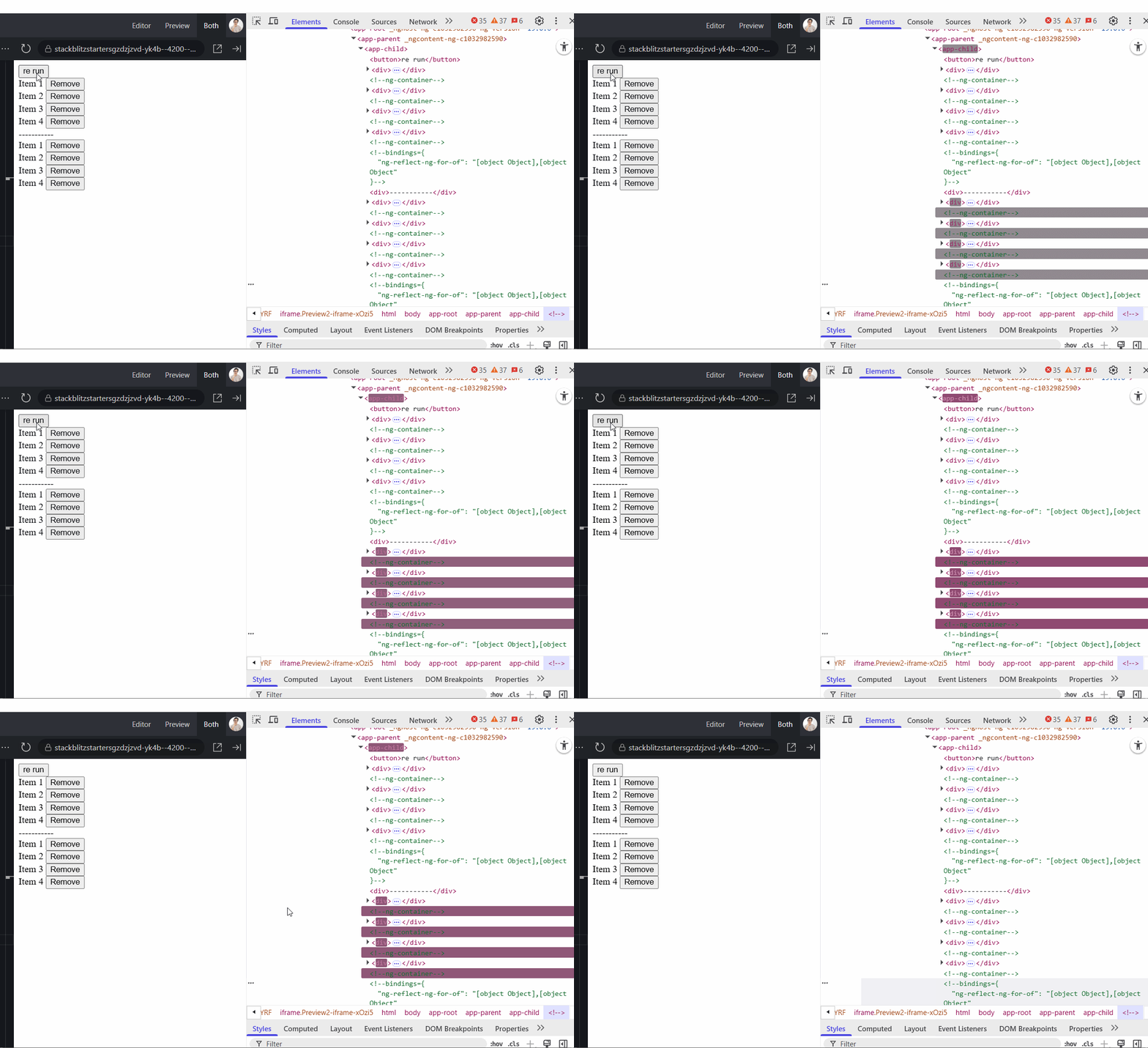
Each time onRerun() fires and the array resets — even if contents haven't altered — Angular re-creates every DOM node in the list. Without a way to identify stable elements, it takes the safe route and rebuilds everything. For long or complex lists, this leads to visible flicker and wasted cycles. A trackBy function solves that:
@Component({
  selector: 'app-child',
  imports: [CommonModule],
  template: `
    <ng-container *ngFor="let item of items(); trackBy: identify">
        <!-- previous code -->
    </ng-container>
`
})
export class ChildComponent {
  // ... previous code

  identify(index: number, item: { id: string }): string | number {
    return item.id;
  }
}
Now Angular receives a unique identifier for each row, typically an id. Whether you use trackBy or the track key in @for(), Angular pairs each list item with its DOM counterpart. On subsequent updates, it compares keys rather than whole object references, so untouched entries remain in the DOM.
The impact boils down to cost — DOM manipulation is pricey. Without tracking, Angular tears down and rebuilds every element even when nothing real has changed. With tracking, existing elements stay put, and only the bindings that actually changed get refreshed.
In the GIF below, the top list incorporates trackBy: identify, whereas the second skips it. The results speak for themselves. The first list preserves its DOM elements across reloads; the second rebuilds them from scratch every time.
Since @for() enforces a track key, two misapplications still occur regularly:
- Keying on the object itself — e.g.,
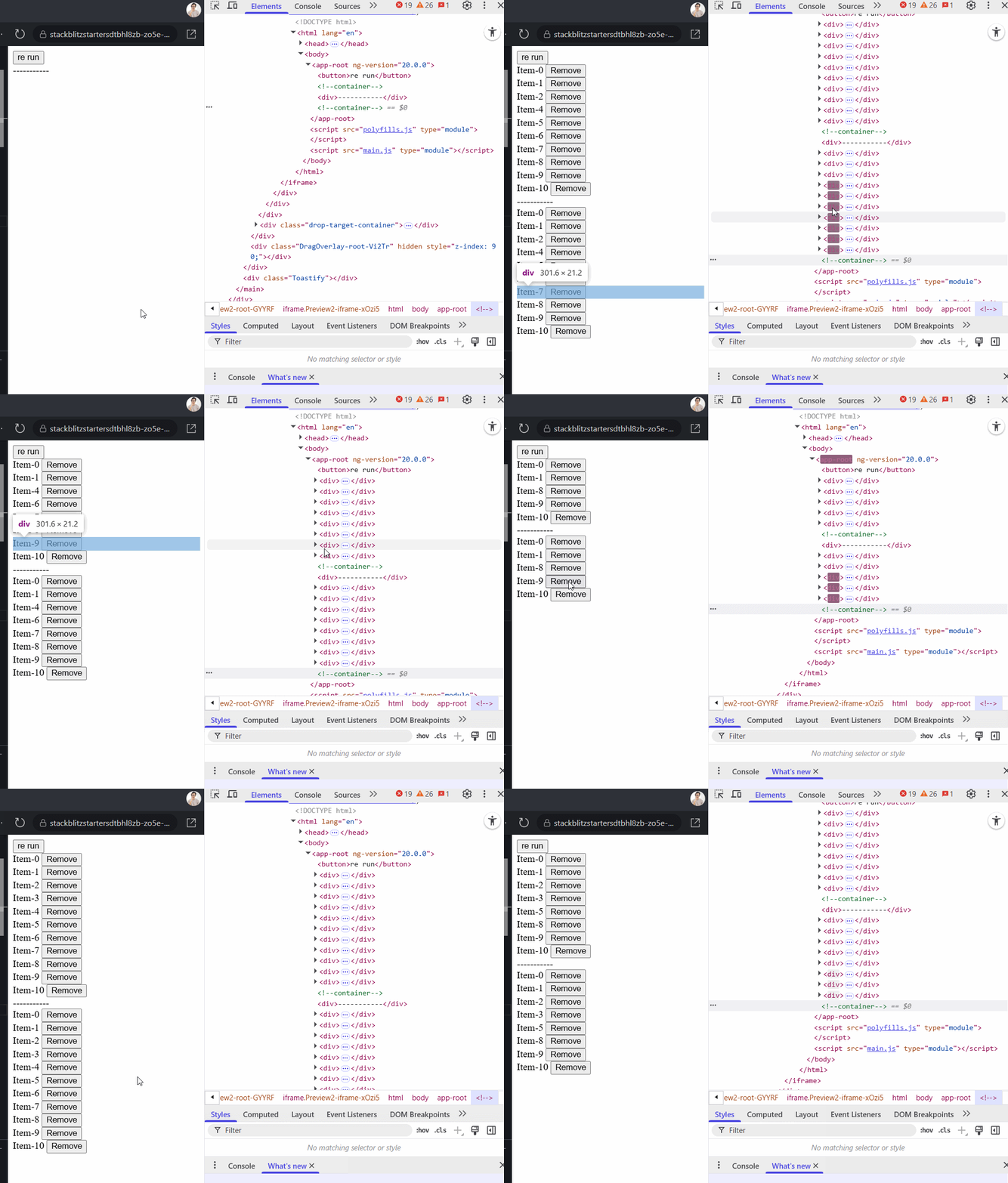
@for (item of items(); track item). This defeats the purpose because each reload produces new references, even for identical data, forcing the UI to refresh entirely and ignoring the tracking logic. - Keying on
$index— e.g.,@for (item of items(); track $index). Watch out for deletions. Removing the 5th item in a 10-item list shifts every subsequent index, forcing all those rows to re-render. In stateful views like forms, users might lose focus or cursor position. For purely static lists, however,$indexworks fine.
Check the side-by-side below: the top row relies on track item.id, the bottom on track $index. Note how the first retains DOM nodes upon deletion. You can experiment with this stackblitz example to play with.
What is the the difference between providers and viewProviders ? Can you provide an example when to use either of them ?
Paweł Kubiak's article Hidden Parts of Angular: View Providers does a fantastic job covering this topic. Here's a condensed version of what he explains, plus a practical demo.
“When you use providers, the service is available to the component itself, its template, any child components, and even to content projected into it using
<ng-content>.On the other hand,
viewProviderslimit the service's visibility strictly to the component's view. That means it's accessible only to the component and the elements declared directly in its template—but not to projected content or external child components.”
Across the applications I've built, both providers and viewProviders come up sparingly. The places they shine are NGRX patterns and scenarios requiring dynamic component generation with customized dependencies.
Think about a flight booking portal at the final payment step. Users pick between Stripe (default) or PayPal, and each option carries its own logic while sharing a common PaymentService contract:
export abstract class PaymentService {
  abstract pay(): void;
}

@Injectable()
export class StripeService implements PaymentService {
  pay() { console.log('Paid with Stripe!'); }
}

@Injectable()
export class PaypalService implements PaymentService {
  pay() { console.log('Paid with PayPal!'); }
}

@Component({
  selector: 'app-payment-button',
  template: `<button (click)="handlePayment()">Pay</button>`,
})
export class PaymentButtonComponent {
  private paymentService = inject(PaymentService);

  handlePayment() {
    this.paymentService.pay();
  }
}
Production code would also manage connecting to the provider, handling errors, and more. The PaymentButtonComponent button consumes the abstract PaymentService, meaning we must supply either a Paypal or Stripe concrete implementation. To pick based on user selection, we manually construct and inject the right provider. The example below shows tearing down and rebuilding the component with a different PaymentService provider for each choice:
@Component({
  imports: [FormsModule],
  template: `
    <label>
      <input type="checkbox" [(ngModel)]="usePaypal" /> Use PayPal
    </label>

    <ng-template #container />
  `
})
export class TestComponent {
  readonly usePaypal = signal(false);

  readonly container = viewChild('container', {
    read: ViewContainerRef
  });

  constructor() {
    // init payment button
    effect(() => {
      const container = this.container();
      const usePaypal = this.usePaypal();

      untracked(() => {
        if (container) {
          this.loadComponent(container, usePaypal);
        }
      });
    });
  }

  loadComponent(vcr: ViewContainerRef, usePaypal: boolean) {
    // remove previous
    vcr.clear();

    const injector = Injector.create({
      providers: [
        {
          provide: PaymentService,
          useClass: usePaypal ? PaypalService : StripeService
        }
      ]
    });

    // attach component to DOM
    vcr.createComponent(PaymentButtonComponent, { injector });
  }
}
What this illustrates is how providers adapt to runtime conditions. Even if these services were registered with providedIn: 'root', we deliberately omit that here because Injector.create() always creates fresh instances, bypassing any singleton intention.
If the candidate can't articulate the precise distinction, that's tolerable — but I'd push for at least one story where a global service fell short and they required scoped providers to spin up separate instances.
Why pipes are considered safe in a template, but regular function calls (not signals) are not ?
Pure pipes distinguish themselves by running only when their inputs actually change, which makes them both efficient and template-friendly. Functions called directly in a template, by contrast, get invoked repeatedly on each change detection cycle.
So, writing {{ name | uppercase }} in the template is entirely predictable, but {{ someHeavyFunction() }} could execute dozens of times per second, likely not what you want. The Angular docs clarify: “by default all pipes are considered pure, which means that it only executes when a primitive input value is changed.”
Given my interest in this area, I wrote a piece on the Implementation of Angular Pipes. Laravel Angular pipes maintain a cache: for a given input, they compute the output once and stash it. When change detection re-runs with the same input, the pipe hits the cache first, returning the stored result in constant, O(1), time.
Angular Questions - Signals
Signals made their debut in Angular back in May 2023 with version 16, and there was considerable anticipation even before the official launch. What stands out to me is when an interviewee remarks, "Yeah, signals are available, but we were working on a legacy codebase and never migrated, so I haven't had the opportunity to explore them." That raises a concern... what more can I say? A senior developer is expected to grasp modern features and their mechanics, regardless of whether they've applied them in a live environment.
What approach would you take to persuade your team to refactor a project from Observables to signals?
This query reveals two things. First, it shows whether the individual has a thorough comprehension of signals, and second, whether they have ever spearheaded a significant technical debt overhaul in a project. In my view, a senior developer should proactively champion technical enhancements and come forward with proposals like this. A strong response might resemble:
"Angular, and the broader frontend landscape, is definitely heading toward signals. There's even a TC39 proposal aiming to bring native signal support to JavaScript. Many of the newer Angular APIs, including the Resource API, are built with signals at their core. Signals also streamline state management since they allow you to both subscribe to changes and read the current value synchronously."
Can you describe the diamond problem with Observables and explain why signals avoid it?
Up to this point, this question has led to a very low success rate, yet I appreciate seeing how candidates handle a subject they probably haven't faced in an Angular interview before.
I first encountered the diamond problem in a piece by Mike Pearson - I changed my mind. Angular needs a reactive primitive. In it, he makes the case that RxJS, despite being well-liked, might not be the most reliable foundation for Angular's future, and explains why SolidJS opted for signals.
Mike discusses the diamond problem, and the illustration below draws heavily from his post. Our focus is on how the combineLatest operator behaves in this context.
Consider an effect that depends on two signals. Signals operate synchronously and are batched, so even when both signals get updated sequentially, the effect executes only once. In contrast, with combineLatest, every change to a dependency triggers an emission, leading to multiple emissions in the same update cycle.
export class TestComponent {
  prop1 = signal('a');
  prop2 = signal('b');

  constructor() {
    effect(() => {
      const prop1 = this.prop1();
      const prop2 = this.prop2();

      console.log(`Signal: ${prop1} - ${prop2}`);
    });

    combineLatest([
	    toObservable(this.prop1),
	    toObservable(this.prop2)]
	  ).subscribe(([p1, p2]) => console.log(`Observable: ${[p1} - ${p2}`));

    setTimeout(() => {
      this.prop1.set('one');
      this.prop2.set('two');
    }, 1000);
  }
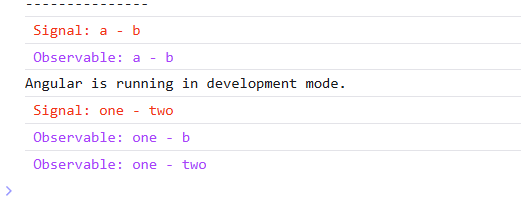
When you look at the console output, you'll observe:
- The
effectlogs a single time, only after both values have been modified. - The
combineLatestlogs twice, one for each distinct update.
This serves as a clear illustration of the diamond problem - redundant or excessive emissions caused by shared dependencies within a reactive graph. Signals sidestep this issue due to their synchronous, batched nature.
I recognize this might lean toward being a "gotcha" style question, so you could reword it as: "Why can Observables such as combineLatest result in needless emissions, and what mechanisms do signals use to avoid that?"
In a signal-based application, when is it appropriate to use effect and untracked?
The Angular documentation includes a segment on use cases for effects that outlines when effects are suitable. Drawing from that, I anticipate an answer along these lines:
"Employ effect when there are no other options available. For instance, when you need to depend on a reactive value but the other side isn't reactive. Common scenarios include DOM API synchronization, feeding data into analytics, or interfacing with a non-reactive library."
It's equally crucial that the candidate grasps the purpose of the untracked function when the goal is to remove dependency tracking within an effect. A frequent issue I've run into repeatedly is an effect that reads multiple signals while also altering them, which creates a never-ending cycle and keeps it running perpetually. In my own practice, I lean on untracked the majority of the time, keeping only the essential dependency signals outside it. In the following example, the aim is to give focus to an input field when the button is clicked. I'm utilizing afterRenderEffect, which functions much like effect, but the key distinction is that it executes after the application finishes rendering.
@Component({
  selector: 'app-focus-example',
  imports: [FormsModule],
  changeDetection: ChangeDetectionStrategy.OnPush,
  template: `
    <button (click)="editMode.set(!editMode())">
      {{ editMode() ? 'Exit' : 'Enter' }} Edit Mode
    </button>

   <input #editInput [(ngModel)]="value" [disabled]="!editMode()" />
  `
})
export class FocusExampleComponent {
  editMode = signal(false);
  value = signal('Initial value');
  editInput = viewChild('editInput', { read: ElementRef });

  constructor() {
    afterRenderEffect(() => {
	    const editMode = this.editMode();

	    untracked(() => {
	      if (editMode ) {
	        // read the element reference once, without tracking it
	        const inputRef = this.editInput();
	        // defer the focus() until after the DOM is updated
	        setTimeout(() => {
		        inputRef?.nativeElement?.focus();
	        })
	      }
	    })
    });
  }
}
In a fully signal-based application, do lifecycle hooks remain necessary?
This query provides an excellent opportunity to collaborate with a candidate, exploring their grasp of both these hooks and signal mechanics. From what I've seen, a large portion of lifecycle hooks can be substituted with signals and reactive primitives:
NgOnInit(NOT REQUIRED) - This can largely be replaced withconstructororeffect(). Historically, this hook handles initialization logic tied to resolved inputs, data retrieval, or observer setup. For trivial logic,constructor()is enough, while more intricate reactive situations are better managed witheffect().NgOnChange(NOT REQUIRED) - It can be superseded bycomputed()oreffect(), as these are capable of responding to shifts ininput()signal dependencies.NgAfterViewInit(NOT REQUIRED) -effect()can take over for applying updates to DOM elements, usingviewChild()signal references as its dependencies.NgAfterContentInit(NOT REQUIRED) - Much likeNgAfterViewInit,effect()can manage initialization tasks that depend oncontentChild()signal references, or you can turn to the afterNextRender callback.NgAfterContentChecked/NgAfterViewchecked(NOT REQUIRED) - These fire after each change detection pass, making them performance-sensitive. afterRenderEffect can serve as a replacement, as it executes after the view renders and only when a signal dependency has changed.NgOnDestroy(NOT REQUIRED) - For cleanup duties like unsubscribing from third-party libraries, clearing timers, or handling other manual teardown that signals don't handle automatically, you can inject DestroyRef and listen foronDestroy.
Angular Questions - RxJS
Even in an application that is built entirely on signals, there remain scenarios where RxJS proves to be the superior choice. In my experience, nearly all logic can be implemented with signals, but RxJS sometimes provides a more declarative or composable solution, especially for complex asynchronous flows. Because of this, I like to spark discussion around certain RxJS topics.
What is a higher-order observable and how do the variations differ?
For a comprehensive dive into this subject, I include a blog post I authored previously: Angular Interview: What is a Higher-Order Observable?. A classic illustration is the search box scenario, where an API call fires on every keystroke. The candidate should be able to articulate how the behavior shifts based on the higher-order observable operator chosen.
export class TestComponent {
  private readonly http = inject(HttpClient);
  readonly control = new FormControl<string>('');

  search$ = this.control.valueChanges.pipe(
    // switchMap, concatMap, mergeMap, exhaustMap
    switchMap((val) => this.http.get('...', {
      val: val
    }))
   )
 }
switchMap- It aborts any in-flight request when a new value arrives. This is perfect for search boxes, where only the most recent input is relevant.mergeMap- It initiates all requests concurrently. Every keystroke triggers a request, no matter the timing. This suits logging, but it's not suitable for search.concatMap- It places each request in a queue and handles them one after another, maintaining order. This works better for form submission flows, but not for live search.exhaustMap- It disregards new values while a request is underway. This is useful for preventing duplicate submissions (such as when a button is mashed), but it's poor for rapid typing in a search box. If you skip usingabortSignalwith the resource API, it behaves similarly toexhaustMap.
What distinguishes share() from shareReplay()?
Is this too academic a question? Not at all. In a legacy project that depends heavily on Observables, you might encounter scenarios where you employ one of these to multicast values to multiple subscribers. Yet, there are occasional glitches—like when you navigate back and forth between pages. The next time you return, the latest value has vanished, or you've inadvertently rerun logic that the shareReplay() operator should have cached. Alternatively, you might skip both and rely on a BehaviorSubject.
Both share() and shareReplay() function as RxJS multicasting operators. They enable numerous subscribers to share the same source observable, avoiding duplicated side effects like HTTP calls.
- Choose
share()when you intend for future subscribers to receive emissions going forward. It doesn't store or replay past values. In essence, it turns a cold observable into a hot one. - Choose
shareReplay()when you want new subscribers to get the most recent value(s) right away. It's valuable for caching situations where rerunning the source (like an HTTP request) is expensive or not desired.
Configuration options for shareReplay() include:
bufferSize– This specifies how many prior values are retained and replayed to new subscribers. A common setting is1for straightforward caching.refCount– If set totrue, the observable automatically unsubscribes from the source once there are no subscribers. Whenfalse, it maintains the connection indefinitely (useful for shared streams).
What is the purpose of this code? - scan() + expand()
Both scan() and expand() are infrequently seen in standard Angular development. However, their appearance often signals that a candidate has dealt with more challenging issues that go beyond the typical use of map, filter, or take. I enjoy demonstrating a real-world case like this:
  private paginationOffset$ = new Subject<number>();

  loadedMessages = toSignal(this.paginationOffset$.pipe(
    startWith(0),
    exhaustMap((offset) =>
      this.api.getMessages(offset).pipe(
        expand((_, i) =>
	        (i < 2 ? this.api.getMessages(offset + 20) : EMPTY)
	    ),
        map((data) => ({ data })),
        catchError((err) => of({ data: [] })),
        startWith({ data: [] }),
      ),
    ),
    scan(
      (acc, curr) => ({ data: [...acc.data, ...curr.data] }),
      { data: [] as MessageChat[] },
    ),
  ), {initialValue: [] });

  nextScroll() {
    this.paginationOffset$.next(this.loadedMessages().data.length);
  }
The code shown above illustrates a pagination pattern based on recursive API calls. Whenever the user triggers nextScroll() (for instance, by clicking a "Load More" button), the count of already loaded messages gets emitted into the paginationOffset$ subject. Within the loadedMessages signal:
exhaustMapholds off on processing new emissions until the current inner observable finishes. This means the user can't request additional data until the initial batch is complete.expandenables recursive API calls to fetch multiple pages. Let's say each request returns 20 messages. Withexpand, we can mimic loading three pages in a single action (the initial call plus two recursive ones).scanaggregates all loaded messages into a single stream, ensuring previously fetched data is never lost.catchErrorguarantees that a failed API call won't interrupt the entire pipeline.startWithmakes sure the stream emits an initial empty state, preventing any undefined references.
Wrap-Up
Here are some additional questions that often come up:
- Tell us about a time you refactored legacy Angular code — how did you go about it?
- How do you keep large Angular applications scalable and performant?
- What is
OnPushchange detection and in what scenarios do you rely on it? - Explain the difference between
combineLatest,withLatestFrom, andforkJoin. How do you choose among them? - What is your testing strategy and which mocking library do you prefer?
- How would you incrementally migrate an existing app to use standalone components and Signals?
- What is hydration, how do you enable it, and why is it necessary?
These are the kind of questions I tend to emphasize. However, there is one final question we never skip:
“Can you walk us through a more complex feature you built in the last year or two? What was the challenge, and how did you resolve it?”
A developer might not know every Angular detail, but they may have tackled difficult problems — maybe even ones we are currently wrestling with. Real-world problem-solving experience often proves more valuable than deep framework knowledge, which can be picked up over time.
At the end of the day, it comes down to what your team needs. Are you looking for an Angular specialist who can refactor and modernize legacy code while keeping tech debt in check? Or do you need someone who can slot into a wider team and grow with guidance from colleagues? The choice is yours.
I would love to hear your perspective — check out more of my writing on dev.to, reach me on LinkedIn, or visit my Personal Website.