An Initial Example That Leaves Room for Improvement
To illustrate the three rules, let me use a simple Angular application:

The first implementation I look at is not reactive and leaves quite a bit of room for improvement:
@Component([…])
export class DessertsComponent implements OnInit {
  #dessertService = inject(DessertService);
  #ratingService = inject(RatingService);
  […]

  originalName = '';
  englishName = '';
  loading = false;

  desserts: Dessert[] = [];

  ngOnInit(): void {
    this.search();
  }

  search(): void {
    const filter: DessertFilter = {
      originalName: this.originalName,
      englishName: this.englishName,
    };

    this.loading = true;

    this.#dessertService.find(filter).subscribe({
      next: (desserts) => {
        this.desserts = desserts;
        this.loading = false;
      },
      error: (error) => { […] },
    });
  }

  toRated(desserts: Dessert[], ratings: DessertIdToRatingMap): Dessert[] {
    return desserts.map((d) =>
      ratings[d.id] ? { ...d, rating: ratings[d.id] } : d,
    );
  }

  loadRatings(): void {
    this.loading = true;

    this.#ratingService.loadExpertRatings().subscribe({
      next: (ratings) => {
        const rated = this.toRated(this.desserts, ratings);
        this.desserts = rated;
        this.loading = false;
      },
      error: (error) => { […] },
    });
  }
  […]
}
Because the bound properties are neither Observables nor Signals, the OnPush strategy cannot be used to optimize change detection performance. A closer look also reveals that the loadRatings method updates the desserts array, even though its actual purpose—loading ratings—has nothing to do with that array.
Moreover, developers have to remember that any change to the ratings must also be reflected in the desserts array. This is exactly the kind of thing that leads to difficult-to-maintain code and hidden bugs, especially if desserts and ratings are updated at different points in the application. The situation becomes even more complicated when additional data structures need to be factored into these calculations. The first rule of thumb I present below addresses this issue directly.
Rule 1: Where Possible, Derive State Synchronously
Signals help mitigate the disadvantages just mentioned. Introducing Signals makes the component reactive, which means OnPush can be activated. In addition, the component can derive its state from individual Signals in a synchronous way using computed:
@Component({
  […],
  changeDetection: ChangeDetectionStrategy.OnPush,
})
export class DessertsComponent implements OnInit {
  #dessertService = inject(DessertService);
  #ratingService = inject(RatingService);

  originalName = signal('');
  englishName = signal('');
  loading = signal(false);

  desserts = signal<Dessert[]>([]);
  ratings = signal<DessertIdToRatingMap>({});
  ratedDesserts = computed(() => this.toRated(this.desserts(), this.ratings()));

  […]

  loadRatings(): void {
    this.loading.set(true);

    this.#ratingService.loadExpertRatings().subscribe({
      next: (ratings) => {
        this.ratings.set(ratings);
        this.loading.set(false);
      },
      error: (error) => { […] }
  });

  […]
}
This makes the code much more straightforward: The loadRatings method simply fetches the ratings and stores them in a signal. The computed Signal ratedDesserts handles the task of merging desserts and ratings. No matter when or where the application updates desserts or ratings, ratedDesserts stays in sync.
It is worth noting that computed only supports synchronous derivation of state. For asynchronous derivation, Angular provides the Resource API.
More: Angular Architecture Workshop (online, interactive, advanced)
Become an expert for enterprise-scale and maintainable Angular applications with our Angular Architecture workshop!
All Details (English Workshop) | All Details (German Workshop)
Rule 2: Avoid Effects for Propagating State
Effects are the right tool when there is no way to achieve the desired output through data binding. However, they bring certain pitfalls when used to propagate changes. In the following sections, I take a closer look at these.
Proper Usage of Effects
In most cases, Signals are bound in the template. But sometimes the desired form of output cannot be accomplished via data binding. One example is logging a Signal to the console for debugging. Another example involves toasts that are triggered via services and are meant to display a Signal's value. For these scenarios, Angular provides Effects:
[…]
constructor() {
  effect(() => {
    console.log('originalName', this.originalName());
    console.log('englishName', this.englishName());
  });

  effect(() => {
    this.#toastService.show(this.desserts().length + ' desserts loaded!');
  });
}
[…]
Signals are Glitch-free
When writing code like in the previous section, it is important to understand that Signals are glitch-free. This means that if you change a signal several times in a row (within a single stack frame), the consumer—such as an effect—will only see the final change:
@Component([...])
export class AboutComponent {

  constructor() {
    const signal1 = signal('A');
    const signal2 = signal('B');

    effect(() => {
      console.log('signal1', signal1());
      console.log('signal2', signal2());
    });

    signal1.set('C');
    signal1.set('D');

    signal1.set('E');

    signal2.set('F');
  }
}
In this case, only the values E and F appear on the console. The intermediate values are skipped.
This illustrates that Signals are not designed for modeling events; they are meant for data that we want to bind to the view. In that scenario, only the current value matters, and binding intermediate values would actually be counterproductive. For this reason, the effects shown in the previous section are only triggered once, even if there are multiple changes happening in a row.
If you need to express events, Observables are the appropriate choice, as they do not offer this glitch-free guarantee by design.
Problematic Use of Effects
Even when using Effects, Signals are still primarily used to transport the desired data into the view. In theory, however, Effects could also be used to transmit state to other Signals:
effect(() => {
    this.originalName.set(this.englishName());
});
But such approaches come with several drawbacks, which is why Angular forbids writing Signals within Effects by default:
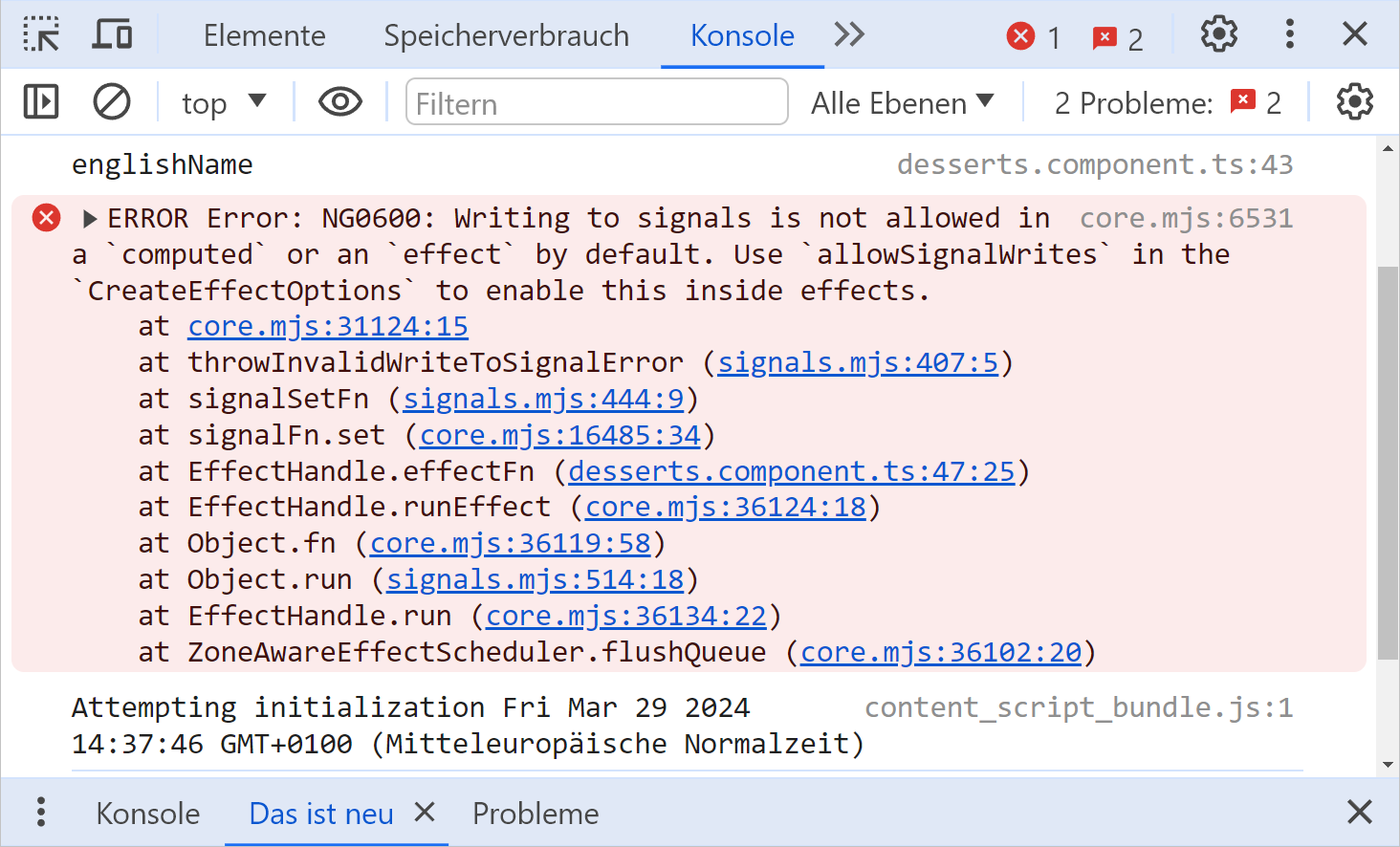
One of these disadvantages is the risk of unmanageable change cascades, leading to hard-to-maintain code and cyclic dependencies. Since Effects register implicitly with all Signals they read, the associated problems might not even be apparent at first glance. If you still want to use Effects for writing, you can tell Angular to allow it by setting allowSignalWrites:
// Try hard to avoid this
effect(() => {
    this.originalName.set(this.englishName());
  },
  { allowSignalWrites: true },
);
Application code should only use
allowSignalWritesas a last resort.
The general consensus in the community is that application code should only use allowSignalWrites as a last resort. Libraries like NGRX, on the other hand, use this option internally. In that case, the library authors take responsibility for using it correctly, so application developers do not have to worry about it.
It is also important to note that the Effect itself registers with Signals in called methods as well. For instance, the following Effect is triggered when Signals change within search:
// Try hard to avoid this
effect(() => {
    this.search();
  },
  { allowSignalWrites: true },
);
This leads to a further increase in complexity. At least this problem can be alleviated with built-in features:
// Try hard to avoid this
effect(() => {
    const originalName = this.originalName();
    const englishName = this.englishName();
    untracked(() => {
        this.load(originalName, englishName);
    })
  }
);
The untracked function prevents the current reactive context from spilling over to the called search method. Angular itself now uses this pattern in selected cases. An example is triggering events in sub-components so that the event handler does not run in the reactive context of the component that dispatched the event. Other popular libraries that make use of this technique include NGRX, NGRX Signal Store, and ngextensions.
Strategies for Preventing Effects With Signal Writes
Effects that propagate data via Signal writes can often be avoided using the following approaches:
- Consistent derivation of state using
computed(see rule 1, above) or the Resource API - Direct use of the events that caused the Signal to change.
Instead of calling search inside an Effect, as shown above, the application could rely on the change event of the input fields used for the search filters. Observables can also serve as a source for such actions. The search method could, for example, be triggered by the valueChanges observable of a FormGroup. When you only have Signals, they can be converted into Observables using the RxJS Interop that Angular provides:
@Component([…])
export class DessertsComponent {
  #dessertService = inject(DessertService);
  #ratingService = inject(RatingService);
  #toastService = inject(ToastService);

  originalName = signal('');
  englishName = signal('Cake');
  loading = signal(false);

  originalName$ = toObservable(this.originalName);
  englishName$ = toObservable(this.englishName);

  desserts$ = combineLatest({
    originalName: this.originalName$,
    englishName: this.englishName$,
  }).pipe(
    filter((c) => c.originalName.length >= 3 || c.englishName.length >= 3),
    debounceTime(300),
    tap(() => this.loading.set(true)),
    switchMap((c) => this.findDesserts(c)),
    tap(() => this.loading.set(false)),
  );

  desserts = toSignal(this.desserts$, {
    initialValue: [],
  });

  ratings = signal<DessertIdToRatingMap>({});
  ratedDesserts = computed(() => this.toRated(this.desserts(), this.ratings()));

  findDesserts(c: DessertFilter): Observable<Dessert[]> {
    return this.#dessertService.find(c).pipe(
      catchError((error) => {
        this.#toastService.show('Error loading desserts!');
        console.error(error);
        return of([]);
      }),
    );
  }
  […]
}
The flattening operators offered by RxJS provide guarantees for overlapping asynchronous actions and thus prevent race conditions.
Using Observables at this point brings several advantages:
- Unlike Signals, Observables are also suitable for triggering asynchronous actions.
- The
toObservablefunction strips the current reactive context usinguntracked. - RxJS provides a wealth of powerful operators, such as
debounceTime. - The flattening operators offered by RxJS provide guarantees for overlapping asynchronous actions and thus prevent race conditions. In the example above,
switchMapensures that when search queries overlap, only the result of the last one is used, and the others are canceled.
In many cases, one could argue that instead of converting a Signal into an Observable, it would be more fitting to directly use the event that caused the Signal to change, as proposed earlier. On the other hand, as Angular APIs increasingly adopt Signal-based approaches, using them directly will likely become more convenient and feel more intuitive. Therefore, this seems to be a gray area where we need to be aware of the consequences, such as those related to the glitch-free guarantee of Signals. I plan to examine this topic in more detail in a follow-up article.
Rule 3: Stores Simplify Reactive Data Flow
Stores—whether the traditional NGRX Store or the lighter NGRX Signal Store—do more than just manage state. They also keep the reactive data flow under control:
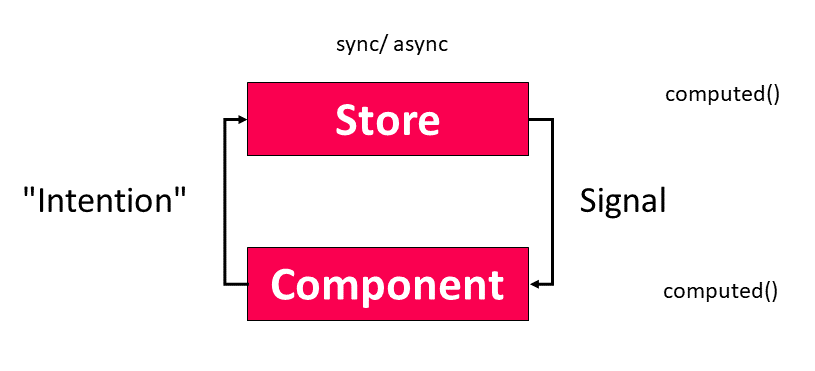
The application expresses its intent to the store via an event. I deliberately use the term "intent" in a broad, technology-agnostic sense, since various stores implement this concept differently. With Redux, and thus with the classic NGRX store, the application dispatches an action to the store, which then forwards it to the reducer and effects. With lightweight stores, such as the NGRX Signal Store, the application instead calls a method exposed by the store.
Deferring asynchronous operations to the store also addresses the limitation that Signals are currently built only for synchronous workflows.
The store then proceeds to handle these operations, be they synchronous or asynchronous. When RxJS is in play, flattening operators help avoid race conditions, as discussed earlier. Deferring asynchronous operations to the store also addresses the limitation that Signals are currently built only for synchronous workflows.
The outcome of these operations triggers a modification in the store-managed state. This state can be represented by Signals, which are then mapped to other Signals via computing (see rule 1). These mappings can take place inside the store itself or within the component (or any other consumer of the store), depending on how local or global the store and the derived data are.
The result is that consistently applying this pattern reinforces unidirectional data flow, which in turn makes system behavior easier to reason about. The following listing illustrates this from a component's viewpoint when using the NGRX Signal Store.
@Component([…])
export class DessertsComponent {
  #store = inject(DessertStore);

  originalName = this.#store.filter.originalName;
  englishName = this.#store.filter.englishName;

  ratedDesserts = this.#store.ratedDesserts;
  loading = this.#store.loading;

  constructor() {
    this.#store.loadDesserts();
  }

  search(): void {
    this.#store.loadDesserts();
  }

  loadRatings(): void {
    this.#store.loadRatings();
  }

  updateRating(id: number, rating: number): void {
    this.#store.updateRating(id, rating);
  }

  updateFilter(filter: DessertFilter): void {
    this.#store.updateFilter(filter);
  }
}
Since the component merely delegates to the store, its code stays simple and straightforward.
Summary
To fully harness the power of Signals, the application needs to be architected as a reactive system. Among other things, this means avoiding direct writes in favor of deriving values from existing ones. This keeps the code cleaner, especially since derived values stay in sync automatically.
At present, Signals are best suited for delivering data to the view. Effects come into play when API calls are necessary for that purpose—for example, when showing a toast notification. The current Signals implementation is not intended for triggering asynchronous actions; instead, classic events or observables are the appropriate tools. Stores that also handle asynchronous operations help cement unidirectional data flow and make reactive applications far easier to manage.
What's Next? More on Architecture!
For additional insights into enterprise-scale Angular architectures, see our free eBook (5th edition, 12 chapters):
- What criteria help divide a large application into sub-domains?
- How can we ensure the solution remains maintainable for years—or even decades?
- Which Micro Frontends capabilities does Module Federation provide?
You can also download it right away!