
It’s fair to say that HttpClient ranks among the most recognized services the Angular framework offers. With the arrival of version 15, the Angular team has aligned it with the standalone component paradigm, and in the same go, they reworked the way interceptors function.
This piece walks through those changes.
Standalone APIs for HttpClient
Starting with release 15, HttpClient no longer needs the HttpClientModule to be configured. The alternative is to call provideHttpClient during the application bootstrap phase:
import { provideHttpClient, withInterceptors } from "@angular/common/http";

[...]

bootstrapApplication(AppComponent, {
    providers: [
        provideHttpClient(
            withInterceptors([authInterceptor]),
        ),
    ]
});
This new function also unlocks additional HttpClient capabilities. Each capability is tied to its own dedicated function—like withInterceptors, which adds Http Interceptor support.
The pairing of a provideXYZ function with several optional withXYZ functions is no accident. It mirrors the standard pattern Angular’s team uses across all standalone APIs. So when adopting a new library, developers should scan for functions prefixed with provide or with.
Beyond that, this design yields a valuable benefit: libraries become more tree-shakable. Static code analysis can quickly tell whether an application invokes a given function, which is harder with methods because of polymorphic usage on objects.
Functional Interceptors
While rolling out standalone APIs, the Angular team also gave HttpClient a tune-up. A key outcome is the introduction of functional interceptors, letting you define an interceptor as a plain function—no need for a dedicated service that implements a fixed interface:
import { HttpInterceptorFn } from "@angular/common/http";
import { tap } from "rxjs";

export const authInterceptor: HttpInterceptorFn = (req, next) => {

    console.log('request', req.method, req.url);
    console.log('authInterceptor')

    if (req.url.startsWith('https://demo.angulararchitects.io/api/')) {

        // Setting a dummy token for demonstration

        constheaders = req.headers.set('Authorization', 'Bearer Auth-1234567');

        req = req.clone({
            headers
        });

    }

    return next(req).pipes(
        tap(resp => console.log('response', resp))
    );

}
The interceptor above attaches a demonstrative security token to HTTP requests aimed at particular endpoints. Apart from the fact that it now exists as an HttpInterceptorFn function, the core mechanics behind this approach are essentially unaltered. As demonstrated earlier, functional interceptors are registered via withInterceptors during the invocation of provideHttpClient.
Interceptors and Lazy Loading
Interceptors residing in lazy modules have historically been a source of confusion: When a lazy module defines its own interceptors, those belonging to outer scopes—like the root scope—stop firing entirely.
Although modules with standalone components and APIs are now obsolete, the underlying issue persists, particularly since (lazy) route configurations are now capable of provisioning their own services:
export const FLIGHT_BOOKING_ROUTES: Routes = [{
    paths: '',
    component: FlightBookingComponent,
    providers: [
        MyService,
        provideState(bookingFeature),
        provideEffects([BookingEffects])
        provideHttpClient(
            withInterceptors([bookingInterceptor]),
            withRequestsMadeViaParent(),
        ),
    ],
}];
These services mirror the ones previously registered by the application inside lazy modules. From a technical standpoint, Angular spins up its own injector as soon as such a providers array is present. That injector, called an environment injector, establishes a boundary for the current route and all its nested routes.
Within this same providers array, the new provideHttpClient function can be employed to define interceptors for the corresponding lazy-loaded segment of the app. As a default, the earlier rule still holds: when the current environment injector contains any interceptors, Angular disregards those found in outer scopes.
This default behavior is precisely what withRequestsMadeViaParent alters: invoking this method forces Angular to run interceptors from enclosing scopes as well.
Pitfall with withRequestsMadeViaParent
The aforementioned withRequestsMadeViaParent function hides a subtle trap: a service scoped to the root has no visibility into inner scopes or the interceptors they define. It consistently obtains the HttpClient from the root scope, which means only the interceptors configured at that level are ever invoked:
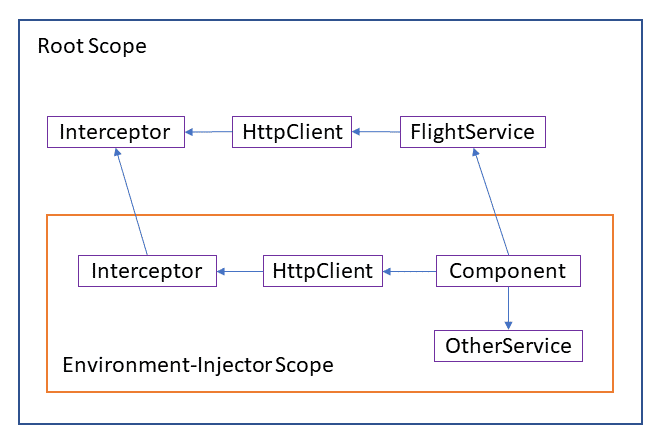
To address this issue, the application might alternatively register the outer service within the route configuration's providers array, placing it in the inner scope.
However, maintaining an overview of such setups generally proves quite challenging. Consequently, it may be wise to avoid interceptors in inner scopes entirely. Instead, a broadly scoped interceptor at the root level could serve as an alternative. Such an interceptor could even incorporate extra logic via a dynamic import from lazy-loaded application segments.
Legacy Interceptors and Other Features
Despite the appeal of the new functional interceptors, existing class-based interceptors remain available for use. Enabling this option requires the withLegacyInterceptors feature. Once activated, class-based interceptors are registered through a multi-provider in the customary manner:
bootstrapApplication(AppComponent, {
    providers: [
        provideHttpClient(
            withInterceptors([authInterceptor]),
            withLegacyInterceptors(),
        ),
        {
            provide: HTTP_INTERCEPTORS,
            useClass: LegacyInterceptor,
            multiple: true,
        },
    ]
});
Further Features
Beyond what’s already covered, HttpClient offers several other capabilities that you can enable with with-functions. For instance, withJsonpSupport turns on JSONP support, while withXsrfConfiguration lets you fine-tune how XSRF tokens are handled. When you omit withXsrfConfiguration, the library falls back to its default behavior. If your goal is to switch off XSRF token usage entirely, you should call withNoXsrfProtection instead.
Summary
The updated HttpClient fits neatly into the world of standalone components and related notions like environment injectors. The Angular team also used this opportunity to rework interceptors, simplifying them into plain functions. This change also opens the door to using interceptors at broader scopes.
More on Standalone Components?
If you’d like to dive deeper into Standalone Components, grab the free eBook covering them:
- The mental model behind Standalone Components
- Migration scenarios and compatibility with existing code
- Standalone Components and the router and lazy loading
- Standalone Components and Web Components
- Standalone Components and DI and NGRX
The eBook is available here:

Feel free to download it here now!