Thinking reactively in Angular and RXJS
 •
•
Foreword
RxJS stands out as a powerful tool for building reactive web applications. At first, such applications may seem daunting, but the payoff is substantial once you get the hang of it.
Our focus here is on shifting your mindset from imperative coding to thinking reactively. We’ll walk through creating a reactive calendar app with minimal code, and here’s a hint—it’ll be live in real time.
The technology stack includes Angular, Angular Material, TypeScript, RxJS, Firebase, and AngularFire. Note that this guide centers on reactive programming principles rather than covering every RxJS operator. Our aim is to show you how to visualize, conceptualize, and reason about reactive apps. We’ll dive into thinking in streams, and if streams are unfamiliar, start with this excellent read first.
Heads-up: Some terms in this article are my own.
The Reactive Calendar
Here’s the app we’ll build. It’s a compact yet full-featured calendar with the following capabilities:
- Toggle between day, week, and month views.
- Move forward or backward across days, weeks, or months.
- Create, edit, and delete appointments.
- Find specific appointments via search.
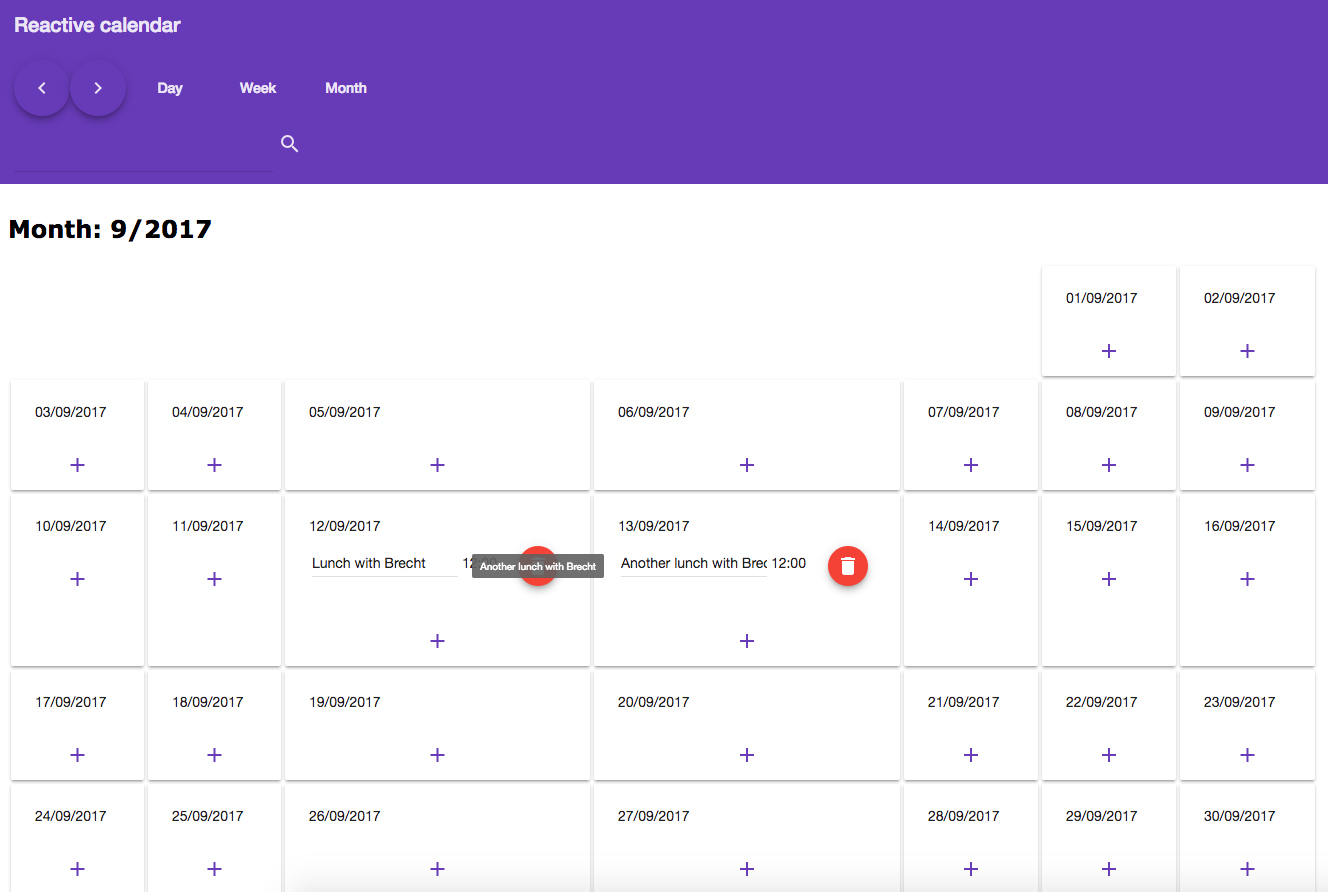
The UI exposes the following controls to the user:
- Next button: Moves forward to the following day in day mode, the next week in week mode, and so on.
- Previous button: Moves backward to the prior day in day mode, the previous week in week mode, and so on.
- Day, week, month buttons: Lets the user toggle among the available view modes.
- Search term input: Filters appointments live as the user types.
- Plus-buttons in the grid: Adds new appointments.
- Trashcan buttons in the grid: Deletes existing appointments.
- Description inputs: Edits the text of an appointment’s description.
For the backend, Firebase was my choice—this makes the app realtime and offline-first right out of the box.
Note: A minor caveat: I took a shortcut, so only lunch appointments are creatable. =) But hey! Feel free to treat that as an exercise.
Setting Up the Project
A git branch named initial has been prepared as our starting point. It includes the default logic, components, scaffolding, and styles. No reactive code exists yet—only plain Angular. We’ll build the reactive layer ourselves.
The Component Tree
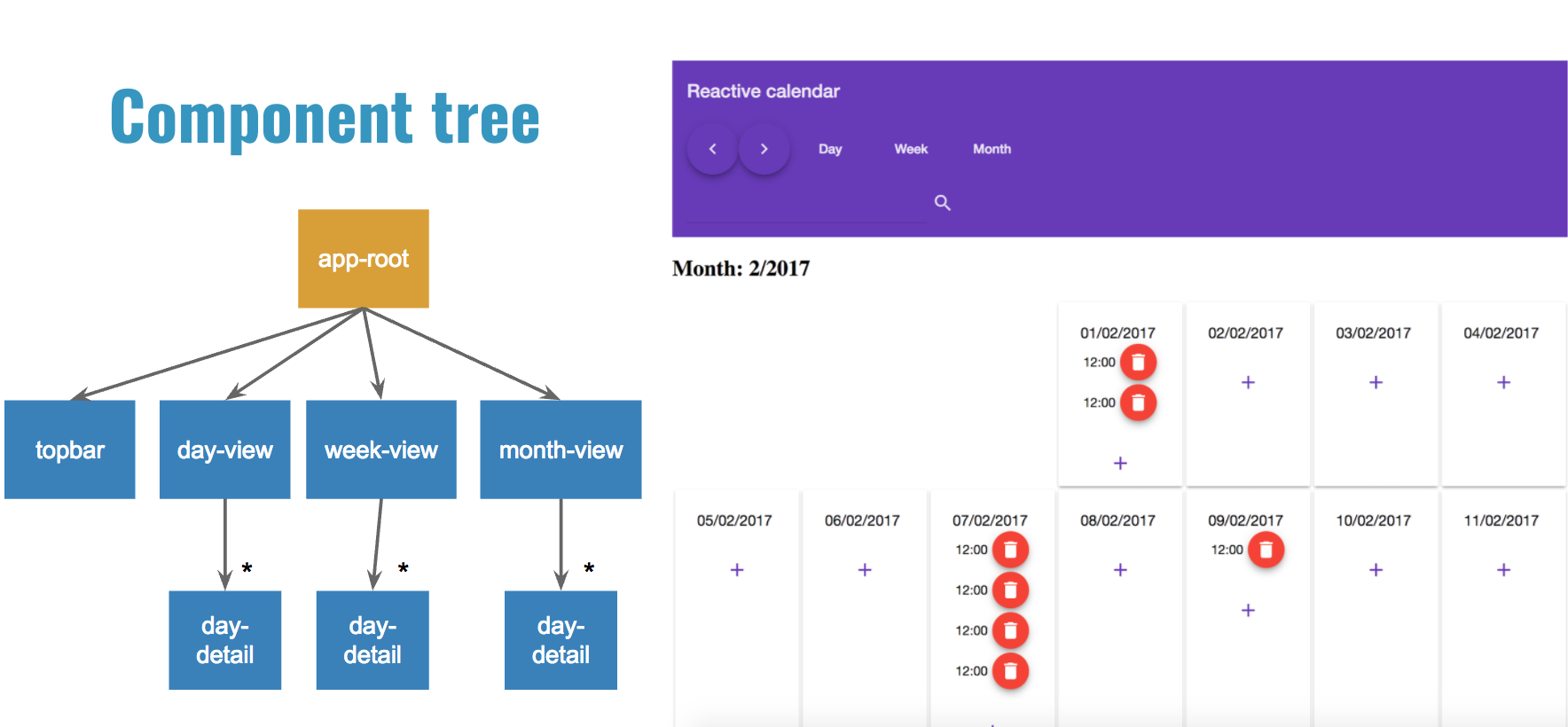 The dumb components (blue) are already implemented. The
 app-root (orange) is the one and only smart component in the application and the only place where we will write code.
If the distinction between smart and dumb components is unclear to you, start with this post.
Setting Up the Project on Your Machine
To begin, clone the repository to your local environment and switch to the initial branch. All the boilerplate code that isn’t relevant to this discussion is already present on that branch.
Open your terminal, navigate to the directory where you’d like the project to live, and execute these commands:
$ git clone git@github.com:brechtbilliet/reactive-calendar.git
$ cd reactive-calendar/reactive-calendar
$ git checkout initial
$ npm install
Configuring Firebase
Our backend choice is Firebase, selected for its near-zero configuration overhead, inherent realtime capabilities, and the seamless stream integration provided by AngularFire. Setting it up takes only a handful of quick actions:
- Go to https://firebase.google.com, click on the “GO TO CONSOLE” button, and choose your Google account.
- Click on the “Add project” button and choose a name for your project. Let’s take “reactive-calendar” to keep it simple.
- Click on the “CREATE PROJECT” button. Now we should be redirected to something like this.
- In the Authentication tab, go to “SIGN-IN METHOD” and enable the “Anonymous” setting.
- Click on database and navigate to the rules tab. Set the read and write property to “true” and click “publish”:
{ "rules": { ".read": "true", ".write": "true" } } - Go back to the overview by clicking on the home icon, and then select “Add Firebase to your web app”.
- Copy the config with the correct properties and replace the firebaseConfig object in src/app/app.module.ts with these properties. It might look something like this:
const firebaseConfig = {
    apiKey: "AIzaSyBuqjTJd5v6xTf8D2EZmvFUl8lseH8lVuHU",
    authDomain: "reactive-calendar.firebaseapp.com",
    databaseURL: "https://reactive-calendar.firebaseio.com",
    projectId: "reactive-calendar",
    storageBucket: "reactive-calendar.appspot.com",
    messagingSenderId: "3978123451455750"
};
Moving on. Kick off the project with the command below, then launch your browser at http://localhost:4200.
npm start
Observe that this approach only provides fixed data—the controls remain unresponsive and appointments aren’t wired up yet. That’s our starting point.
Thinking Reactively
Here’s where the challenge begins. We’re aiming to set aside imperative programming for the moment and shift toward a reactive way of thinking.
Marble Diagrams
To adopt a reactive mindset, we need a visual framework for conceptualizing streams. Marble diagrams serve this purpose well. In the illustration below, notice how each marble denotes a value occurring over time.
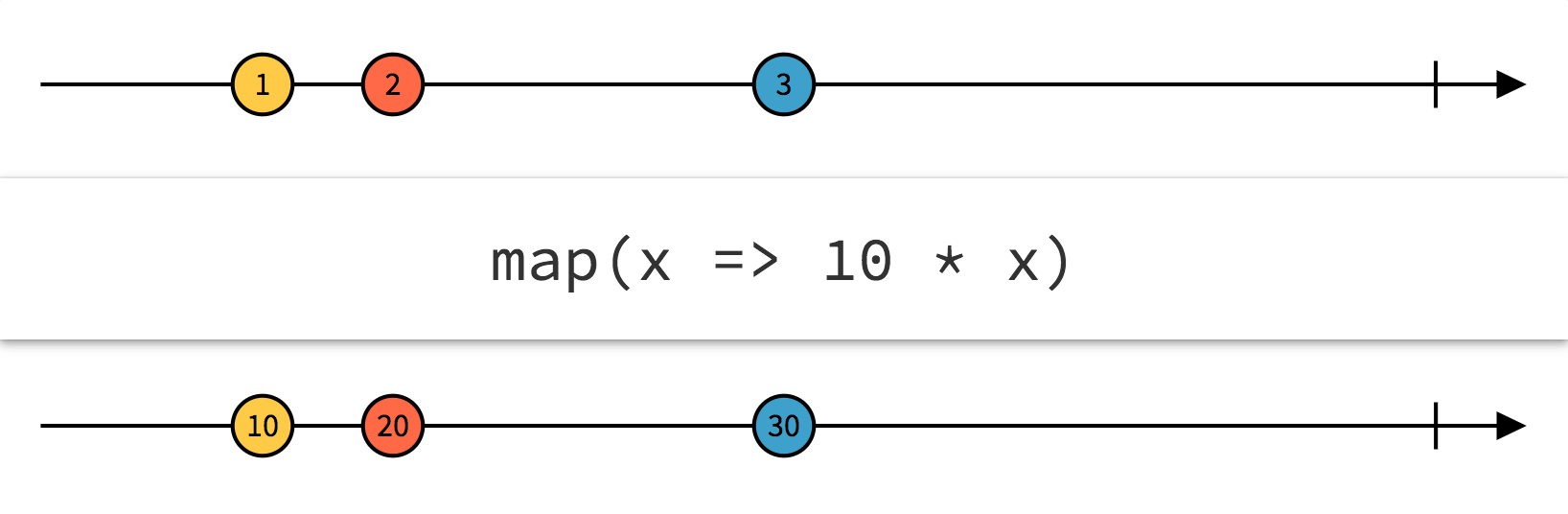
The interactive playground at rxmarbles.com is an excellent resource for experimenting with and visualizing marble diagrams.
ASCII Documentation
It can be argued that code should require no documentation and be inherently clear. However, that is rarely true when dealing with intricate streams. By documenting such streams, we get a clear view of their internal behavior, which greatly helps our teammates understand them. ASCII notation offers one way to document streams. As this topic is not the focus of the article, I’ll simply present a brief snippet below.
// a$ gets three values over time and then stops
// a$: -------a-----b-----c|

// b$ has an initial value (a), has three values in total
// and will keep on living
// b$: a------b-----c------...
Imperative Programming: What Does the App Have to Do?
As we consider what our application must accomplish, we soon realise that numerous edge cases and exceptional conditions exist. For every single user action within the interface, the application has to react to that particular action. At times, multiple actions must be merged, and the resulting combination has to be managed as well. Consider this slightly exaggerated yet straightforward scenario.
When the view mode is switched to week, and the prior one was month, plus the month was June and the year 2017, and a new appointment got created, with the search term being "Brecht", then we need to refresh...
Indeed, a great deal of updates would be required. That is how imperative reasoning operates, and it can become overwhelming. There is a likelihood that certain edge cases get overlooked. And we won't even touch on the added complexity of dealing with asynchronous operations on top of that.
In the image below, we see all the different interactions the user has in the calendar application.
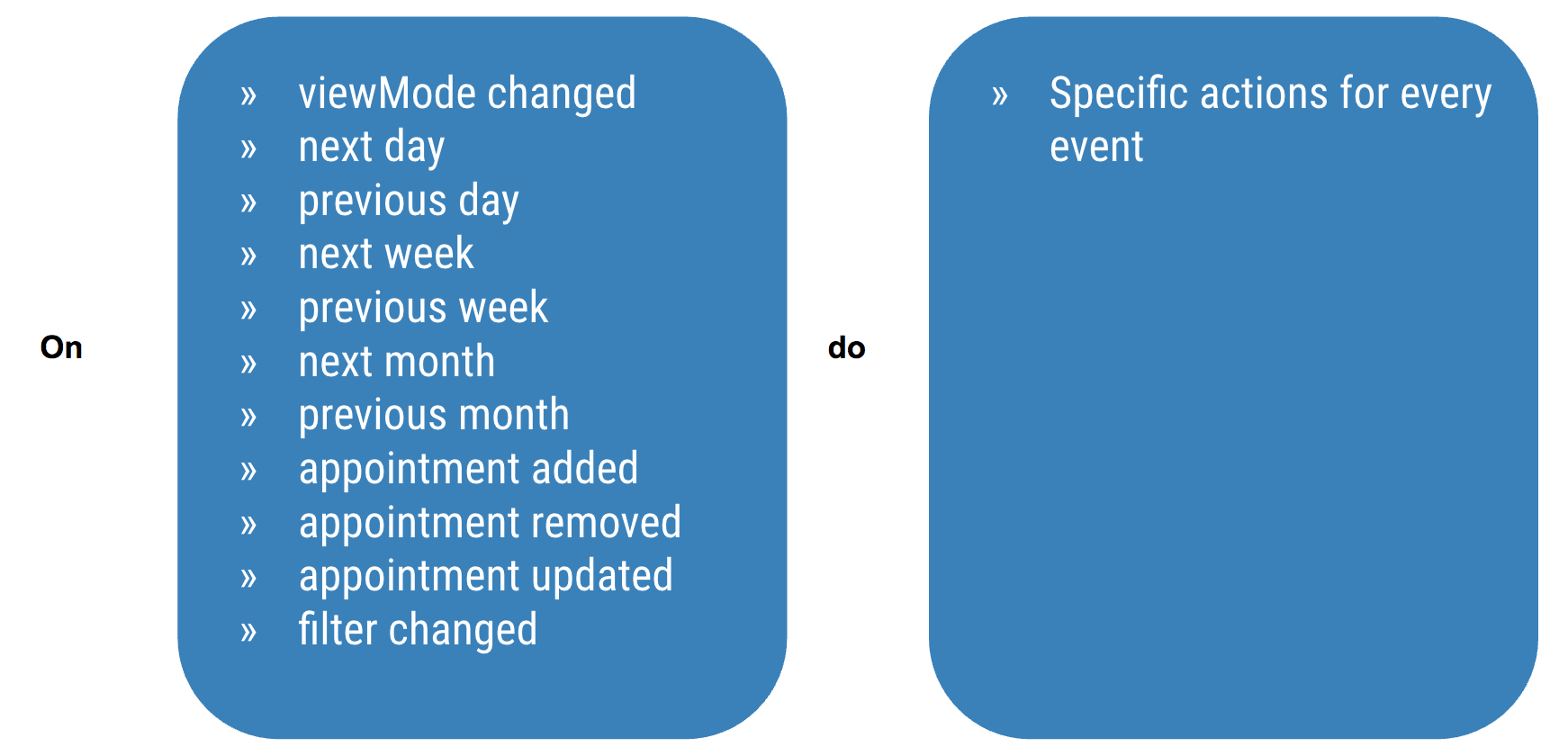
Each user action triggers distinct UI updates.
Thinking in streams: What changes, and what do components subscribe to?
Source streams
Let’s pause all the current logic. Forget edge cases and one-off conditions. The key is to model data as streams—sequences of events unfolding over time. Identify every dynamic piece of state in your app and treat it as its own stream. These are our source streams.
Note: We’ll append a $ to every stream name for clarity.
There are four such streams:
- navigation$: Holds -1, 0, or 1
- viewMode$: Holds DAY, WEEK, or MONTH
- searchTerm$: Holds the current search input
- appointments$: Holds an array of appointments loaded from Firebase
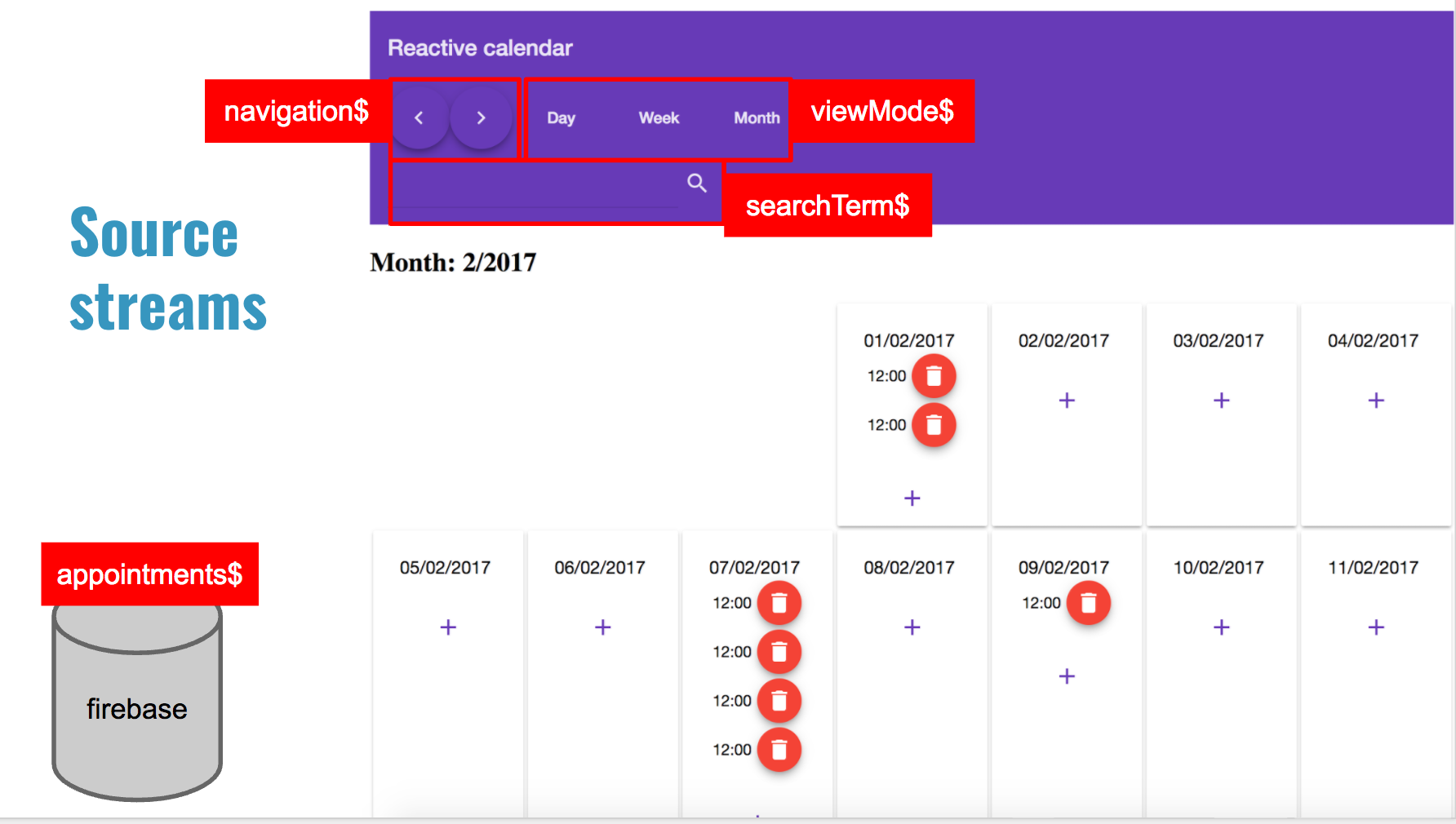
Getting that working took almost no effort—all we needed was to consider the possible events happening in the app. Users might navigate, switch views, run a search, or Firebase might update the appointment list. That’s where reactive thinking starts. Forget about which actor causes what; treat every change as a stream.
Sketching marble diagrams is a smart move whenever you want clearer reasoning.
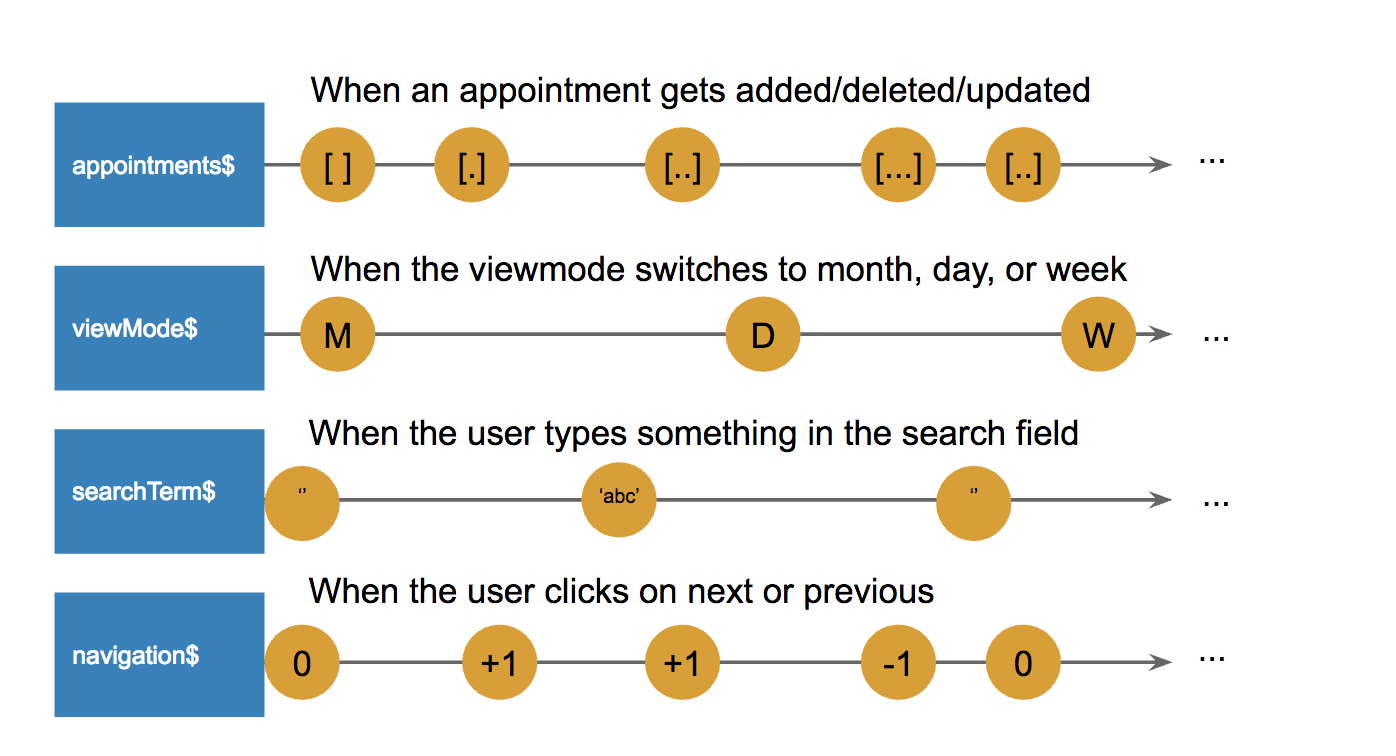
The appointments$ stream comes from AngularFire, while viewMode$, searchTerm$, and navigation$ are plain behavior subjects. Subjects are our choice because we manage the stream values ourselves, and we opt for BehaviorSubject specifically since every source stream must begin with a value.
export class AppComponent {
    ...
    // this is how we can retrieve the list of appointments from angularfire
    appointments$ = this.db.list('/appointments');
     // 0--------(+1)----(+1)----(-1)-------------...
    viewMode$ = new BehaviorSubject(VIEW_MODE.MONTH);
    navigation$ = new BehaviorSubject(0);
    searchTerm$ = new BehaviorSubject('');

	// because we set up the angularfire configuration correctly, we can just
	// inject the angularfiredatabase right here and use it
    constructor(private db: AngularFireDatabase) {
    }
    ...
}
The values that these subjects emit are triggered by interactions originating directly in the template.
@Component({
    ...
    template: `
        <topbar
                (next)="onNext()"
                (previous)="onPrevious()"
                (setViewMode)="onSetViewMode($event)"
                (searchChanged)="onSearchChanged($event)">
        </topbar>
        ...
    `
})
export class AppComponent {
    ...

    onSetViewMode(viewMode: string): void {
        // when the viewmode changes, update its subject
        this.viewMode$.next(viewMode);
    }

    onPrevious(): void {
        // when the user clicks the previous button
        // update the navigation subject
        this.navigation$.next(-1);
    }

    onNext(): void {
        // when the user clicks the next button
        // update the navigation subject
        this.navigation$.next(1);
    }

    onSearchChanged(e: string): void {
        // when the user searches
        // update the searchterm subject
        this.searchTerm$.next(e);
    }
}
Presentational Streams
Our next concern shifts to the data requirements of the components, which must stay in sync with the changes emitted by the source streams. Consider the following example:
<div [ngSwitch]="XX" class="main">
    <day-view
            *ngSwitchCase="'DAY'"
            [appointments]="XX"
            [date]="XX"
            ...>
    </day-view>
    <week-view
            *ngSwitchCase="'WEEK'"
            [appointments]="XX"
            [year]="XX"
            [week]="XX"
            ...>
    </week-view>
    <month-view
            *ngSwitchCase="'MONTH'"
            [month]="XX"
            [year]="XX"
            [appointments]="xxx"
            ...>
    </month-view>
</div>
I’ve annotated the component’s input properties with XX to clarify what data shape our components depend on. Those same spots are also where we’ll need to introduce streams. I’ll refer to these as presentational streams.
Time to close those gaps, right?
Note: We’re relying on Angular’s async pipe to handle automatic subscription and cleanup of streams.
<div [ngSwitch]="viewMode$|async" class="main">
    <day-view
            *ngSwitchCase="'DAY'"
            [appointments]="filteredAppointments$|async"
            [date]="currentDate$|async"
            ...>
    </day-view>
    <week-view
            *ngSwitchCase="'WEEK'"
            [appointments]="filteredAppointments$|async"
            [year]="currentYear$|async"
            [week]="currentWeek$|async"
            ...>
    </week-view>
    <month-view
            *ngSwitchCase="'MONTH'"
            [month]="currentMonth$|async"
            [year]="currentYear$|async"
            [appointments]="filteredAppointments$|async"
            ...>
    </month-view>
</div>
We've identified the 6 presentational streams below:
- viewMode$ (string): determines which view to display
- filteredAppointments$ (Array < Appointment >): used by the day, week, and month views for rendering appointments
- currentDate$ (date): the date shown in the day view
- currentWeek$ (number): the week shown in the week view
- currentYear$ (number): required by the week and month views
- currentMonth$ (number): required by the month view
Now that we know the source streams as drivers of change and the presentational streams that components consume, here comes the interesting part: It's now our task to derive those presentational streams from the source streams.
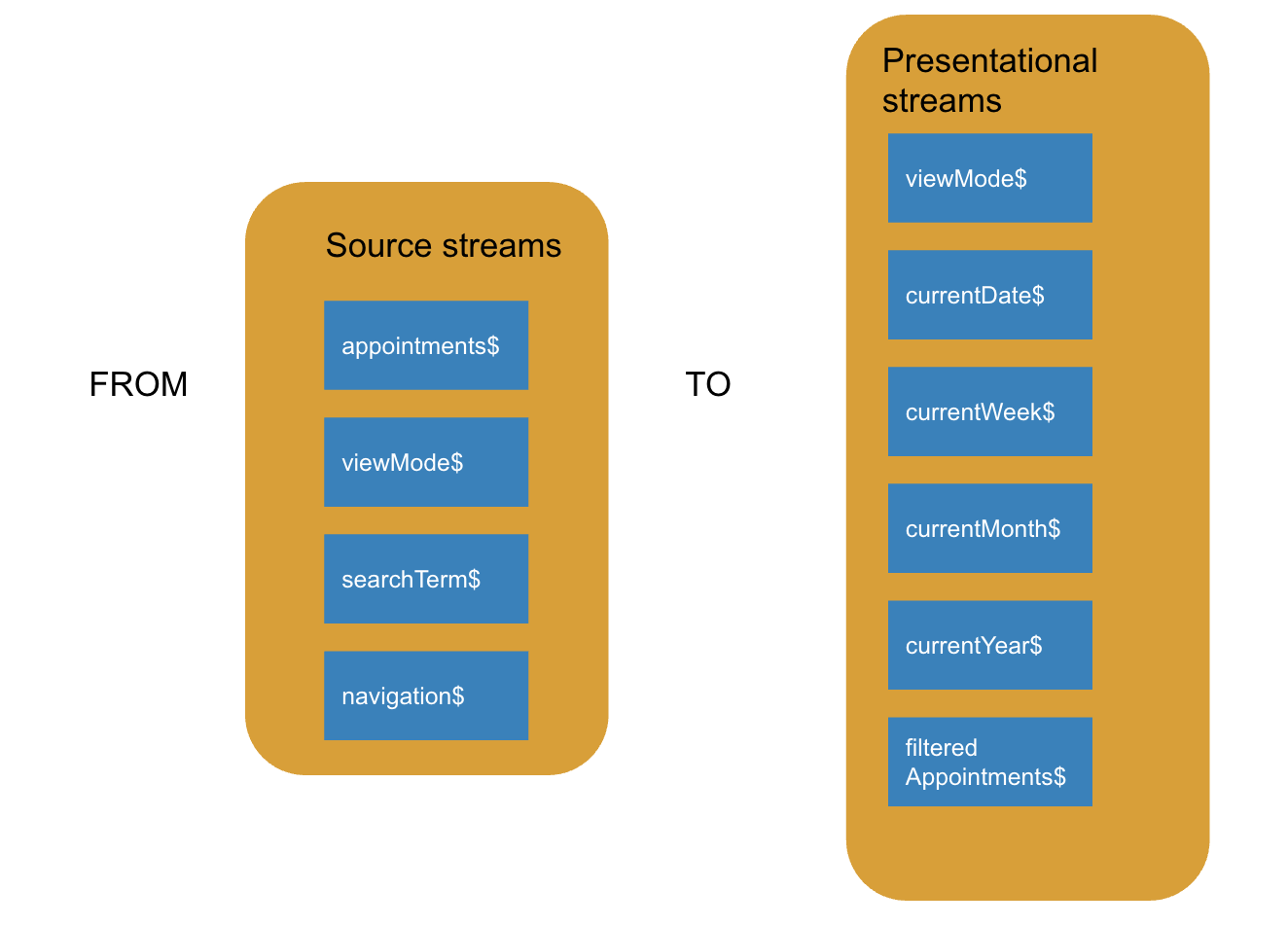
We’ll start with viewMode$, our first presentational stream. Getting it is straightforward, because viewMode$ doubles as a source stream.
currentDate$
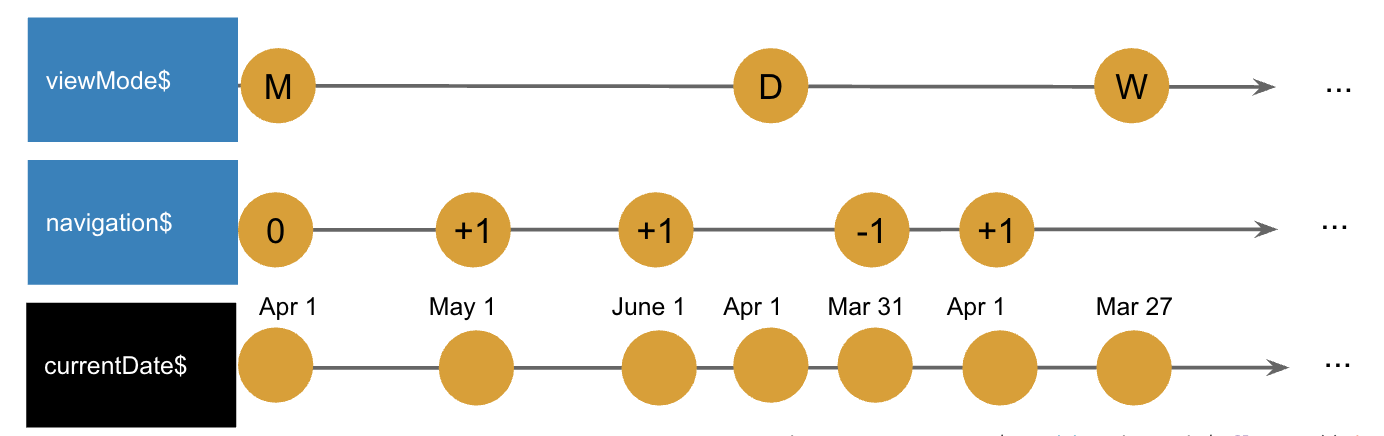
Note: For date arithmetic, we rely on moment.js. The M suffix on the currentDate property signals its type as Moment — essentially, the value is wrapped in a moment object, not a plain date.
// we will need this stream a few times, so let's extract the stream
// in a currentDateM first

// viewMode$:     M------------------W---------------D--------...
// navigation$:   0---(+1)-(-1)----------(+1)-(-1)------------...
// currentDateM$: d---d----d---------d---d----d------d--------...
private currentDateM = this.viewMode$.flatMap((viewMode: string) => {
    // every time the viewMode changes, the navigation should be reset as well
    // the dateM variable will contain the navigation and because of the
    // flatMap it will reset every time the view mode changes
    // if the navigation$ changes afterwards it will manipulate the dateM object
    // by adding months, weeks, or days depending on the viewMode
    const dateM = moment();
    return this.navigation$
        .map((action: number) => {
            switch (viewMode) {
                case VIEW_MODE.MONTH:
                    return dateM.startOf('month').add(action, "months");
                case VIEW_MODE.WEEK:
                    return dateM.startOf('week').add(action, "weeks");
                case VIEW_MODE.DAY:
                    return dateM.startOf('day').add(action, "days");
            }
            return dateM;
        })
})
currentDate$ = this.currentDateM$.map(dateM => dateM.toDate());
currentWeek$
Using currentDateM$, we determine the week in progress. This observable simply carries a moment instance of today’s date, derived from the active navigation and viewMode.
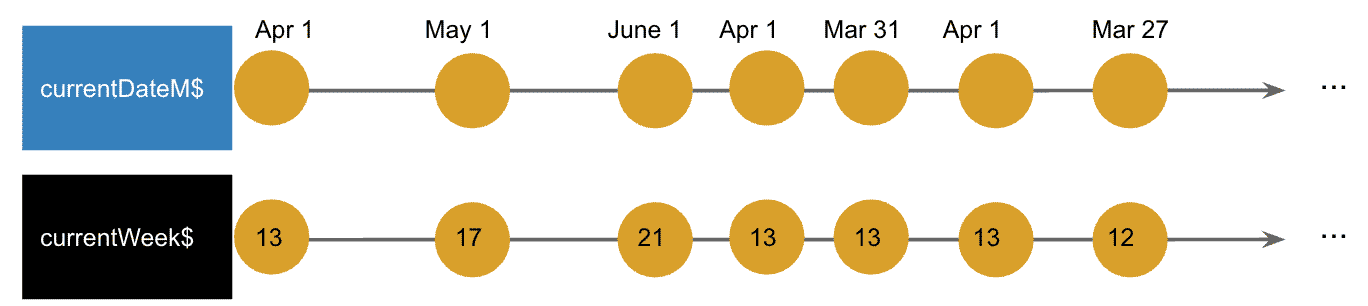
currentWeek$ = this.currentDateM$.map(dateM => dateM.week());
currentMonth$
The same principle we applied to derive currentWeek$ from currentDateM$ works equally well in this case.
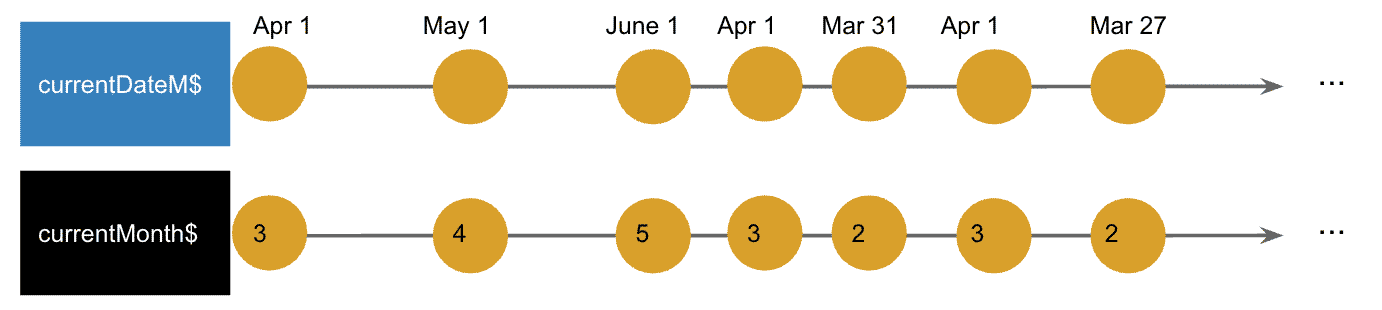
currentMonth$ = this.currentDateM$.map(dateM => dateM.month());
currentYear$
The same logic that produced currentWeek$ and currentMonth$ from currentDateM$ can be applied here as well.
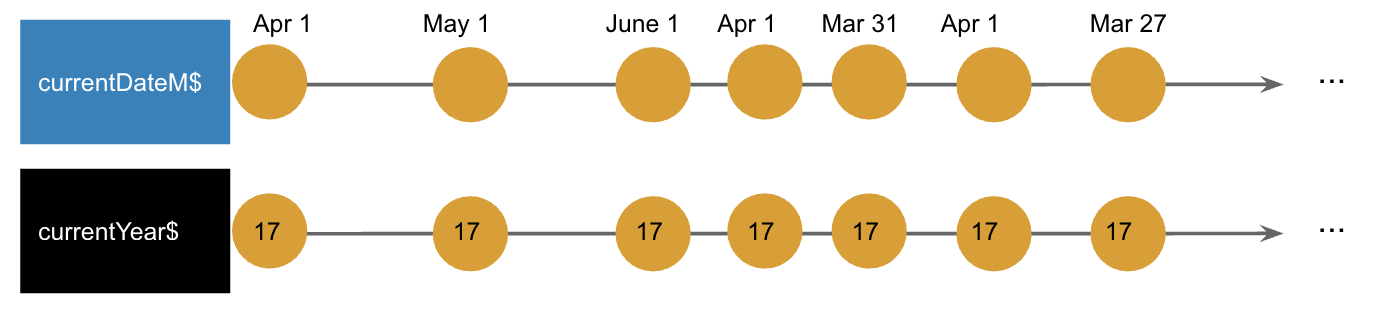
currentYear$ = this.currentDateM$.map(dateM => dateM.year());
filteredAppointments$
The central stream is this one. Every view relies on it to render its appointments, and its value is derived from several other streams:
- viewMode$
- currentDateM$
- appointments$
- searchTerm$
It sounds intricate, yet it is manageable.
Note: [] in the diagram indicates an empty array, while [.] represents an array holding a single item, and so forth.
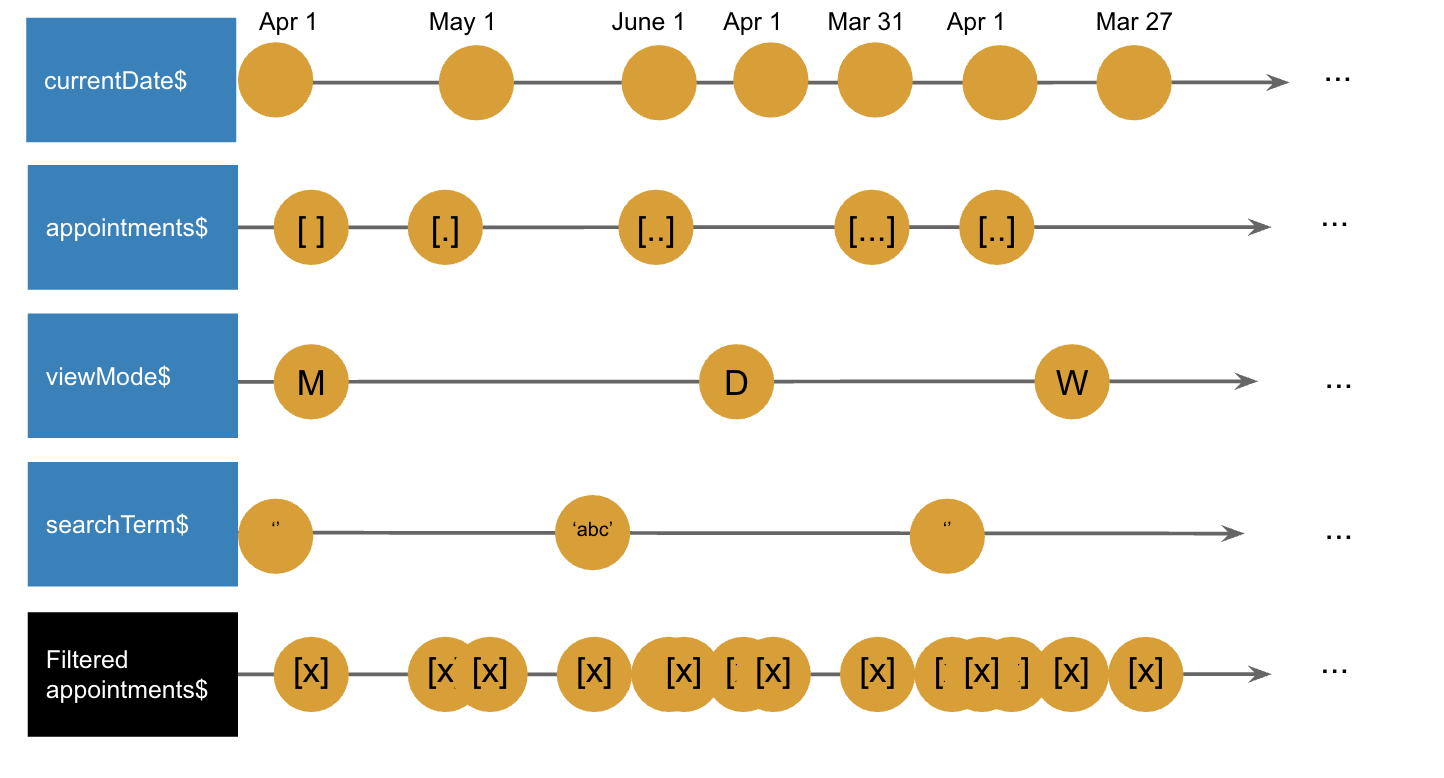
Let’s take a moment to digest what we’re looking at. The operator we’ll be using to merge all these streams is known as combineLatest. It produces a stream that holds off until each source stream has emitted at least once, then it begins pushing out values every time any of those streams changes.
What this boils down to is a function that gives us access to every piece of data we need at once: the appointments from Firebase, the selected view mode, the search term, and the current date. Using this set of values, we can figure out the appointments for each view:
filteredAppointments$ = Observable.combineLatest(
    [this.viewMode$, this.currentDateM$,
    this.appointments$, this.searchTerm$],
    (viewMode: string, currentDateM: Moment,
        appointments: Array<Appointment>, searchTerm: string) => {
        switch (viewMode) {
            // calculate the appointments for the month-view based on
            // the current date, the appointments in firebase
            // and the searchterm
            case VIEW_MODE.MONTH:
                return appointments
                    .filter(item => moment(item.date).format('MM/YYYY') === currentDateM.format('MM/YYYY'))
                    .filter(item => this.filterByTerm(item, searchTerm));
             // calculate the appointments for the week-view based on
             // the current date, the appointments in firebase
             // and the searchterm
            case VIEW_MODE.WEEK:
                return appointments
                    .filter(item => moment(item.date).format('ww/YYYY') === currentDateM.format('ww/YYYY'))
                    .filter(item => this.filterByTerm(item, searchTerm));
            // calculate the appointments for the day-view based on
            // the current date, the appointments in firebase
            // and the searchterm
            case VIEW_MODE.DAY:
                return appointments
                    .filter(item => moment(item.date).format('DD/MM/YYYY') === currentDateM.format('DD/MM/YYYY'))
                    .filter(item => this.filterByTerm(item, searchTerm));

        }
    });

private filterByTerm(appointment: Appointment, term: string): boolean {
    return appointment.description.toLowerCase().indexOf(term.toLowerCase()) > -1;
}
That’s everything required to build a solid realtime reactive calendar app. We did it quickly, using just a handful of code lines. On reflection, you’ll notice every edge case is already handled.
Performance Improvements
Here’s how the full component looks at this point. You should see the calendar working fully in your browser.
import { Component } from '@angular/core';
import { VIEW_MODE } from '../../constants';
import * as moment from 'moment';
import { Appointment } from '../../types/appointment.type';
import { AngularFireDatabase } from 'angularfire2/database';
import { Observable } from 'rxjs/Observable';
import Moment = moment.Moment;
import { BehaviorSubject } from 'rxjs/BehaviorSubject';


@Component({
    selector: 'app-root',
    template: `
        <topbar
                (next)="onNext()"
                (previous)="onPrevious()"
                (setViewMode)="onSetViewMode($event)"
                (searchChanged)="onSearchChanged($event)">
        </topbar>
        <div [ngSwitch]="viewMode$|async">
            <day-view
                    *ngSwitchCase="VIEW_MODE.DAY"
                    [appointments]="filteredAppointments$|async"
                    [date]="currentDate$|async"
                    (removeAppointment)="onRemoveAppointment($event)"
                    (addAppointment)="onAddAppointment($event)"
                    (updateAppointment)="onUpdateAppointment($event)"
            >
            </day-view>
            <week-view
                    *ngSwitchCase="VIEW_MODE.WEEK"
                    [appointments]="filteredAppointments$|async"
                    [year]="currentYear$|async"
                    [week]="currentWeek$|async"
                    (removeAppointment)="onRemoveAppointment($event)"
                    (addAppointment)="onAddAppointment($event)"
                    (updateAppointment)="onUpdateAppointment($event)"
            >
            </week-view>
            <month-view
                    *ngSwitchCase="VIEW_MODE.MONTH"
                    [month]="currentMonth$|async"
                    [year]="currentYear$|async"
                    [appointments]="filteredAppointments$|async"
                    (removeAppointment)="onRemoveAppointment($event)"
                    (addAppointment)="onAddAppointment($event)"
                    (updateAppointment)="onUpdateAppointment($event)"
            >
            </month-view>
        </div>
    `,
    styleUrls: ['./app.component.less']
})
export class AppComponent {
    VIEW_MODE = VIEW_MODE;
    viewMode$ = new BehaviorSubject(VIEW_MODE.MONTH);
    // 0--------(+1)----(+1)----(-1)-------------...
    navigation$ = new BehaviorSubject<number>(0);
    searchTerm$ = new BehaviorSubject('');

    // -----MONTH---------------------YEAR------...
    // -----MONTH-------------------------------...
    // -----(d)---------------------------------...
    // --------(+1)----(+1)----(-1)-------------...
    // -----d---d-------d-------d-----d----------...

    private currentDateM$ = this.viewMode$.flatMap((viewMode: string) => {
        let dateM = moment();
        return this.navigation$
            .map((action: number) => {
                switch (viewMode) {
                    case VIEW_MODE.MONTH:
                        return dateM.startOf('month').add(action, 'months');
                    case VIEW_MODE.WEEK:
                        return dateM.startOf('week').add(action, 'weeks');
                    case VIEW_MODE.DAY:
                        return dateM.startOf('day').add(action, 'days');
                }
                return dateM;
            })
    });

    currentDate$ = this.currentDateM$.map(dateM => dateM.toDate());
    currentYear$ = this.currentDateM$.map(dateM => dateM.year());
    currentMonth$ = this.currentDateM$.map(dateM => dateM.month());
    currentWeek$ = this.currentDateM$.map(dateM => dateM.week());
    appointments$ = this.db.list('/appointments');
    filteredAppointments$ = Observable.combineLatest([this.viewMode$, this.currentDateM$, this.appointments$, this.searchTerm$],
        (viewMode: string, currentDateM: Moment, appointments: Array<Appointment>, searchTerm: string) => {
            switch (viewMode) {
                case VIEW_MODE.MONTH:
                    return appointments
                        .filter(item => moment(item.date).format('MM/YYYY') === currentDateM.format('MM/YYYY'))
                        .filter(item => this.filterByTerm(item, searchTerm));
                case VIEW_MODE.WEEK:
                    return appointments
                        .filter(item => moment(item.date).format('ww/YYYY') === currentDateM.format('ww/YYYY'))
                        .filter(item => this.filterByTerm(item, searchTerm));
                case VIEW_MODE.DAY:
                    return appointments
                        .filter(item => moment(item.date).format('DD/MM/YYYY') === currentDateM.format('DD/MM/YYYY'))
                        .filter(item => this.filterByTerm(item, searchTerm));

            }
        });

    constructor(private db: AngularFireDatabase) {
    }

    private filterByTerm(appointment: Appointment, term: string): boolean {
        return appointment.description.toLowerCase().indexOf(term.toLowerCase()) > -1;
    }

    onSetViewMode(viewMode: string): void {
        this.viewMode$.next(viewMode);
    }

    onPrevious(): void {
        this.navigation$.next(-1);
    }

    onNext(): void {
        this.navigation$.next(1);
    }

    onSearchChanged(e: string): void {
        this.searchTerm$.next(e);
    }

    onRemoveAppointment(id: string): void {
        this.appointments$.remove(id);
    }

    onAddAppointment(date: Date): void {
        this.appointments$.push(new Appointment(date.toDateString(), ''));
    }

    onUpdateAppointment(appointment: Appointment): void {
        this.db.object('appointments/' + appointment.$key).set({
            description: appointment.description,
            date: appointment.date
        });
    }
}
There’s a catch, though. Those same observables tend to appear in multiple places within the template. Since observables are cold by default, each subscription triggers a fresh execution. In Angular, that means one execution per async pipe, which can hurt performance. To avoid recalculating these streams unless something truly changes, we can turn to the share() operator from RxJS. share() is essentially shorthand for publish().refCount(), and it allows the subscription to be shared across multiple consumers.
But this approach isn’t without its own issues when paired with Angular’s async pipe. Here’s how the trouble typically unfolds:
- Because we’re working with BehaviorSubjects, each stream starts with an initial value, which is exactly what we want.
- On the very first subscription, the
share()operator emits that initial value. - Once the app boots up, the async pipes begin subscribing to the stream, one after another.
- Since the first async pipe triggers the emission, the others—subscribing later—end up missing that initial value entirely.
Enter shareReplay(): it still emits those values but also remembers them, so no async pipe ever misses out on a value.
Wrap-Up
In the end, we’ve built a fully reactive calendar that runs efficiently, resolving several edge cases in just a handful of lines. Simply by separating source streams from presentational streams, the whole process turned out to be not all that difficult. I’m hoping this encourages others to adopt a reactive mindset and start building some seriously effective apps.
A Shout-Out
I want to express my gratitude to the fantastic folks who reviewed this article and offered valuable feedback:
- Dominic Elm (@elmd_)
- Manfred Steyer (@manfredsteyer)
- David Müllerchen (@webdave_de)
- Maxim Robert (@sizerOne)
Thank you all so much—it truly matters to me!