Actions
If you have worked with state management from NgRx before, you're already familiar with actions and their purpose. The core mechanics haven't shifted between releases, but what has evolved is the syntax — and that's true across all of NgRx. At present, there are two distinct approaches to defining actions.
The first route leverages the createAction function:
export const login = createAction(
  '[Login Page] Login'
  props<{ payload: LoginPayload }>()
);
This is more concise compared to the older pattern, which involved a class paired with a constructor.
export class Login implements Action {
  readonly type = '[Login Page] Login'

  constructor(public payload: LoginPayload){}
}
There's less boilerplate and it reads more cleanly, though it's not without its drawbacks. You've likely run into the copy-paste scenario where you spin up a new action and forget to update the type — which has to be globally unique. When that happens, unexpected behavior can surface, like an API request firing twice. That's exactly where the newly introduced createActionGroup method steps in:
const authApiActions = createActionGroup({
  source: 'Auth API',
  events: {
    'Login': props<{ payload: LoginPayload }>
    'Login Success': props<{ userId: number; token: string; }>(),
    'Login Failure': props<{ error: string; }>(),
  },
});
This tackles the problem head-on: the events form a record, where your type serves as the key — and you can't assign two actions the same key. Quite the improvement, isn't it?
concatLatestFrom
Previously, when you needed to pull state data inside an effect, the go-to operator was withLatestFrom. These days, the NgRx team points you toward a newer alternative — concatLatestFrom. So what really sets them apart?
When retrieving data from the store, there are times when the values turn out to be stale. That's usually a sign that something is racing — in our case, the state being fetched too soon.
With withLatestFrom, the subscription was "eager," meaning it could start listening before the action even fired. The newer concatLatestFrom behaves differently: its subscription is "lazy," so it only begins observing once the action has actually been dispatched. This operator removes that race and fetches data only after the action has gone through.
Entities
A solid habit for data management is keeping collections as keyed objects — essentially maps. Life got considerably easier once the NgRx team shipped a built-in way to do this via @ngrx/entity. Besides convenience, storing data this way also boosts read performance — retrieving from a map runs in O(1), while scanning an array costs O(n).
A state built with entity looks like this:
export interface State extends EntityState<User> {
  selectedUserId: string | null;
}

export const adapter: EntityAdapter<User> = createEntityAdapter<User>({
  selectId: (user: User) => user.userId
});

export const initialState: State = adapter.getInitialState({
  selectedUserId: null,
})
You extend your state interface with EntityState and then construct the initial state with the entity adapter.
The resulting state carries the declared fields, plus two extra ones: entities and ids. The entities field is the actual map of objects you're storing. By default, the key comes from the id property, though you can override that. In this particular case, selectUserId is used as the key. Why bring up the default and the override? Imagine your user model looks like this:
export interface User {
  userId: number;
  name: string;
  surname: string;
}
If you simply feed the raw API response into your state, you'll notice the data doesn't land where you'd expect.
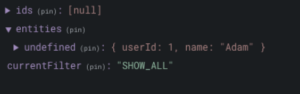
You'll see undefined as the first key in entities — that happens because we didn't specify which field should serve as the map key. The fix is either to reshape the incoming data so it includes an id, or to tell the adapter to use userId as the key instead.
What does the adapter actually do? It provides a set of methods for modifying entities — letting you insert, remove, or update objects within the map.
export const userReducer = createReducer(
  initialState,
  on(UserActions.loadUsers, (state, { users }) => {
    return adapter.setAll(users, state);
  }),
  on(UserActions.updateUser, (state, { update }) => {
    return adapter.updateOne(update, state);
  }),
  on(UserActions.deleteUser, (state, { id }) => {
    return adapter.removeOne(id, state);
  }),
);
Selectors
Selectors with props are now deprecated. Here's a quick illustration of how a props-based selector used to be written, and what the modern approach looks like.
// correct
export const getCount = (multiply: number) => createSelector( getCounterValue, (counter) => counter * multiply );

// depricated
export const getCount = createSelector( getCounterValue, (counter, props) => counter * props.multiply );
The recommended way of invoking selectors has changed too — it's considerably more straightforward now.
// use that
this.store.select(selectUser());

// instead of
this.store.pipe(select(selectUser));
NgRx and standalone components
Angular 14 shipped a fair amount of changes, among them the much-anticipated standalone component approach. At this point, it's possible to structure an application without any modules. But how do you configure reducers and effects in that setup?
For global state or effects, the importProviderFrom method within the application injector is your option.
bootstrapApplication(AppComponent, {
  providers: [
    importProvidersFrom(
      StoreModule.forRoot({
        router: routerReducer,
        auth: authReducer,
      }),
      StoreRouterConnectingModule.forRoot(),
      StoreDevtoolsModule.instrument(),
      EffectsModule.forRoot([RouterEffects, AuthEffects])
    ),
  ],
});
NgRx also offers dedicated helpers for wiring up state and effects: provideStore and provideEffect.
bootstrapApplication(AppComponent, {
  providers: [
    provideStore({ router: routerReducer, auth: AuthReducer }),
    provideRouterStore(),
    provideStoreDevtools(),
    provideEffects([RouterEffects, AuthEffects]),
  ]),
});
The equivalent of forFeature is just as straightforward — state and effects can be configured right at the routing level.
path: '',
providers: [
  provideStoreFeature('users', usersReducer),
  provideFeatureEffects([UsersApiEffects]),
],
children: [
...
]
Looking back, NgRx has steadily introduced a number of new features and refinements that make life easier for developers. There's no question that NgRx stands as the most widely adopted state management library for Angular projects, so it pays to stay current — keep your packages up to date and check back regularly for tips and updates.