
A closer look at micro frontend architecture
Micro frontends have been a recognized architectural pattern for quite some time, frequently drawing comparisons to the microservices approach that has long been standard on the server side of web development.
Most complex applications are composed of numerous distinct business modules. Building an online store, for example, requires a landing page, a product search interface, a checkout flow, and several other components.
With a micro frontend strategy, the overall application is assembled from multiple smaller, standalone applications that operate in conjunction. Each of these modules can be owned by a separate team and released on its own schedule. These individual pieces, referred to as "remotes," are then combined into a unified experience known as the "shell application" or "host application."
Large enterprises running extensive products and services commonly adopt this model. The rationale is straightforward: each micro frontend can be treated as an independent deliverable, offering clients greater flexibility when building sophisticated Angular applications.
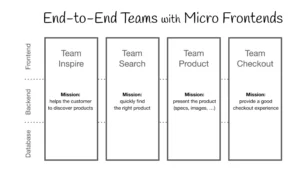
The following diagram shows a representative application based on this architecture. The remotes are clearly separated and each is handled by a distinct, autonomous team.
Module Federation and Native Federation bring new possibilities
Module Federation was introduced as part of Webpack's version 5 release. This feature significantly accelerated interest in micro frontends by offering an accessible entry point for the pattern. The caveat is that it locks your application into using Webpack, given that it is the bundler that originally shipped the capability.
That constraint is far from ideal. Many contemporary frontend projects rely on alternative bundlers such as esbuild, which frequently deliver better performance than Webpack.
Native Federation addresses this gap; it is nearly identical in concept. The distinction, however subtle, matters a great deal. Native Federation does not commit you to any particular build tool or framework. It integrates smoothly with whatever technology stack you have chosen and can even communicate with applications developed using React or Vue.

Modular monolith versus micro frontend architecture
Naturally, the key question arises: when is a micro frontend approach the right call?
Many applications today are structured using the nrwl/nx methodology, which supports developing multiple applications within a single repository. This setup commonly includes shared libraries to promote code reuse across different business areas. This approach sounds ideal — and importantly, it does not rule out the adoption of micro frontends later on.
Signs that micro frontends make sense for your project
The micro frontend pattern is crafted for a particular set of circumstances. As outlined at the start, it is intended for developing expansive and intricate Angular applications.
As a system grows larger, the benefits of clear code boundaries become more pronounced. Splitting an application into distinct units enables several teams to work concurrently with minimal risk of introducing system-wide failures. Allegro, Poland's largest e-commerce platform, exemplifies this strategy in practice.

A practical guideline is that a micro frontend approach deserves serious consideration when the application contains numerous distinct business domains. For simpler websites, the overhead is rarely justified. But as the number of modules expands, the strengths of this distributed model become increasingly compelling.
This architecture is especially advantageous when the application is built with a mix of technologies, such as React or Vue. In these heterogeneous environments, state management presents a particular challenge. Coordinating state across competing frameworks is non-trivial and demands thoughtful planning.
Managing state and inter-module communication
Most web applications need some form of state management and a way for different areas of the app to interact. A frequent requirement is storing details about the currently authenticated user.
In a modular monolith, this is fairly straightforward. Tokens and user information are held in a data-access layer. Components and interceptors then retrieve what they need through selectors. Straightforward, isn't it?
This becomes less obvious in a micro frontend environment. A workable solution is to distribute a dedicated library through a private registry, which holds and provides the data that the individual micro frontends consume.
Let's revisit the online store example to illustrate state synchronization. Adding an item to the shopping cart serves as a clear example. Suppose the product detail page and the cart widget are separate micro frontends. When a user clicks "add product," the cart's contents must refresh. This necessitates a communication mechanism between the two modules, which can be achieved using events:
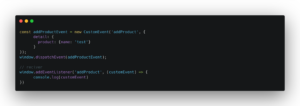
For stronger type safety, it is advisable to build a service that exposes a listener and dedicated methods for publishing events, along with their associated types. A fundamental example is shown below:
@Injectable({
 providedIn: 'root'
})
export class ProductEventsService {
 addProduct(): void {
   sendEvent(ProductEvents.AddProduct);
 }
}


function sendEvent(type: ProductEvents): void {
 window.addEventListener(type, (customEvent) => {
   console.log(customEvent)
 })
}


export const enum ProductEvents {
 AddProduct = 'AddProduct',
 RemoveProduct = 'RemoveProduct',
}
This particular solution, as you can see, is heavily tied to Angular. If your other micro frontends are constructed with different frameworks, they won't be able to utilize it. To ensure seamless interoperability, providing a plain JavaScript-based solution is generally a safer bet.
Potential drawbacks of the micro frontend approach
Developers first exploring micro frontends frequently run into a steep learning curve, especially when they are accustomed to tools like nrwl/nx.
Sharing dependencies often causes headaches. A component library designed for Angular 15 might not interoperate cleanly with an Angular 17 application. Keeping everything current means upgrading each module independently, which adds to the maintenance burden.
Data flow and state management between modules also pose a challenge for newcomers. While events simplify communication, debugging becomes more involved as the application's complexity grows.
Shared libraries cannot be allowed to expand without limits. Since they are modified by various teams, the potential for unexpected issues is ever-present. Clear boundaries and strict governance for shared resources are essential. This demands organizational commitment and rigorous discipline. If not, you might find yourself with a scenario similar to the image below:

Micro frontend systems require more attention from devops. Each micro frontend needs its own pipeline configuration, which is labor-intensive. Deployment procedures are also more involved. There is a positive aspect, however: while the initial setup is complex and time-consuming, it typically results in faster deployments over the long term.
The final bundle size of a micro frontend application tends to be larger than that of a monolith. As a result, server-side infrastructure expenses are typically higher.
Another hurdle relates to knowledge dissemination across teams. Without proper coordination, you may see inconsistencies in how code is written across different modules.
Developers value their working experience, but micro frontends can sometimes hurt developer experience. Debugging is often more difficult, and you may find yourself navigating multiple distinct codebases.
Building with Native Federation
Let's put together a basic application using Native Federation. It will consist of just one micro frontend, which is sufficient to demonstrate route configuration and dependency sharing.
First, we create a bare Angular workspace. This is accomplished using the `-no-create-application` flag with ng new:
`ng new native-federation-demo-app no-create-application`
Let's now generate two applications, one named `shell` and another `users`.
ng generate application shell
ng generate application users
The next step is to install the Schematics that automate our Native Federation setup. These Schematics were authored by Manfred Steyer, a familiar name in the Angular community. The package is available on npm:
npm i @angular-architects/native-federation
Now we need to configure each application, which the Schematics will handle. Run these two commands:
ng g @angular-architects/native-federation:init --project users --port 4201 --type remoteng g @angular-architects/native-federation:init --project shell --port 4200 --type dynamic-host
You will notice that the Schematics have generated a `federation.config.js` file inside each application, with content similar to the following:
const { withNativeFederation, shareAll } = require('@angular-architects/native-federation/config');


module.exports = withNativeFederation({


 shared: {
   ...shareAll({ singleton: true, strictVersion: true, requiredVersion: 'auto' }),
 },


 skip: [
   'rxjs/ajax',
   'rxjs/fetch',
   'rxjs/testing',
   'rxjs/webSocket',
   // Add further packages you don't need at runtime
 ]


});
In the shared object, we specify the dependencies that a micro frontend is ready to share with others. If we use Ngrx, for instance, we could share it -- this helps optimize how dependencies are fetched. Conversely, the skip array lists dependencies that must not be shared.
You may have also seen the `singleton`, `strictVersion`, and `requiredVersion` fields. With `singleton` set to `true`, the dependency is loaded just once, at the earliest point in the application lifecycle.
`strictVersion` enforces a single, unified version for a given dependency. If one micro frontend uses Angular Material 17.0.0 and another uses 17.1.0, the application won't function correctly with `strictVersion` enabled. If that flag is turned off, you'll simply see a console warning about the version mismatch.
The `requiredVersion` field determines an acceptable range of versions for a micro frontend. It could be something explicit, like Angular 16.1 up to 17.1. Alternatively, it can be set to `auto`, which lets Native Federation infer the appropriate versions on its own.
The shell application uses `federation.manifest.json` to identify and list its micro frontends.
{
 "users": "http://localhost:4201/remoteEntry.json"
}
Here is what our remote's configuration looks like:
const { withNativeFederation, shareAll } = require('@angular-architects/native-federation/config');


module.exports = withNativeFederation({


 name: 'users',


 exposes: {
   './Component': './projects/users/src/app/app.component.ts',
 },


 shared: {
   ...shareAll({ singleton: true, strictVersion: true, requiredVersion: 'auto' }),
 },


 skip: [
   'rxjs/ajax',
   'rxjs/fetch',
   'rxjs/testing',
   'rxjs/webSocket',
   // Add further packages you don't need at runtime
 ]


});
The configuration appears quite similar to the host's. There are two extra fields of note: `name`, which defines the identifier for the micro frontend, and `exposes`, an object that lists the components or modules the micro frontend makes available.
The configuration is now done. Let's move on to setting up routes -- the process is quite simple.
import { Routes } from '@angular/router';
import { AppComponent } from "./app.component";
import { loadRemoteModule } from "@angular-architects/native-federation";


export const routes: Routes = [
 {
   path: '',
   component: AppComponent
 },
 {
   path: 'users',
   loadComponent: () =>
     loadRemoteModule('users', './Component').then((m) => m.AppComponent),
 },
];
It looks approachable, doesn't it? At a glance, it resembles standard lazy loading. The one distinction is the use of `loadRemoteModule`.

Observing dependency loads in the browser
Here is what the network tab shows when we load the app. The central portion reveals that shared dependencies like `angular-platform-browers`, `angular-core`, and `rxjs` are fetched.
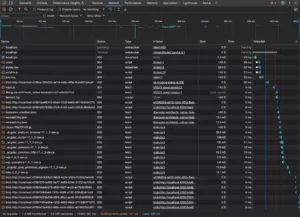
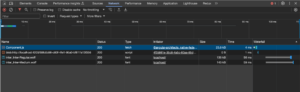
The secondary application shares the same dependencies, and we expect them to be reused. This happens automatically. When we navigate to the users micro frontend, we see only its component along with dependencies exclusive to it, like additional fonts.
Final observations
To sum it up, the micro frontend pattern isn't the simplest path. The expertise required presents a notable learning curve when compared to a conventional modular monolith. Yet, these two strategies serve different purposes. Micro frontends really excel when applied to modular, intricate systems operating across multiple teams.
Native Federation, being independent of a specific tech stack, offers an effective route to building micro frontends while easing concerns about optimizing shared dependencies.
While micro frontends may not be an everyday necessity for every developer, having a fundamental understanding of the pattern is valuable, since it broadens your toolkit for future architectural decisions.