Example
The demonstration project is built around a shell application that can pull in individual microfrontends on demand. The shell is the dark navigation bar at the top, while the microfrontend occupies the framed region below it. Importantly, the microfrontend can also run standalone, without the shell.
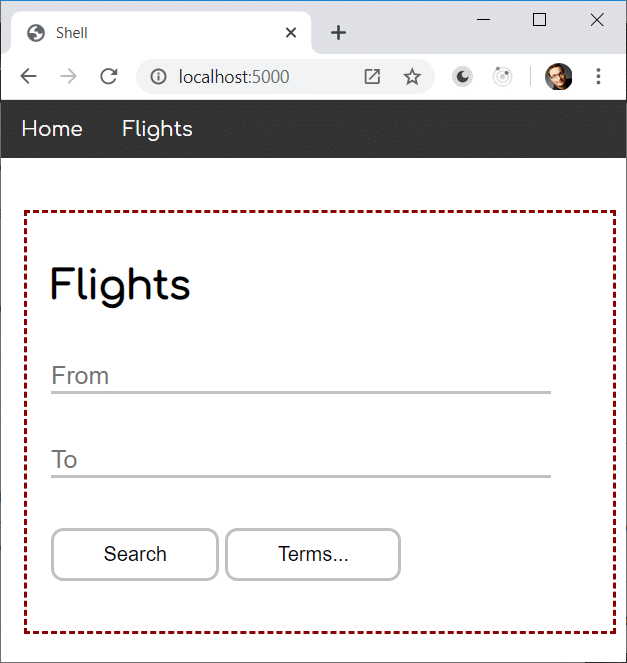
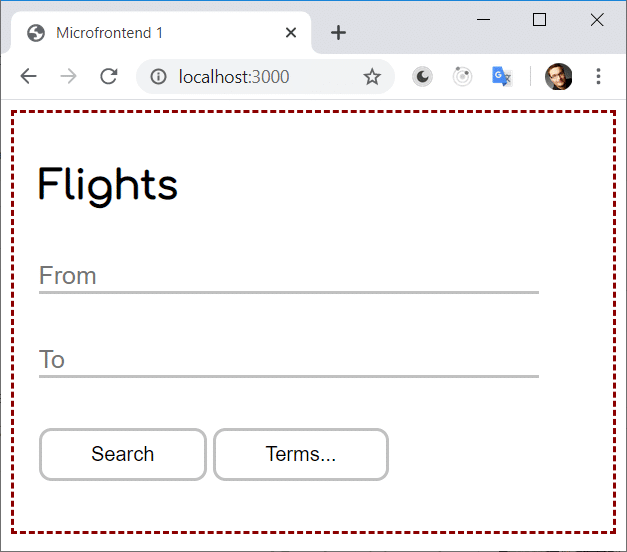
This standalone capability is essential for independent development and testing. It also benefits resource-constrained devices, such as mobile phones, which only need to fetch the specific portion of the application they require.
Core Concepts of Module Federation
Historically, building this kind of architecture was awkward because tools like Webpack assume that all application code is present at build time. While lazy loading exists, it only works for chunks that were carved out during the compilation step.
With microfrontends, however, the goal is to compile and deploy each piece separately, with the ability to reference one another via URLs. Ideally, you would write code like this:
import('http://other-microfrontend');Since that was not feasible, developers resorted to workarounds such as externals and manual script tags. The Federation module introduced in Webpack 5 changes this picture.
The underlying idea is straightforward: a host refers to a remote using a logical name. What that name resolves to is unknown when the host is compiled:
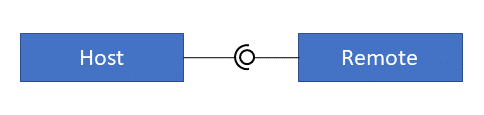
The resolution happens at runtime, when the host loads a special remote entry point — a tiny script that maps the configured name to the actual external URL.
Building the Host
The host is a standard JavaScript application that loads a remote lazily, using a dynamic import. In the example below, the host fetches mfe1/component: here mfe1 identifies the remote, and component is the name of an EcmaScript module it exposes.
const rxjs = await import('rxjs');

 const container = document.getElementById('container');
 const flightsLink = document.getElementById('flights');

 rxjs.fromEvent(flightsLink, 'click').subscribe(async _ => {
     const module = await import('mfe1/component');
     const elm = document.createElement(module.elementName);
     […]
     container.appendChild(elm);
 });
Normally, Webpack would try to bundle this import at build time and create a separate chunk for it. The ModuleFederationPlugin prevents that:
const ModuleFederationPlugin = require("webpack/lib/container/ModuleFederationPlugin");

 […]
  output: {
       publicPath: "http://localhost:5000/",
       uniqueName: 'shell',
       […]
  },
 plugins: [
   new ModuleFederationPlugin({
     name: "shell",
     library: { type: "var", name: "shell" },
     remoteType: "var",
     remotes: {
       mfe1: "mfe1"
     },
     shared: ["rxjs"]
   })
 ]
This configuration declares the remote named mfe1. The mapping shown associates the internal alias mfe1 with the same official name. As a result, Webpack will not include any import that references mfe1 in the bundles it produces during compilation.
The shared array lists libraries that the host is willing to share with remotes. Here, rxjs is included, meaning the entire application only needs to load that library once. Without this declaration, rxjs would be duplicated in both the host bundle and every remote bundle. For sharing to work smoothly, the host and remotes must agree on a compatible version.
Apart from the plugin settings, the output section requires a few options. The publicPath points to the URL where the application will be deployed, which tells Webpack where to find the bundles and static assets like images or stylesheets. The uniqueName identifies the host or remote inside the generated bundles. Webpack defaults to the name in package.json; however, in monorepos containing several applications, setting it explicitly is advisable to avoid naming collisions.
Handling Shared Libraries
To load shared libraries, dynamic imports are required:
const rxjs = await import('rxjs');These are asynchronous, which gives Webpack the chance to evaluate which version of a library to use and to fetch it. This matters particularly when different remotes or the host depend on different versions of the same library. In general, Webpack picks the highest version that remains compatible with all consumers. Details about version negotiation and resolving mismatches appear later in this series.
A practical way to sidestep this complexity is to load the entire application via a dynamic import in the entry point. For instance, a microfrontend could define a main.ts similar to this:
import('./component');This approach gives Webpack the necessary time to negotiate versions and load shared libraries during startup. Consequently, the rest of the application can use ordinary static imports, like the following:
import * as rxjs from 'rxjs';Building the Remote
The remote is itself a standalone application. In this example, it is implemented with Web Components:
class Microfrontend1 extends HTMLElement {

     constructor() {
         super();
         this.attachShadow({ mode: 'open' });
     }

     async connectedCallback() {
         this.shadowRoot.innerHTML = […];
     }
 }

 const elementName = 'microfrontend-one';
 customElements.define(elementName, Microfrontend1);

 export { elementName };
Of course, the remote could equally expose framework-based components or plain JavaScript constructs. In that case, the framework itself can be listed in the shared section so that both host and remotes reuse the same copy.
The remote's webpack configuration — also using the ModuleFederationPlugin — exposes the component through the exposes property under the alias component:
 output: {
       publicPath: "http://localhost:3000/",
       uniqueName: 'mfe1',
       […]
  },
  […]
  plugins: [
     new ModuleFederationPlugin({
       name: "mfe1",
       library: { type: "var", name: "mfe1" },
       filename: "remoteEntry.js",
       exposes: {
         './component': "./mfe1/component"
       },
       shared: ["rxjs"]
     })
 ]
The name component points to the corresponding source file. The configuration also sets the remote's name to mfe1. The host reaches this remote using a path built from the two configured names, mfe1 and component, which yields the import statement shown earlier:
import('mfe1/component')For the host to locate the remote, however, it needs to know the URL where mfe1 lives. The next section explains how that is arranged.
Linking Host and Remote
To allow the host to resolve the name mfe1, the host must load a remote entry point. This is a script emitted by the ModuleFederationPlugin when the remote is compiled. Its filename is set through the filename property shown earlier, while the remote's URL comes from publicPath. This means the remote's URL must be known at build time. Fortunately, a pull request already exists that removes this requirement.
The script simply needs to be included in the host:
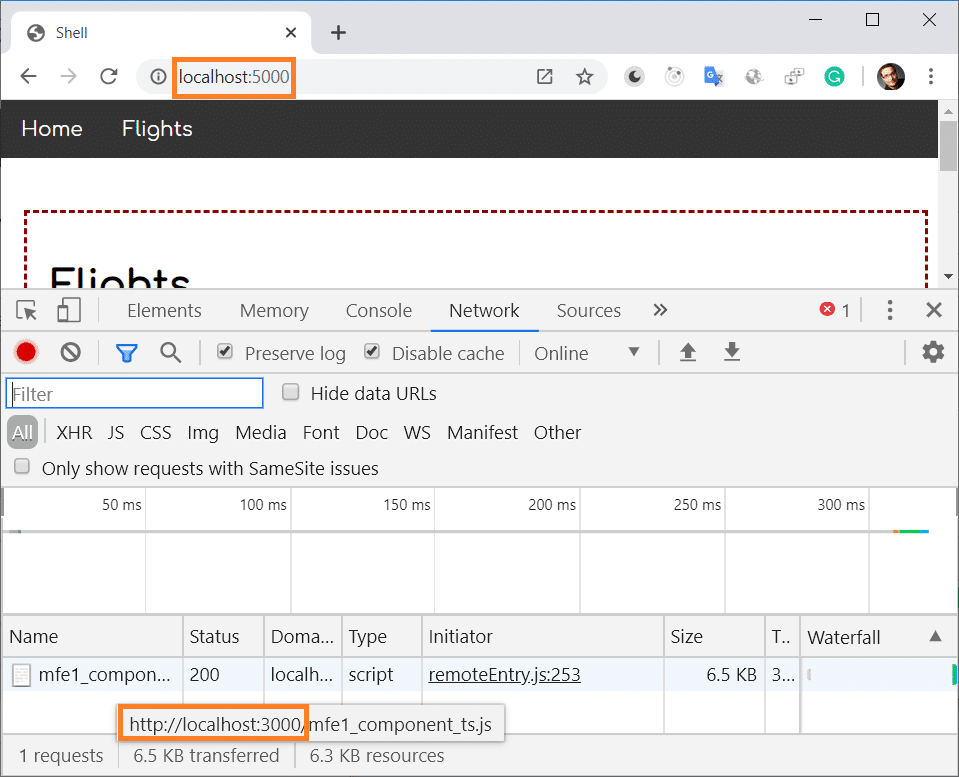
<script src="http://localhost:3000/remoteEntry.js"></script>At runtime, you can observe that the instruction
import('mfe1/component');triggers the host to load the remote from its configured URL — in this case, localhost:3000:
Summary and Next Steps
The Module Federation feature introduced in Webpack 5 closes a significant gap in the microfrontend landscape. For the first time, you can load separately compiled and deployed modules while reusing libraries that have already been fetched.
That said, teams still need to coordinate the interaction between parts manually. This includes defining and honoring contracts between microfrontends, as well as agreeing on specific versions for every shared dependency.
Dive Deeper into Architecture
Module Federation clearly provides a straightforward path to build Micro Frontends with Angular. Still, several follow-up questions naturally arise:
- What are good criteria for splitting a large application into microfrontends?
- Which access-control strategies make sense?
- Which established patterns should be applied?
- How can common pitfalls be avoided when using Module Federation?
- What advanced use cases are possible?
Our free eBook — around 100 pages — addresses all of these topics and more:
You can download it here.