In the first installment of this series, I shared which LLMs I currently prefer for Angular work. The second post explored the apps and harnesses built around those models — Codex, the Claude Desktop app, Cursor, Antigravity, VS Code, WebStorm, and a few others. Now, in this third part, I turn to the less glamorous but essential topic: money.
Money, however, is only half of the equation. The other half is about the data we hand over to these tools and which setups are viable for companies in practice. I originally planned to cover both here, but the material grew too large for a single piece. So this post stays strictly on costs, and the data and policy side will be handled in the next article.
And let me give away the ending right now: if one of the subsidized subscriptions (or in my case, all four of them) fits your situation, it is unequivocally the best value currently on the market. Before we get going, I want to be transparent: I am not trying to sell you anything, except maybe my newly launched Agentic Engineering Workshop 😅. This post exists to lay out the real options so you can decide for yourself.
There is one thread running through everything I am about to say, so let me state it up front: what ultimately counts is not the price per token. It is the cost per accepted, reviewed, merged change. More on that later.
There is also a broader reason I keep returning to this subject. In my view, too many European teams remain hesitant to commit to agentic coding, and that lag will only widen over time. So please help me get the word out — share these posts with your network.
Still Not a Benchmark
Same caveat as in the previous two pieces, just compressed: this is my current assessment as of June 1, 2026, drawn from real Angular projects and extensive tinkering in Codex and the Claude Desktop app — not a scientific benchmark, not procurement guidance.
I also spend time in Cursor, since it is a serious contender — especially with Elon's planned acquisition of Cursor later this year (I am fairly confident he will), and I want to keep tracking where it heads. Antigravity, on the other hand, is more of a periodic test target for me. I don't rely on it for daily Angular work yet because it still feels less polished than Codex, the Claude Desktop app, and lately Cursor too.
Subscription prices themselves have held fairly steady so far. What shifts more frequently is what you actually receive: model access, included usage, rate limits, fast modes, and sometimes the invisible routing behind the curtain. For API and enterprise arrangements, extended agent runs can also directly alter the real cost.
So if you come across this post a few months from now, double-check the linked pricing pages. Included usage and enterprise/API terms may have moved. One more note on the numbers: providers bill in US dollars, so the euro amounts here are approximate, not the precise figures on your invoice. Still, the overall cost structure is likely to remain similar:
- subsidized subscriptions are exceptional value when they match your workflow
- API pricing is far more transparent, but costs can climb quickly
- enterprise plans carry a higher price tag but solve a different challenge
TL;DR: Start With €40 or €60, Upgrade Only Where You Hit Limits
If you are an independent developer, freelancer, trainer, consultant, or in a workplace where these tools are permitted, I would not begin with a single tool. If you have no access right now, I would start by buying the €20 monthly subscription from OpenAI and the €20 one from Anthropic. That comes to €40/month, which for me is currently the most practical entry point.
If you can stretch to another €20, I would add Cursor for a month as well. That puts you at €60/month and lets you compare not just the models, but the applications surrounding them: Codex, the Claude Desktop app, and Cursor. That is far more informative than reading yet another comparison table.
The current setup pattern looks roughly like this:
- €40/month: OpenAI Plus plus Anthropic Pro, the minimum I would suggest for meaningful experimentation
- €60/month: add Cursor Pro if you want to evaluate a third strong app workflow
- +€80/month per provider: move OpenAI or Anthropic from the €20 tier to the €100 tier once that specific tool turns into your bottleneck
- +€100/month after that: push the same provider from the €100 tier to the €200 tier when you genuinely need the 20x-style heavy-user level
- Cursor upgrades: a separate ladder — €20 Pro, €60 Pro+, €200 Ultra, and €40/user/month Teams
- Enterprise: different billing, contracts, pooled usage, overage charges, and typically far more expensive
If you are new to agentic coding, don't worry about the upper tiers on day one. Begin with the base subscriptions, learn the apps, and upgrade only where you run into actual constraints. That is exactly what I did.
These days my own setup is heavier: OpenAI and Anthropic sit at the €100 tier, while Cursor and Google are both at the €20 level. I don't need all of them every day, but I want the ability to compare them on short notice since this space moves fast.
Why Subscriptions Are Such a Good Deal
These subscriptions are not just API pricing wrapped in a nicer interface. They are deliberately subsidized product bundles, and agentic coding involves a lot of behind-the-scenes work: file reads, searches, tool calls, tests, terminal output, diffs, edits, and context compaction. At raw API prices, that overhead would become painfully obvious.
That is precisely why subscriptions look so attractive. The providers want developers locked into their ecosystem, and right now we are the beneficiaries. But there is a significant caveat: these plans are designed for humans using the product directly, not as a cut-price backend for your company, CI pipeline, or SaaS offering. In larger organizations, personal consumer subscriptions also clash with procurement, billing, reporting, and cost governance.
So the real first question is not:
Which model is cheapest per token?
The real first cost question is:
Can we use the subsidized app subscription, or do we need a business, enterprise, or API setup?
That single decision can easily swing the cost calculation by a factor of 10 or more.
The €20 Tier Is for Getting Started
For me, the €20 tier is not just about "cheap model access". It is the entry ticket into the whole product ecosystem around the model. That is why, if I had no access today, I would not buy just one subscription. I would grab OpenAI and Anthropic first, and likely Cursor as well.
The key comparison is not merely GPT versus Claude versus Composer or Gemini. What matters is Codex versus Claude Desktop app versus Cursor. These are the super apps where the actual workflow takes place: repository search, file editing, tool calls, terminal output, diffs, review, cloud tasks, local tasks, and all the small product choices that determine whether an agent feels useful or frustrating.
So my recommendation is straightforward: spend €40 or €60 for one month and push the same realistic Angular tasks through each tool:
- migrate a component to signal-based
input()andoutput(), and convert a template from*ngIfand*ngForto@ifand@for - write tests for a service that has several dependencies
- request a code review of an actual pull request
- attempt a Git operation like rebasing one branch onto another and working through a bunch of merge conflicts
- describe a bug by stating the current behavior and the desired behavior, then ask the agent to track it down and fix it
Then examine the diffs, the review workflow, how the terminal is used, how verification is handled, and how much hand-holding you had to do. After two or three evenings, you will typically know far more than any pricing chart could communicate.
The Current Pricing Picture
Let's look at that pricing table anyway, but only briefly. Again, please verify against the official pages before making a real decision, since these figures are moving targets.
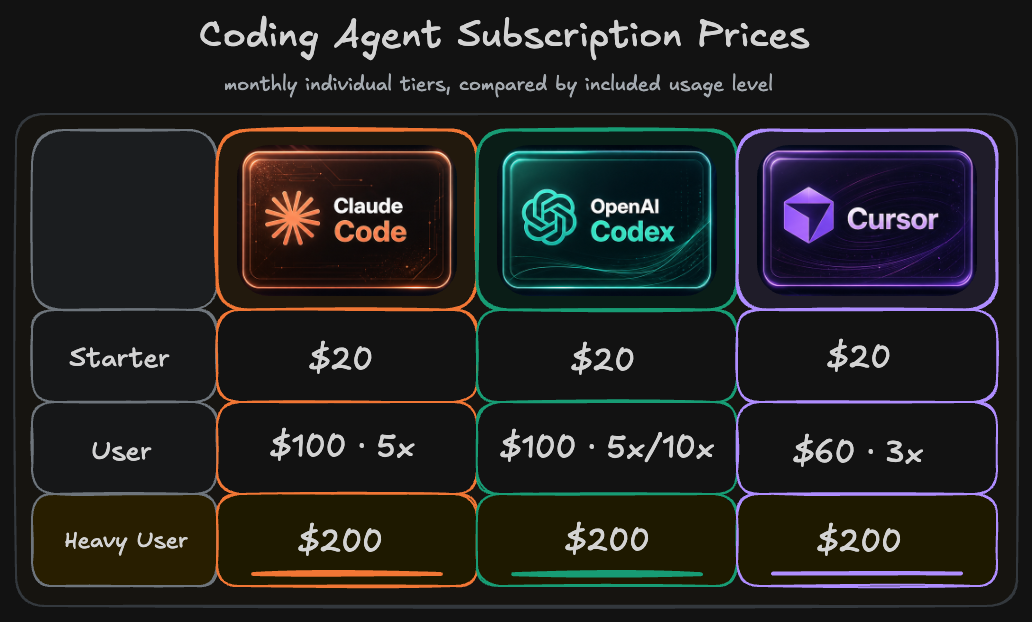
Nothing unusual here. All three Frontier Labs — OpenAI, Anthropic, and Cursor (SpaceXAI) — have settled on essentially the same pricing, with the lone exception being Cursor's 3x plan at €60.
OpenAI / Codex
For Codex details, check the Codex pricing page and the ChatGPT pricing page.
Anthropic / Claude
For Claude Code specifics, see Anthropic's Claude pricing page.
Cursor
For Cursor pricing, check the Cursor pricing page.
Google / Gemini / Antigravity
For Google, see the Gemini subscriptions page and the Google AI subscription update.
Copilot
Honestly, I would not build a 2026 workflow around Copilot anymore. And the pricing story is weakening too: GitHub has shifted Copilot to usage-based billing as of today (June 1, 2026), swapping premium request units for AI Credits. Microsoft's heavy subsidization of frontier-model usage inside Copilot is finished. On top of that, the frontier LLMs are increasingly restricted within Copilot. But the larger issue is straightforward: Copilot is simply not the best harness for agentic coding. If your company forces you to use it, consider starting a rebellion. You might end up securing your employer's long-term survival. This series might give you some ammunition for that fight.
Team Plans Sit in the Middle
Between the personal subscriptions above and the enterprise contracts below, both providers offer a team tier that keeps the per-seat price modest while adding pooled usage, centralized billing, and admin controls.
On the OpenAI side, the Team plan has two levels: a standard tier around €20 per seat and month and a premium tier around €100 per seat and month with substantially more included usage — the same ladder as the personal plans. Both include Codex, company knowledge, SSO/MFA, and data that is never used for training. See ChatGPT Business pricing.
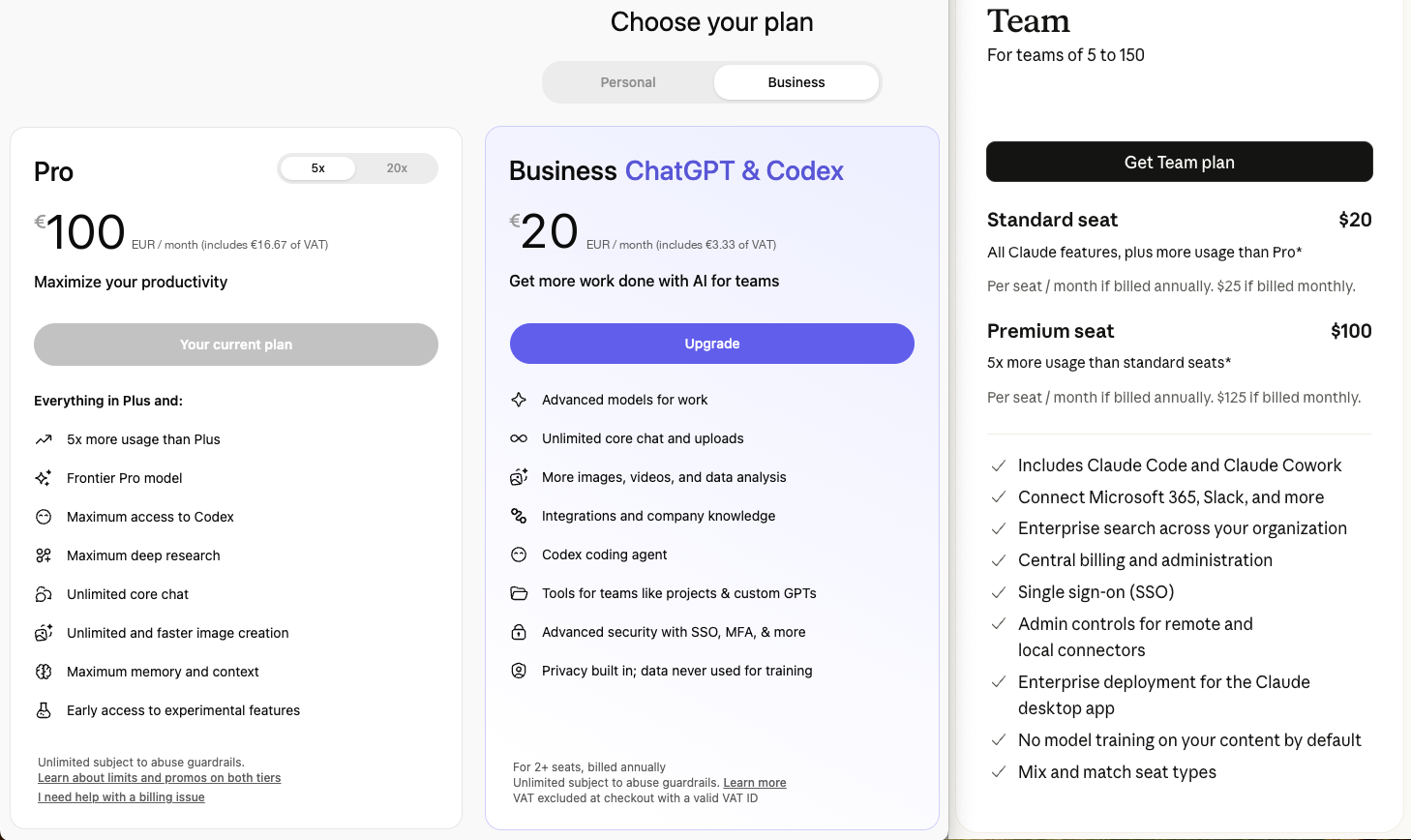
Anthropic's Team plan (for teams ranging from 5 to 150 people) mirrors those two tiers: €20 or €100 per seat and month, again depending on how much included usage your developers require. Both tiers come with Claude Code and Desktop, and the team gets the full agentic tooling, SSO, and a "no model training" guarantee. For more details, see Claude team pricing.
Enterprise: A Different Cost Reality
At first glance, a €20 subscription seems like a bargain compared to what enterprises shell out. That comparison misses the point, though. Enterprise plans aren't simply premium versions of the same product. They solve a different problem: seat management, shared usage pools, overage fees, central invoicing, detailed usage dashboards, administrative oversight, support agreements, and predictable monthly billing.
What really matters is how things play out when 50 developers are hammering the tool constantly. Generous-looking limits on cheaper plans can quickly spiral into unexpected overage charges, developers waiting on rate limits, retrying failed requests, and hours spent on cleanup.
My advice would be to start small. Take a handful of senior developers, give them two paid setups each, and let them use them for a month on actual Angular work. Track what you actually spend, how many changes get accepted, how long reviews take, PR cycle times, and where you hit limits.
What You Really Pay at the API Level
Subscriptions and enterprise agreements tend to mask the underlying costs. API pricing is completely transparent. The OpenAI API pricing page and Claude API pricing docs currently quote rates in USD. After a rough conversion for comparison, GPT 5.5 comes to around €5 per million input tokens and €30 per million output tokens, while Claude Opus 4.8 is roughly €5 for input and €25 for output.
Prices per million tokens seem reasonable on the surface. Just keep in mind that output tokens cost anywhere from five to six times what you pay for input.
Below is the pricing snapshot I tend to reference when discussing agentic coding. Most providers still list their official prices in USD, so view this as a rough comparison rather than an invoice prediction. Verify billing currency, applicable VAT, and any enterprise discounts before making procurement decisions.
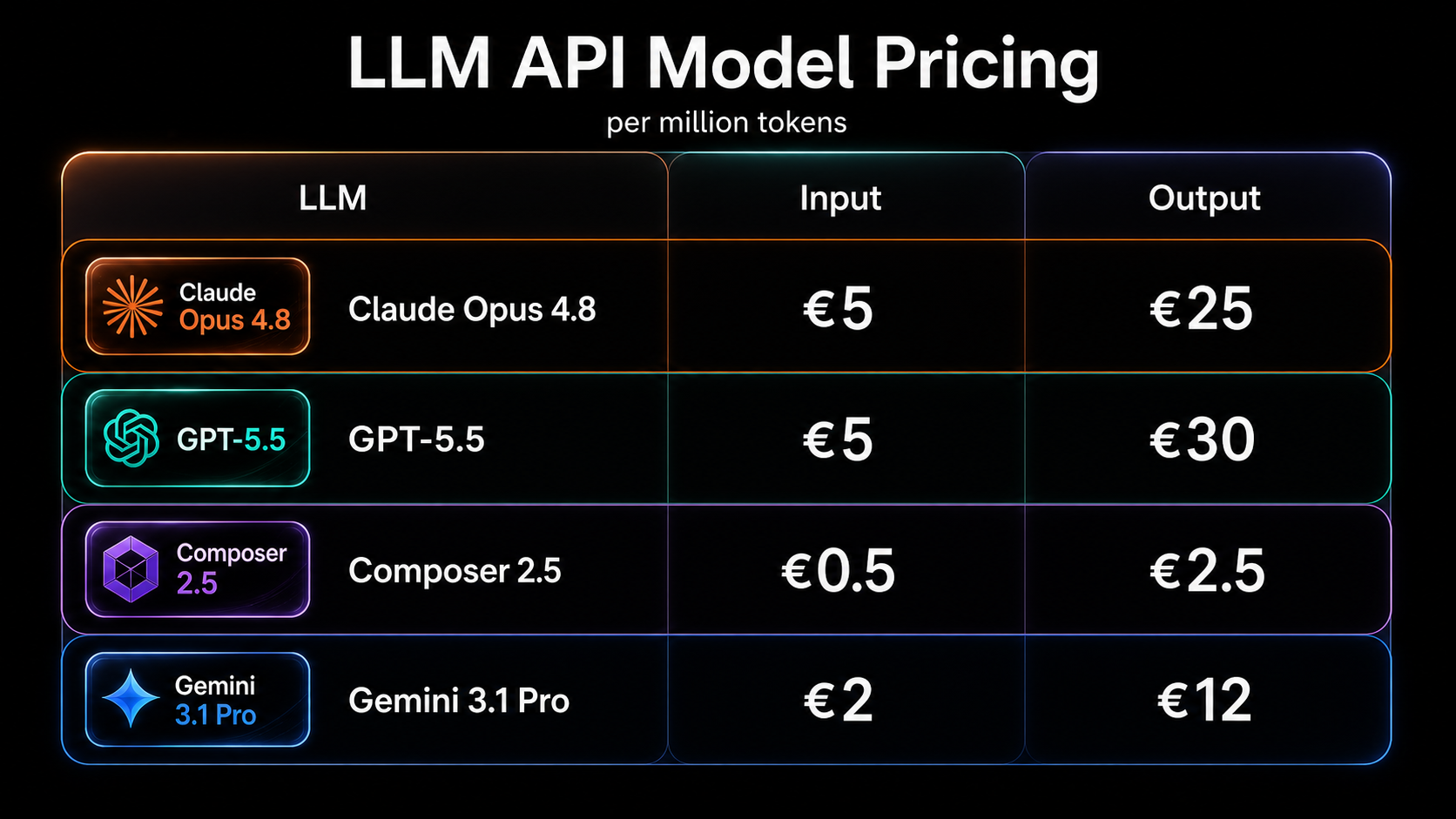
All figures reflect per-million-token rates from the providers' published API pricing. The table keeps things simple: no batch discounts, no tool-call surcharges, no VAT, no currency conversion, no enterprise rate cuts.
Teams that live in their IDE might want to look at BYOK (bring your own key), regardless of whether they prefer WebStorm or VS Code. JetBrains users can check the JetBrains AI plans or the Junie BYOK docs for details. Most VS Code AI extensions follow the same pattern: keep your IDE, plug in your own provider keys, and pay the provider directly.
The real question, though, is how many tokens an agent consumes per task. That's the metric that actually determines your bill.
Token Volume: Where the Money Really Goes
According to OpenAI's documentation on tokens, one token corresponds to roughly four characters of English text. For a coding agent, hitting 200,000 input tokens isn't some exotic scenario. Repository context, tool schemas, file contents, diffs, terminal output, and the conversation history add up faster than you'd expect. Anthropic is upfront about it too: tool names, schemas, invocations, and results all count towards the bill.
Let's do the math with current API pricing. A single turn with 200,000 input tokens and 20,000 output tokens lands around €1.60 on GPT 5.5 and €1.50 on Claude Opus 4.8. Spending that once is no big deal. Seeing it 20 times gets annoying. If the agent starts going in circles, costs quickly spiral.
Prompt caching exists and does help, but it won't make output cheaper, and it absolutely won't save you from a sloppy workflow. So I wouldn't obsess over token prices alone. A model that costs more per token can still work out cheaper overall if it finishes the job with fewer back-and-forth cycles.
That's also why raw tokens-per-second doesn't impress me. A model might churn out tokens quickly, yet still feel sluggish if it needs countless turns, excessive tool invocations, or lengthy reasoning to wrap up. For agentic coding, the measurable that matters is how long it takes to get to a ready-for-review diff. A model that streams slower could still win on wall-clock time if it targets the right files early and generates less junk along the way.
So the figure I actually care about isn't cost per token — it's cost per accepted, reviewed, merged change.
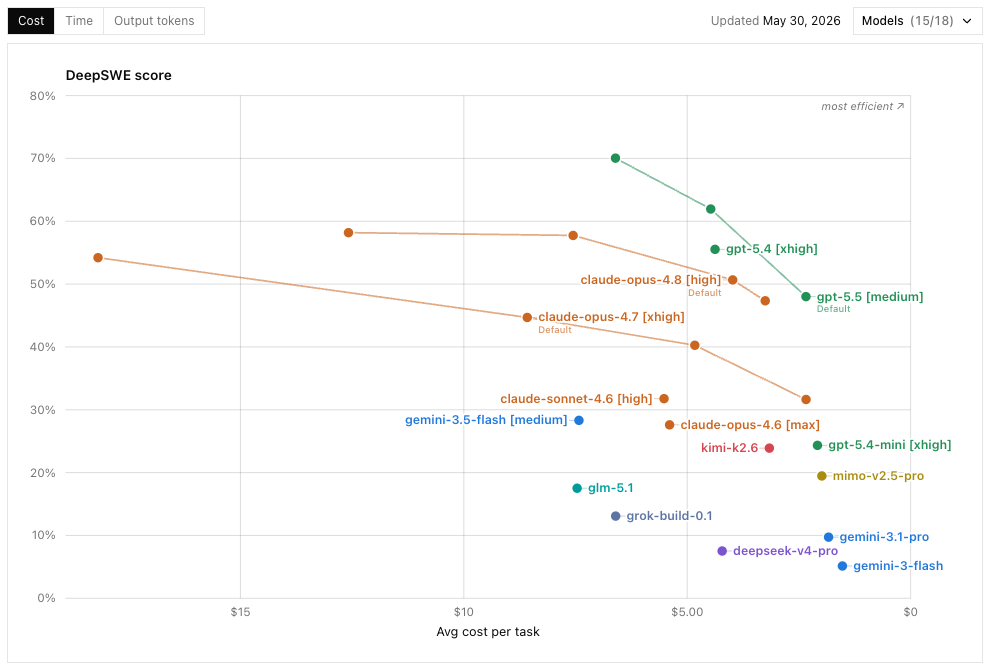
At the moment, I trust DeepSWE the most among available benchmarks. In the chart, higher percentages indicate stronger benchmark performance; positioning further to the right implies better cost efficiency. A notable absence: Composer, because it has no public API to run it through similar tests.
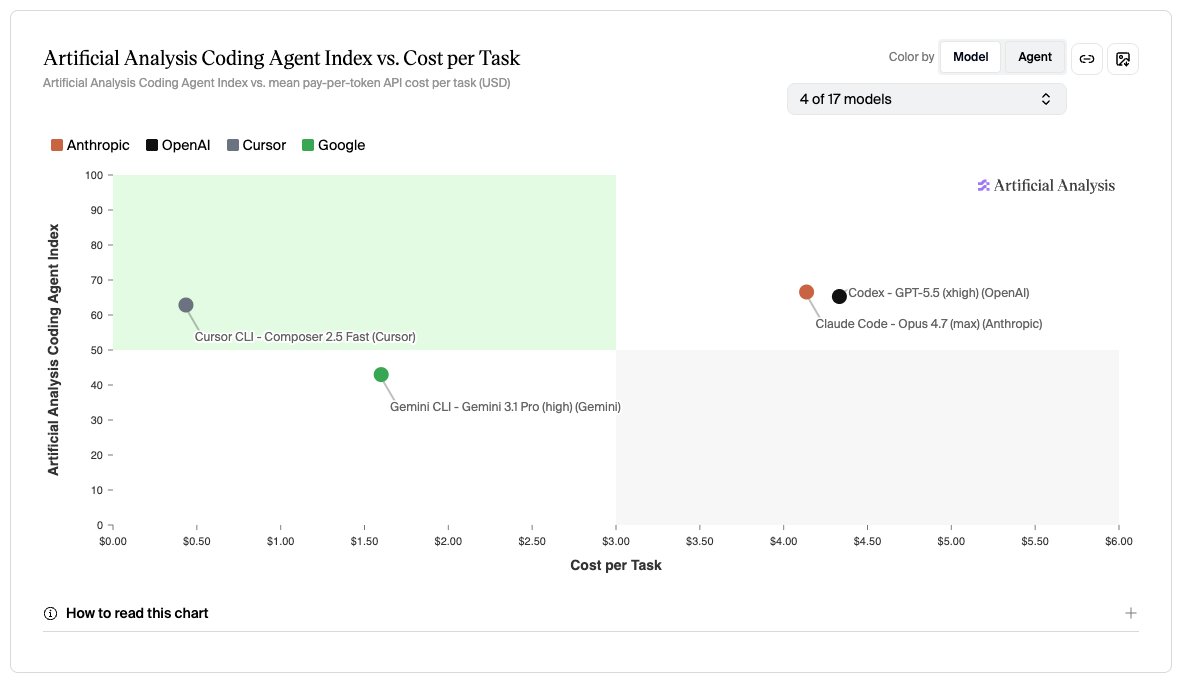
This next chart draws on Artificial Analysis's coding-agent evaluations, which can exercise Composer through Cursor's own testing harness. With Composer included, it turns out to be the most cost-efficient option by a significant margin — the strongest ROI of the bunch. Definitely worth tracking if you're considering API-based usage.
Reasoning Levels: Low Through Extra
Since token volume is what actually drives expense, the reasoning setting is your first and most obvious lever. Pretty much every tool these days offers tiered reasoning options: low, medium, high, extra, max, whatever the naming happens to be.
For real Angular work: low works for small single-line changes, medium suits standard feature implementation, high helps with intricate bugs, new component work, and refactoring. The extended tiers — extra, Pro, or Max — make sense when a bad output would end up costing far more than the extra tokens.
Personally, I tend to stick with High as a default (for both GPT and Opus). It feels like a solid middle ground and spares me the constant fiddle of tuning per task. Some people might frown at that, but I'd rather spend my time elsewhere, especially when the subsidized subscription is paying the bill anyway. I can always bump up the plan if I need more headroom 😏
Fast Mode
Reasoning levels work alongside another setting: fast mode. Speed matters — if an agent takes too long, I simply lose concentration. But fast mode also carries a price. In Codex, faster speed settings burn through more credits. In the Claude API, Fast mode provides quicker Opus responses for an extra fee.
Give it a chance, run some experiments, and if your time truly is valuable, just turn it on and don't look back.
Practical Cost Control for Teams
Managing spend comes down to managing your workflow. I'd set firm ground rules right away:
- default to medium reasoning for run-of-the-mill implementation
- 'high' or 'extra' for tasks that really justify it
- keep the scope of each task tight
- open a fresh conversation when the context turns into a mess
- make project instructions concise and genuinely helpful
- keep an eye on terminal output size
- always keep a human accountable for the final review
None of this is only about cost. Agents simply produce better outcomes when the assignment is cleanly defined.
Agentic Engineering Workshop
And that brings me to the uncomfortable truth about cost: the token price isn't your main lever. The combination of model choice, the tool you run, my Angular Guardrails, my Angular Coding Style Guide, and the entire review process — that whole system is what determines the true price of an accepted change. And that system is trainable.
If you're ready to take control of AI coding costs and think in terms of cost per accepted, reviewed, merged change rather than per token, you might be interested in our Agentic Engineering Workshop, held in both English and German. It's designed for advanced Angular developers who want to transition from vibe coding to structured, traceable Agentic Engineering workflows: AI-ready project setup, guardrails, spec- and plan-first approaches, UX and component prototyping, code review, testing, and refactoring in brownfield codebases.
- 🤖 Agentic Engineering Workshop – 2-day remote session
Wrapping Up
Right now, the most cost-effective way to get going remains a subsidized personal subscription. If you haven't got access yet, I'd suggest starting with an OpenAI and an Anthropic plan at roughly €40/month combined, maybe adding one month of Cursor at another €20. You'll be testing Codex, the Claude Desktop app, and Cursor against actual Angular tasks — far more informative than poring over any benchmark chart.
From there, keep whatever ends up genuinely changing how you work. When you start running into limits, upgrade the product that's holding you back: take OpenAI or Anthropic from €20 to €100, and only then consider €200 if you're a heavy user. At a company level, business or enterprise seats might be the answer, or pooled credits, direct API billing, or an IDE-based arrangement where you bring your own provider keys — AI Assistant and Junie inside WebStorm, or VS Code with AI extensions.
So I'm not here to tell you to buy a specific product. Go build a small, focused AI coding workflow today. Track cost per accepted, reviewed, merged change, and preserve human responsibility for quality.
Teams that take this seriously won't just increase their output. They'll convert the same spend into a greater number of accepted, reviewed, merged changes — and that edge gets stronger every month.
In the next post, I'm going to address the other side of the topic: what, exactly, we end up sharing with these coding tools, and how I'd approach privacy, data retention, EU rules, and company policies. In the personal verdict, I'll bring everything together — models, harnesses, pricing, privacy — into one final assessment.
Thanks for reading 🙏 this article was written by Alexander Thalhammer. If you have thoughts, criticisms, or questions, please don't hesitate to reach out ❤️