Angular 10 – Paving the Way for What's Next
The release of Angular 10 has prompted plenty of questions from the community, with many wondering where the headline features are. While it's true that there isn't a single show-stopping addition, this release is less about flashy new capabilities and more about establishing a solid foundation for the framework's future. Let's break down what shipped and why it matters for Angular's evolution.
What's New in the Core
TypeScript 3.9
Angular 10 now fully supports TypeScript 3.9, leaving older versions behind. This iteration brings a handful of bug fixes and minor refinements, setting the stage for the more significant changes expected in TypeScript 4.0.
Solution-style TypeScript Configurations
With TypeScript 3.9 came the introduction of solution-style configs. Previously, a single tsconfig.json file was expanded upon by both tsconfig.app.json and tsconfig.spec.json. In the new setup, tsconfig.json is dedicated to editor tooling, simply referencing the other config files used by the application. Meanwhile, a fresh tsconfig.base.json houses the actual compiler configuration. Here's an idea of what your updated tsconfig.json will look like:
{
  "files": [
  ],
  "references": [
    {
      "path": "./tsconfig.app.json"
    },
    {
      "path": "./tsconfig.spec.json"
    }
  ]
}
Note that the solution-style config is currently being rolled back. Multiple issues have been reported in both the Microsoft and Angular CLI repositories, which you can review here. It might make a comeback in a future release, though.
Tighter Configurations with the –strict Flag
Strict mode was introduced with Ivy in Angular 9, but enabling it by default could generate a significant number of errors for applications that weren't strictly typed. That's why the Angular team decided against making it the default. Instead, when you scaffold a new app with the --strict flag, several additional compiler options are added to your tsconfig.base.json.
This flag also adds a dedicated package.json inside your app folder. This file includes a sideEffects property set to false. Doing so allows for more aggressive tree-shaking of unused imports. Note that sideEffects is meant for things like polyfills that alter application behavior and cannot be safely removed.
A complete list of available compiler options can be found in the Angular Documentation.
Streamlined Browser Support
Angular uses the .browserslistrc file to decide which browsers need compiled output. In previous versions, more browser versions were supported by default. Angular 10, however, has dropped support for IE 9 and 10. Support for IE 11 is now opt-in, meaning fresh projects won't get differential loading out of the box, though it will still function if you migrate an existing app. For Chrome and Firefox, only the latest major version is supported, while Edge, Safari, and iOS get support for the last two major versions.
Service Worker Updates
- Cache matching options: You can now use options like
ignoreSearchwhen matching cached requests. For instance, if a request to `http://foo.com/?value=bar` is made, usingignoreSearchwill strip thevalue=barquery parameter before looking for a match. More details are available on MDN. - New
ignoreVaryoption: While Angular offers PV-first-class support viang add @angular/pwa, thevaryresponse header isn't universally supported by browsers, which can lead to unexpected behavior when retrieving cached responses. The service worker config now accepts anignoreVary:truesetting to bypass the header entirely. See the relevant GitHub commit and MDN docs for more. - Customizable SW registration: Previously, the service worker would wait indefinitely to register until the app was stable. Now, you can define a specific timeout, which is handy for custom
registrationStrategysetups that depend on third-party responses. The new default is'registerWhenStable:30000`, which waits up to 30 seconds before falling back to the standard strategy. Further reading is available on the Angular API docs.
Router
canLoadreturnsUrlTree: Historically, thecanLoadguard could only return aboolean,Observable<boolean>, orPromise<boolean>. Now it can also return aUrlTree, making it consistent with other route guards and allowing for redirects during lazy loading.
SSR Enhancements
- Absolute URLs for HTTP: When making HTTP calls during server-side rendering, you previously had to manually prepend the absolute URL. Now, a
useAbsoluteUrlflag can be provided via theINITIAL_CONFIG.
provide: INITIAL_CONFIG,
useValue: { document: '<app></app>', url: 'http://abc.com', useAbsoluteUrl: true }
Once configured, all HTTP requests will use http://abc.com as their base URL.
Treating SMS as URL Safe
The SMS URI scheme was not previously considered safe for URLs in Angular. This has changed, and it is now treated as secure. This is particularly beneficial for PWA developers who previously had to resort to bypassSecurityTrustResourceUrl as a workaround. If you were using it just for SMS links, you can remove that code.
Bazel's New Home
The @angular/bazel package is no more. If you're using Bazel, you'll need to migrate to @bazel/angular, now maintained by Alex Eagle. He has documented the migration process in a detailed blog post.
Angular CLI
CommonJS Library Warnings
Angular strongly recommends avoiding CommonJS modules. They often present bundling challenges, are harder to tree-shake effectively, and might not be compatible with modern browser optimizations. Even though packages like lodash are widely used, the tree-shakable lodash-es version is preferred. Starting with Angular 10, you'll see warning messages in your console whenever such modules are detected in your build.
If you've evaluated the trade-offs and still need to use a CommonJS library, you can silence these warnings by adding the following to your build options:
"build": {
  "builder": "@angular-devkit/build-angular:browser",
  "options": {
    "allowedCommonJsDependencies": [
      "lodash"
    ]
  }
}
Keep in mind this setting is for applications only and cannot be used in library projects.
Lazy Loading for Universal Projects
Previously, lazy-loaded routes in Universal applications were all bundled together, negating the benefits of code-splitting. That's no longer the case; new Universal projects will have lazy loading enabled by default, provided it's configured. If you want this functionality in an Angular 9 project, you can opt in by removing the commonjs module target from your tsconfig.server.json. Thanks to Alan from the CLI team for pointing this out.
Breaking Changes
- The
ng getandng setcommands have been deprecated. Please useng configinstead. - Deprecated options in the app-shell and universal schematics have been removed.
Angular Components
DateRangePicker Component
A new DateRangePicker control is now part of Angular Material 10, allowing users to select a start and end date. A basic usage example is below.
<mat-date-range-input [rangePicker]="picker">
  <input matStartDate placeholder="Start date">
  <input matEndDate placeholder="End date">
</mat-date-range-input>

<mat-date-range-picker #picker></mat-date-range-picker>
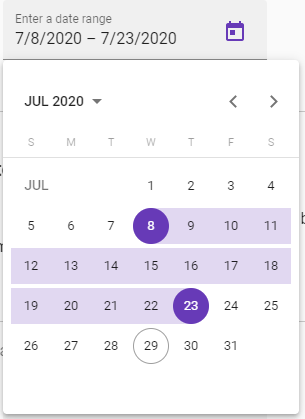
DateRangePicker
Positioning the DatePicker
You now have direct control over the popup position for the DatePicker. The xPosition input accepts start or end, while yPosition accepts above or below.
<mat-form-field class="example-full-width" appearance="fill">
  <mat-label>Choose a date</mat-label>
  <input matInput [matDatepicker]="picker">
  <mat-datepicker xPosition="end" yPosition="above" #picker></mat-datepicker>
</mat-form-field>
<button mat-raised-button (click)="picker.open()">Open</button>
Fetching SVG Icons with Credentials
Fetching icons from a remote source that requires authentication would previously result in an exception. The new withCredentials option allows you to pass credentials alongside the HTTP request when retrieving SVG icons.
  constructor(iconRegistry: MatIconRegistry) {
    iconRegistry.addSvgIcon(
        'thumbs-up',
        'url',
        {
          withCredentials: true
        });
  }
Simplified Empty State for matTable
In the past, showing a message when a table had no data after filtering meant writing a custom *ngIf. Angular Material 10 introduces a cleaner way to handle this scenario using the snippet below.
 <tr class="mat-row" *matNoDataRow>
    <td class="mat-cell" colspan="4">No data matching the filter "{{input.value}}"</td>
  </tr>
MDC Snackbar
The Angular Material team is progressively migrating components to the Material Design Components (MDC) system, which is currently experimental. A new Snackbar built with MDC is now available in an experimental state, aiming to align Angular's components more closely with the official Material Design specification.
Multi-Select in Selection Lists
The mat-list now supports multiple selection. You can apply this by adding mat-list-option elements within a mat-selection-list parent. The snippet below demonstrates the usage:
<mat-selection-list #shoes>
  <mat-list-option *ngFor="let shoe of typesOfShoes">
    {{shoe}}
  </mat-list-option>
</mat-selection-list>

<p>
  Options selected: {{shoes.selectedOptions.selected.length}}
</p>
Routing Option for Navigation Schematics
The material navigation schematic is a quick way to generate a navbar. Previously, it would add a simple href attribute to the links. Now, you can pass a --routing flag during generation to use routerLink directives instead.
ng generate @angular/material:navigation <component-name> --routing
Breaking Changes
Removal of HammerJs Configurations
HammerJs was already removed as a core dependency in version 9.0. This version goes a step further by removing all related tokens and options:
MAT_HAMMER_OPTIONShas been removed.GestureConfighas been removed.HammerInputhas been removed.HammerStatichas been removed.Recognizerhas been removed.RecognizerStatichas been removed.HammerInstancehas been removed.HammerManagerhas been removed.HammerOptionshas been removed.
Final Thoughts
Angular 10 represents a quieter release cycle than usual, which is a deliberate move. It's about paying down technical debt and addressing community feedback to set a stronger course for the future. There are promising features on the horizon, such as strict typed reactive forms. Additionally, the ongoing migration of Angular Material components to the official MDC spec is a welcome change. Plus, the Angular CLI itself has been made smaller as part of these efforts.