
After the momentum generated by the v14 release, the Angular team is already moving forward with an impressive batch of updates in Angular 15. The 14.X minor versions also introduced several notable features that we haven’t covered on our blog yet. Here is a rundown of the most significant developments.
Standalone APIs become stable
As of version 15, the standalone APIs are officially out of the developer preview phase. This means we can now rely on them in production environments without hesitation. Many of the changes discussed later in this piece build directly on this milestone.
If you're not yet familiar with standalone components, we recommend checking out our dedicated deep dive: Angular Standalone API.
Router updates
Version 14.1 introduced a fresh type of guard called canMatch. To understand its role, we need to compare it with existing guards. The canLoad guard determines whether a route can be loaded when it points to a lazy module. On the other hand, canActivate and canActivateChild control whether a route (or child route) can be activated. The canMatch guard operates at an earlier stage—it decides whether the current URL can be matched to a given route at all. This makes it functionally similar to both canLoad (which it is ultimately designed to replace) and canActivate, with one key distinction: when canMatch returns false, the router moves on to evaluate the next configuration entry.
This opens up a powerful possibility: you can define multiple routes with the exact same path and direct users to different destinations based on custom logic. This is particularly handy for role-based navigation or for loading feature variants based on feature flags. Here’s an example:
@Injectable()
class CanMatchSettings implements CanMatch {
 constructor(private currentUser: User) {}

 canMatch(route: Route, segments: UrlSegment[]): boolean {
   return this.currentUser.isAdmin;
 }
}

const routes: Routes = [
 {
   path: 'settings',
   canMatch: [CanMatchSettings],
   loadComponent: () =>
     import('./admin-settings/admin-settings.component').then(
       (v) => v.AdminSettingsComponent
     ),
 },
 {
   path: 'settings',
   loadComponent: () =>
     import('./user-settings/user-settings.component').then(
       (v) => v.UserSettingsComponent
     ),
 },
];
With the rise of standalone components, the router evolved quickly. Version 14.2 shipped APIs that fully embrace the module-less architecture.
In practice, this means your application no longer needs to import RouterModule to set up routing. Instead, you can use a collection of alternative, tree-shakeable functions:
const routes: Routes = [...];

bootstrapApplication(AppComponent, {
 providers: [
   provideRouter(
     routes,
     withDebugTracing(),
     withPreloading(PreloadAllModules)
   ),
 ],
});
For a complete list of all available functions and options that pair with provideRouter, see the official documentation.
The same version also introduced support for functional guards and resolvers. Instead of class-based guards, you can now write plain functions. This shift sparked some debate within the community—some see it as a positive step forward, others have concerns. Regardless of where you stand, one advantage is hard to dispute: the amount of boilerplate is significantly reduced. Moreover, creating higher-order, parameterized guard factories is now straightforward. Here’s a quick comparison with the earlier approach:
const routes: Routes = [
 {
   path: 'settings',
   canMatch: [() => inject(User).isAdmin],
   loadComponent: () =>
     import('./admin-settings/admin-settings.component').then(
       (v) => v.AdminSettingsComponent
     ),
 },
 {
   path: 'settings',
   loadComponent: () =>
     import('./user-settings/user-settings.component').then(
       (v) => v.UserSettingsComponent
     ),
 },
];
HttpClient enhancements
The HTTP client got its own share of updates in Angular 15.
The first change mirrors the router: new APIs for a module-less setup.
bootstrapApplication(AppComponent, {
 providers: [
   provideHttpClient(
     withXsrfConfiguration({
       cookieName: 'MY-XSRF-TOKEN',
       headerName: 'X-MY-XSRF-TOKEN',
     })
   ),
 ],
});
You can explore the full list of functions compatible with provideHttpClient in the documentation.
Another parallel with the router is the addition of functional interceptors. The usage looks like this:
bootstrapApplication(AppComponent, {
 providers: [
   provideHttpClient(
     withInterceptors([
       (request, next) => {
         console.log('Url: ', request.urlWithParams);
         return next(request);
       },
     ])
   ),
 ],
});
Directive composition
Reusing directives and applying their behavior to other directives or components has long been a highly requested feature. Angular 15 finally brings this to the table.
Previously, developers used workarounds like inheritance, which is limited to a single base class. Another common approach, seen in Angular Material, involved TypeScript mixins. However, mixins require a very particular coding style, complicate implementation, and cannot leverage Angular APIs.
The new directive composition feature is remarkably flexible and opens up a wide range of possibilities—your creativity is the main limit.
The only notable constraint is that only standalone directives can be applied to your own directives or components (the target doesn't need to be standalone). Here's an example:
@Component({
 selector: 'my-component',
 templateUrl: './my-component.html',
 hostDirectives: [
   {
     directive: NgClass,
   },
   {
     directive: CdkDrag,
     inputs: ['data'],
     outputs: ['moved: dragged'],
   },
 ],
 standalone: true,
})
export class MyComponent {
}
In the snippet above, the NgClass and CdkDrag directives are applied to a component. The first exposes no inputs or outputs, so you can't interact with it from the template. The second, however, provides an input and an output, with a custom alias for the output. Using the component might look like this:
<my-component [data]="myData" (dragged)=onDragged($event)></my-component>So, NgClass only contributes its default behavior, which in this case amounts to nothing. Is there a way to control it? Yes—thanks to the inject function, you can inject an instance of the directive into your component and manipulate its properties directly:
@Component({
 selector: 'my-component',
 templateUrl: './my-component.html',
 hostDirectives: [
   {
     directive: NgClass,
   },
   {
     directive: CdkDrag,
     inputs: ['data'],
     outputs: ['moved: dragged'],
   },
 ],
 standalone: true,
})
export class MyComponent {
 private ngClassDirective = inject(NgClass);
 private cdkDragDirective = inject(CdkDrag);

 someCallback(): void {
   this.ngClassDirective.ngClass = 'my-class';
 }
}
Below is a simple interactive demo that brings all these concepts together. Pay special attention to how input and output aliases behave when multiple directives are composed.
Here are some additional ideas for leveraging directive composition:
https://twitter.com/_crisbeto/status/1582475442715385858
https://twitter.com/BartBurgov/status/1582692518986100736
https://twitter.com/NetanelBasal/status/1581614761212796935
https://twitter.com/i_beqiri21/status/1592434518291808261
https://twitter.com/ArmanOzak/status/1597279998716481536
To learn more about the changes covered in Angular v14 and later, check out our free ebook, "The Ultimate Guide to Angular Evolution".

Development experience improvements
Stack traces and debugging
These improvements stem from a collaboration between the Angular and Chrome teams. The foundation is the ability to mark certain scripts as "external," which excludes them from developer tool functions like stack traces. Since Angular 14.1, contents of the node_modules and webpack directories are marked this way. This mechanism is available to all developers, so even authors of other frameworks can benefit.
For Angular users, the result is that console errors now display stack traces without components that are unlikely to be the source of the issue, such as zone.js. When stepping through code during debugging, those external scripts are skipped as well.
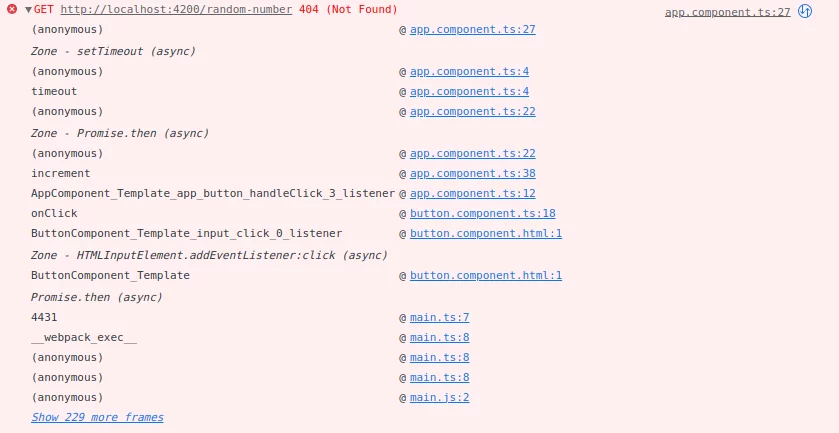
A second UX improvement involves linking stack traces for asynchronous operations. Code that runs after an asynchronous task completes can now be properly traced back to the code that initiated it (for example, a click event or a server call). This is enabled by Chrome's Async Stack Tagging API.
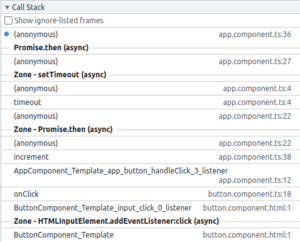 vs
vs 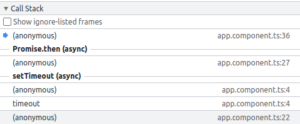
Lazy loading
Angular 15 also brings a small syntax improvement for lazy loading. From now on, importing default exports from a file requires fewer characters, applicable to both loadChildren and loadComponent.
export const mainRoutes: Route[] = [
 {path: 'my-feature', loadChildren: () => import('./my-feature/routes')},
 // vs
 {path: 'my-feature-old', loadChildren: () => import('./my-feature-old/routes').then(m => m.routes)},
];

// my-feature/routes.ts:
export default [
 {path: 'foo', component: FooComponent},
] as Route[];

// my-feature-old/routes.ts:
export const routes: Route[] = [
 {path: 'foo', component: OldFooComponent},
];
Language service
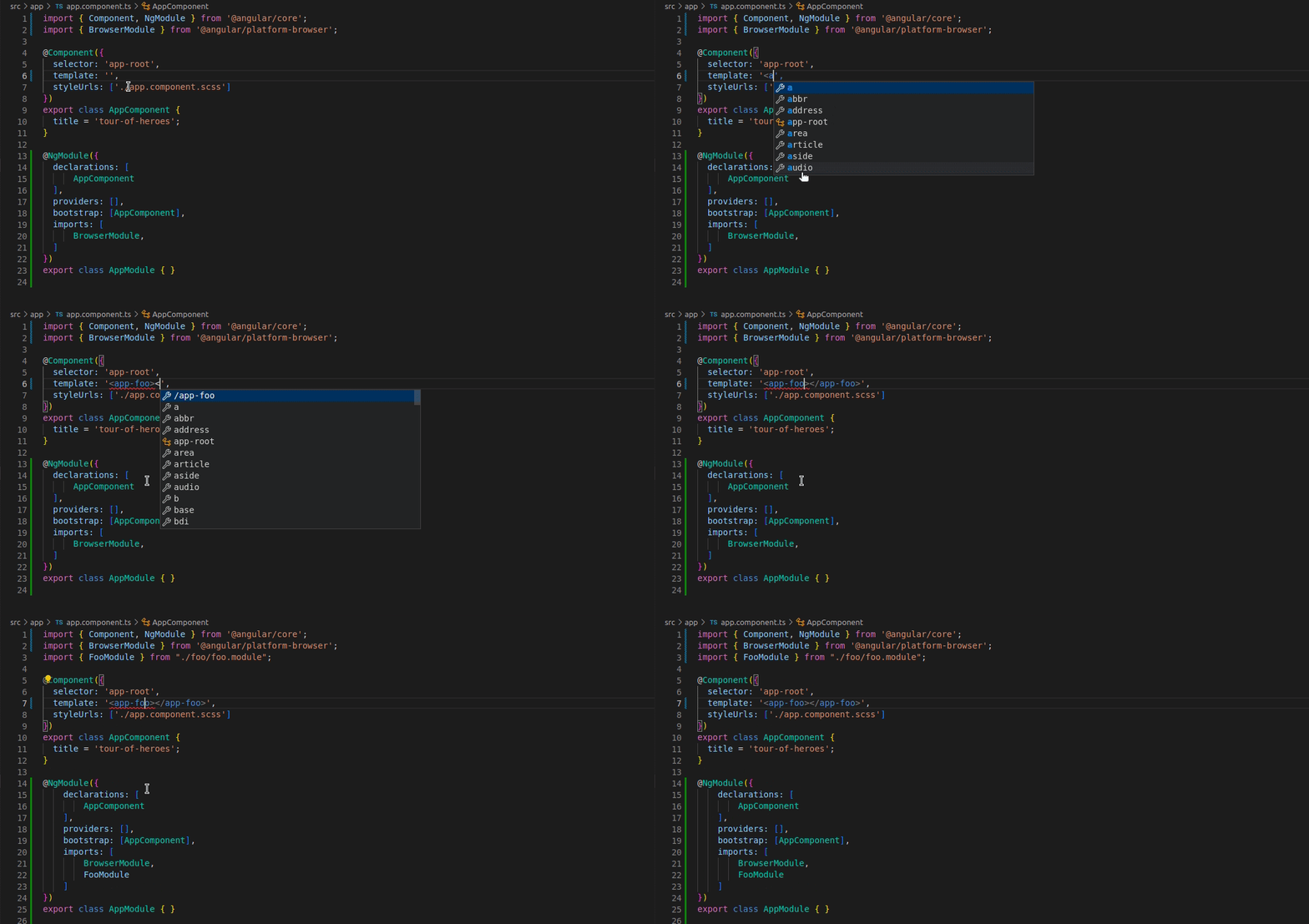
Another quality-of-life feature is automatic component imports. If a selector in another component’s template is used, the language service can now automatically add the corresponding import, whether the component is standalone or part of a module.
Summary
This overview demonstrates just how many meaningful changes have landed since Angular 14.0. Even so, we’ve only scratched the surface—updates like the esbuild-based builder, the NgOptimizedImage directive, and the full rewrite of Angular Material deserve articles of their own.
Looking ahead, Angular 15.1 is expected shortly and will bring TypeScript 4.9 support, deprecate the canLoad guard, and further refine the language service.
For a broader view of what's coming, take a look at the updated official roadmap, refreshed in early November. It lists some highly anticipated items—improvements to SSR, a zone-less approach, and local change detection, likely grounded in signals. We’ll keep you posted on these topics as they develop.