Change detection: A brief foundation
Before we look at what has changed, it helps to have a solid grasp of the change detection system that has powered Angular for years. The new features are built on top of this foundation rather than replacing it entirely — an evolution, not a revolution. If you already feel confident about how change detection worked before signals and Zoneless execution, you might want to skip ahead.
When I think about change detection, I find it useful to separate the topic into two questions: "when" does it run, and "how" does it work? Keeping these two ideas distinct makes the whole mechanism much easier to reason about.

The scheduling side
The "when" part of change detection is all about scheduling. It deals with the moments change detection gets triggered and what causes those triggers in the first place.
Besides manually invoking change detection, the scheduler normally handles this for us. Since Angular's early days, that scheduler has leaned on the Zone.js library. Zone.js works by patching browser APIs and keeping track of task executions.
To put it simply, Angular's zone (NgZone) examines whether the microtask queue has emptied after each intercepted operation completes. When that condition is met, it fires a special event that the scheduler picks up, which ultimately leads to a change detection pass. We don't need to go deeper here, but if this mechanism is unfamiliar, I'd suggest checking out this article (or even the full collection of related posts if you're keen).
The main point to remember is that Zone.js informs Angular when operations have finished, prompting the framework to launch change detection. Crucially, at this stage, Angular has no idea whether any template-bound data actually changed — a refresh might turn out to be entirely unnecessary.
The execution side
The "how" side covers the mechanics: how Angular walks the component tree and what checking for changes involves. Once a change detection run has been scheduled, we need to understand what that means in practice for our application.
Here's a condensed version of the essentials we'll rely on later. For a more thorough overview, this guide is worth a look.
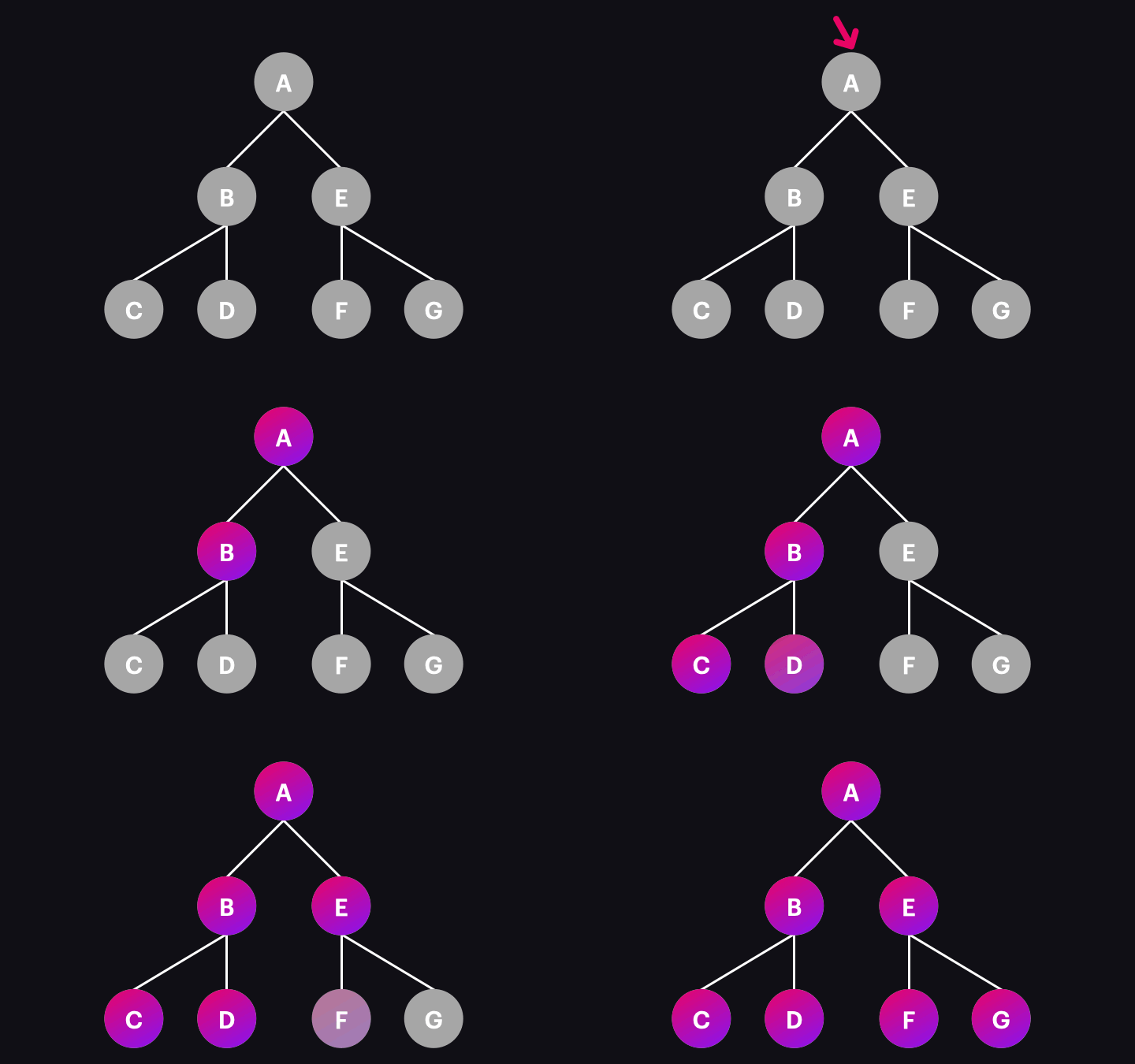
Angular organizes components into a tree structure. Under the default configuration, the high-level rules for a change detection pass look like this:
- The traversal starts at the root component(s).
- Every single node in the component tree gets visited and checked.
- The direction of the traversal is always from the top down.
- The visiting order follows a depth-first search (DFS) algorithm.
You can see the process in action here:
What actually happens when a node gets visited? A handful of operations take place: lifecycle hooks run, bindings get updated, and the view refreshes if needed. We won't dig into all of that here since it's a topic of its own. For now, it's enough to know that when data has changed, the component's view gets updated during change detection.
One misconception worth clearing up: Angular does not "rerender" components during change detection. That would imply the entire template DOM gets replaced, which isn't the case. Angular is selective and only updates the specific DOM nodes — or even just individual attributes — that actually require changes.
The OnPush strategy
Angular ships with two change detection strategies: Default and OnPush. The rules we just described in the "How?" section outline the Default strategy. So what makes OnPush different?
The fundamental rules for traversing the tree stay the same, but OnPush gives us a way to "prune" certain branches during a change detection pass. With fewer operations to execute, performance gets a meaningful boost.
When a component opts into OnPush, neither it nor its children are checked on every pass. They only get checked when they've been flagged as "dirty." If a component isn't dirty, the entire branch below it is simply skipped.
You're free to mix Default and OnPush components in the same application. For instance, if a parent uses OnPush while its child uses Default, the child still gets checked as long as the traversal reaches it — which only happens if the parent was dirty and wasn't cut off.
At this point, the earlier rule about visiting every node no longer holds universally. With OnPush components in the mix, that rule becomes the exception rather than the norm.
Here's an illustration of how that plays out:

What marks a component dirty?
We've established that the OnPush strategy depends on a component's dirty state during change detection. That naturally raises a question: what exactly makes a component dirty? There's a fixed set of circumstances that flip a component into this state:
- An input value changes (assuming immutable updates).
- A template-bound event fires (this covers output emits and host listeners).
- A value gets consumed by an async pipe.
ChangeDetectorRef.markForCheck()is called directly.- The state of a
@deferblock changes.
There's another subtle but important detail: these dirty-marking operations "bubble up" the component hierarchy. This is handled by the markViewDirty function. When a change originates in a nested component, not just that component gets marked (F in the example above) — every ancestor up to the root gets flagged as well (E and A in our case). This guarantees that the deeply nested component (F) is always reachable during change detection and won't get skipped by an OnPush parent that isn't dirty itself.
Imagine the alternative: if only F were marked dirty, a change detection run starting from A would stop short at E (since E is OnPush and clean), and F would never be visited. That's exactly why the bubbling behavior is so critical.
There is one exception to this bubbling rule. When a component gets marked dirty because of an input change coming from a parent's binding, the parent is already in the middle of its own change detection check. There's no point in marking it dirty again. In that case, only the component receiving the new input gets flagged, so it gets processed right after its parent finishes.
Enhancing the “how” – signals
With a solid understanding of Angular’s conventional change detection mechanics in place, we can now turn to the ways this process can be optimized.
Signals have recently become the cornerstone of many of the framework’s most notable advancements, and change detection is no different. For refining the “how,” signals provide a notable upgrade over the standard workflow. Let’s break down the mechanics and what developers must account for.
This discussion presumes you’re already familiar with the fundamentals of signals, signal graphs, and their associated terminology. If not, it’s strongly advised to start with Max Koretskyi’s comprehensive write-up: Signals in Angular – Deep Dive for Busy Developers.
A crucial idea to internalize is that, within the signals graph, the component view operates as a reactive consumer. This means it responds to any signal reads that occur inside the template. A visual representation looks like this:
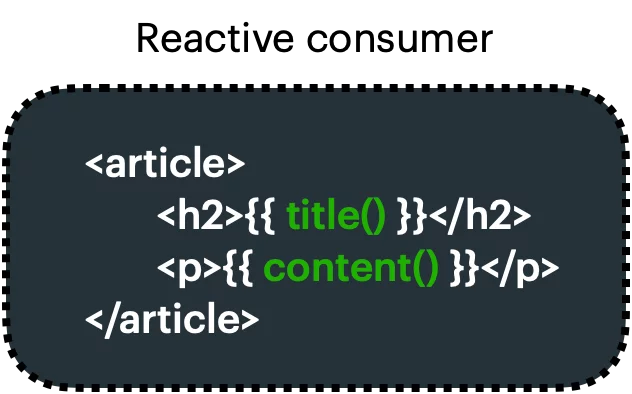
Once a signal that’s read in the template receives a new value, it flags the associated reactive consumer as dirty. It’s vital to highlight this difference – the marking happens on the reactive consumer tied to the component view, not on the component view itself (meaning not on the node within the component tree). If it were the latter, we’d essentially replicate the standard OnPush behavior. Because of this distinction, the outcome differs, as you’ll see shortly.
So, what does flagging the reactive consumer as dirty actually imply for your app? That hinges on which Angular version you’re running. Prior to v17, this action also rendered the component view as dirty, producing an outcome akin to what the AsyncPipe delivers.
In that scenario, the best you could hope for is pairing it with OnPush across every component, which slims change detection down to a solitary path:
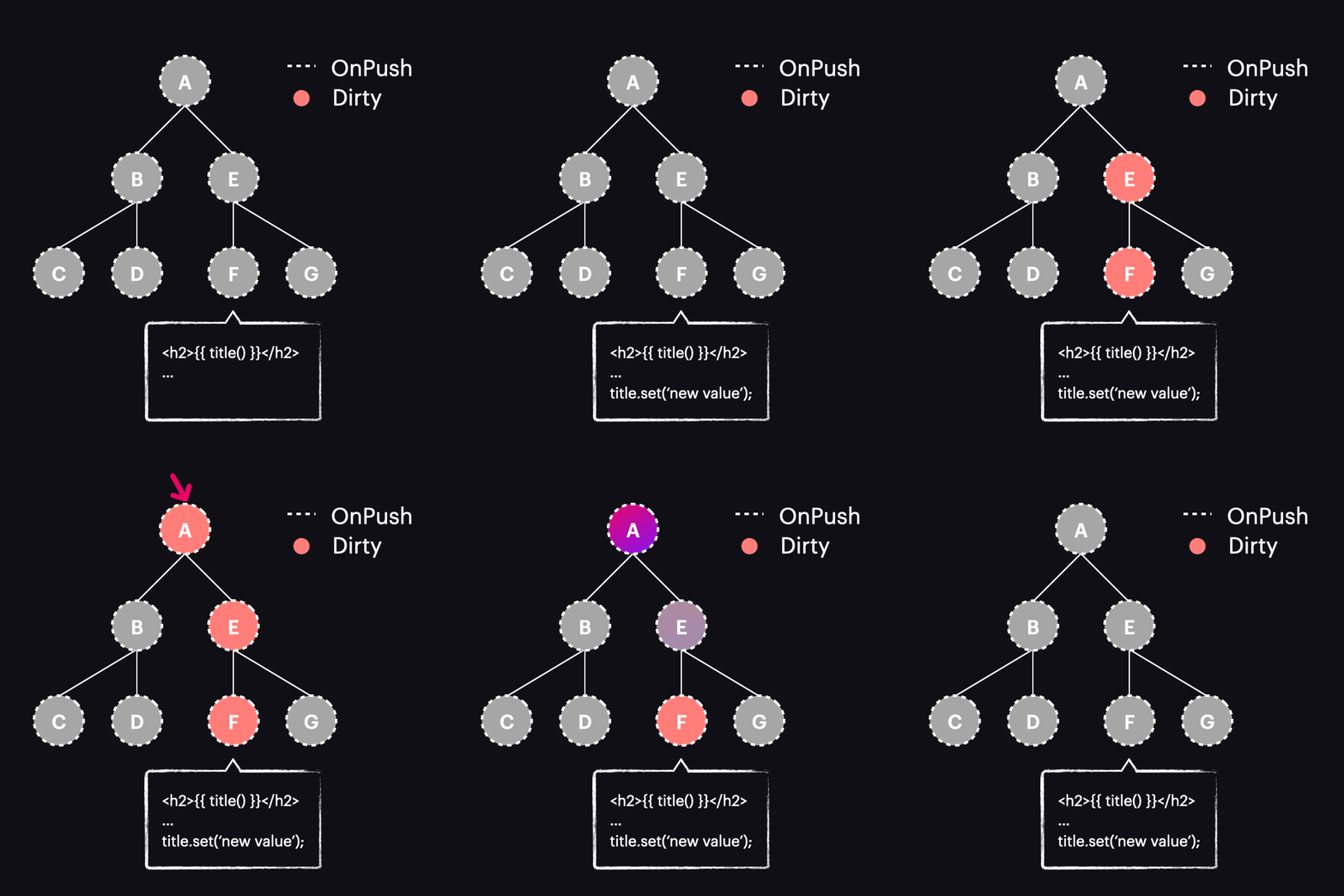
Yet, as we’ve just established, this is functionally identical to the AsyncPipe, so there’s little to gain here.
The situation shifts dramatically with Angular 17 and beyond. In these releases, marking the reactive consumer as dirty no longer marks the whole component as dirty. Instead, a new function, markAncestorsForTraversal, gets invoked. This function travels upward from the component through its ancestor chain up to the root (just as markViewDirty would), but the key twist is that it doesn’t dirty the current component – the reactive consumer already has that handled. Its ancestors, by contrast, receive a fresh flag called HasChildViewsToRefresh. Here’s how that looks:
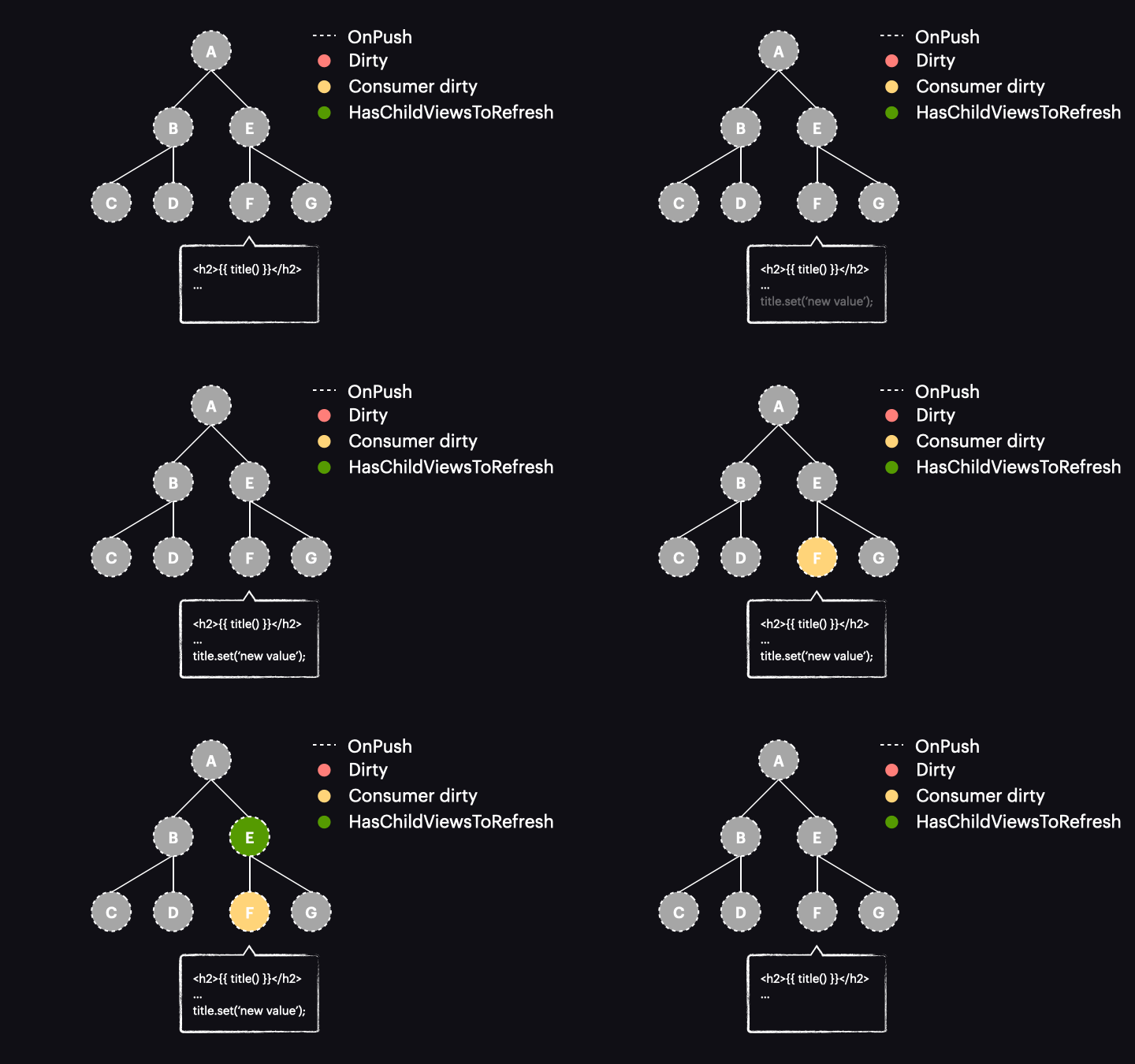
The change detection traversal algorithm has also been reworked. Now, when the process kicks off with the tree in this configuration, it bypasses components A and E without performing any change detection on them. That’s because they’re OnPush but not dirty. Armed with the new HasChildViewsToRefresh indicator, Angular keeps moving through nodes carrying that flag, hunting for the component that actually needs a change detection pass (in our case, the one whose reactive consumer is dirty). When it lands on component F, it sees that the reactive consumer is marked dirty, so F gets processed – and it’s the sole component touched.
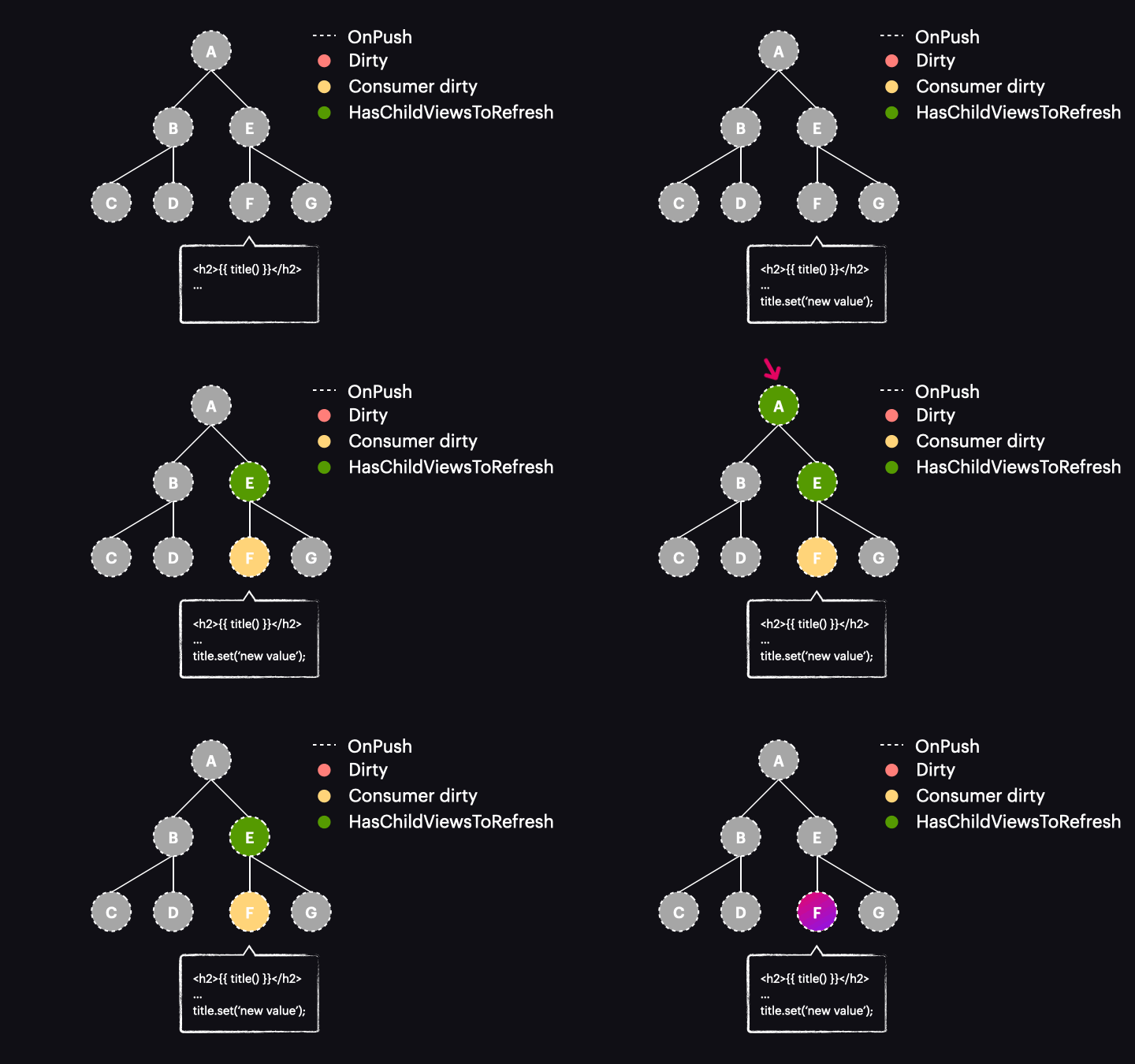
Pretty compelling, isn’t it? We’ve shifted from change detecting an entire path of components down to a single one. While this is a simplified component tree illustration, the performance uplift in real-world applications is far more pronounced.
This newfangled strategy, where signals enable change detection on just one component, is frequently termed “semi-local” or “global-local/glocal” change detection.
Gotchas to watch for
However, a few caveats warrant attention. Consider this scenario, where a user click alters a signal:
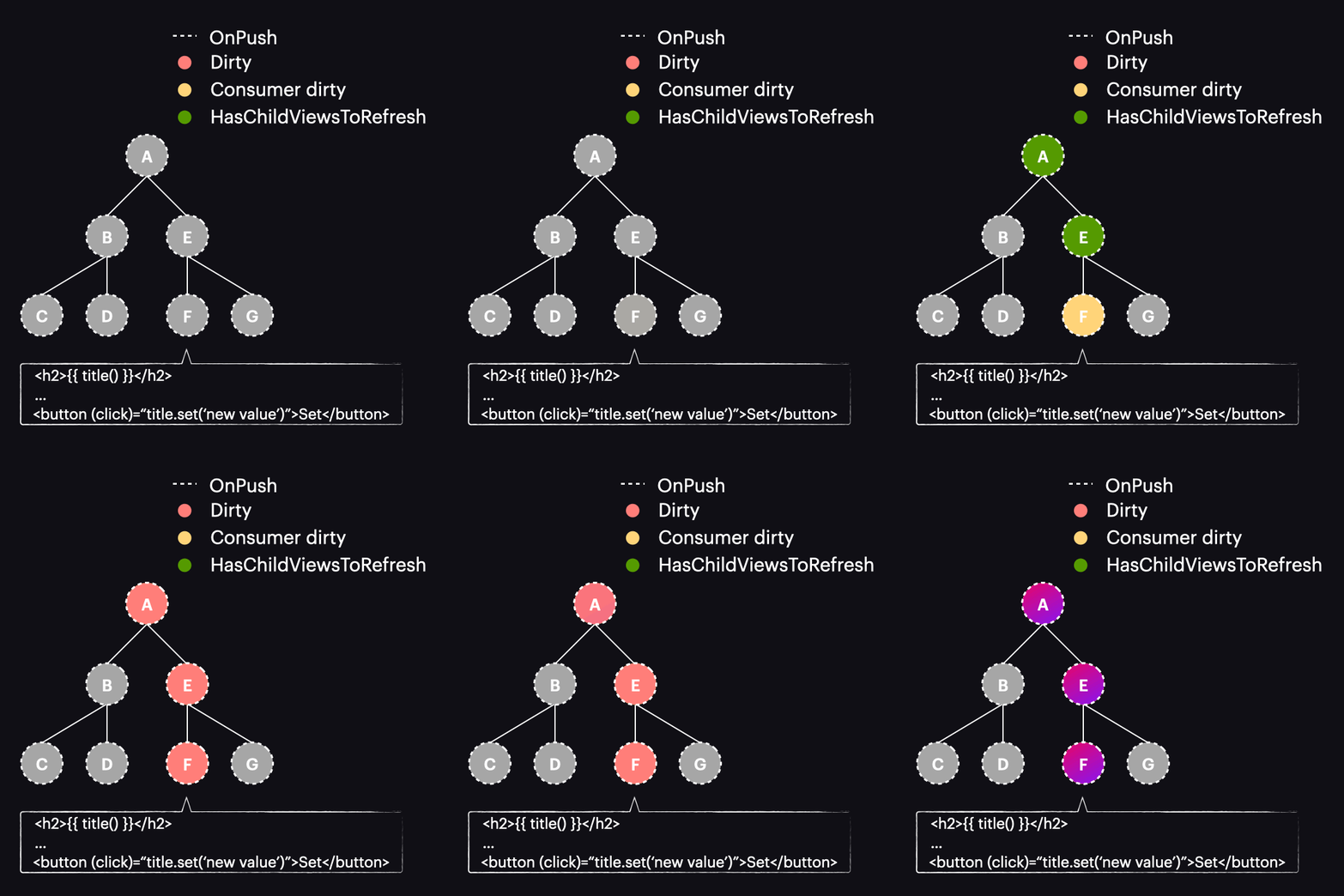
After that button press, you’ll observe that rather than the earlier described flow, our component along with every ancestor gets flagged as dirty, causing all of them to be change detected. Why’s that? It comes down to the fact that the old change detection rules are still operative. Recall the triggers that dirty a component – one of them is template-bound events, and that’s exactly what’s happening here. If you trace through such a case in debugging, you’ll find that alongside markAncestorsForTraversal, markViewDirty is also being invoked.
This brings us to a key takeaway: the origin of the signal’s value change is what matters. If that change is set off by something that dirties the component, you won’t see any benefit over the conventional OnPush strategy, such as when leveraging the async pipe. To tap into semi-local change detection, the trigger must stem from an action that avoids dirtying the component yet still schedules a change detection run. A few prime examples are:
setInterval,setTimeoutObservable.subscribe,toSignal(Observable), for instance, anHttpClientrequest- RxJS
fromEvent,Renderer2.listen
Another pitfall – more straightforward but still capable of derailing your efforts – is having components in the app that don’t adopt the OnPush strategy. In the tree below, assuming the trigger for the signal change doesn’t mark components as dirty, the ABCD subtree will still go through change detection together with our F component, purely because those components lack OnPush and are hence re-evaluated on every cycle (the default strategy remains in effect for them).
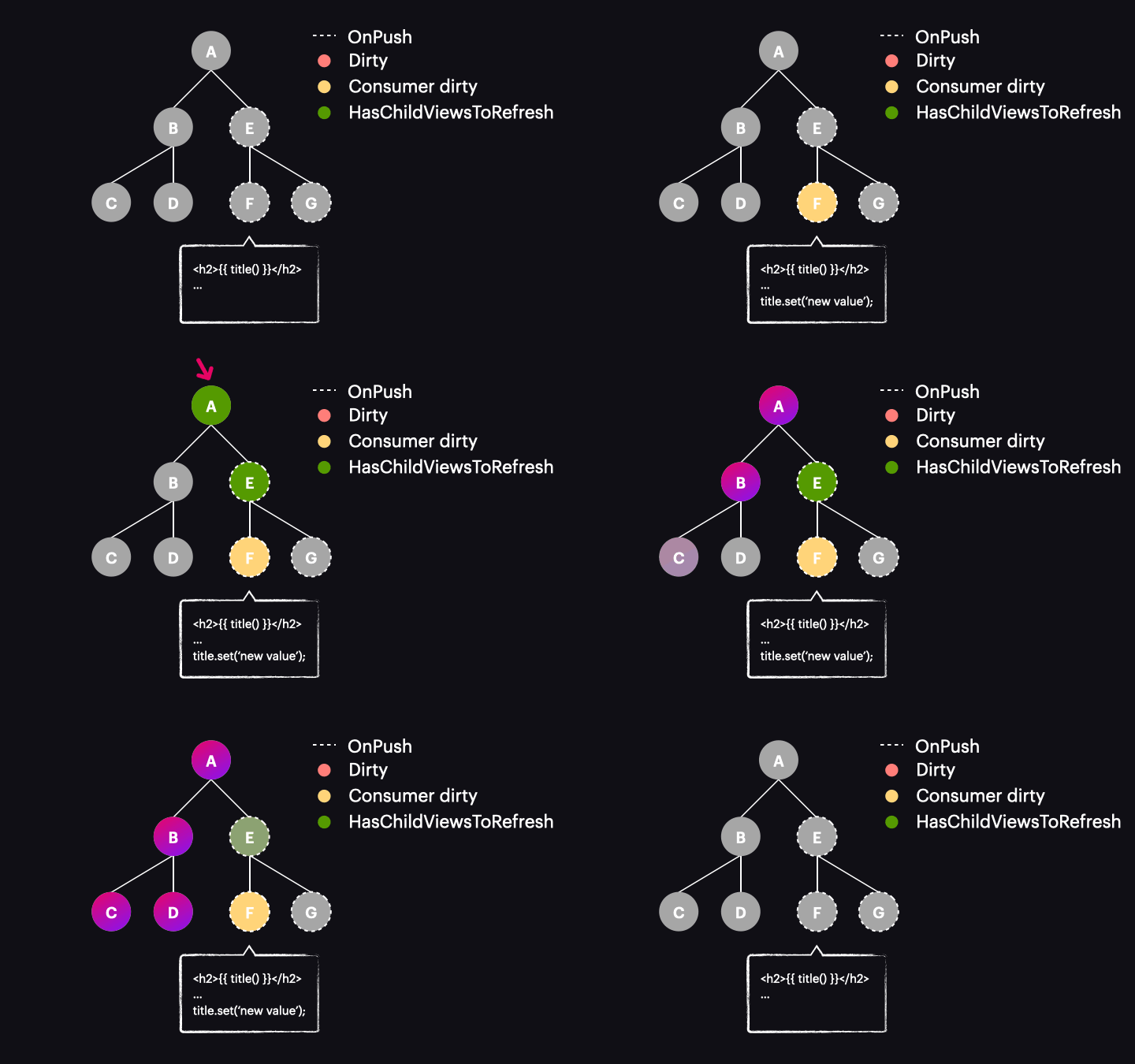
Refining the "when" – Zoneless
We’ve seen how signals have transformed the "how" behind Angular’s change detection. Now, let’s shift our focus to the other side of the equation: what improvements are possible for the "when"? The Angular team’s solution here is to embrace a "Zoneless" architecture.
The case for removing Zone.js
Before diving into the new approach, it’s worth examining the motivations for dropping Zone.js entirely. Several factors come into play:
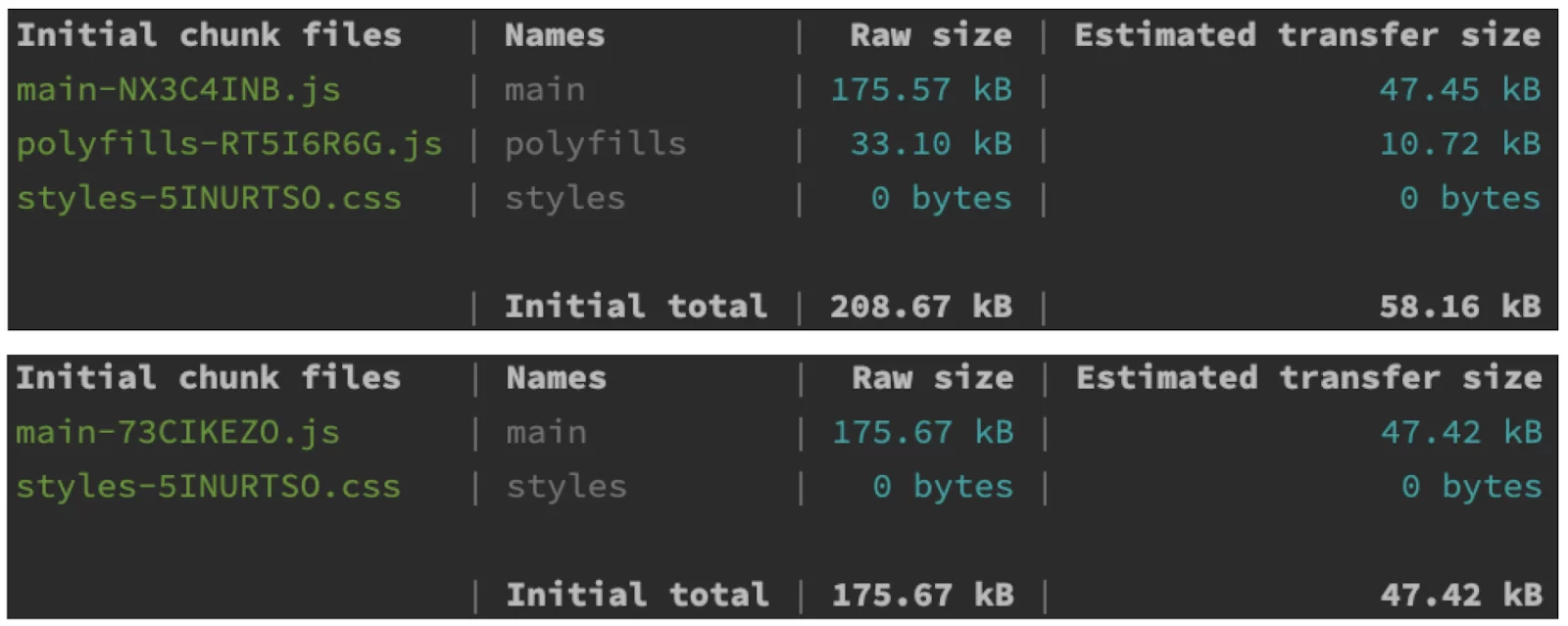
- Decreasing initial bundle size: Take a look at these two outputs (Zone-full and Zoneless). The numbers show that Zone.js contributes roughly 30kB raw and about 10kB gzipped. That’s a substantial amount for a dependency that must be eagerly loaded before your app can even begin bootstrapping.
- Avoiding redundant change detection runs: Zone.js serves Angular by signaling when async operations complete, but it lacks insight into whether those operations actually modified any data. As a result, the framework tends to be overzealous, scheduling a change detection pass “just to be safe.”
- Enhancing the debugging experience: Many of us are familiar with the daunting call stacks that appear during development (the screenshot below only captures about 20% of the stack – and it’s just for a click handler!).
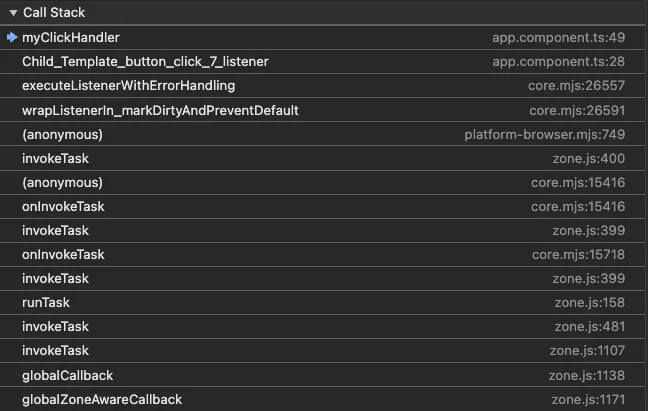
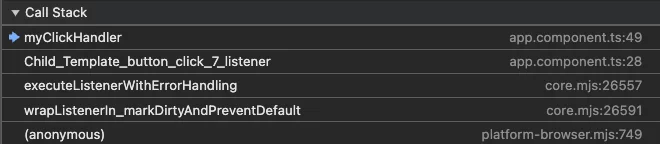
The tangled mix of Zone.js, framework internals, and application code makes debugging more cumbersome. Although the Angular team made significant strides in debugging in version 15, completely removing the Zone.js layer still offers a cleaner experience.
- Accelerating startup: Beyond needing to be loaded upfront, Zone.js also has to execute to patch and intercept various browser APIs. Removing this process can reclaim valuable milliseconds during initialization.
Let me be clear – I have a great deal of respect for Zone.js as a tool (or at least, I did when it first appeared). It has played a pivotal role in Angular’s early adoption and success. It abstracts away a lot of complexity, allowing even newcomers to work productively without worrying about the underlying mechanics.
However, this convenience isn’t free. While many applications will operate perfectly well with Zone.js in place, exploring alternatives becomes a logical step when performance and complexity are paramount.
So, what does Angular offer as a replacement? Since we’ve established that triggering change detection falls to the scheduler, it’s fitting that a new scheduler is the answer.
The Zoneless scheduler
Debuting in version 17.1, the new Zoneless scheduler discards its dependency on Zone.js events. Instead, it waits for explicit signals from other framework parts. This marks a fundamental shift in philosophy. Instead of running change detection because “something happened that might have changed data,” the framework now reacts only when it’s directly informed that a data change has occurred.
To make this happen, the new scheduler exposes a public notify method, which gets invoked under these circumstances:
- When a signal read within a template is assigned a new value (specifically, when
markAncestorsForTraversalis executed). - When a component is flagged as dirty through the
markViewDirtyfunction. This can be triggered by anAsyncPipereceiving a new value, an event bound in the template, aComponentRef.setInputcall, or a manual invocation ofChangeDetectorRef.markForCheck, to name a few. - When an
afterRenderhook is registered, or when a view is reattached to the change detection tree or detached from the DOM. In these instances,notifyis invoked, but it only processes the hooks and does not refresh the view.
A natural question is whether this could lead to excessive change detection runs, especially if multiple signals change rapidly or events fire in quick succession. The scheduler’s design accounts for this. It aggregates incoming notifications over a brief window and then triggers a single change detection cycle, rather than launching separate runs for each event. This coalescing behavior relies on a race between setTimeout and requestAnimationFrame, though we won’t examine those internals here. The essential point is that multiple notify calls are batched for optimal performance.
To activate this new scheduler, your app configuration must be adjusted as follows (the crucial addition being provideExperimentalZonelessChangeDetection, while the remaining setup depends on your current structure):
import {ApplicationConfig, provideExperimentalZonelessChangeDetection} from '@angular/core';
import {bootstrapApplication} from "@angular/platform-browser";
import {AppComponent} from "./app.component";

export const appConfig: ApplicationConfig = {
 providers: [
   provideExperimentalZonelessChangeDetection(),
 ]
};

bootstrapApplication(AppComponent, appConfig)
 .catch((err) => console.error(err));

// remove the following from angular.json:
//
// "polyfills": [
//   "zone.js"
// ],
The animation below demonstrates how the Zoneless scheduler functions in an application leveraging OnPush and signals:
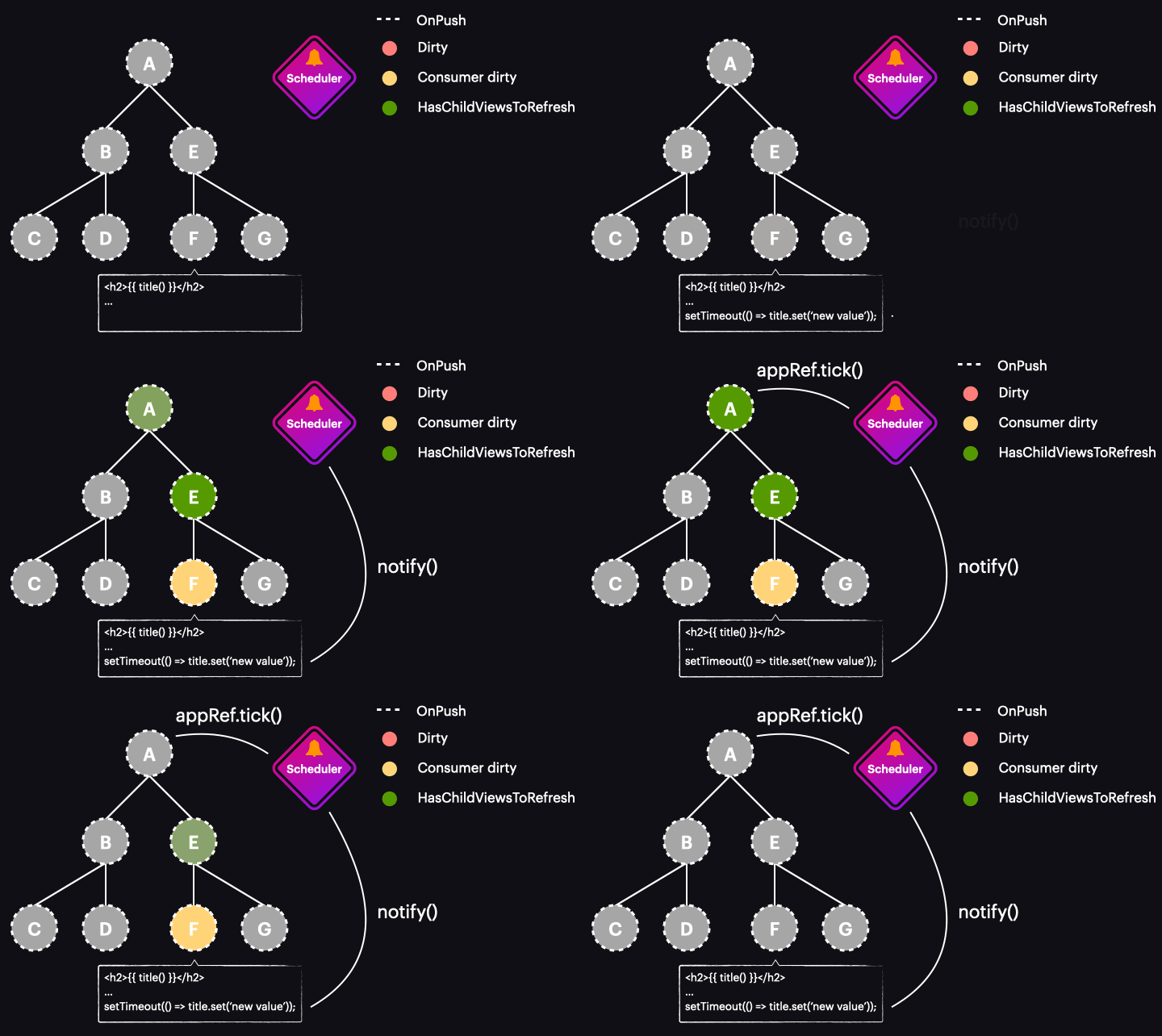
This, of course, represents an ideal scenario. A single signal change marks just one component and initiates a change detection pass only for that component. It’s a perfect alignment of necessity and timing – running change detection precisely where and when it’s required.
It’s worth noting that adopting a Zoneless approach doesn’t mandate using signals. The new scheduler responds to a broader range of notifications beyond signals (as outlined earlier), so applications rich in OnPush components can take advantage of this feature as well.
Furthermore, a full migration to Zoneless isn’t a prerequisite for better performance. You can still achieve noticeable gains by sticking with the zone-based scheduler.

The zonefull/hybrid scheduler
In the previous section, we discussed the Zoneless scheduler’s introduction in 17.1. Angular 18 brought substantial refinements to that implementation and also introduced a notable upgrade to the existing zone-based scheduler by integrating the explicit notification mechanism we’ve explored. Consequently, this scheduler now responds not only to Zone.js events but also to direct calls to the notify method.
Prior to Angular 18, a signal update occurring outside the zone wouldn’t schedule change detection – only operations executed within the zone would do so. Consider this scenario, where a view wouldn’t refresh:
zone.runOutsideAngular(() => {
  httpClient.get<Post>('https://jsonplaceholder.typicode.com/posts/1')
    .pipe(
      delay(3000),
      map((res) => res.title)
    ).subscribe((title) => {
      this.title.set(title);
    });
});
With the enhanced hybrid scheduler, the same scenario now results in a view refresh. The signal value change invokes the notify method, and the distinction between being inside or outside the zone becomes irrelevant.
This paves the way for a host of new opportunities for applications that aren’t yet Zoneless-ready but can still enjoy the advantages of a gradual transition.
Wrap-up
I trust this article has clarified the progress being made in Angular’s change detection and shown how these new concepts can work in tandem. One takeaway I’d love for you to have is that these innovations don’t require an all-or-nothing commitment. If that fear is holding you back, remember you can ease into signals, gradually convert components to OnPush, and eventually move toward a Zoneless setup. Each step along the way brings its own benefits.