
Inline templates: a closer look
While scrolling through X recently, I stumbled upon a post by Younes asking the community whether they would consider moving from templateUrl to inline templates if Angular allowed importing TypeScript structures directly into the template without assigning them to class properties.
If (BIG HYPOTHETICAL IF) you could use anything imported or defined in an #Angular component’s TS file inside inline templates, would you switch from using `templateUrl` to inline templates?
Of course, this implies IDE / language service support.
Cf. example below
— Younes (@yjaaidi) October 26, 2024
Personally, I’m already a big fan of inline templates, but it seems not everyone shares that enthusiasm. That’s precisely what I’d like to dig into here. Along the way, I’ll also demonstrate how custom code snippets in your IDE can boost your productivity when working with inline templates.
And if you’re not yet following Younes, I strongly suggest you do – he puts out some fantastic content.
The two template options in Angular
Let’s start by revisiting the template choices Angular offers. Thanks to the Angular CLI, generating a component is a breeze – just one command. By default, that command produces four files:
- A
.tsfile containing all the logic - An
.htmlfile where the component’s view lives - A
.css/.scssfile for styling - A
.spec.tsfile for testing
However, we have full control over what gets generated by adding extra flags or tweaking the configuration file. We can adjust things like change detection strategy, skip test files, set a custom selector, or opt for an inline template.
An inline template means defining the HTML directly in the TypeScript file via the template property. So you have two paths: use a separate .html file:
// hello.component.ts
@Component({
  standalone: true,
  selector: 'app-hello',
  templateUrl: './hello.component.html',
})
export class HelloComponent {}
// hello.component.html
<div>Hello world!</div>or embed the template as a string in the .ts file:
// hello.component.ts
@Component({
  standalone: true,
  selector: 'app-hello',
  template: `<div>Hello world!</div>`,
})
export class HelloComponent {}
The --inline-template flag defaults to false, so the CLI will create an .html file for your component’s template by default. This is what we Angular developers are accustomed to – keeping the view in an external file to separate concerns. It feels natural, correct, and very Angular-ish, doesn’t it? Of course it does, but I want to approach this from a different angle and explore the potential perks of having the template right inside the .ts file.
The “bad practice” myth
Looking through various opinions online, I found threads on Reddit and StackOverflow where some folks claim that inline templates are a bad practice. I firmly believe that’s not accurate! In fact, inline templates can encourage developers to produce cleaner, more thoughtful code.
How inline templates simplify components
Inline templates offer advantages that often fly under the radar. By keeping both logic and template together, they give you immediate context and clarity, which makes understanding and maintaining components much simpler.
While large inline templates can make the TypeScript file unwieldy, breaking components into smaller, focused pieces mitigates this issue. This approach keeps your code modular and manageable without sacrificing readability.
In the example below, I’ll demonstrate how using inline templates can streamline your components and improve your development workflow – all while maintaining a tidy and organized codebase.
A practical example
For instance, in our angular.love repository, I came across a header component that had an 80-line template in its .html file. Moving that template inline would make the .ts file 128 lines long, with 63% of it being HTML. That’s a bit much, isn’t it?
Instead of one large header.component.ts, we can split it into smaller, more manageable pieces:
header.component.tsheader-logo.component.tsheader-language.component.tsheader-mobile-menu.component.tsheader-hamburger.component.ts
The resulting template looks like this:
<header class="bg-al-background/95 z-30 h-20 w-full border-b shadow-xl">
  <div
    class="mx-auto flex h-full w-full max-w-screen-xl items-center justify-between px-6 py-4 xl:px-0"
  >
    <al-header-logo />

    <div class="flex flex-row items-center">
      <al-navigation class="hidden lg:block" />

      <al-header-language
        [language]="language()"
        (languageChange)="languageChange.emit($event)"
      />

      <ng-content />

      <al-header-hamburger
        [isOpened]="showNav()"
        (toggleOpen)="toggleNav()"
      />
    </div>
  </div>
</header>
<al-header-mobile-menu [isOpened]="showNav()" (closed)="toggleNav()" />
To see the original component, check out this PR – the code is too long to include here https://github.com/HouseOfAngular/angular-love/pull/339/files
We went from 80 lines of template down to 24, making the header component just 67 lines in total! Of course, none of that code vanished – it still exists, just spread across different components. We simply distributed the pieces, giving the parent component a clean, descriptive view.
Wrapping up the refactor
To be honest, this refactor doesn’t seem revolutionary at first glance. The UI looks identical, behaves the same way, and we ended up with more files to manage. But that’s not the point – this example illustrates how your perspective shifts just by using an inline template. I’m confident this component would have looked this way from the start if an inline template had been used originally. Of course, we could reach similar conclusions with external templates, but inline templates provide instant feedback as a component grows.
You might argue that components are meant to be reusable units of code. The components above certainly aren’t reusable, are they? Well, I don’t think we need to view it that way. Components shouldn’t be judged solely on reusability – there are other important factors. So let me list the potential benefits of smaller components:
- Better separation of concerns – each component has a single responsibility, which lowers complexity and makes debugging or updates simpler.
- Future reuse becomes easier – even if you don’t predict reuse now, smaller components could prove handy later, either for reuse or for isolated testing.
- Higher-level abstraction – smaller components let you hide implementation details, making the parent template more succinct and easier to understand.
- Enhanced focus – breaking things down into smaller, more focused units reduces the cognitive load needed to grasp and maintain the code. This helps you stay organized and feel much better at the day’s end, since you’re not overwhelmed by overly complex components.
Streamlining code reviews
Keeping templates in separate files forces you to mentally map the relationship between the component’s logic and its view. This can blur the overall picture during review, since you’re constantly toggling between files to see how everything connects. Placing the template alongside the logic in one spot often gives better context and makes the review process more intuitive and efficient. In short, inline templates can accelerate code reviews and speed up iteration on changes.
Dealing with boilerplate
Once you adopt a different mental model, you’ll likely create more components than before. That’s not really a problem, since we have the CLI, right? Well, I’ll admit – I’m too lazy to use the CLI, even if it’s just one click away. But modern IDEs pack powerful features that let you generate any piece of code quickly. In WebStorm, this feature is called Live Templates – it prints a predefined snippet when you type a specific abbreviation. There are tons of built-in ones, like a-component or a-component-inline. Those are great, but I wanted something more tailored to my needs, so I created my own live template.
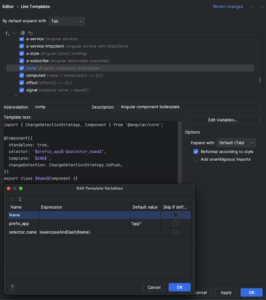
VSCode users can achieve the same effect by installing the Angular Snippets extension by John Papa https://marketplace.visualstudio.com/items?itemName=johnpapa.Angular2.
If you want them more custom, you can craft your own:
{
   "Angular Standalone Component":{
      "prefix":"comp",
      "body":[
         "import { ChangeDetectionStrategy, Component } from '@angular/core';",
         "",
         "@Component({",
         "\tstandalone: true,",
         "\tselector: '${2:app}${3:${1/[A-Z]/-${0:/downcase}/g}}',",
         "\ttemplate: `$0`,",
         "\tchangeDetection: ChangeDetectionStrategy.OnPush,",
         "})",
         "export class ${1:Name}Component {}"
      ],
      "description":"Creates an Angular standalone component"
   }
}
This one automatically transforms the given Name into a dash-separated, lowercased selector.
This way, you can spin up new components by simply typing the defined prefix. You can always expand your toolkit by adding new snippets for directives, pipes, and more.
Is an inline template always the right call?
Not necessarily. While inline templates have their perks, they aren’t always the best fit. In some scenarios, templates can balloon in size, especially with complex forms. The boilerplate needed for value accessors can make splitting the template impractical. In those cases, a separate file can help keep context clear and the code maintainable.
However, in many situations – particularly for smaller or more focused components – inline templates can noticeably boost readability and development speed by offering immediate context without file-switching. This tight link between logic and view can streamline development, especially in simpler components where keeping everything together boosts efficiency.
Why not mix both?
There’s no single right way to do this. Mixing inline and external templates is perfectly fine, depending on the situation. The choice should be yours, guided by your preferences or experience. Ultimately, the aim is to pick the approach that serves your project’s needs and makes your workflow as efficient as possible.
Finding the sweet spot
So, how do you decide between an inline template and a separate file? Is there a clear threshold for when to use inline? Is there a line-count limit for inline templates? Do you even need them? And won’t mixing both approaches create chaos in the codebase? These are questions you and your team will have to answer based on your project’s requirements.
My personal advice is to give inline templates a chance whenever possible. A good starting point is to create components with an inline template from the get-go. Keeping the template inline works well as long as the context window lets you easily follow the component’s flow and logic.
Key takeaways
In this piece, we weighed the pros and cons of inline templates in Angular. While they might not always suit complex or large components, they shine in terms of readability and efficiency for smaller, focused ones. We touched on how breaking components down and keeping templates inline can simplify development, ease code reviews, and offer better context. In the end, the choice between inline templates and external files depends on your project’s needs, but it’s worth exploring inline templates, especially for smaller components. The key is to find the right balance that works for you and your team.