The previous article on Angular.love laid out the core principles behind Claude Skills and how they keep language models from dragging legacy patterns into modern codebases. Without guardrails, an LLM will happily produce an Angular 8 component stuffed with constructor injection and a dedicated NgModule file. That earlier post addressed this by crafting custom skills or leaning on community-maintained packages.
The Angular core team recently integrated the official angular-developer skill straight into the main framework repository. This piece dissects the skill’s internal architecture, explains why it relies on an orchestrator pattern instead of a modular split, and walks through wiring it into a typical development setup.

Determining the Context Strategy
When defining conventions for an agent, the first decision is how to inject context. Options include a single project-level CLAUDE.md, distributed community skills (such as the AnalogJS set), or the official unified skill. Each carries distinct trade-offs.
A monolithic CLAUDE.md burns a sizable chunk of the context window on every interaction, even when the included rules have zero relevance to the assignment at hand. The AnalogJS modular skills, on the other hand, demand manual installation and upkeep of ten separate packages like angular-signals and angular-ssr.
The official Angular skill sidesteps both problems by functioning as a single orchestrator. Adopting it as the universal baseline across v20+ projects provides a consistent, framework-aligned rule set from the start, while token usage stays limited to the task-specific domain. We then reserve CLAUDE.md for project-specific state management decisions and internal folder layouts.
Anatomy of the Architecture
Agent instructions face a fundamental constraint: progressive disclosure. Loading thirty pages of API docs into a single prompt is not viable. The official Angular skill addresses this by structuring itself as a router. The entry point is a compact SKILL.md that announces tool capabilities and acts as a dependency graph mapping to over 30 specialized markdown files housed in a references/ subdirectory.
At startup, Claude reads only the YAML frontmatter.
---
name: angular-developer
description: Expert Angular developer skill. Use this for any Angular-related tasks, including component creation, routing, forms, signals, and testing.
---
When a routing-related prompt arrives, Claude processes the SKILL.md body, decides it needs define-routes.md and loading-strategies.md, and leaves the remaining 28 files — such as reactive-forms.md or component-harnesses.md — unloaded. This mechanism yields deep, precise technical context for the given task without swelling token usage.
Setup and Installation
Configuring the local environment for the official Angular team skill is straightforward with the Vercel skills CLI, which handles both installation and remote synchronization.
Point the CLI at the Angular skills repository to install the skill.
npx skills add angular/skillsKeep in mind that angular/skills is a snapshot repository. Upstream content lives in the main repo. Any change there triggers a new snapshot commit in the mirror.
The CLI manages file placement through symlinks. It downloads the canonical skill files into a global .agents/skills/angular-developer/ directory, then creates a symlink at .claude/skills/angular-developer/ pointing to that global store.
Verifying Skill Activation
Two methods confirm whether a skill is active: firing a test prompt and inspecting the trace, or querying the agent’s current state directly. The prompt method validates output but consumes tokens in the process.
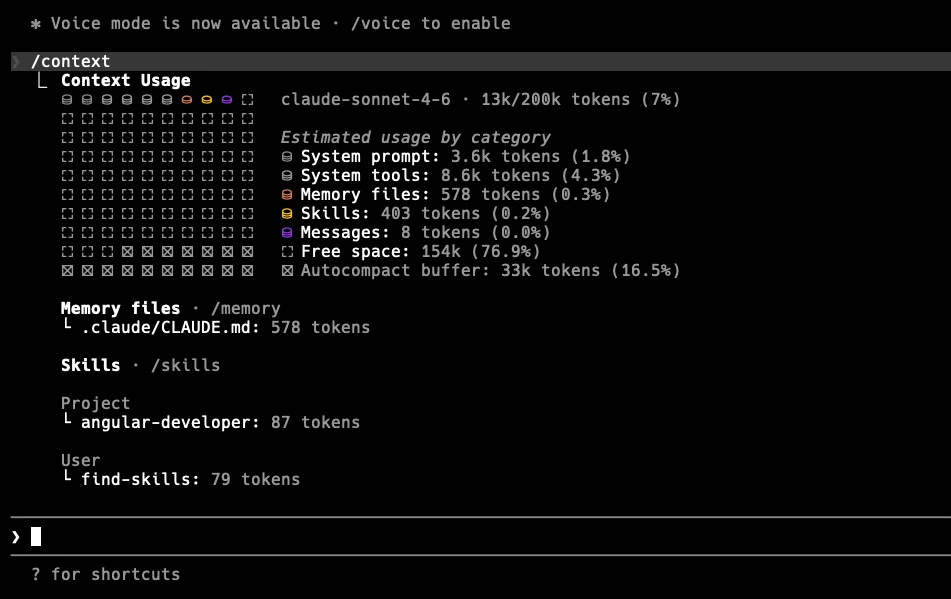
Claude Code exposes diagnostic commands for internal inspection. Rather than guessing whether the angular-developer orchestrator loaded through the .claude/skills symlink, we can pull the active session state with /context.
Impact on Code Quality and Agent Workflow
The real standout of the official skill is its built-in verification loop. Generating code solves only part of the problem; confirming it compiles against the existing TypeScript configuration is the rest.
The official skill insists that Claude executes ng build after generating or altering files. We can see this in action by asking the agent to produce a component with a deliberate gap.
claude "Create a simple user list component that accepts a list of users as input and emits a selected user event."Claude creates the file using the modern input() function, following the skill’s directive against @Input() decorators. Right after writing the file, the agent runs a shell command per the skill’s mandate.
The terminal trace reveals the subagent lifecycle at work:
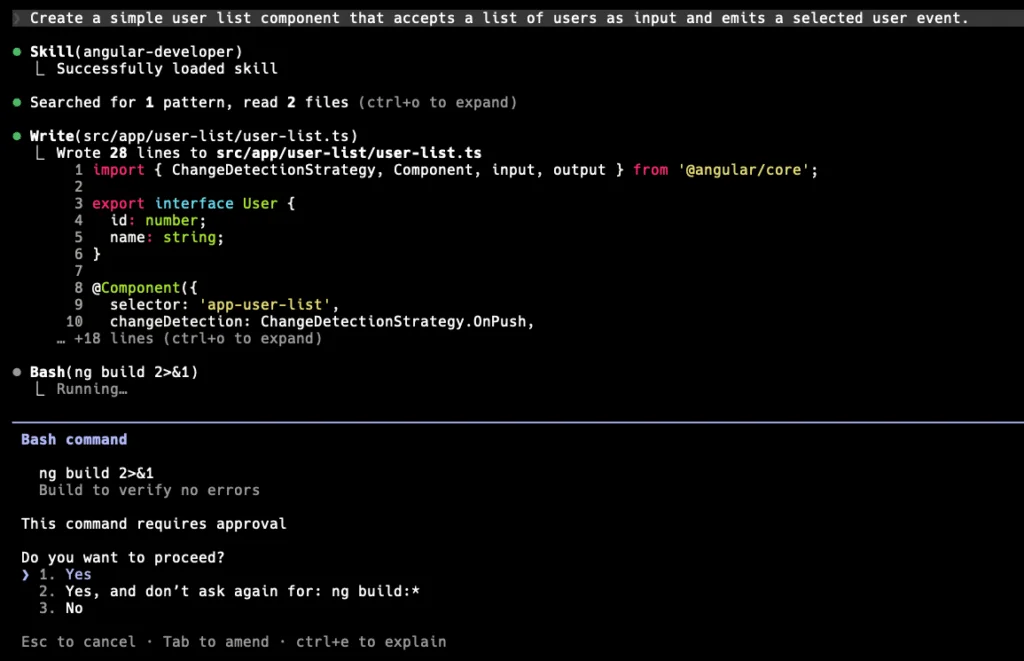
After detecting the compilation failure, the agent corrects the missing import, rebuilds to confirm the fix, and only then hands control back to the terminal.
Keeping the Baseline Fresh
How do we stop the agent from falling behind as the framework evolves? Angular ships minor releases on a steady cadence. If a local agent holds onto an outdated angular-developer skill, it eventually regresses to generating stale patterns.
The skills CLI manages versions through a .skill-lock.json file. This file tracks the skillFolderHash of each installed skill against the upstream repo.
Drift checks and updates run from the terminal.
# Evaluate the local hash against the remote main branch
npx skills check
# Apply the updates interactively
npx skills update
Automation is worth the effort — relying on developers to remember manual pulls is a losing bet. A weekly CI/CD job running npx skills update --yes can open an automatic pull request whenever .skill-lock.json changes.
Stacking Project Context
Since the official skill enforces framework-level rules — for instance, using @if rather than *ngIf and omitting standalone: true since it is the default in v20 — project-specific architectural choices must be handled separately.
The answer is a terse CLAUDE.md file at the workspace root. With the official skill covering the Angular API surface, our CLAUDE.md only captures domain constraints.
## Architecture
- We use NgRx SignalStore for all state management. Never use RxJS BehaviorSubjects for local state.
- Feature modules follow the feature-driven directory structure: `src/app/features/[feature-name]/`.

## Testing
- We use Vitest. Do not generate Karma or Jasmine configuration files.
- All components must have a corresponding `.spec.ts` file utilizing Angular Testing Library, not standard TestBed fixture methods.
Pairing the official angular-developer orchestrator with a rigid 10-line CLAUDE.md yields a sandboxed environment where the agent produces compile-ready, structurally coherent, and architecturally sound code.
Wrap-Up
The official angular-developer skill should be the mandated baseline for any v20+ workspace. It mirrors the Angular core team’s view of how routing, state, and components ought to look by default. Offloading framework-level syntax constraints to the official repo means we stop wrestling with Claude’s stale training data.