
Angular 16: Signals and Beyond
Angular's development velocity has reached unprecedented levels. Looking back at the introduction of Angular 14 and 15, we already saw a steady stream of fresh ideas and features. But as we now examine version 16, it's clear that this rapid cadence has become the norm rather than the exception. Surprisingly, Angular 16 delivers an even more substantial set of groundbreaking capabilities than its predecessors. Let's dive into the highlights.
Signals in Angular 16
Unquestionably, signals represent the most talked-about addition in this release. The signals territory is expansive, and our blog will be dedicating substantial coverage to it. For now, I'll keep things concise and give you a quick overview of what signals are and why they hold such significance.
const count = signal(0);
const isEven = computed(() => count() % 2 === 0);

effect(() => {
 console.log('Count changed', count());
 console.log('Is count even?', isEven());
});

function increment() {
 count.update(c => c + 1);
}

function reset() {
 count.set(0);
}
Signals aren't breaking entirely new ground. Frameworks like Solid.js have leveraged them for quite some time, so this concept is only new to the Angular ecosystem.
You might have come across the phrase "reactive primitive" when reading about signals and wondered what it implies. Essentially, a signal functions as the fundamental building block of the reactivity system. Think of it like a standard variable—it stores a value, and you can access it synchronously whenever you need. But here's the differentiator: when that value shifts, the signal can emit notifications to all the nodes that are hooked into it. This could be a component template that reads it, a derived signal created with computed, a dedicated effect function, or any other dependent item. This gives us a mechanism that informs others about value changes, builds derived state restrictively, and still permits synchronous reads—all while being performant. Pretty impressive, right?
Why do signals carry so much weight? It's about the ripple effect they'll have on other parts of the framework. Currently, Angular's change detection is deeply reliant on zone.js. With signals introduced, the reactivity model looks set to change fundamentally—the change detection layer could rely on notifications from signals to trigger re-renders. Here's a crucial insight: zone.js merely signals that something might have changed. With signals, the framework will know not only whether something changed but also precisely what changed. This opens the door to per-component—or even finer-grained—change detection. These are just a few dimensions of signals' potential; other areas, like state management libraries, could also integrate signals and build new abstractions atop them.
It's important to clarify that signals are an optional feature. You can continue using Angular in the same manner you always have. And if you're concerned about RxJS being set aside, rest assured—it's evolving to work together with signals, ensuring interoperability.
For those eager to explore signals in greater depth, keep an eye out; we're already working on a dedicated article. Meanwhile, we strongly suggest reviewing the official RFC. It's where the Angular team presents the initial signal design, the rationale behind their decisions, and—just as importantly—accepts community queries and feedback. The RFC encompasses four distinct sections: the rationale for adopting signals as the reactive primitive, the signals API, signal-based components, and the interplay between signals and observables. Those links are all accessible from the main document referenced above.
Server-side rendering
Server-side rendering has seen some major upgrades in Angular 16. Previously, Angular SSR applications relied on destructive hydration. That means the server engine generates the app, you see it on screen, and once the client-side bundle downloads and boots up, it wipes out the existing DOM and rebuilds the client app from the ground up. This approach leads to visible flickering and negatively affects certain Core Web Vitals values, including LCP and CLS. Although there have been workarounds to mitigate these downsides, none effectively address the root cause.
Angular 16 introduces non-destructive hydration. This method is a clear improvement: the server renders the app, you see it, and when the client bundle arrives and initializes, it adopts the existing DOM, augmenting it with client-side functionalities like event listeners—rather than replacing it entirely.
This non-destructive hydration is in developer preview, but it's ready for you to experiment with today. Simply add provideClientHydration() to the providers when you're bootstrapping a standalone app:
bootstrapApplication(AppRootCmp, {
 providers: [provideClientHydration()]
});
Or, if your app is module-based, you can include the same provider in your root module (typically AppModule).
For cases where hydration isn't suitable—such as components that directly manipulate the DOM using browser APIs—you have the option to bypass hydration for specific components (or component trees). You can leverage either of these methods:
<test-component ngSkipHydration />or
@Component({
 ...
 host: {ngSkipHydration: 'true'},
})
class TestComponent {}
Additionally, SSR receives other enhancements. For instance, HTTP requests made on the server can now be cached and reused on the client; this logic is now built into HttpClient itself and activates it via the withTransferCache function. Another addition is the provideServerRendering function, which sets up the necessary providers to run a standalone app with SSR (serving as the counterpart to ServerModule).
Required Inputs
Marking inputs as required has been a long-requested feature. Before Angular 16, there was no built-in way to enforce this, but a workaround involving the component selector was common:
@Component({
 selector: 'app-test-component[title]', // note attribute selector here
 template: '{{ title }}',
})
export class TestComponent {
 @Input()
 title!: string;
}
Unfortunately, this approach has its issues. For starters, it clutters the component selector—every required input name has to be appended there, which complicates refactoring. It also breaks IDE auto-import features. If you forget to supply a value for an input designated this way, the resulting error is rather misleading since no "incomplete" selector matches anything:
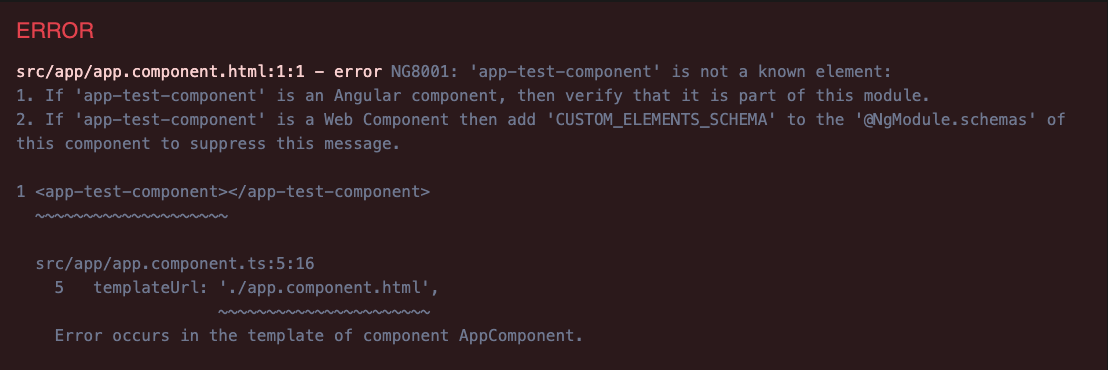
The new feature solves this. You can now explicitly flag an input as required, either within the @Input decorator:
@Input({required: true})
title!: string;
or through the @Component decorator's inputs array:
@Component({
 ...
 inputs: [
   {name: 'title', required: true}
 ]
})
However, this solution isn't without its caveats, and there are two notable ones. First, it functions under AOT compilation but not in JIT mode. Second, it's still subject to the strictPropertyInitialization TypeScript flag, which Angular has enabled by default (happens to be a good practice). TypeScript will flag the uncustomized property because it's non-nullable yet uninitialized in the constructor or inline.
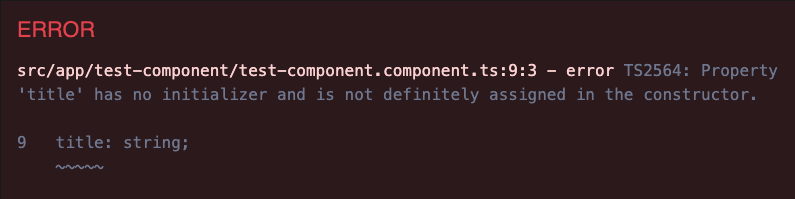
Even though the consumer's template must provide the value, you'll still need to get around this check—such as by applying the non-null assertion operator to the property:
@Input({required: true})
title!: string;
Router Inputs
Here's another Input-related feature worth noting: the ability to connect component inputs directly to route data—be it path params, query params, and so on. This removes the necessity to inject ActivatedRoute into a component just to access router information.
On the mechanics side, the binding applies solely to routable components (those in the routing configuration); inputs on child components rendered within a routable component's template remain unaffected. Route data maps to inputs by name (or alias when specified), so it's possible that multiple data sources could serve as input values. When names are identical, the binding precedence is:
- resolved route data
- static data
- optional/matrix params
- path params
- query params
With parent route configurations and parent component context in the mix, additional layers of complexity appear. To test various scenarios, you can explore our live example below:
esbuild dev server
Angular 14 introduced a builder powered by esbuild, but that integration was limited to production-like builds (ng build)—the development server (ng serve) remained untouched. In Angular 16, we now have support for the dev server too. The new dev server is built on Vite; it still depends on esbuild for the actual build output. Vite handles the serving layer, meaning the build process doesn't leverage Vite's full toolkit. This is still a significant stride, as we reap esbuild's performance perks now, and future iterations might see deeper Vite roots.
Both the esbuild-based ng build and ng serve remain experimental. To test them, edit the build target in your project's angular.json to reference esbuild (no changes to the serve target needed):
"build": {
 "builder": "@angular-devkit/build-angular:browser-esbuild",
 ...
},
Further updates introduced in Angular 16
Angular 16 brings a wealth of modifications, and it is impossible to cover every single one. Still, a few more stand out:
- The ngcc (Angular Compatibility Compiler) is gone. Libraries built for the View Engine will no longer function in projects using Ivy.
- A new DestroyRef abstraction has been added. This injection token is connected to the lifecycle of a component, directive, or injector. It lets you register a callback that fires when that scope is torn down.
@Component({
 ...
})
class TestComponent {
 constructor(destroyRef: DestroyRef) {
   destroyRef.onDestroy(() => { /* some logic */ });
 }
}- The takeUntilDestroyed RxJS operator is now included directly in the framework, so external libraries are no longer necessary. Its implementation builds on DestroyRef.
- Support for TypeScript 4.8 has ended, while TypeScript 5.0 is now supported. This matters because version 5.0 aligns with ECMAScript Decorators. Previously, Angular relied on “experimental decorators,” a TypeScript-specific approach that predated the TC39 standard. Now you can disable experimentalDecorators in your Angular setup, and decorators will still function using the standardized implementation. The one caveat is that decorators on constructor parameters will not work, since the standard does not cover them:
In those cases, the inject function should be used instead:constructor(@Optional() public myService: MyService) {}myService = inject(MyService, {optional: true}); - Several schematics have been updated to accommodate standalone applications: the ng-new and application schematics, the Angular Universal schematic, and the app-shell schematic.
- After Angular Material moved to MDC in version 15, the team has spent Angular 16 working on adopting Material Design’s design tokens. This paves the way for a smoother migration to Angular Material 3 later, while giving developers and designers far more control over the look and feel of their applications.
Looking ahead after Angular 16
Given the scale of what Angular 16 delivers, it is reasonable to assume the momentum will carry forward. When it comes to what Angular 17 and later versions will prioritize, two sources offer guidance. The first is the official roadmap, which remains consistent. The second is a mix of streams and podcasts featuring Angular team members, such as this one or that one. Bringing those insights together, expect continued emphasis on developer experience and performance, with the bulk of effort going toward:
- Signals (reactivity, signal-based components, local change detection, a zoneless approach, and how RxJS and signals work together),
- SSR enhancements (partial hydration, resumability),
- esbuild builders (filling in the missing pieces),
- collaboration with Angular Material on Material 3 compatibility.
Want a fast way to track Angular’s progress? Our free ebook covers everything from Angular 14 to the current release: features, use cases, and business implications. It is a handy, comprehensive reference you can consult at any time. Grab your copy here.

Wrap-up
Clearly, Angular is evolving faster than most people can track. Fortunately, the team balances new features with a strong commitment to backwards compatibility. That means everyone can adopt these changes at their own pace, and ideally, we all end up benefiting in the long run.
What are your thoughts? Are you happy with the direction and speed of the framework? We would love to hear from you in the comments.