
Designing Angular Applications with Flux, Redux, and Immutable.js
This article covers the practical aspects of structuring an Angular application following the Flux pattern, using Redux as the state container and Immutable.js for data collections. Here's what we'll examine:
- Why large single-page applications present unique difficulties
- The three categories of state found in applications
- The Flux architecture and its core concepts
- Redux as a state container implementation
- Benefits of working with immutable state
- Immutable.js and its collection types
- A step-by-step approach to building a Flux-driven Angular app
- Maintaining type-safety while using Immutable.js
- Key takeaways
Before we dive in, the most pertinent question is when and why this architecture makes sense. A dedicated post on the subject provides guidance on that matter — Angular Service Layers: Redux, RxJs and Ngrx Store - When to Use a Store And Why?
If Observables and Angular are new to you, this article on common RxJS pitfalls might serve as a useful starting point before continuing.
The challenge of building larger single-page applications
The shift to single-page applications moved the application state from the server to the client. This state now resides entirely in the browser, accessible for modification from any corner of the app. While convenient initially, this unrestricted access becomes a significant problem as codebases expand and teams grow.
Risks of unmanaged mutable state
When any part of the application can mutate shared state at any moment, the system becomes unpredictable. Bugs, race conditions, and hard-to-trace side effects emerge. Refactoring becomes risky as changes ripple through unrelated parts of the codebase.
Maintaining a healthy frontend codebase hinges on:
- Keeping the state manageable and the app understandable
- Preserving type-safety to facilitate refactoring and long-term maintenance
Why immutable state is beneficial
To counter the dangers of mutable state, treating data as read-only by default is a safe approach. Instead of modifying existing state, a new state is created to replace it. This strategy offers two distinct advantages:
- The application becomes simpler to reason about, since changes occur only through explicit mechanisms
- Frameworks like React or Angular can leverage immutability to optimize change detection and boost performance
The three types of application state
Distinguishing between different kinds of state is essential. There are three categories:
- Internal Component State: This is local to a single component, such as an
openflag controlling whether a dropdown is expanded - Global UI State: This governs user preferences, like the active language or which charts are displayed
- Application Data State: This is the core data of the app, for instance, the list of items fed into a dropdown
Each state type may need its own control strategy. The Flux architecture offers a framework for this.
Understanding the Flux Architecture
Flux originated from the React community as a way to build frontends by centralizing state in a data store. Its core idea is that all changes to state flow through a controlled process.
The architecture rests on four pillars:
- Actions
- Dispatchers
- Store
- View
The View
The View is your Angular component tree — the full set of UI widgets. In a Flux setup, these components act as pure functions, rendering incoming data without directly modifying it.
The Store
The Store is the heart of Flux, holding the application state. The view cannot alter this state; it can only read it. While an app might have multiple stores, for simplicity, we often consider a single store scenario.
The data emitted from the store must be immutable.
Actions
If state is immutable, how is it updated? In Flux, the only path to change is by dispatching an Action. This triggers the creation of a new state, which replaces the old one without mutation.
An action is a plain message object indicating that an event occurred, like data loaded or a todo added. It carries all the necessary data for the new state, such as the new todo item or the updated sort order.
Dispatcher
The Dispatcher routes actions to all stores subscribed to them. An action can affect multiple stores concurrently. For example, receiving an email might update a count in the folder list while also adding the email subject to the main list view.
Since our application has a single store, a dispatcher is unnecessary; actions are sent directly to the store.
Building the Flux-based Angular Application
We'll construct a simple demo app, whose source code is available in this repository. A visual representation is below:
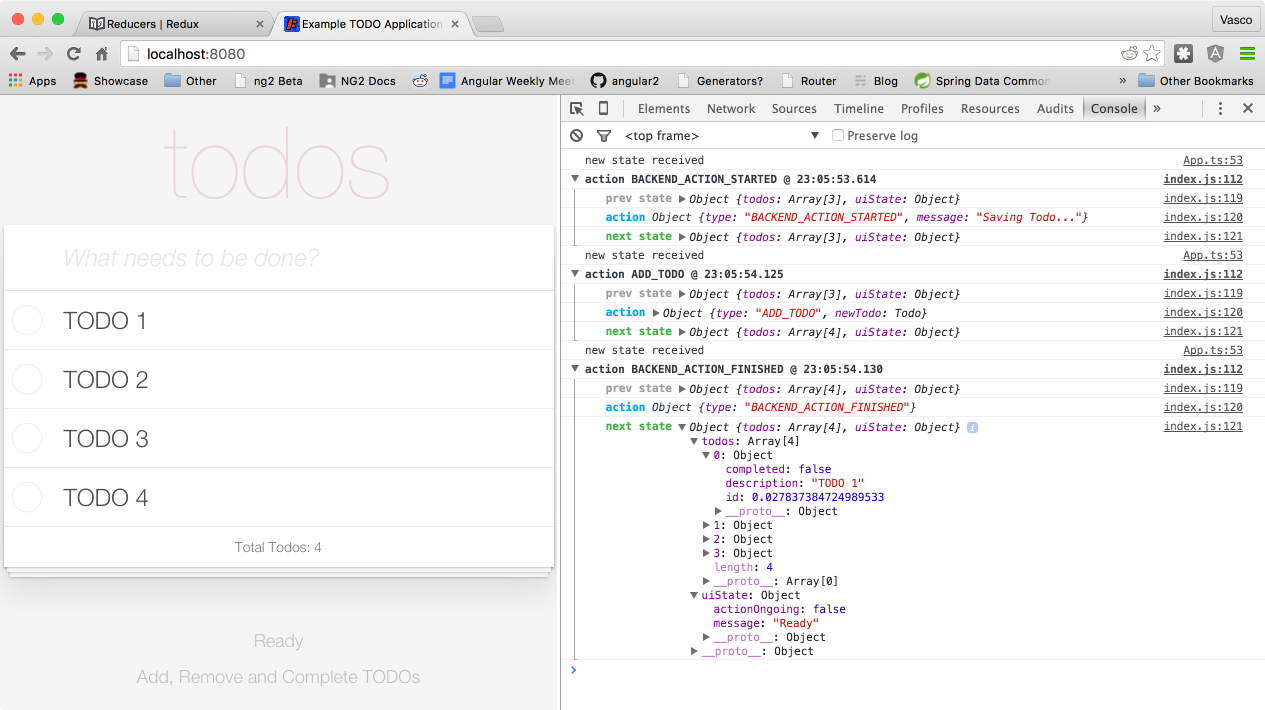
Notice the app state appearing in the console. That logging comes from our first library, Redux.
Introducing the Redux State Container
Redux is a state container designed for Flux apps, following a specific interpretation that uses a single store, thereby eliminating the need for dispatchers. Despite this, Redux still enables different app parts to respond differently to the same action.
Actions can be processed through middleware, such as redux-logger, which generates the console output shown above.
Defining the Application State
A good practice is to define the state shape upfront. Our Todo App's state is structured as follows:
The state splits into two main areas:
- Core application data, stored under the
todosproperty - Global UI settings, kept under the
uiStateproperty
Creating an Action in Redux
We define application actions by writing Action Creator methods. These functions create action objects but do not dispatch them. An action is a simple POJO with a type string identifier and a payload containing all data needed to perform the change, like a new Todo item.
Handling Actions
To define how state changes in response to an action, we write pure functions called reducers. These are similar to the reduce operator in functional programming:
(state, action) => state
A reducer takes the current state and an action, and returns the next state. Reducers are pure functions without side effects; they never mutate their inputs, making them easy to test and understand.
Writing a Redux Reducer
For instance, here is a reducer for the application's data state:
This reducer branches on the action type, delegating to other functions or computing the new state directly if simple. We also need a reducer for the UI state:
We can combine these reducers for different state slices using the combineReducers API:
This produces a single reducer that distributes work to the smaller reducers based on the state structure.
Setting Up the Redux Store
With our reducers defined, we create the store. Adding middleware like a logger is common:
We pass the combined reducer, the initial state, and add the logger. Now the store is ready to integrate with our Angular application.
Connecting Redux to an Angular App
Many components will need access to the store to dispatch actions. We can make it available across the app via dependency injection. A minimalistic approach is outlined in the Angular Redux Store repository. We wrap our created store in a class, as shown here. A complete example is available here. This injectable store can be used in any component to dispatch actions.
Immutable.js and Collections
Using Redux to store state provides little benefit without a practical way to make the state immutable. We need an efficient method to both enforce immutability and generate new state versions from the old, without tedious boilerplate.
Unlike languages like Scala with built-in immutable collections, JavaScript relies on a library: Immutable.js. This library is crucial for implementing Flux architecture in Angular. Let's explore it.
Working with Immutable Lists
First, we create an immutable list with a single element:
This list mimics the array API — supporting push, filter, map, reduce, slice, and more. It also implements the Iterable interface, so you can loop over it using for ... of in an Angular template.
Although the API feels familiar, it's fundamentally different as none of these methods mutate the list. Even calling push on the list, which would insert an element, won't change the original. Instead, it returns a new list including the new element, leaving the old one intact. Internally, Immutable.js efficiently creates a new collection by sharing structure, avoiding a deep copy. This behavior is transparent, simplifying work with immutable data.
This API is perfect for creating reducers because it easily produces altered versions of nested structures. Immutable.js makes immutability practical by offering simple ways to derive new data from existing data.
Immutable Objects and Maps
Immutable.js offers immutable object-like structures that support nesting. Let's create an immutable Todo object:
This creates a Map-like structure, and properties are accessed like this:
let description = todo.get('description');
While functional, it’s not as elegant as using todo.description. We'll circle back to improving this. The todo object is immutable, but it has a set() method. Calling it returns a new Map with the property updated:
let newTodo = todo.set('description', 'NEW TODO');
Here, newTodo.description holds the value NEW TODO. Immutable Maps accept any key, like a plain object, but their generic nature makes them unsuitable for type-safe programs.
Introducing Immutable Records
The next step up is an immutable Record. It's similar to a Map but defines a fixed set of allowed keys:
This creates a new prototype for a specific type of immutable object with those three keys. A new instance of TodoRecord can be created like this:
This constructs a Record where id and description are set, while completed defaults to false. Attempting to set an unrecognized property throws an error. Unlike a Map, properties are accessible using the standard object notation:
console.log(todo.description);
This prints TODO 1. This is a step forward but still not fully type-safe. There is a defined set of keys with known types, but the TypeScript compiler isn't aware of them. This knowledge is exclusive to Immutable.js. Let's explore a way to improve this situation.
Achieving Type-Safety with Immutable.js
JavaScript relies on prototype-based inheritance. The extends keyword in TypeScript extends an object prototype, not a class. What happens if we extend a TodoRecord?
Instances of the resulting Todo class will inherit properties from TodoRecord. Furthermore:
- these instances are immutable
todo.descriptionand other accessors work as expected
However, this is still not type-safe. TypeScript can't infer the properties of the Todo class. A straightforward solution is to redeclare them:
By adding the properties directly to the class, the TypeScript compiler gains full knowledge. You get auto-completion, type checking, and IDE refactoring support. It's a manual workaround but provides the closest approximation to a type-safe immutable class in JavaScript. The complete example can be found here.
Now we can create strongly typed immutable Todo instances and build a safe program. The todo variable is typed, immutable, and has accessible properties. If you know of a better approach to define immutable classes in JavaScript, please share your insights below.
Key Conclusions
A robust ecosystem exists for creating solid Flux applications in Angular. Redux serves as a reliable state container, backed by robust principles, a vibrant plugin ecosystem, extensive documentation, and strong community support.
Evaluate the need for Flux
It's crucial to match technology to the use case. Pete Hunt, a React contributor, shares his perspective on when Flux is a good fit in this GitHub discussion.
While core Redux is intuitive, adding middleware like redux-thunk or redux-promise can increase complexity. The real-world example in the Redux repository illustrates the setup for a more typical application.
Immutable.js for data handling
Alongside Redux, Immutable.js offers practical and type-safe methods for performing deep changes to large data structures, ensuring data integrity.
RxJs and Functional Reactive Programming
Angular integrates RxJs by default, which offers a compelling alternative for structuring your app. This post demonstrates building the same sample app with RxJs. For a different data management strategy, check out this article on Observable Data Services.
Final Thoughts
The future of Angular app architecture is still unfolding, but Flux is a proven option. It's been successfully used to build complex applications, like Facebook's core UI.
Getting Started with Angular
If you found this article useful, consider subscribing to the Angular University Newsletter for more insights.
You can also learn more through our YouTube course, which has introduced listeners to components, properties, and debugging techniques.
References for Further Reading
For more on Flux within Angular, these two articles are valuable:
To dive deeper into Redux and Immutable.js, these tutorials are excellent starting points:
If you are eager to learn more about Angular, check out our Angular for Beginners Course:

Additional Angular Reads
If you found this post valuable, you might also enjoy these other articles from our blog:
- Angular Router - How To Build a Navigation Menu with Bootstrap 4 and Nested Routes
- Angular Router - Extended Guided Tour, Avoid Common Pitfalls
- How to run Angular in Production Today
- How to build Angular apps using Observable Data Services - Pitfalls to avoid
- Introduction to Angular Forms - Template Driven, Model Driven or In-Between
- Angular ngFor - Learn all Features including trackBy, why is it not only for Arrays ?
- Angular Universal In Practice - How to build SEO Friendly Single Page Apps with Angular
- How does Angular Change Detection Really Work?