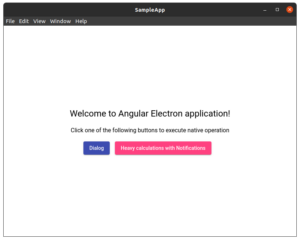
Sample application
For this integration exercise, we’ll put together a minimal Angular app that taps into native Electron capabilities.
To keep things practical, the app will demonstrate how to trigger a native dialog and fire off native notifications, both simulating work done on the server side.
On the Electron front, we’re sticking with the electron-secure-defaults template introduced earlier.
Here’s a quick look at what we’re building:
A high-level view of an Electron app that leverages built-in platform features.
With the app skeleton in place, the next step is wiring it up to the server side.
Using @electron/remote via ngx-electron
We’ll start with the @electron/remote module, which gives the renderer direct access to the main process. As noted before, this is not a recommended practice because of potential security risks.
We’ll walk through the setup for completeness, even though we’d advise against using it in production.
For this, we’ll pull in the ngx-electron and @electron/remote packages:

After installing, the remote module needs to be initialized. This happens in the main.ts file during app bootstrap:

To make the module work, we have to relax several security settings on the window:
- nodeIntegration:
true - contextIsolation:
false - enableRemoteModule:
true - sandbox:
false
Additionally, the call to app.enableSandbox() must be removed or commented out.
Once the initial configuration is in place—importing the module and injecting the service—we can start calling native functions from within the Angular app.
The service that wraps these calls looks like this:

A service that leverages the remote module to show dialogs and notifications.
IPC with ngx-electron
Now we switch gears and use IPC to handle communication between the renderer and the main process. This time, we’ll pair ngx-electron with a NestJs controller.
Start by installing the package:

Just like before, having direct access to ipcMain and ipcRenderer means adjusting the same security flags:
- nodeIntegration:
true - contextIsolation:
false - sandbox:
false
And again, we must disable app.enableSandbox().
On the backend, we define a controller in NestJs to handle incoming messages:

A controller that listens for and responds to specific messages.
The logic for dialogs and notifications lives in AppService. Its implementation is similar to the @electron/remote approach, but now we’re working directly with Electron’s modules.
On the Angular side, the service from ngx-electron is still used, but we call ipcRenderer rather than remote:
A service that sends messages to the main process.
This approach is a step up in terms of safety, but because we’ve turned off so many protections, there’s still a risk of an attacker gaining access to the user’s machine.
Preload script approach
Next up is using a preload script. The key difference here is that we only need to disable one flag—the one for context isolation:
- contextIsolation:
false
Inside the preload script, we define the API that will be added to the shared window object:
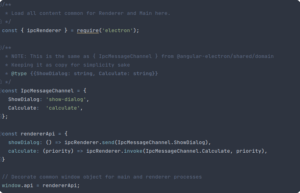
A preload script that extends the global window with custom methods.
From the service side, we just call those methods:
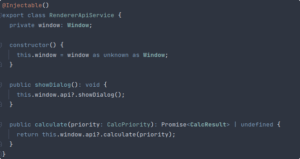
A service that interacts with methods on the window object.
To keep things type-safe, we’ve defined interfaces that describe the extended window object:

Interfaces that type out the new window properties.
The backend controller stays unchanged.
This method is closer to what’s recommended for Electron communication, but there are still some security gaps that remain.
Using the PostMessage API
Another option is to use the PostMessage API within the preload script to handle communication.
With this approach, we can keep the default, more secure Electron configuration provided by electron-secure-defaults.
The main change is how the preload script is written:
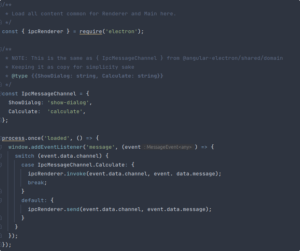
A preload script that uses the PostMessage API.
And the corresponding messaging service:
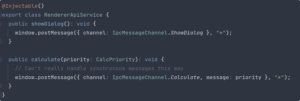
A service that sends messages to the main process via PostMessage.
The drawback here is that communication has to be asynchronous. Also, we’re forced to use "*" for the targetOrigin parameter when posting messages, which can open up potential security holes.
So let’s look at a method that keeps security intact while still allowing synchronous communication.
Context Bridge
The go-to approach today is to use the Context Bridge inside the preload script to set up communication between processes.
We still define the API for the app in the preload script, but instead of touching the window object directly, we expose the API through the Context Bridge:
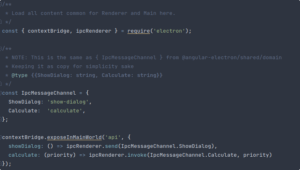
Exposing an API through the Context Bridge.
The service that uses this API looks identical to the one from the direct window extension example.
This is currently one of the safer ways to handle communication. Still, there’s another, more flexible option that involves dropping IPC altogether.
Local server setup
The final approach is running a local server. Your application communicates with it using whatever protocol you prefer, just like it would with a remote backend.
You’re free to pick any technology stack here, but it’s essential to lock down the server’s security.
We’ll stick with NestJs for consistency. Here’s how the controller is set up:
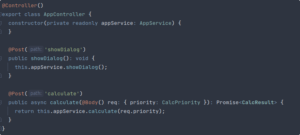
A controller that exposes API endpoints.
The service implementation is nearly unchanged, aside from a few tweaks to the function signatures (no more IPC events).
From the app’s side, we simply send HTTP requests to the local address:

A service that talks to the local server.
The big wins here are flexibility in backend choice and ease of swapping it out later. As always, keeping the server secure is critical.
Wrap-up
Getting an Angular app to work with Electron isn’t complicated, but it’s easy to overlook security pitfalls. Stick with the recommended safeguards, and your app will be in good shape.
The full source code is available in the repository, and you can hop between branches to see how each integration method plays out.
We hope this gives you the tools to build secure, Angular-powered Electron apps of your own.
References and further reading
- Electron remote module considered harmful, https://nornagon.medium.com/electrons-remote-module-considered-harmful-70d69500f31
- Awesome ElectronJs hacking repository, https://github.com/doyensec/awesome-electronjs-hacking
- Electronegativity, https://github.com/doyensec/electronegativity
- Electron secure defaults, https://github.com/1Password/electron-secure-defaults
- Security checklist, https://www.electronjs.org/docs/tutorial/security#checklist-security-recommendations
- Sandbox, https://www.electronjs.org/docs/tutorial/sandbox
- Session, https://www.electronjs.org/docs/api/session
- Electron IPC and NodeIntegration, https://stackoverflow.com/questions/52236641/electron-ipc-and-nodeintegration