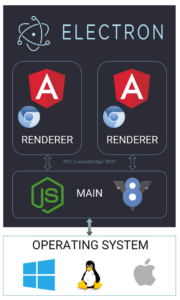
 At a high level, Electron apps are built around two distinct types of processes. There is the renderer process, which is tied to an individual application window, and the main process, which lives in the Node.js environment and has direct access to the underlying system and its native features.
Schematic representation of the Electron application architecture.
Still, to unlock the full potential of this architecture, we need a reliable way for these isolated processes to exchange information. The framework provides multiple paths for establishing that communication channel.Remote
In the early days of Electron, the go-to mechanism for talking between the renderer and the main process was theremote module. It gave the renderer side direct access to Node.js modules without any extra ceremony.
That convenience came at a cost, however. Using remote introduced serious security and performance trade-offs, and the module was eventually deprecated. For an in-depth explanation of the problems it caused, take a look at Jeremy Rose’s write-up on the subject.
The official docs for remote have since been fully removed. The maintainers’ recommendation back then was to move to IPC—so let’s look at that option next.
IPC
Inter-Process Communication, or IPC, is a standard OS-level technique for exchanging data between separate processes on the same machine. In Electron specifically, it is used to pass messages—either synchronously or asynchronously—between the renderer and the main processes, and it also powers internal framework communication. Electron exposes this functionality through theipcMain and ipcRenderer modules. These allow you to both send and listen for messages across the process boundary. The catch is that using them directly in the renderer requires the nodeIntegration flag to be enabled.
Enabling nodeIntegration has significant security implications, though. If the application is hit by an XSS vulnerability, that exposure can escalate to remote code execution (RCE) because the renderer now has full access to Node.js APIs. We’ll get into the details of that in the security section.
ngx-electron
In the Angular ecosystem, thengx-electron package provides a set of services that wrap this communication. Under the hood it still relies on the IPC modules, so the nodeIntegration flag remains a requirement here.
This library gives us a service that can push messages to the main process, along with access to some additional Electron APIs. The full list of what’s available is covered in the package documentation.
Preload
When you create the main window for your app, you have the option to supply a preload script. That script runs with visibility into both the DOM’swindow object and the Node.js runtime.
A commonly used technique is to attach custom methods to the window object inside this script, allowing the renderer to call Node.js operations indirectly. This was possible because the renderer and the main process shared the same global context.
The advantage here is that this approach works even with nodeIntegration disabled, which already gives you a leg up on security. The catch is that the contextIsolation flag, which we’ll discuss later, has to be turned off for this strategy to function.
That restriction makes this method vulnerable too: since the renderer effectively shares context with Node.js, an XSS vulnerability could once again lead to RCE. More on that in the security chapter.
PostMessage API
The PostMessage API is another viable way to relay messages between the main process and the renderer. Just like the preload approach, it can be used withnodeIntegration turned off.
To set it up, you define handlers for incoming messages both in the preload script and inside the Angular application itself, and then exchange data by firing and listening for events.
One notable limitation is spelled out in the docs: the postMessage protocol does not support the file:// protocol as a message source. Because of that, you are forced to pass "*" as the targetOrigin argument, which is a weak point from a security standpoint.
Context Bridge
Each of the approaches discussed so far required some degree of security compromise. This one is different—it is the approach Electron officially recommends for renderer-to-main communication today. If you recall, enablingcontextIsolation creates separate window objects for the two processes, so extending the renderer’s window in a preload script no longer has any effect. Electron solves this neatly with the Context Bridge, which lets you define a safe, limited API surface for the renderer to consume while keeping contexts fully isolated.
Local server
Since we’re operating within a Node.js environment anyway, there is nothing stopping us from spinning up a local server at startup. The Angular app can then communicate with it over whatever protocol we pick (typically HTTP or WebSockets). Since the backend side is a regular Node.js process, this approach opens the door to using any server-side framework you prefer. Unsurprisingly, our choice here is NestJS since it is the closest equivalent to Angular on the backend. With this architecture, we also inherit increased responsibility. The safety of the entire application rests almost entirely on how securely that local server is configured, so a misstep there directly undermines the security of the desktop application as a whole. All of the described communication methods are used in our integration sample. But before we walk through it, let’s dedicate a bit more time to the topic of Electron security, and explore why it matters so much.Security
Even though Electron is a handy framework, its security posture is often questioned. Most of the criticism comes down to improper configuration. When settings are too permissive, the app becomes exposed to attacks like XSS and, in the worst case, RCE. The likelihood of RCE comes from the design of Electron itself. Since the renderer process can reach into the main process—and through it, the OS—once an attacker manages to run their own code in the renderer, they may work their way up to the host system. History here is not in our favor: at some point, almost every major Electron app had a serious vulnerability of this kind. The list includes well-known tools like the Steam client, WhatsApp, Discord, Slack, Teams, and even VSCode. If you want to dive deeper into the security side, the awesome-electronjs-hacking repository on GitHub is a great aggregation point. It collects talks, videos, and articles that cover these attack vectors in great detail.
Do you recognize all the Electron applications shown?
The urgency around security becomes clearer once you look at the scale: at the time this article was written, there were around 950 custom Electron apps officially available—and those are just the ones listed. So what are the practical steps to meet the required security bar?Security checklist
In response to the wave of misconfigured applications, the Electron team compiled a list of recommended practices and configuration flags. It’s a structured checklist that helps developers follow what the framework authors consider secure defaults. The details, including the rationale behind each setting, are provided in a dedicated section of the official Electron documentation—well worth reading before shipping any desktop app.Electronegativity
To help catch misconfigurations before they become a problem, there is also the Electronegativity tool. This npm package audits your application against recommended security settings and supplies documentation that walks you through each finding.
It is a straightforward yet effective way to confirm your application’s security posture.
Electron secure defaults
1Password’s engineering team has shared a template they built to ensure their own Electron apps start with a secure foundation.
For anyone beginning to work on this kind of desktop software, it serves as a reliable reference point that prioritizes security from the outset.
Electron hardener
The same team behind Electron secure defaults also developed the Electron hardener library. Its purpose is to block additional command-line flags that could be passed to an Electron app, preventing those flags from opening up potential attack vectors.
If you want your application to meet a higher security bar, this library is a worthwhile addition.
Examples of incorrect configuration
Node Integration
Electron was designed with the intent of merging web technologies and NodeJs in one application. To achieve that, the renderer process was given access to the native environment.
While the idea makes sense, it also means that any vulnerability found in the renderer could be escalated into RCE. Fortunately, the direct bridge between renderer and main can be turned off.
This switch is the nodeIntegration flag, which is disabled by default for new windows starting with version v5.
Without that flag, one might wonder how Electron could function as a desktop app without NodeJs access. As noted earlier, there are several secure alternatives for inter-process communication nowadays, like Context Bridge.
An instance where this flag was exploited can be seen in the Notable application.
Context Isolation
For a long while, the preload script and the renderer process worked within a shared context, meaning changes made to the window object in one were immediately visible in the other.
With the contextIsolation flag, Electron lets you disable this behavior; it is enabled by default since version v12. When activated, both the renderer and the preload script work on their own separate copies of objects like window and document.
This shared-context behavior could be leveraged to carry out XSS attacks, for instance by overwriting prototypes.
Attacks have been demonstrated on the Discord application and on WireApp.
Sandboxing
Because Electron relies on Chromium for rendering, it can also adopt the security mechanisms that Chromium provides.
One such feature is sandboxing, which restricts the privileges of a process. The goal is to keep an attacker contained even after a successful breach, preventing them from gaining more control over the host system.
The sandbox flag has been enabled by default since version v5.
Summary
We have introduced a way to build desktop-ready applications that do not require a permanent internet connection — all while staying within our favourite framework, Angular.
Still, it is important to recognize that these apps carry their own set of security risks. Following the recommended practices and using the available safeguards goes a long way toward ensuring that your application remains secure.
With this foundation, you are now ready to put your knowledge into practice and build your own secure desktop applications with Angular.
Useful links
- Electron remote module considered harmful, https://nornagon.medium.com/electrons-remote-module-considered-harmful-70d69500f31
- Awesome ElectronJs hacking repository, https://github.com/doyensec/awesome-electronjs-hacking
- Electronegativity, https://github.com/doyensec/electronegativity
- Electron secure defaults, https://github.com/1Password/electron-secure-defaults
- Security checklist, https://www.electronjs.org/docs/tutorial/security#checklist-security-recommendations
- Sandbox, https://www.electronjs.org/docs/tutorial/sandbox
- Session, https://www.electronjs.org/docs/api/session
- Electron IPC and NodeIntegration, https://stackoverflow.com/questions/52236641/electron-ipc-and-nodeintegration