What makes an app hybrid?
If Angular is your primary technology, you have likely only used it for building web applications. But its scope isn't limited to that category of software.
Tools like NativeScript, PWA, and Capacitor make it possible to run your app on a mobile device. This piece walks you through the fundamentals and shows you how to wire up your existing project with Capacitor, so you can broaden your skill set by shipping mobile apps. Let's first clarify what a hybrid application actually is.
A hybrid application is the result of merging two separate technology environments that normally don't interact. In the standard setup, the app itself is written with web technologies but is packaged for platforms such as desktop or mobile. The focus here is on the mobile case.
The clear advantage of this strategy is code reuse: a single shared codebase can be compiled for multiple platforms. That allows one team to maintain an app across two or more platforms, which has a significant impact on costs.
The downside is that a hybrid app runs inside a container which renders its content, so its performance falls short of native behavior. That's why this approach doesn't suit demanding products such as games. There are exceptions, though — technologies like React Native or the increasingly popular Flutter compile code (partially or fully) to native platforms. Even so, despite vendor assurances about high performance, the smoothness of these apps still doesn't quite match truly native ones.
Building hybrid applications normally relies on dedicated tooling, aside from those frameworks which ship their own compilation mechanisms.
Cordova
Cordova, created by Apache, was the pioneer in this space. It let you run any web app on mobile platforms like Android and iOS, while exposing an API and a range of plugins to tap into physical device hardware (storage, camera, microphone, and so on). The web application itself was loaded inside a WebView — a native view designed to render web content.
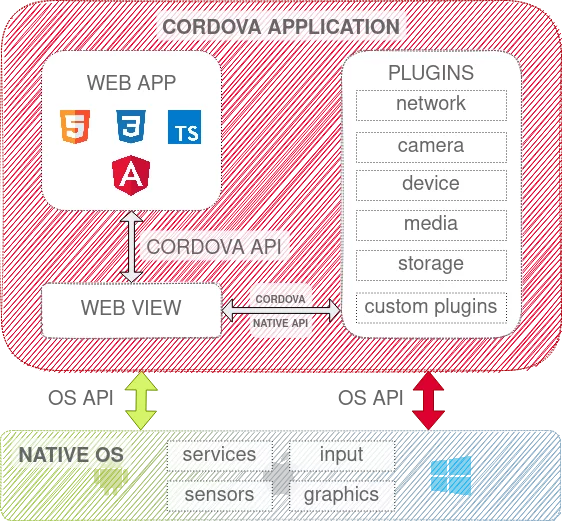
Diagram showing the architecture of an application built with Cordova.
Capacitor
Development of Cordova has been discontinued, and Capacitor emerged as its direct successor. This tool lets you build hybrid applications using a similar model.
The key differences come down to leveraging the latest Web APIs and native platform capabilities more completely. Capacitor also provides unified interfaces for native functionality regardless of the target platform, freeing developers from maintaining separate plugins and APIs for each environment.
Ionic
Ionic also deserves a mention, as a library built on top of the technologies described above. Its main contribution is that apps built with it take on a native look and feel on the chosen platform, thanks to properly configured components.
In practice, you get a set of components, guidelines, and services that speed up and simplify development. For more details, see the official website.
Integration
If you want to integrate an existing Angular application scaffolded with Nx, you can try the @nxtend/capacitor plugin and follow the steps in the official documentation. At the time of writing, however, that plugin only supports Capacitor 2, even though Capacitor 3 is already out.
To use the current release, you'll need to perform the installation manually.
Before you can finalize your app for a target platform, you'll also need the appropriate IDE for that environment. You can find all the details in the environment setup guide.
Initialization
Following the official Capacitor documentation, we start by adding the CLI and Core packages to the project.
$ npm install @capacitor/cli @capacitor/coreNext, navigate to your app and use the Capacitor CLI to run the command that generates the configuration file. (The full list of available commands is in the CLI docs.)
$ npx cap initYou'll be prompted to supply details about your application; once that's done, a capacitor.config.js file should appear.
Double-check that the web directory path points to the correct build output — in the config file, that will likely look like „webDir”: „../../dist/apps/my-app”.
Package.json
One step the official docs skip is creating a separate package.json for your application. It just needs the essential metadata (name is sufficient) and a list of plugins as dependencies — running npm init is a convenient way to set it up.
Adding a platform
At this point you can add the platforms you intend to support. Make sure you're inside the application's directory. A useful note: all packages except plugins should be installed in the Nx Workspace, while plugins go into the app's own folder.
$ npm install @capacitor/android
$ npx cap add android
Once the platform is added, you can build your application and sync it with the target platform using the following commands:
$ nx build
$ npx cap sync android
This step copies the generated files to the appropriate folders and updates configuration files to reflect any plugins you've added or removed.
Building
With all the previous steps done, you're ready to produce the final build for your chosen platform. Open the generated project in the matching IDE, for example with this command:
$ npx cap open androidAndroid Studio should open, and from there you can build the app.

The finished hybrid application, shown running on an emulator.
The process above was demonstrated for Android, but the commands work the same way for other platforms.
Summary
Hybrid mobile applications are a strong option when you need one corporate codebase to serve several platforms. But before committing, look carefully at the app you're building, paying close attention to what end-users expect in terms of performance — smoothness can suffer, especially with heavy operations or complex views.
Also, not every native API is available, so check in advance which device features your app will actually rely on.
Integrating Capacitor to create a hybrid app is quick and straightforward; ongoing work mostly boils down to running a handful of commands now and then. It's fair to say it's a worthy successor to Cordova.