Why the package size isn't a dealbreaker
You might wonder why you'd pull in such a large utility belt just for a couple of simple functions. Let's address that concern directly.
If we check bundlephobia, the numbers look like this:
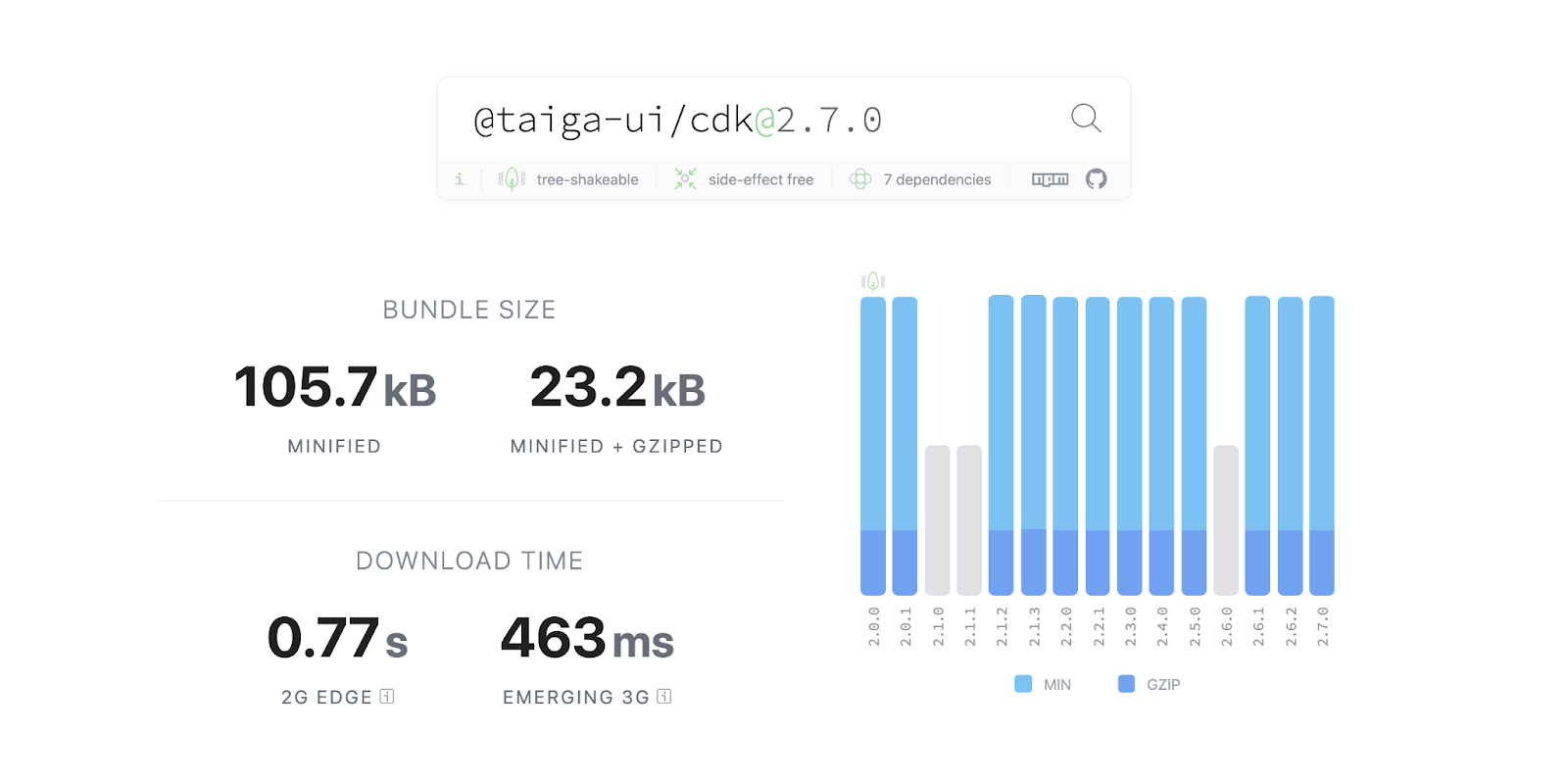
23 KB isn't catastrophic, but it's still a noticeable chunk. The key point is that CDK relies on Secondary Entry Points (Kevin Kreuzer wrote an excellent piece about this), which makes the entire package tree-shakable. In plain terms, you only pay for what you actually import. If you need just a pair of utilities, they'll be the only thing in your final bundle—weighing in at less than 1 KB combined.
tuiPure: memoization on steroids
This decorator works with both getters and pure class methods. Let's examine each scenario.
Applied to a getter
Slap tuiPure on a getter and you get lazy evaluation for free. If a user never clicks that button that flips the "show" property to true, the getter simply won't run.
Example #1: displaying the 40th Fibonacci number only after a user clicks.
// template
<div *ngIf="show">fibonacci(40) = {{ fibonacci40 }}</div>

// component
@tuiPure
get fibonacci40(): number {
    return calculateFibonacci(40);
}
On the first request, the method computes the 40th Fibonacci element. Every subsequent access returns the cached value instantly.
Example #2: consider a Pull-To-Refresh component that mimics native iOS and Android behavior. One of its streams is Android-only and shouldn't exist on iOS. Creating the stream in the constructor would instantiate it on both platforms. Wrapping it in a tuiPure getter ensures that unused Observable never materializes on iOS.
<tui-mobile-ios-loader
   *ngIf="isIOS; else angroidLoader"
></tui-mobile-ios-loader>

<ng-template #angroidLoader>
   <tui-mobile-android-loader
       [style.transform]="loaderTransform$ | async"
   ></tui-mobile-android-loader>
</ng-template>


@tuiPure
get loaderTransform$(): Observable<string> {
    return this.pulling$.pipe(
        map(distance =>
          translateY(Math.min(distance, ANDROID_MAX_DISTANCE))),
    );
}
You can also leverage the "changes" of ContentChild or ContentChildren. When the template calls such a getter, you're guaranteed that all content is rendered—Angular always completes content rendering before view rendering. With careful ordering, the same trick works for ViewChild and ViewChildren.
Applied to a method
@tuiPure also adds memoization to regular methods. The first invocation computes the value; subsequent calls return that same result immediately—until an argument changes. When that happens, the value recalculates.
This proves invaluable for expensive mathematical operations or when you need non-primitive values like arrays and objects from a getter.
get filteredItems(): readonly string[] {
   return this.computeFilteredItems(this.items);
}

@tuiPure
private computeFilteredItems(items: readonly string[]): readonly string[] {
   return items.filter(someCondition);
}
Calling that getter from a template triggers a one-time filter on the items array. The same filtered array returns on every change detection cycle until this.items mutates. This avoids recreating new arrays endlessly, preventing reference-comparison issues with template bindings. You also skip manual synchronization in ngOnChanges if items arrives as component input.
Under the hood, it patches the getter's or method's TypedPropertyDescriptor and returns a wrapped version with memoization built in. The implementation is straightforward and extensible—you could easily adapt it to cache all values rather than just the most recent.
*tuiLet: local template variables
This structural directive is refreshingly simple—it lets you define local variables right in your template:
<ng-container *tuiLet="timer$ | async as time">
   <p>Timer value: {{time}}</p>
   <p>
       It can be used many times:
       <tui-badge [value]="time"></tui-badge>
   </p>
   <p>
       It subsribed once and async pipe unsubsribes it after component destroy
   </p>
</ng-container>
You might reach for *ngIf instead, but that only works if falsy values don't matter. Numbers are a classic counterexample: zero is usually a perfectly valid value, yet *ngIf would hide it. *tuiLet displays zero without hesitation.
You can check out the implementation—it's an excellent reference for building your own structural directives.
The meta pipes: tuiMapper and tuiFilter
We built tuiMapper to eliminate the need for creating countless one-off pipes.
It's a pure pipe that accepts a transformation function plus any number of arguments. The resulting template looks like this:
{{value | tuiMapper : mapper : arg1 : arg2 }}
This pattern shines when you need to massage data for component inputs or combine it with *ngIf and *tuiLet:
<div
    *ngIf="item | tuiMapper : toMarkers : itemIsToday(item) : !!getItemRange(item) as markers"
    class="dots"
>
    <div class="dot" [tuiBackground]="markers[0]"></div>
    <div
    	*ngIf="markers.length > 1"
        class="dot"
        [tuiBackground]="markers[1]"
    ></div>
</div>
Something like adding colored marker dots to calendars from @taiga-ui/core.
Since pure pipes cache their previous outputs, they skip recalculations during each change detection cycle—a solid performance win.
You can work with handlers (pure functions that transform data), swap them out, or even pass them from outside as component inputs. No need to spin up a whole new pipe for a single use case.
For filter operations, there's tuiFilter—technically a specialized mapper case, but common enough to merit its own pipe. It's pure, so performance concerns go out the window; the pipe caches computed arrays instead of rebuilding them every change detection pass.
mapper documentation / filter documentation
Check out these tuiMapper and tuiFilter implementations—both are plain pure pipes with well-typed transform methods.
destroy$: unsubscription made easy
This Observable-based service streamlines unsubscribing in components and directives.
@Component({
   // ...
   providers: [TuiDestroyService],
})
export class TuiDestroyExample {
   constructor(@Inject(TuiDestroyService) private readonly destroy$: Observable<void>) {}

   // …
   subscribeSomething() {
       fromEvent(this.element, 'click')
           .pipe(takeUntil(this.destroy$))
           .subscribe(() => {
               console.log('click');
           });
   }
}
Add it to the component's "providers", inject it in the constructor, and you're done. I prefer typing DI entities as narrowly as possible—here that means Observable<void>. A shorter version works too:
constructor(private destroy$: TuiDestroyService) {}
The service hooks into the component's DI injector rather than its lifecycle. This means it can even unsubscribe streams within services or DI factories—rare cases, to be sure, but TuiDestroyService shines there since alternatives are scarce. For instance, we call markForCheck from a token factory in that article about DI tricks for providing data through components.
Look at how elegantly simple the implementation is! Just a subject-based service with an approach based on lifecycle hooks.
ng-event-plugins: smarter event handling
The ng-event-plugins library ships with CDK as a dependency—no extra installation needed. It registers new handlers with Angular's plugin manager and bundles several useful plugins to streamline template event handling.
Take the .stop and .prevent modifiers—they declaratively call stopPropagation and preventDefault.
Before:
 <some-input
   (mousedown)="handle($event)"
 >
   Choose date
 </some-input>
Template
export class SomeComponent {
   // …
   handle(event: MouseEvent) {
      event.preventDefault();
      event.stopPropagation();

      this.onMouseDown(event);
   }
}
Component
After:
<some-input
  (mousedown.prevent.stop)="onMouseDown()"
>
  Choose date
</some-input>
Then there's .silent, which stops change detection entirely after the event fires:
<div (mousemove.silent)="onMouseMove()">
  Callbacks to mousemove will not trigger change detection
</div>
Events can also be caught during the .capture phase:
<div (click.capture.stop)="onClick()">
   <div (click)="never()">
      Clicks will be stopped before reaching this DIV
   </div>
</div>
Everything works with @HostListener and custom events too. Dive into the ng-event-plugins documentation or Alex Inkin's detailed write-up for the full lowdown.
Wrapping up
We've covered several utilities from @taiga-ui/cdk. Hopefully a few of them earn a permanent spot in your toolkit.
There's also a companion article about Taiga UI that walks through its other packages and the underlying philosophy.