
The Drivers Behind This Approach
In a previous piece, I detailed how our team enhanced base component flexibility and minimized duplication through creative Dependency Injection strategies. You can revisit that discussion here.
This follow-up dives into more advanced applications of directive-controllers, focusing on how we construct a unified metacontroller from smaller, specialized controllers. The goal is to unlock the full potential of Angular's Dependency Injection for building scalable and maintainable libraries.
Here, we’ll design a metacontroller that orchestrates several individual controllers. Prepare to explore the depths of DI.
Important note: throughout this article, "input" refers to a form field component for data entry, whereas "@Input" specifically denotes the Angular decorator used for property binding.
Setting the Stage
This journey began when we had numerous specialized input components, all extending a single foundational component called PrimitiveTextfield.
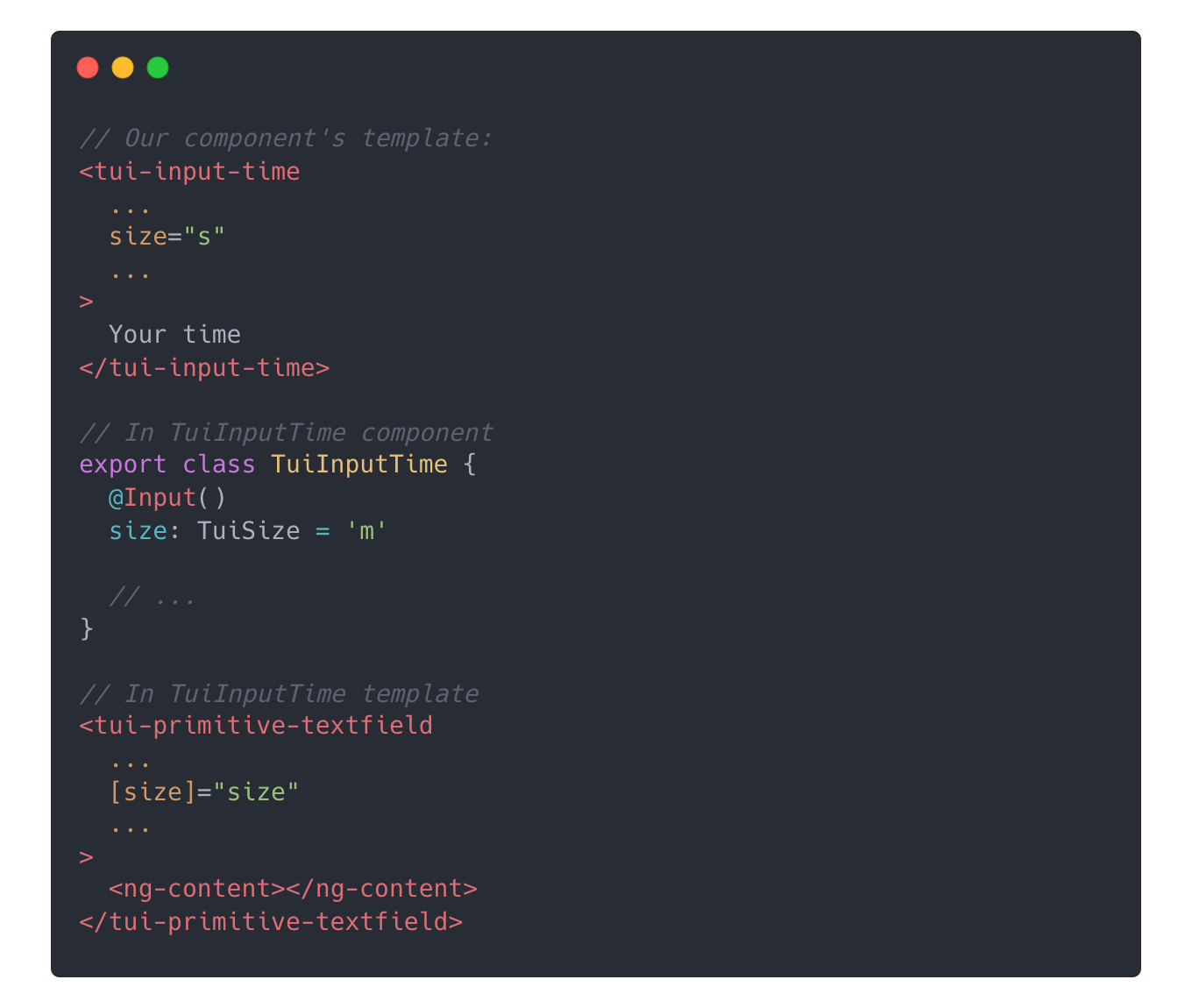
These high-level components each declared a series of @Inputs just to pass them straight through to the PrimitiveTextfield. This led to significant duplication. Many of these @Inputs were only essential for a fraction of projects, yet they had to be present in every variant. Each new input component made this brittle structure harder to manage.
I decided to categorize all the @Inputs of the base component:
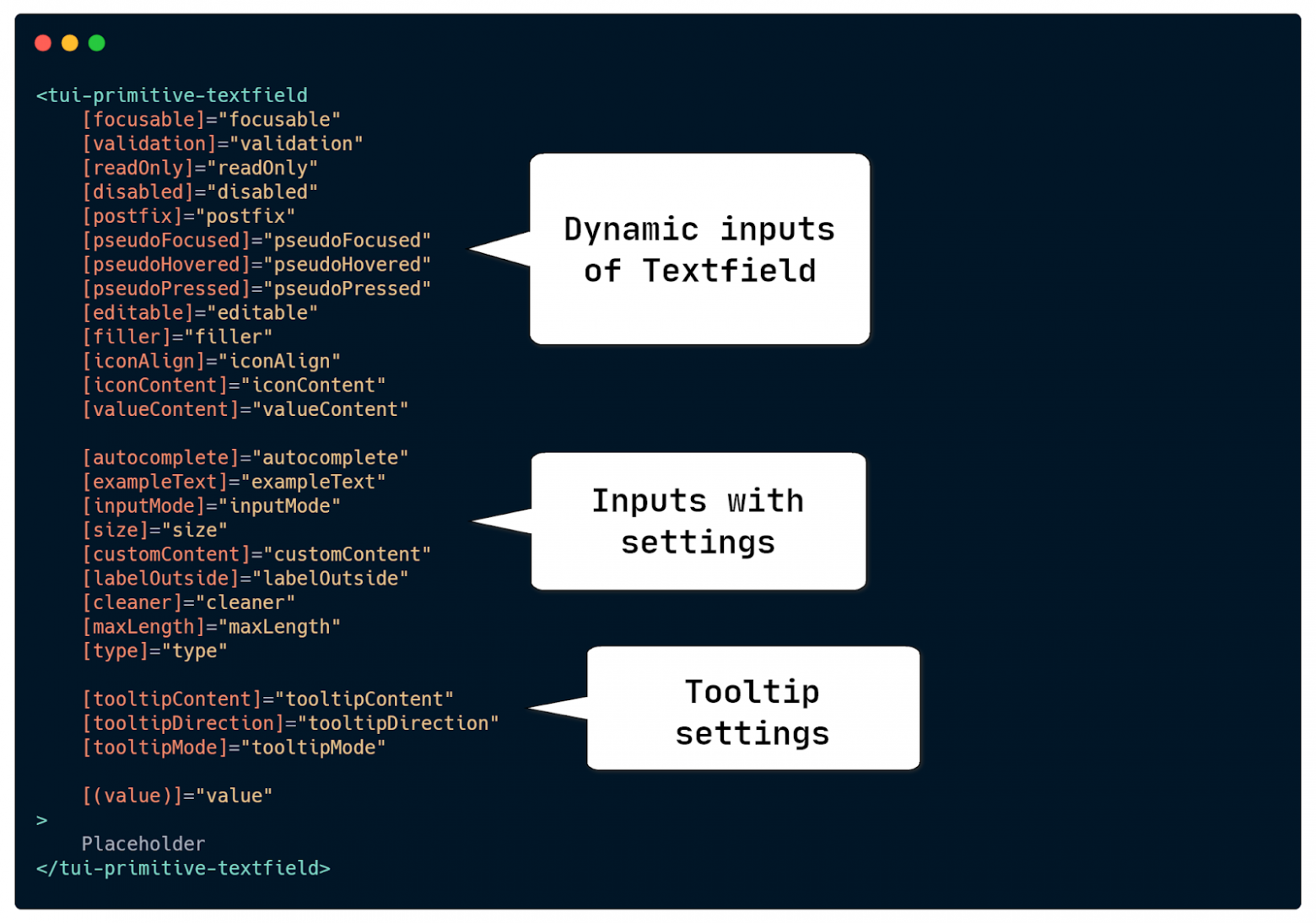
The first category includes dynamic @Inputs that change frequently during runtime—fields get enabled or disabled on the fly.
The final group, concerning tooltip configurations, was addressed in the previous article. We solved it using directive-controllers, which we applied not only to the textfield but to every component with a tooltip.
Now, I will focus on the second group. These are @Inputs configured once at initialization and not expected to change. However, we still want to enable component users to set them at any point and at any level of the component tree.
Defining Our Objective
Consider the InputTime component as a case study:
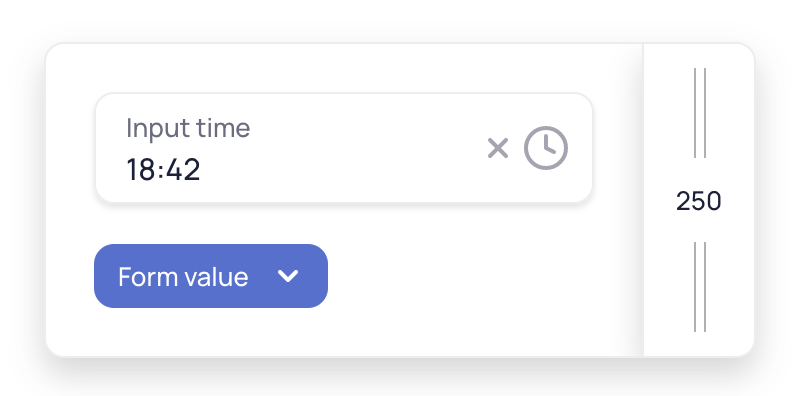
This component passes two specific settings to PrimitiveTextfield: a clock icon via [customContent], and a placeholder pattern via [filler]. While InputTime sets these, end users can still adjust other PrimitiveTextfield attributes like its cleaner or size.
The objective is to merge settings from different levels of a component hierarchy. For instance, InputTime might provide the clock icon. One developer could then add a cleaner directive for their specific form, while another might set a global "L" size for all inputs in the application. Ideally, PrimitiveTextfield could retrieve this combined configuration as a single entity via DI.
Developing the Directive-Controller
Each directive will be responsible for managing a single specific setting on the textfield. Here’s an example of a directive that controls the cleaner's visibility:
@Directive({
   selector: '[tuiTextfieldCleaner]',
   providers: [
       {
           provide: TUI_TEXTFIELD_CLEANER,
           useExisting: forwardRef(() => TuiTextfieldCleanerDirective),
       },
   ],
})
export class TuiTextfieldCleanerDirective extends Controller {
   @Input('tuiTextfieldCleaner')
   cleaner = false;
}
This directive extends the Controller class we established in the initial article:
export abstract class Controller implements OnChanges {
   readonly change$ = new Subject<void>();

   ngOnChanges() {
       this.change$.next();
   }
}
Notice how the directive provides itself in DI using a specific token. This token is declared in the same file:
export const TUI_TEXTFIELD_CLEANER = new InjectionToken<TuiTextfieldCleanerDirective>(
   'tuiTextfieldCleaner',
   {factory: cleanerDirectiveFactory},
);

export function cleanerDirectiveFactory(): TuiTextfieldCleanerDirective {
   return new TuiTextfieldCleanerDirective();
}
We'll use these tokens later to consolidate everything into one large controller. Why a token, rather than injecting the directive directly? The key is that a token can have a factory. If no directive is present in the entire DI tree, we get a directive instance with default values instead of a null reference.
Structuring Controllers
I prefer to place each controller in its own dedicated file for better code organization and faster navigation.
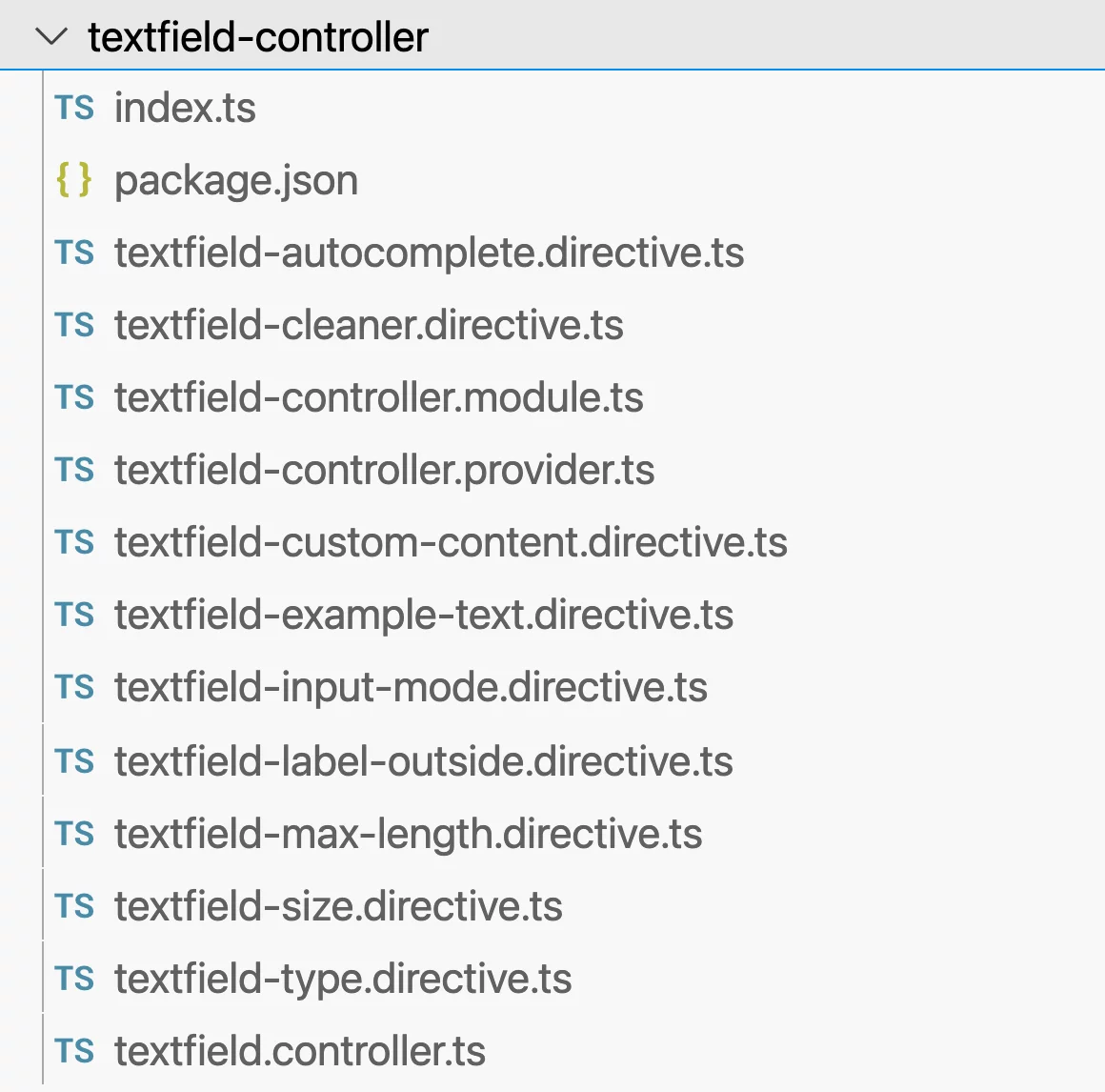
All these are exported from a single Secondary Entry Point and are declared in TextfieldControllerModule to simplify integration for developers.
To add a new feature to all inputs, we simply create a new file and declare the necessary entities—there's no need to modify existing components.
Assembling the Metacontroller
Having Textfield inject and react to each individual controller would be inefficient. Instead, we combine them into a single metacontroller. This class will hold the current values for all settings and handle its own update logic, which we’ll set up within a private provider.
export class TuiTextfieldController {
   constructor(
       readonly change$: Observable<void>,
       private readonly autocompleteDirective: TuiTextfieldAutocompleteDirective,
       private readonly cleanerDirective: TuiTextfieldCleanerDirective,
       // other directives...
   ) {}

   get autocomplete(): TuiAutofillFieldName | null {
       return this.autocompleteDirective.autocomplete;
   }

   get cleaner(): boolean {
       return this.cleanerDirective.cleaner;
   }

   // other directives...
}
The metacontroller is a simple class that receives all the directives as dependencies along with a stream that signals when any of them changes. When an @Input in any directive is updated, we recalculate the getters to reflect the new state.
We instantiate this class via a provider factory:
export const TUI_TEXTFIELD_WATCHED_CONTROLLER = new InjectionToken<TuiTextfieldController>(
   'watched textfield controller',
);

export const TEXTFIELD_CONTROLLER_PROVIDER: Provider = [
   TuiDestroyService,
   {
       provide: TUI_TEXTFIELD_WATCHED_CONTROLLER,
       deps: [
           ChangeDetectorRef,
           TuiDestroyService,
           TUI_TEXTFIELD_AUTOCOMPLETE,
           TUI_TEXTFIELD_CLEANER,
           TUI_TEXTFIELD_CUSTOM_CONTENT,
           TUI_TEXTFIELD_EXAMPLE_TEXT,
           TUI_TEXTFIELD_INPUT_MODE,
           TUI_TEXTFIELD_LABEL_OUTSIDE,
           TUI_TEXTFIELD_MAX_LENGTH,
           TUI_TEXTFIELD_SIZE,
           TUI_TEXTFIELD_TYPE,
       ],
       useFactory: textfieldWatchedControllerFactory,
   },
];
The factory collects the values from the tokens and passes them to the metacontroller, which performs no special operations:
export function textfieldWatchedControllerFactory(
   changeDetectorRef: ChangeDetectorRef,
   destroy$: Observable<void>,
   ...controllers: [
       TuiTextfieldAutocompleteDirective,
       TuiTextfieldCleanerDirective,
       TuiTextfieldCustomContentDirective,
       TuiTextfieldExampleTextDirective,
       TuiTextfieldInputModeDirective,
       TuiTextfieldLabelOutsideDirective,
       TuiTextfieldMaxLengthDirective,
       TuiTextfieldSizeDirective,
       TuiTextfieldTypeDirective,
   ]
): TuiTextfieldController {
   const change$ = merge(...controllers.map(({change$}) => change$)).pipe(
       takeUntil(destroy$),
	tap(() => changeDetectorRef.markForCheck()),
   );

   change$.subscribe();

   return new TuiTextfieldController(change$, ...controllers);
}
We also merge the change streams from all the controllers and subscribe to that combined stream. A notable advantage is the ability to safely unsubscribe upon destruction using TuiDestroyService from taiga-ui/cdk.
Integrating with Textfield
Next, we connect this metacontroller to the PrimitiveTextfield component:
@Component({
   // …,
   providers: [TEXTFIELD_CONTROLLER_PROVIDER],
})
export class TuiPrimitiveTextfieldComponent {
    constructor(
        @Inject(TUI_TEXTFIELD_WATCHED_CONTROLLER)
        readonly controller: TuiTextfieldController,
    ) {}

    get hasCleaner(): boolean {
       return (
           this.controller.cleaner && this.hasValue && !this.disabled && !this.readOnly
       );
   }

   // ...
}
Since all change detection is already handled internally, we can use the metacontroller just like any other service from DI. The Textfield remains unaware of the internal mechanics and can easily swap it out in DI if necessary.
The Textfield simply receives the aggregated entity from the closest set of directives found in the DI tree. This allows for setting a value at the form level and then overriding it for a specific input, as DI resolution works from the bottom up, encountering the more specific input directive first.
Advantages of This Design
Although this introduces many new entities and may seem to add complexity, the benefits for library users are substantial.
Enhanced Flexibility
This provides exceptional customization capabilities. For example, you can create a form with five inputs styled with "L" size and without labels by setting [labelOutside]=“true”.
Previously: You would have needed to add both size and labelOutside @Inputs to each of the five controls, even though they don't use them. These properties would just be passed down to Textfield, increasing bundle size without adding value.
Now: You can set directives for size and labelOutside on the form element itself. Thanks to the hierarchical nature of DI, these settings apply to all controls within. You could even place the directive on the root tui-root to establish a global default.
The controls themselves remain unaware of these configuration details. The basic component uses the data purely from DI, at the point where it's actually needed.
Leveraging DI's Power
Angular's DI is incredibly potent. Providers can be overridden, removed, or rearranged. We can create reusable providers that alter the default behavior of our controllers.
Take a dropdown controller that defaults to the width of its content. For some components, we need the dropdown to match the host's width. We can achieve this with a specific provider for those cases:
export function fixedDropdownControllerFactory(
   directive: TuiDropdownControllerDirective | null,
): TuiDropdownControllerDirective {
   directive = directive || new TuiDropdownControllerDirective();
   directive.limitWidth = 'fixed';

   return directive;
}

export const FIXED_DROPDOWN_CONTROLLER_PROVIDER: Provider = [
   {
       provide: TUI_DROPDOWN_CONTROLLER,
       deps: [[new Optional(), TuiDropdownControllerDirective]],
       useFactory: fixedDropdownControllerFactory,
   },
];
By adding this provider to a component's providers array, its factory is used when the dropdown controller is requested. It modifies the default settings for the controller, or creates one if it doesn't exist. The critical detail is that we only change the default. If a user has explicitly bound an @Input via a directive, Angular will prioritize the user's value over this factory-provided default.
Improved Lightness
Many of our components previously included repetitive @Inputs they didn't need. These have been relocated to DI. Components are now cleaner and only contain properties they actually use. Furthermore, removing these @Inputs decreases the bundle size for both the library and the applications using it, and it even has a marginal positive effect on runtime memory consumption.
Code References
If you'd like to see the full implementation, you can explore these real-world examples from Taiga UI:
- Textfield controllers, and the textfield component itself
- Tooltip controllers, also utilized in the textfield
- Dropdown controllers and how they integrate with hosted-dropdown
Closing Thoughts
This complex configuration might seem daunting, but it becomes second nature after seeing it applied in a few real-world scenarios. Ultimately, we're only utilizing standard Angular tools: directives, DI tokens, and factory providers.
This pattern may be overkill for smaller projects, but at scale, it provides tangible advantages and supports high-velocity development without accruing technical debt.
For more content, tips, and tricks about Angular, follow me on Twitter: @marsibarsi