
Making Base Components More Flexible: The Controllers Concept in Angular
While building our Taiga UI component library, we discovered that several of our major components were carrying Angular @Inputs solely to forward them into other base components. In some cases, this nesting went three levels deep.
We addressed this by introducing a set of clever directives we call Controllers. This approach eliminated the deep nesting and trimmed the overall bundle size of the library.
This article walks through how we organized a unified settings system for every textfield in our library, relying heavily on the power of Angular's Dependency Injection.
A Practical Case: the Primitive Textfield in Older Taiga Versions
At the core, we have a Primitive Textfield component.
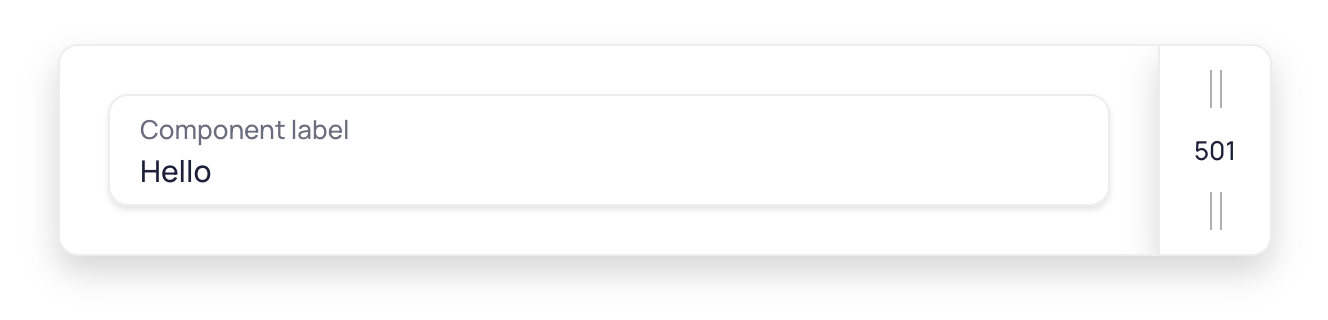
This component wraps a styled native <input> element. It is not designed to work with Angular forms directly, but serves as a foundation for building higher-level input components.
Initially, the Textfield was straightforward and served as a base for a few more intricate components. However, as we added features, the number of properties being passed down through @Inputs grew significantly, making the component complex.
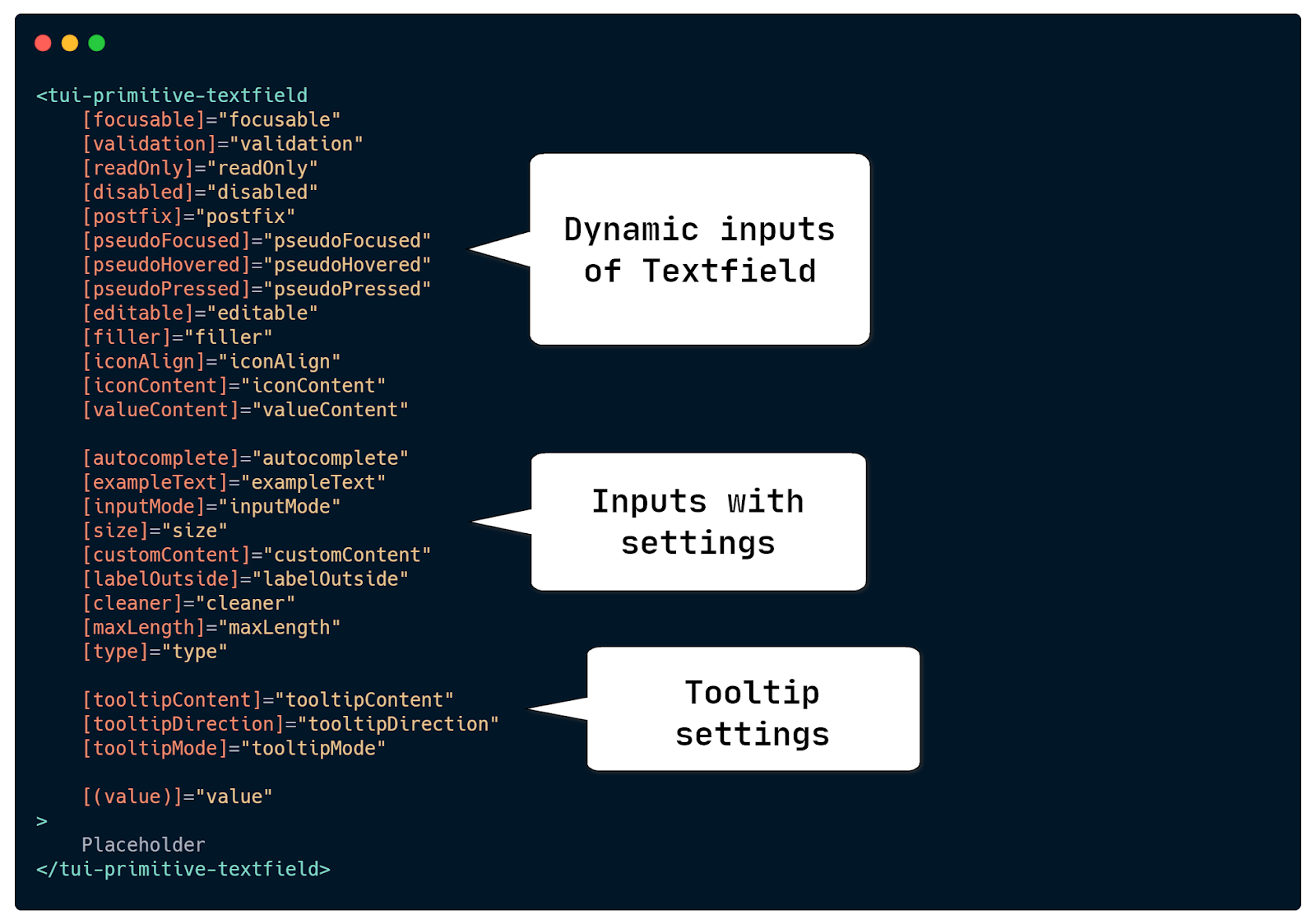
These @Inputs fall into three categories. First, there are dynamic @Inputs that change frequently, such as disabling a form control or toggling an icon for password visibility. Second, there are the configuration settings that alter the Textfield's appearance or behavior, like its size or the presence of a cleaner button. Finally, there are settings for tooltips and two-way binding for its value.
By the time we began planning for the open-source release, our library included 17 distinct components built on top of the PrimitiveTextfield. This is when two fundamental issues emerged:
Many higher-level components were declaring @Inputs purely to relay them down to the PrimitiveTextfield without any modification. As a result, every new @Input added to the Textfield required us to update all 17 of its dependent components as well.
Some of these @Inputs were used infrequently, yet they were present in every component. This increased the bundle weight: one @Input in the Textfield meant one more in each component depending on it. Any of the ten projects using our library would then have extra, unused properties.
This called for a redesign.
Refactoring Inputs into Directives for On-Demand Use
Let's examine the @Inputs of the old Textfield. We had three specific inputs for managing tooltips: [tooltipContent], [tooltipDirection], and [tooltipMode].
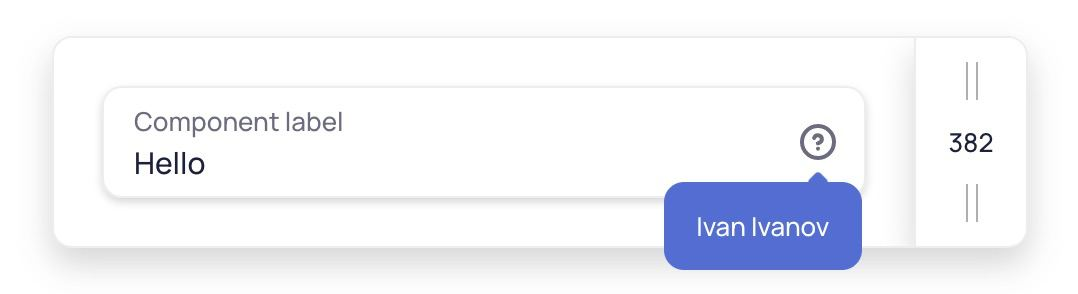
This is fairly self-contained logic and, therefore, an ideal candidate for a first refactor. The component receives the content to display through these inputs and has its own logic to show the tooltip on hover or focus, ensuring accessibility for users who rely on keyboards.
These three inputs were being passed down from other components and were not used that often. Since such hints could also benefit other components, we decided to create a standalone Controller directive for all hint-related settings in our library.
@Directive({
   selector: '[tuiHintContent]'
})
export class TuiHintControllerDirective {
   @Input('tuiHintContent')
   content: PolymorpheusContent = ’’;

   @Input('tuiHintDirection')
   direction: TuiDirection = 'bottom-left';

   @Input('tuiHintMode')
   mode: TuiHintMode | null = null;
}
This represents the most basic form of a Controller: simply three @Inputs holding the necessary information. The directive's selector checks only for tuiHintContent, as there is no reason to adjust the direction or mode if the content itself is absent.
You can now bind this directive to the Textfield or any of its parent elements. Our next step is to inject this directive in the Textfield using DI and retrieve its data.
constructor(
    @Optional()
    @Inject(TuiHintControllerDirective)
    readonly hintController: TuiHintControllerDirective | null,
) { }
Still, there are a couple of details to iron out.
When an @Input on the directive is changed, the Textfield's OnPush change detection won't fire automatically. Because the directive sits above in the DI hierarchy, it has no awareness of the Textfield, and these @Inputs therefore don't follow standard Angular change-detection flow. The solution is to create an RxJS stream that emits whenever the controller's @Input changes. We also considered it wise to encapsulate this stream in an abstract Controller class that all other controllers can extend.
export abstract class Controller implements OnChanges {
   readonly change$ = new Subject<void>();

   ngOnChanges() {
       this.change$.next();
   }
}
Within the component, we need to react to this change$ stream. The simplest implementation is to inject the directive and a ChangeDetectorRef, then call its markForCheck method on every emission. This is a viable path when a controller targets a single component.
constructor(
    private readonly changeDetectorRef: ChangeDetectorRef,
    @Optional()
    @Inject(TuiHintControllerDirective)
    readonly hintController: TuiHintControllerDirective | null,
) {
    if (!hintController) {
    	return;
    }

    hintController.change$
    	.pipe(takeUntil(this.destroy$))
        .subscribe(() => {
		changeDetectorRef.markForCheck();
    	});
}
The usage would look like this. Note that this is not the final solution; we will refactor and abstract it later.
Now, showing a tooltip in a Textfield is as simple as binding the tuiHintContent directive to the component itself or to any parent element.
This approach immediately cleaned up our codebase: the wrapper components no longer carry @Inputs for hint functionality just to pass them down. Each component instance is also free of these redundant properties.
However, reusing this controller in other base components now requires duplicating the same change-detection and subscription-handling code in each new component. For instance, to add HintController support to a TextArea—which isn't based on the Textfield—we would need to repeat the same constructor logic seen in the previous example.
Abstracting Change Detection with Providers
The goal is to let any component fetch a controller as a simple data object, without dealing with extra subscriptions, change-detection concerns, or @Optional() null checks. This is exactly where Angular's DI providers shine. Here's what we want inside a Textfield component:
  constructor(
      @Inject(TUI_HINT_WATCHED_CONTROLLER)
      readonly hintController: TuiHintControllerDirective,
  ) {}
To achieve this, we introduce a token TUI_HINT_WATCHED_CONTROLLER along with its provider:
export const TUI_HINT_WATCHED_CONTROLLER = new InjectionToken('watched hint controller');

export const HINT_CONTROLLER_PROVIDER: Provider = [
   TuiDestroyService,
   {
       provide: TUI_HINT_WATCHED_CONTROLLER,
       deps: [[new Optional(), TuiHintControllerDirective], ChangeDetectorRef, TuiDestroyService],
       useFactory: hintWatchedControllerFactory,
   },
];

export function hintWatchedControllerFactory(
   controller: TuiHintControllerDirective | null,
   changeDetectorRef: ChangeDetectorRef,
   destroy$: Observable<void>,
): Controller {
  if (!controller) {
     return new TuiHintControllerDirective();
  }

   controller.change$.pipe(takeUntil(destroy$)).subscribe(() => {
      changeDetectorRef.markForCheck();
   });

   return controller;
}
Injecting this token into our component automatically subscribes to changes via the factory function. The HINT_CONTROLLER_PROVIDER is placed in the Textfield's providers array so that its deps are the actual ChangeDetectorRef and TuiDestroyService. The latter is a small service we provide just above the hint provider; it binds to the component injector's ngOnDestroy hook and acts as a Subject by calling its own next method (the linked implementation clarifies this).
All that's left is to add the provider and inject the new token:
@Component({
   //...
   providers: [HINT_CONTROLLER_PROVIDER,],
})
export class TuiPrimitiveTextfieldComponent {
   constructor(
       //...
       @Inject(TUI_HINT_WATCHED_CONTROLLER)
       readonly hintController: TuiHintControllerDirective,
   ) {}
}
At this point, you can bind the directive to the Textfield, to any component containing a Textfield, or to any element within it. Thanks to the safe subscription in the factory, the Textfield's change detection will run after every @Input change on the directive.
This makes working with a Controller in a Textfield very convenient: the component simply pulls a ready-made object from the DI tree and uses it in the template without worrying about subscriptions, change detection, or existence checks.
One potential enhancement we see is generalizing hintWatchedControllerFactory into a common factory that could handle all controller types. We indeed did this once we introduced a second type of Controller; for now, the current solution is perfectly acceptable.
What’s on the Horizon?
So far we have looked at one simple controller use case. The Textfield also contains a collection of other settings that we've split into a more sophisticated controller, one capable of handling arbitrary nesting levels. For instance, you could set one @Input on the Textfield, another on a parent component, and a third on an entire form, affecting all Textfields within it; each setting can also be overridden at any nesting depth. This is accomplished with pure, albeit advanced, Angular DI.
I'd love to write a follow-up article about this—but first I'd like to gauge interest. If you'd like to read it, just let me know!
Closing Thoughts
With just a few dozen lines of code and some creative Angular DI patterns, we significantly cut down repetition, simplified our component APIs, and shrank the library bundle, along with the bundle size of every application using it.
This is not a trivial pattern and might be overkill in some scenarios. For our use case, however, it allowed us to drastically simplify a large portion of our package through thoughtful DI usage and a clean, minimal public API.