
Understanding Tree Shaking
A major concern in Angular development is the resulting bundle size. The amount of JavaScript that users must download directly correlates with an application's footprint. The Angular team set a clear objective for reducing this bundle size.
Cake Threshold. This term comes from a team incentive where cakes were promised to everyone if they could get a "Hello, World" application below 10 Kb.

source: https://twitter.com/kuncevic/status/1050165141625483264
With the introduction of the Ivy rendering engine, one of the key optimizations came from tree shaking, also known as dead code elimination. This is the process of removing unused code from the build output, which directly contributes to reducing the final size of the application.
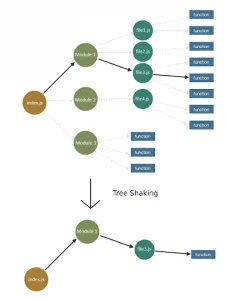
How Tree Shaking Works in Angular Ivy
Integrating tree shaking into the Ivy rendering engine marked a substantial advancement in optimization efforts. To grasp how Angular identifies and discards unused code, it's essential to understand the incremental DOM, the foundation of the Ivy rendering engine.
Google's decision to implement Incremental DOM was driven by two key goals:
- Achieving a smaller bundle size
- Lowering the RAM requirements for the rendering engine
Incremental DOM works by recompiling each component into a set of specific instructions. These instructions are responsible for both creating the DOM tree and updating only the parts where data has changed. This strategy eliminates the need for the Angular interpreter in the final bundle. Also, the method by which these instructions manage DOM updates is more memory-efficient than the Virtual DOM approach used by libraries like React, which creates entirely new versions of the DOM tree.
Why does Incremental DOM make tree shaking possible?
Since components are transformed into instructions during the compilation step, we can systematically check for references from a component to each instruction. If a particular instruction isn't referenced, it becomes a candidate for tree shaking. Virtual DOM, in contrast, depends on an interpreter that cannot pre-determine if a specific piece of code will be needed in the application.
With a clear picture of how this technique functions, let's look at a practical example.
We'll create a simple Angular application with one component that uses interpolation and the date pipe:
import { Component } from '@angular/core';

@Component({
  selector: 'app-root',
  template: `
    <h1>Title: {{ title }}</h1>
    <h2>{{ date | date }}</h2>
  `,
})
export class AppComponent {
  title = 'Tree shaking with Angular Ivy';
  date = new Date();
}
Next, we'll use the Angular Compiler CLI to create Js files that represent our component as a set of instructions. After running the ngc -p tsconfig.json command, the component is transformed into this form:
import { Component } from "@angular/core";
import * as i0 from "@angular/core";
import * as i1 from "@angular/common";
export class AppComponent {
  constructor() {
    this.title = "Tree shaking with Angular Ivy";
    this.date = new Date();
  }
}
AppComponent.ɵfac = function AppComponent_Factory(t) {
  return new (t || AppComponent)();
};
AppComponent.ɵcmp = i0.ɵɵdefineComponent({
  type: AppComponent,
  selectors: [["app-root"]],
  decls: 5,
  vars: 4,
  template: function AppComponent_Template(rf, ctx) {
    if (rf & 1) {
      i0.ɵɵelementStart(0, "h1");
      i0.ɵɵtext(1);
      i0.ɵɵelementEnd();
      i0.ɵɵelementStart(2, "h2");
      i0.ɵɵtext(3);
      i0.ɵɵpipe(4, "date");
      i0.ɵɵelementEnd();
    }
    if (rf & 2) {
      i0.ɵɵadvance(1);
      i0.ɵɵtextInterpolate1("Title: ", ctx.title, "");
      i0.ɵɵadvance(2);
      i0.ɵɵtextInterpolate(i0.ɵɵpipeBind1(4, 2, ctx.date));
    }
  },
  pipes: [i1.DatePipe],
  encapsulation: 2,
});
/*@__PURE__*/ (function () {
  i0.ɵsetClassMetadata(
    AppComponent,
    [
      {
        type: Component,
        args: [
          {
            selector: "app-root",
            template: `
    <h1>Title: {{ title }}</h1>
    <h2>{{ date | date }}</h2>
  `,
          },
        ],
      },
    ],
    null,
    null
  );
})();
//# sourceMappingURL=app.component.js.map
Let's examine the AppComponent_Template function. The first argument, rf, represents the renderFlags, with two possible modes: 1 for RenderFlags.Create and 2 for RenderFlags.Update. During the creation phase, we proceed from line 18 to line 24, adding elements to the Logical View (LView) array, which stores DOM elements, bound values, and directive instances.
Each component gets its own LView array, used for the Change Detection process. In the update mode, the advance instructions help pinpoint the location of the element being updated within the LView array. These values are cached, and during change detection, a comparison is made between the new and the current values. For a deeper dive, I recommend this resource: https://www.youtube.com/watch?v=S0o-4yc2n-8
Let's turn our attention to what our application is using: Interpolation and Pipe. We can see the functions ɵɵtextInterpolate1 and ɵɵpipeBind1 in the generated code. Now, to see these instructions in our final build, we'll create a production bundle with the following command, ensuring the output is readable:
env NG_BUILD_MANGLE=false NG_BUILD_MINIFY=false NG_BUILD_BEAUTIFY=true ng build -prod
And indeed, we can find the following declarations:
function ɵɵtextInterpolate1(prefix, v0, suffix) { ... }And
function ɵɵpipeBind1(index, slotOffset, v1) { ... }Now, let's check if removing the date pipe also eliminates ɵɵpipeBind1 from the generated code. After taking out the date, there is no longer a reference to a Pipe anywhere in the application. Consequently, the following code will not appear in the final bundle:

When comparing the sizes of our production builds, we saw the following outcome (note that the builds were configured to better show the size difference):
With Date pipe: 172.4 kB
Without Date pipe: 160.6 kB
For reference, Angular 6: 258.2 kB
This demonstrates that the code was successfully removed via tree shaking.
In essence, the new rendering engine leverages Incremental DOM, which relies on instructions. This instruction-based approach enables scanning the entire project to check for references to specific parts of the Angular API and the application's own code. Once this scan is complete, we have a definitive list of which parts are unused and can safely be removed through tree shaking.
Additional Reading
If you're interested in more insights, I suggest reviewing an article on how to simulate tree-shakable components using Single Component Angular Modules (SCAMs):