Introduction
Angular 17 introduced a mechanism that gives developers precise control over when components are loaded in an application. The days of using elaborate workarounds to bring individual components onto the screen are over. This capability enables you to fine-tune application performance and manage how much data is transferred to a user's device when they interact with your app. In this piece, we'll take a quick look at how to use the new defer blocks, but the main focus will be on examining the bundle size differences in an application with and without deferred views.
Understanding Deferred Views in Angular
Before diving in, let’s examine a couple of key concepts related to how deferred views operate in Angular. This isn't an exhaustive look at the internals, but it should provide useful context.
First, employing deferred views in your Angular application switches the import type of the deferred component from a static import to a dynamic one. Static imports are a JavaScript feature where all necessary code is downloaded and executed before the app can run. Dynamic imports, on the other hand, let you request a module at any point during the lifecycle of your application.
Another important distinction is the difference between lazy loading and lazy initialization. There's also some discussion on Twitter about this here. In short, lazy initialization only postpones the instantiation of the template, similar to using ng-template. The component's code is still loaded; it just isn’t painted to the screen right away. Lazy loading delays both the loading of the component and the execution of its code until it's actually required.
Using Deferred Views
Implementing deferred views in your Angular app is quite simple: create an app on v17, or update your existing app to v17, and then wrap the component you wish to defer in a defer block:
@defer {
<app-my-component></app-my-component>
}
That's all it takes to start using the new deferred blocks. Naturally, you can gain more control by adding conditions after the @defer and before the opening curly brace. The triggers provided by Angular are as follows:
- On idle
- On viewport
- On interaction
- On hover
- On immediate
- On timer
Once the specified condition is met, the component gets added to the DOM and displays as expected. You can combine these triggers to create more complex conditions if necessary.
There are additional features of deferred views, like placeholder, loading, and error blocks, but those are beyond the scope of this article. For more detailed information, please refer to the official documentation.
How Deferred Views Affect Bundle Size
The primary motivation for using deferred views is to boost app performance, which is significantly influenced by the size of the application bundle. A large initial bundle takes longer to download and start on a user's device, and this issue is amplified on slower networks or less capable hardware. While techniques like lazy loading routes exist, this provides another valuable tool in our toolkit.
Let's examine a sample application to see the effect of deferred views on a single, small component. For this demonstration, I set up a new Nx workspace on Angular v17, using esbuild, Tailwind, and standalone components. I then created a new component that does nothing except display the default text generated for a new component. Below is the bundle size of the application with the component added to the page normally, without any deferred loading.
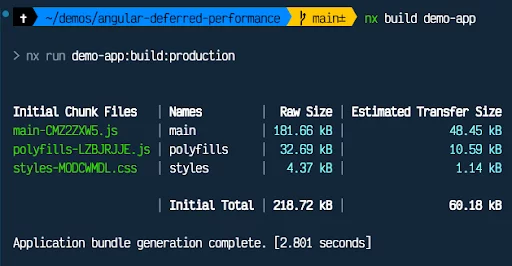
Since the application isn’t doing much, the bundle sizes are already very small. However, observe the main chunk's size after wrapping our new component in a defer block:
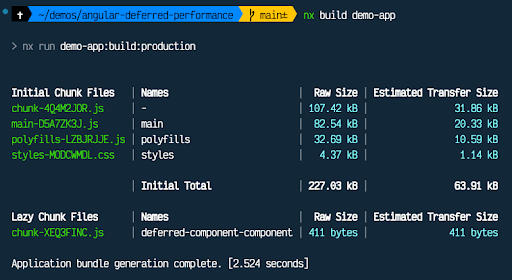
The main chunk shrinks dramatically, coming in at just 82.54 kB compared to 181.66 kB. While there are now a couple of other chunks, including a lazy one, we can see that 411 bytes will be deferred until the user actually needs that information.
This result is particularly interesting if the deferred component isn't used by every visitor. If it's only loaded occasionally or in response to specific interactions, we still save users bandwidth and improve the app's overall performance.
Also, keep in mind this component is tiny and does absolutely nothing. Let's add a bit more content to it, like a substantial list to loop over. I'll create an array of 1000 items, hard-coded in the component, that are iterated and displayed. Here's the bundle size when that component is not deferred.
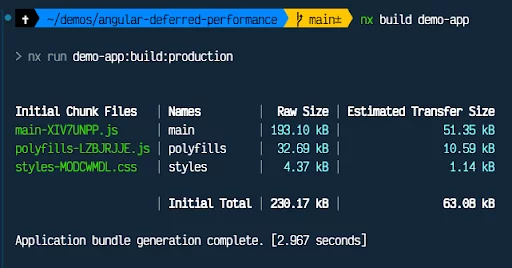
The main chunk has now grown to 193.1 kB, up from 181.66 kB. And here are the sizes when the component is deferred.
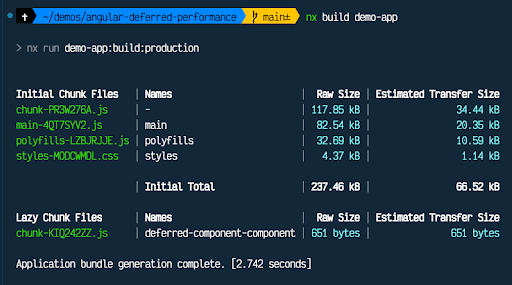
With the deferred component, the main chunk remains the same size as before, even though the component now contains 1000 items. As expected, the lazily loaded chunk is larger, and the top initial chunk has also grown slightly.
Potential Gotchas
Using deferred views in Angular is straightforward, as shown above, but you might run into unexpected issues if you're not careful. One key thing to remember is that your component will only be lazily loaded if it isn't already being eagerly loaded elsewhere in your application.
For instance, imagine you have a contact form component that appears on both the contact page and the cart page, but it is deferred only on the cart page. For this example, let’s also assume the contact and cart pages are part of the same module. Because the contact component is eagerly loaded on the contact page, it will not be lazily loaded on the cart page. This makes sense and might seem obvious, but it's important to highlight so you don't expect your bundle sizes to change in the scenario described here.
Conclusion
Deferred views are shaping up to be one of Angular's standout features. The combination of performance benefits and ease of use makes them accessible to developers of every skill level. As demonstrated, there are clear bundle size improvements, even with extremely basic examples. As your components grow in complexity, the potential savings are likely to become even more pronounced.