
Getting Started with Typed Reactive Forms
Angular 14 introduced type-safe reactive forms, marking a significant shift in how developers work with form controls. Before this update, reactive forms were prone to runtime errors because you could easily reference values or controls that didn’t actually exist on the form. Additionally, there was no restriction on the type of value you could assign to a control — for example, you could set an email control to a numeric value, even though that scenario would never be valid in practice.
The introduction of type safety largely addresses these runtime pitfalls. Now, the Angular compiler and your IDE will flag attempts to access non-existent properties or assign incompatible values to form fields.
This article walks through the setup required for typed reactive forms, explores the practical benefits they deliver, and highlights a few common edge cases you might encounter along the way.
Building Typed Forms
There are three primary ways to construct typed forms in Angular: instantiating a FormControl, creating a FormGroup, or leveraging the FormBuilder service. I’ll demonstrate each briefly, though most examples throughout this guide will rely on the FormBuilder—a matter of personal preference rather than a definitive best practice.
FormControl
To create a typed FormControl, simply instantiate it with the new keyword and provide an initial value:
public name = new FormControl('')
This establishes a control whose value type is inferred as string | null. The reason for the nullable type will be explained shortly. If you attempt to assign a number to this control, your IDE will immediately raise a type error:
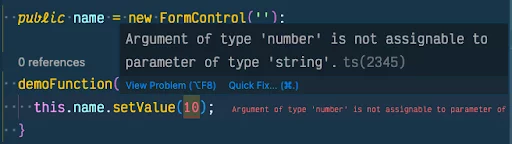
Type safety kicks in as soon as the control is created. You can also specify an explicit type when initializing the control, overriding the inferred default:
public name = new FormControl<string | number>('');
With this explicit typing, assigning a number to the control no longer triggers a compile-time error.
FormGroup
Creating a typed group follows a similar pattern. Here’s a basic FormGroup definition:
public form = new FormGroup({
  name: new FormControl(''),
});
The name control within this group inherits the same type safety as a standalone FormControl. Assigning a numeric value to it results in a type error:
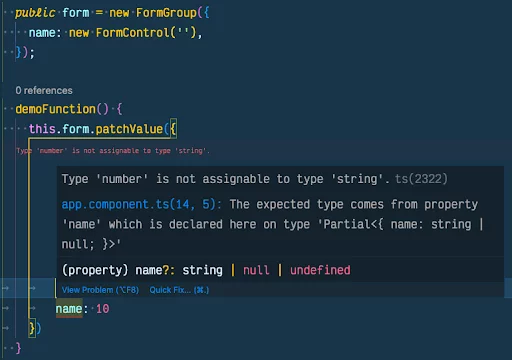
Beyond individual control types, the FormGroup itself is strictly typed. Referencing a property that isn’t part of the group’s declaration will cause a compile-time failure:
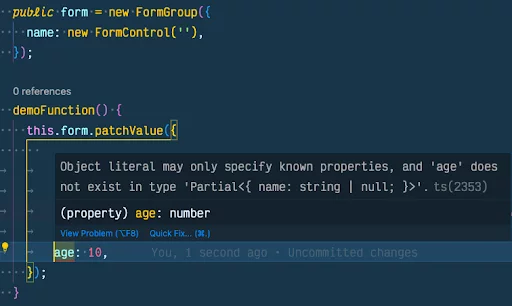
This level of checking helps prevent common mistakes like patching a form with attributes it doesn’t own or assigning unsupported values—giving you full visibility into the form’s value shape at all times.
FormBuilder
The FormBuilder offers a third approach, streamlining the creation of typed forms. While it behaves much like manually constructing a FormGroup, it simplifies the process by handling control creation behind the scenes:
public form = this._fb.group({
  name: [''],
});
Type safety here mirrors the FormGroup approach, so there’s no need to repeat the details. You can also declare a custom interface and pass it as a generic to the FormBuilder‘s group method:
interface InfoForm {
  name: string;
  age: number;
}

public form = this._fb.group<InfoForm>({
  name: '',
  age: 0,
});
This technique is effective because it flags missing fields and enforces correct value types. However, adding validators to fields can cause issues. For instance, if your interface specifies name as a string but you assign an array (the internal representation of validators), the type checker will complain:
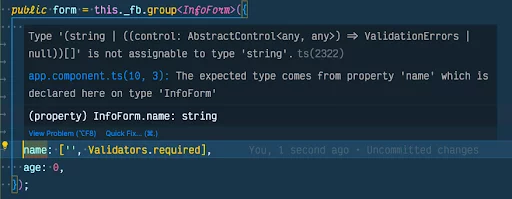
In most cases, supplying an explicit interface like InfoForm is unnecessary—the inferred types from the initial values provide equivalent safety without the extra boilerplate.
Understanding FormControl Values
Earlier, I noted that a FormControl’s value could be null or undefined, regardless of how it’s created—whether via new, FormGroup, or FormBuilder. Let’s clarify why this is the case.
undefined values can arise when a control is disabled. Disabled controls are excluded from the form’s value object. To include them, you’d use getRawValue(), which returns the complete set of values without omitting disabled fields.
null appears by default because typed forms assume a value can be null unless explicitly marked otherwise. For example, resetting a control without passing a new value sets it to null. To make a field non-nullable, you must declare the control or group with the nonNullable option:
public name = new FormControl('', { nonNullable: true });
// or
public form = new FormGroup({
  name: new FormControl('', { nonNullable: true }),
});
// or
public form = this.\_fb.nonNullable.group({
  name: [''],
});
// or
private \_fb = inject(NonNullableFormBuilder);
public form = this.\_fb.group({
  name: [''],
});
When you set up controls this way, the value type no longer includes null, but undefined remains a possibility alongside the initial value’s type.
Why Typed Forms Matter
While there are countless advantages to type-safe forms, a few stand out for everyday development.
First, IDE autocompletion becomes a huge productivity booster. You no longer need to memorize every property or method—just invoke the autocomplete shortcut or hover over a variable to see its structure. Take the valueChanges observable from the earlier form example. When subscribing to the stream, your IDE will suggest the exact shape of the value object:
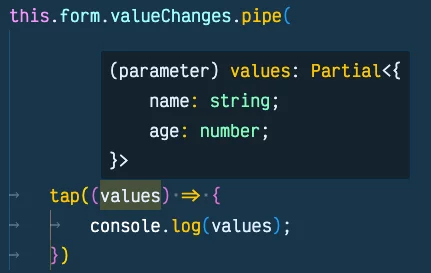
The form above was created with
nonNullable, which is whynameandageare not nullable.
Autocompletion is equally helpful when you need to access specific controls, for instance, to observe a single field’s valueChanges:
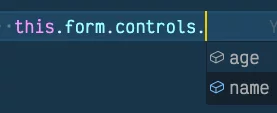
Here, your IDE offers age and name as the only options. Attempting to reference any other control fails at compile time. Without typed forms, such a mistake would only surface at runtime.
Another major benefit relates to updating form values. When calling patchValue or setValue in TypeScript, any invalid property will trigger an IDE warning and prevent compilation:
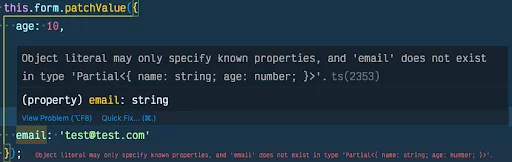
With untyped forms, you could pass an emailAddress property without error, leading to confusion about whether the form actually contains that field. This proactive feedback reduces debugging and helps you catch mistakes long before deployment.
Common Pitfalls with Typed Forms
As beneficial as typed forms are, a couple of situations can feel slightly awkward—though they’re actually signs the framework is working as intended.
Handling Initial Null Values
One recurring challenge involves setting or patching a control whose initial value is null. Consider this example:
public form = this._fb.group({
  name: '',
  age: [null, Validators.required],
});
The age field starts as null and is marked required. This is a deliberate pattern to force users to explicitly choose an age—especially since 0 could be a legitimate selection. But here’s the catch: the only valid values for age become null or undefined. Any attempt to patch the form programmatically will be restricted by this type:
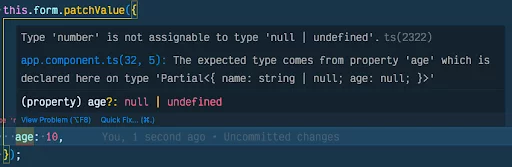
One workaround is to initialize the control with a placeholder number like -1, then add the min validator with a value of 0. This ensures users still have to actively choose an age while allowing 0 as an option. This approach works, but it’s most effective when the control is a select dropdown—you can set the default option’s value to -1. It’s a functional yet slightly inelegant solution.
Fortunately, there’s a cleaner alternative: explicitly type the control while still using the FormBuilder. Here’s how it’s done:
public form = this._fb.group({
  name: '',
  age: this._fb.control<number | null>(null, [Validators.required]),
});
When you use the FormBuilder to construct forms, each property is automatically assigned a control with default values and validators. However, you can also declare controls explicitly with the FormBuilder Instance, as shown, giving you full control over their types.
Similarly, you can make a single field non-nullable instead of the entire form. For example, you could ensure the name attribute is never null:
name: this._fb.nonNullable.control('', [Validators.required]);
With this setup, you can confidently work with name, knowing it will never be null in your component logic.
Avoiding the any Type on FormGroup
Another pitfall arises when declaring a FormGroup variable. A long-standing pattern in Angular component design involved initializing the form inside a lifecycle hook:
export class MyComponent {
  public form: FormGroup;

  ngOnInit() {
    this.form = this._fb.group({ … })
  }
}
While functional, this approach undermines type safety. Declaring the variable as FormGroup without a generic defaults to FormGroup<any>, stripping away autocomplete and type checking. You can preserve type safety in two ways:
- Initialize the form at the point of declaration rather than inside
ngOnInitor the constructor. - Provide an explicit, detailed type for the
FormGroupwhen declaring the variable:
public form!: FormGroup<{ age: FormControl<number | null>, name: FormControl<string |null> }>;
Both approaches restore the full type safety benefits discussed throughout this guide.
Wrapping Up
Typed forms dramatically enhance the Angular development experience. What stands out most to me is how little effort is required to reap the rewards—you’d almost have to go out of your way to opt out of the safety they provide. In an ecosystem where achieving type safety often demands significant configuration, this feature feels refreshingly simple.
Equally valuable is the early warning system built into the compiler and IDE. Deploying an application only to discover a runtime form bug is a stressful experience. Catching these issues at compile time is far preferable, and Angular’s typed forms deliver exactly that peace of mind.