1. What exactly is a "web bundler"
It's worth stepping back and asking why bundling is even necessary in 2020. There are several compelling reasons:
- Performance: Third-party code can be costly. Static code analysis enables optimisations like cherry picking and tree shaking, and consolidating hundreds of files into one reduces the amount of data and resources the user has to download.
- Support: The web runs on a vast array of environments. Bundlers let you write code once and have it work everywhere, adding polyfills where needed.
- User experience: Browser caching gets a boost when you split bundles by purpose — a vendor bundle for libraries and a separate one for your application code.
- Separation of concerns: You can manage how fonts, CSS, images, and JavaScript are served.
At its core, the architecture of a web bundler looks like this:

In simple terms, modules go through a compiler and come out as assets.
The compiler layer is packed with concepts, which is part of why this topic is so fascinating — there's a lot crammed into a small space. These include:
- IIFE
- Pass by reference
- Dependency graphs built by traversing application files
- A custom import/export system that works across environments
- Recursive functions
- AST parsing and generation — turning source into a tokenized form
- Hashing
- Native ESM, which handles cyclic dependencies well thanks to compile-time checks
For this exploration, we'll skip non-JavaScript assets like fonts, CSS, and images.
2. Building a compiler for a "web bundler"
This is a heavily simplified version of how Webpack operates. There are many ways to tackle the problem, but this approach should give you a feel for the underlying mechanisms.
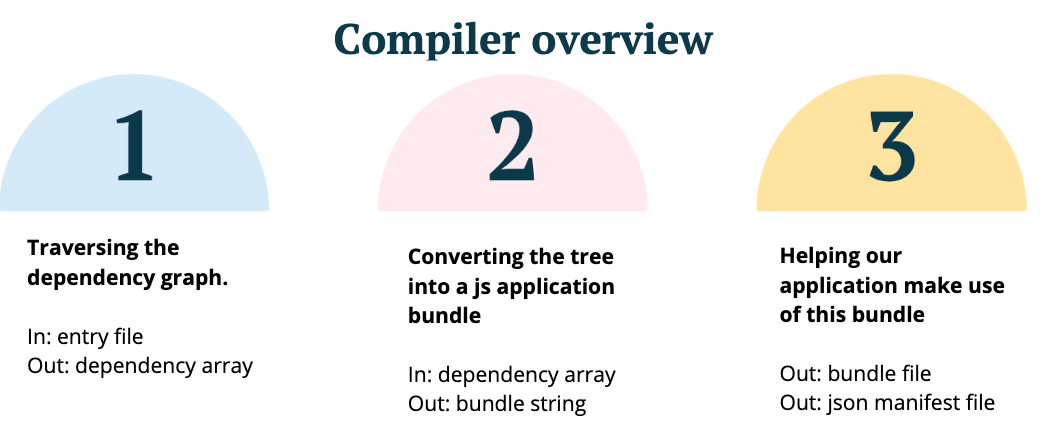
Here's the high-level view of the compiler, with each phase broken down below.
Our sample application:
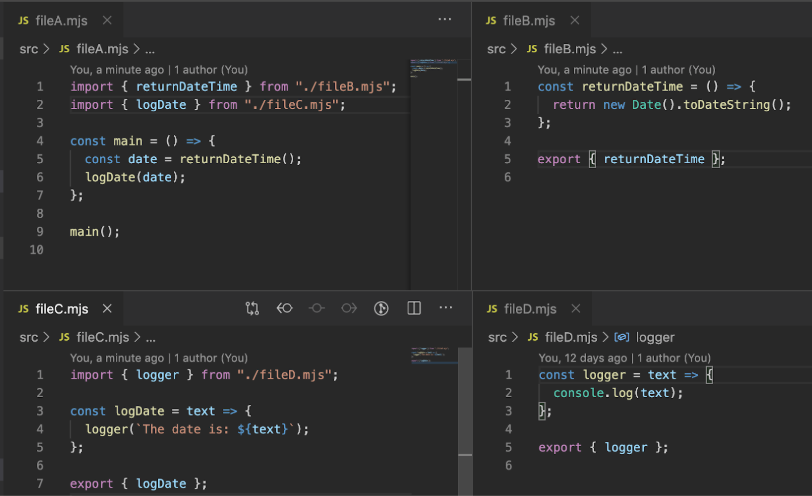
The application is made up of four files. It fetches a datetime, passes it to logDate, which appends text and sends it to a logger. Straightforward stuff.
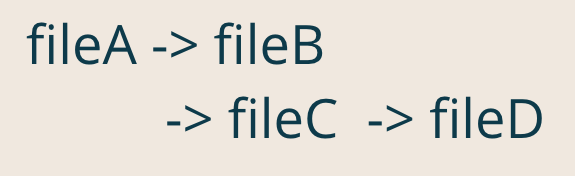
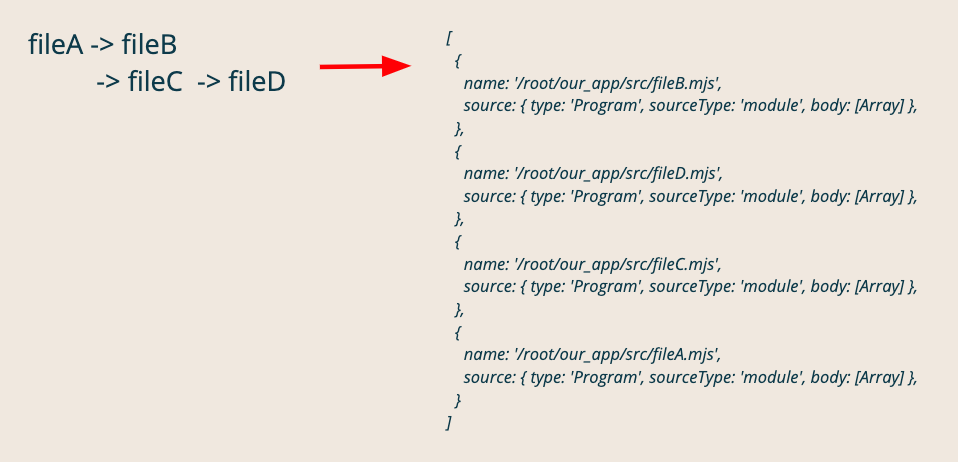
The resulting application tree:
Phase 1
Using a third-party tool for AST parsing, we take the following steps:
- Resolve the file's full path — crucial for identifying if we've seen the same file before
- Read the file contents
- Parse them into an AST
- Store both the contents and AST on a "module" object
- Process dependencies found in the contents via the AST's
ImportDeclarationvalue, recursively calling the function with that value - Push that function onto the
depsArrayso the tree builds with the first file appearing last — an important detail
const depsArray = [];

const depsGraph = (file) => {
 const fullPath = path.resolve(file);

 // return early if exists
 if (!!depsArray.find(item => item.name === fullPath)) return;

 // store path + parsed source as module
 const fileContents = fs.readFileSync(fullPath, "utf8");
  const source = ast.parse(fileContents);
  const module = {
   name: fullPath,
   source
  };

 // process deps
 source.body.map(current => {
 if (current.type === "ImportDeclaration") {
  // process module for each dep.
  depsGraph(current.source.value));
  }
 });

 // Add module to deps array
 depsArray.push(module);

 return depsArray;
};
The tree now looks like the right-side array below:
Phase 2
A compiler's job is to "execute code which produces executable code." That means we have two levels of code to examine. First, we'll look at what the compiler builds, then at the final output that the browser runs.
The built code first
Templates:
Module template: This converts a given module into a format the compiler can work with. We pass in the module code and an index — Webpack uses the index the same way.
The goal is compatibility across as many environments as possible. ES6 modules handle strict mode natively, but ES5 doesn't, so we explicitly enable it in our module templates.
In NodeJS, ES modules are internally wrapped in a function that attaches runtime details like exports. We mirror that approach, and so does Webpack.
/*
* Template to be used for each module.
* module: load exports onto
* _ourRequire: import system
*/
const buildModuleTemplateString = (moduleCode, index) => `
/* index/id ${index} */
(function(module, _ourRequire) {
 "use strict";
 ${moduleCode}
})
`;
Runtime template: This loads our modules and provides the ID of the starting module. We'll dig into this more once the module code is in place.
const buildRuntimeTemplateString = (allModules, indexLocation) => `
 (function(modules) {
  // Define runtime.
  const installedModules = {}; // id/index + exports
  function _our_require_(moduleId) {
   // Module in cache?
   if (installedModules[moduleld]) {
    // return function exported in module
   return installedModules[moduleld].exports
   }

   // Build module, store exports against this ref.
   const module = {
    i: moduleld,
     exports: {},
   }

   // Execute module template function. Add exports to ref.
   modules[moduleld].call({},
    module,
    _our_require_
   );

   // cache exports of module
   const exports = module.exports;
   installedModules[moduleld] = exports

   // Return exports of module
   return exports;
  }
  // Load entry module via id + return exports
  return _our_require_(${indexLocation});
 })
/* Dep tree */
([
 ${allModules}
]);
`;
Custom import/export:
For our import statement, we swap out the "importing" mechanism with our own, as shown in the middle comment.
/*
* Replacing ESM import with our function.
*'const somelmport = _ourRequire("{ID}");'
*'console. logC'Import AST:", ast.parse(program). body [0]);'
*/
const getlmport = (item, allDeps) => {
 // get variable we import onto
 const importFunctionName = item.specifiers[0].imported.name;
 // get files full path and find index in deps array,
 const filelmported = item.source.value;
 const fullFile = path.resolve(filelmported);
 const itemld = allDeps.findlndex(item => item.name === fullFile);

 return {
  type: "VariableDeclaration",
  kind: "const",
  declarations: [
   {
    type: "VariableDeclarator",
    init: {
     type: "CallExpression",
     callee: {
      type: "Identifier",
      name: "_ourRequire"
     },
     arguments: [
      {
       type: "Literal",
       value: itemld
      }
     ]
    },
    id: {
     type: "Identifier",
     name: importFunctionName
    }
   }
  ]
 };
};
Our export works similarly, replacing any exports with our own version, as seen in the bottom comment.
/*
 * Replacing ESM export with our function.
 * Use below code snippet to confirm structure:
 * 'module.exports = someFunction;'
 */
const getExport = item => {
 // get export functions name
 const moduleName = item.specifiers[0].exported.name;
 return {
  type: "ExpressionStatement",
  expression: {
   type: "AssignmentExpression",
   left: {
    type: "MemberExpression",
    object: { type: "Identifier", name: "module" },
    computed: false,
    property: { type: "Identifier", name: "exports" }
   },
   operator: "=",
   right: { type: "Identifier", name: moduleName }
  }
 };
};
A notable difference: Webpack stores dependency IDs on the module early on and has its own "dependency template" that replaces imports and exports with custom variables. My version only swaps the import statement itself, not the entire line or every usage of it. That's just one of many differences from the real Webpack.
Transform
The transform function loops through dependencies, replaces every import and export with our custom ones, then converts the AST back to source and builds a module string. All module strings are joined and passed to the runtime template, with the index of the last item in the dependency array serving as the "entry point."
const transform = depsArray => {
 const updatedModules = depsArray.reduce((acc, dependency, index) => {

  const updatedAst = dependency.source.body.map(item => {
   if (item.type === "ImportDeclaration") {
    // replace module imports with ours
    item = getImport(item, depsArray);
  }
  if (item.type === "ExportNamedDeclaration") {
   // replaces function name with real exported function
   item = getExport(item);
  }
  return item;
 });
 dependency.source.body = updatedAst;

 // Turn AST back into string
 const updatedSource = ast.generate(dependency.source);

 // Bind module source to module template
 const updatedTemplate = buildModuleTemplateString(updatedSource, index);
 acc.push(updatedTemplate);
 return acc;

}, []);
// Add all modules to bundle
 const bundlestring = buildRuntimeTemplateString(
  updatedModules.j oin(","),
  depsArray.length - 1 // index location
 );

 return bundlestring;
};
The compiler's output
(function(modules) {
 // Define runtime.
 const installedModules = {}; // id/index + exports
 function _our_require_(moduleld) {
  // Module in cache?
  if (installedModules[moduleld]) {
   // return function exported in module return
   installedModules[moduleld].exports
  }

  // Build module, store exports against this ref.
  const module = {
   i: moduleld,
   exports: {},
  }

  // Execute module template function. Add exports to ref.
  modules[moduleld].call({},
   module,
   _our_ require_
  );

  // cache exports of module
  const exports = module.exports;
  installedModules[moduleld] = exports

  // Return exports of module
  return exports;
 }

 // Load entry module via id + return exports
 return _our_require_(3);

)}
/* Dep tree */
([
/* index/id 0 */
(functionlmodule, _ourRequire) {
 "use strict";
 const returnDateTime = () => {
 return new Date().toDateString();
};
module.exports = returnDateTime;

})

/* index/id 1 */
(function(module, _ourRequire) {
 "use strict";
 const logger = text => {
 console.log(text);
};
module.exports = logger;
})

/* index/id 2 */
(functionlmodule, _ourRequire) {
 "use strict";
 const logger * _ourRequire(l);
 const logDate = text => {
  logger('The date is now: ${text}'};
 };
 module.exports = logDate;
})

/* index/id 3 */
(function(module, _ourRequire) {
 "use strict";
 const returnDateTime * _ourRequire{0);
 const logDate = _ourRequire(2);
 const main = () => {
 const date = returnDateTime*);
 logDate(date);
};
main();
})
]);
The left side is the runtime, and the right side shows all loaded modules — the same ones we started with.
How it works:
The runtime template IIFE runs immediately, passing the modules array as an argument. We set up a cache (installedModules) and an import function (_our_require_), which executes the module runtime and returns exports for a given module ID, matching its position in the modules array. Exports are attached to the parent module via pass-by-reference, and the module gets cached for quick reuse. Finally, we call the import function on the entry point, which starts the app without needing to invoke an export itself. All internal imports now go through our custom method.
3. Putting the output to use in an application
Now that we have the updated vendorString, we want to use it:
- Create a hash of the contents for the bundle filename and store it in the manifest.
- Write the
vendorStringinto the new bundle.
// create hash
const sum = crypto.createHash("mb5");
sum.update(vendorString);
const hash = sum.digest("hex");
//write contents to bundle
fs.writeFileSync(`./build/bundle-${hash}.js`, vendorString, "utf8");
//write hash to manifest
fs.writeFileSync(
 "./build/manifest.json",
 `{"bundle": "bundle-${hash}.js"}`,
 "utf8"
);
Finally, we run a small Express server that reads the bundle name from the manifest and serves the built code (/build) via a /static route.
import express from "express";
import manifest from "./build/manifest.json";

const app = express();

const html_string = `
<html>
 <script src="/static/${manifest.bundle}"></script>
 <body>
  hello world
 </body>
</html>
`;

app.use("/static", express.static("build"));

app.get("/", (req, res) => res.send(html_string));

app.listen(8000, () => console.log("App listening on port 3000!"));
Running:
> npm run compile
> npm run start
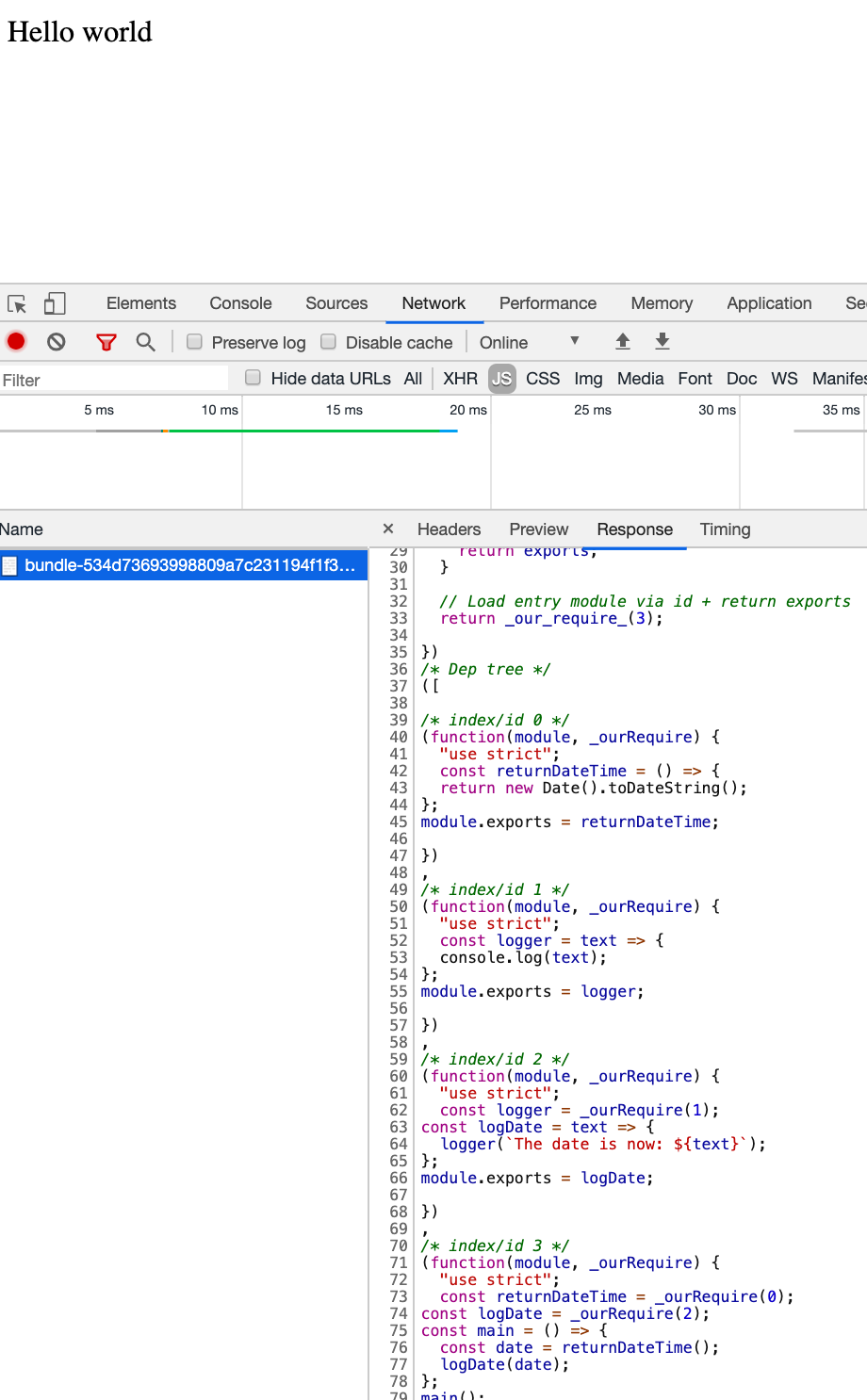
Our app boots up, and the bundle shows up in the "network" tab.
To confirm everything works, check the "console."

What's not covered
You might be asking, "what else does Webpack do that ours doesn't?" Quite a bit, actually:
- Handles non-JS assets like CSS, images, and fonts
- Dev mode and Hot Module Replacement: built into Webpack
- Chunks: Webpack can group modules into separate bundles, each with its own runtime and polyfills if needed — think vendor or dynamic imports
- Multiple exports: possible in ours, but it would require defensive checks on module types, which isn't worth the effort here
- Further optimisations: minification, code splitting, cherry picking, tree shaking, polyfills
- Source maps: Webpack coordinates multiple preprocessors, each generating its own maps, and merges them together
- Extensibility and configuration: loaders, plugins, lifecycle hooks. Webpack is 80% plugins internally — the compiler fires lifecycle events (like "pre-process file") that loaders listen for and run on. We could add similar events using the NodeJS event emitter, but again, it's not worth it for this demo.
That's it
I hope this gave you some insight — I learned a lot building it. The repository is available at https://github.com/craigtaub/our-own-webpack
Thanks, Craig