Syntax vs Semantics
Before diving deeper, it's worth clarifying the distinction between syntax and semantics—a foundational concept for understanding type systems.
Syntax
Syntax refers to code that is valid for the JavaScript runtime. It essentially checks whether a given piece of code is correctly formed JavaScript. For instance, the following is syntactically valid: var foo: number = "not a number";
Semantics
Semantics deals with the type-level correctness of code. It asks whether the types attached to the code align logically. The example above is syntactically correct but semantically flawed—it declares a variable as a number while assigning a string value.
With that distinction in mind, let's move on to ASTs and how compilers operate in the JavaScript ecosystem.
What is AST?
To understand compilers, we first need to examine a core component: the Abstract Syntax Tree (AST).
An AST is essentially a tree of “Nodes” that represents a program's structure. Each “Node” is the smallest unit of code—typically a plain JavaScript object containing type and location properties. While every node has these two properties, additional properties vary depending on the node's type.
Once code is transformed into an AST, it becomes much easier to manipulate. Operations like inserting, removing, or replacing parts of the code become straightforward.
Consider this snippet:
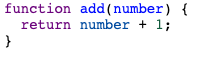
It would transform into the following AST:
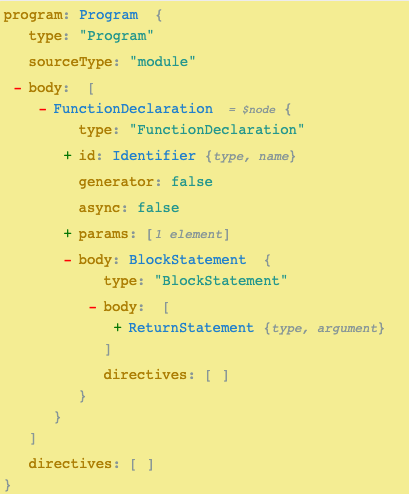
Tools like astexplorer.net are handy for visualizing how JavaScript code maps to its corresponding AST in real time.
Types of compilers
In the JavaScript ecosystem, we generally encounter two kinds of compilers:
1. Native compiler
A native compiler translates code into a format executable by a machine or server—typically machine code. For example, Java's compiler first produces bytecode, which is then compiled further into native machine instructions.
2. Language compiler
Language compilers serve a different purpose. Both TypeScript and Flow fall into this category, as they emit JavaScript as output. Unlike native compilers, they compile primarily for tooling reasons—such as improving developer experience or enabling extra features—not for producing machine-readable output.
What does a language compiler do?
Let's begin with the essentials. A type system compiler has several key responsibilities:
1. Performing type checks
This involves introducing "types"—either through explicit annotations or implicit inference—and then verifying that one type is compatible with another, such as checking string against number.
2. Running a language server
For a type system to be practical in a development environment, it should be able to run checks inside an IDE and give immediate feedback. Language servers bridge the gap between a type system and an editor; they run the compiler in the background and re-trigger checks whenever a file is saved. Both TypeScript and Flow ship with their own language servers.
3. Transforming code
A number of type systems rely on syntax that isn’t valid in plain JavaScript (type annotations being the obvious example), which means they have to convert that unsupported code into something the runtime can actually execute.
As stated at the outset, the focus here is on (1) Performing type checks. If there’s interest, we might look at (2) language servers in a later piece. My write-ups on Web Bundlers and Source Maps go deeper into (3) transforming code.
Let’s walk through the phases that allow a compiler to carry out those tasks in a way that’s both efficient and scalable. Most compilers, in one shape or another, rely on three standard stages.
1) Parse source code into AST
- Lexical analysis — Converts a raw string of code into a sequence (an array) of tokens.
- Syntactic analysis — Turns that token stream into an AST representation.
The parser’s job is to validate the “syntax” of the input. A type system needs its own dedicated parser, which often ends up being thousands of lines long.
The Babel parser has about 2,100 lines of code dedicated purely to handling code statements (you can browse it here). That portion handles the syntactic analysis for compiler-specific syntax and is also able to attach extra type-related details.
Hegel, for instance, adds a typeAnnotation field to any code carrying a type annotation (the relevant logic is here).
TypeScript’s parser is considerably larger, coming in at roughly 8,600 lines (its traversal entry point starts here). That size makes sense given that it supports the full JavaScript superset, all of which the parser has to understand.
2) Transform nodes on AST
- Modify the AST nodes
This is the stage where any AST manipulations are applied.
3) Generate source code
- Convert the AST back into a string of JavaScript source
Here the type system must map any non-JS-compliant AST back into native JavaScript.
So where does a type system sit in this pipeline?
In addition to those common stages, compilers for typed languages tend to insert one or two extra steps right after “parsing” to handle type-specific work.
As an aside, TypeScript’s compiler actually runs through five phases in total:
Notably, the language server includes a pre-processor that limits the type compiler to running over only the file(s) that actually changed. It follows “import” statements to figure out what else might be affected and thus needs to be included in the next pass. The compiler is also capable of re-processing only the part of the AST graph that was modified. We’ll touch on “lazy compilation” shortly.
Type-system compilers typically handle two main jobs:
1. Inferring
Inference steps in for code that lacks an explicit annotation. There’s a thoughtful blog post here about when explicit annotations are worthwhile versus when to rely on inference.
A predefined algorithm is used to determine the type for a given variable or function.
TypeScript applies an approach called “best common type” during its Binding phase (the first of two semantic passes). The algorithm looks at each candidate type and selects the one compatible with all the others. Contextual typing also matters here — that is, using the surrounding code location to guide inference. The TypeScript spec provides further detail here. TypeScript also introduces the concept of “Symbols” (see the interface here) — named declarations that connect AST declaration nodes to other declarations contributing to the same entity. Symbols serve as the foundation of TypeScript’s semantic model.
2. Checking
Once inference is done and types are in place, the engine can run its type checks. These validate the “semantics” of the code. Checks of this kind come in many forms, from type mismatches to references to types that don’t exist.
For TypeScript, this is the Checker (the second semantic pass), and it clocks in at around 20,000 lines of code. That scale really underscores how complex it is to verify so many types across so many different situations.
The type checker is NOT dependent on calling code — that is, it doesn’t rely on whether the file runs any of its own code at runtime. The checker walks through each line of the file on its own and applies the relevant checks.
There are a couple of additional concepts worth mentioning, though we won’t dive into them today given how involved they get:
Lazy compilation
Modern compilers often make use of “lazy loading.” They avoid recalculating or recompiling a file or an AST branch unless it’s genuinely necessary.
TypeScript’s pre-processor can leverage AST data stored in memory from a previous run. That gives a significant performance boost, since the compiler can focus solely on the small portion of the program or node tree that changed. TypeScript relies on immutable, read-only data structures held in what it calls “look-aside tables.” That design makes it easy to tell what has or hasn’t changed.
Soundness
Some operations can’t be proven safe at compile time and have to be deferred to runtime. Every compiler faces tough trade-offs about what to include. TypeScript has certain areas that are considered “not sound” — meaning they require runtime type checks.
We’ll skip both of the features above in our own compiler, since they bring extra complexity that isn’t warranted for a small proof of concept.
Time for the more interesting part: building one ourselves…
Our goal is to build a compiler capable of running type checks for three distinct scenarios, each producing its own specific error message. Keeping it to three cases lets us zero in on the mechanisms at play in each, and by the end you should have a solid sense of how to extend this to more elaborate type checks.
We’ll work with a function declaration and an expression (a call to that function) throughout the compiler.
The scenarios are:
- Type mismatch between a string and a number
fn("craig-string"); // throw with string vs number
function fn(a: number) {}
2. Reference to an unknown type that hasn’t been defined
fn("craig-string"); // throw with string vs ?
function fn(a: made_up_type) {} // throw with bad type
3. Use of a property name that doesn’t exist on the interface
interface Person {
  name: string;
}
fn({ nam: "craig" }); // throw with "nam" vs "name"
function fn(a: Person) {}
Moving on to the compiler itself. It consists of two parts: the parser and the checker.
As noted earlier, a parser isn’t what we’re concentrating on today. We’ll adopt the approach Hegel takes, assuming that a typeAnnotation object has been attached to every annotated AST node. The AST objects are hardcoded here.
Scenario 1 uses the parser below:
function parser(code) {
  // fn("craig-string");
  const expressionAst = {
    type: "ExpressionStatement",
    expression: {
      type: "CallExpression",
      callee: {
        type: "Identifier",
        name: "fn"
      },
      arguments: [
        {
          type: "StringLiteral", // Parser "Inference" for type.
          value: "craig-string"
        }
      ]
    }
  };

  // function fn(a: number) {}
  const declarationAst = {
    type: "FunctionDeclaration",
    id: {
      type: "Identifier",
      name: "fn"
    },
    params: [
      {
        type: "Identifier",
        name: "a",
        typeAnnotation: {
          // our only type annotation
          type: "TypeAnnotation",
          typeAnnotation: {
            type: "NumberTypeAnnotation"
          }
        }
      }
    ],
    body: {
      type: "BlockStatement",
      body: [] // "body" === block/line of code. Ours is empty
    }
  };

  const programAst = {
    type: "File",
    program: {
      type: "Program",
      body: [expressionAst, declarationAst]
    }
  };
  // normal AST except with typeAnnotations on
  return programAst;
}
Notice the expressionAst block handling our top-level expression statement, alongside the declarationAst for the function declaration on the second line. We return a programAst that holds both AST blocks together.
Inside that AST, you’ll see the typeAnnotation attached to the param identifier “a,” matching its position in the code.
Scenario 2 uses the parser below:
function parser(code) {
  // fn("craig-string");
  const expressionAst = {
    type: "ExpressionStatement",
    expression: {
      type: "CallExpression",
      callee: {
        type: "Identifier",
        name: "fn"
      },
      arguments: [
        {
          type: "StringLiteral", // Parser "Inference" for type.
          value: "craig-string"
        }
      ]
    }
  };

  // function fn(a: made_up_type) {}
  const declarationAst = {
    type: "FunctionDeclaration",
    id: {
      type: "Identifier",
      name: "fn"
    },
    params: [
      {
        type: "Identifier",
        name: "a",
        typeAnnotation: {
          // our only type annotation
          type: "TypeAnnotation",
          typeAnnotation: {
            type: "made_up_type" // BREAKS
          }
        }
      }
    ],
    body: {
      type: "BlockStatement",
      body: [] // "body" === block/line of code. Ours is empty
    }
  };

  const programAst = {
    type: "File",
    program: {
      type: "Program",
      body: [expressionAst, declarationAst]
    }
  };
  // normal AST except with typeAnnotations on
  return programAst;
}
It closely mirrors Scenario 1 with its expression, declaration, and program AST blocks. The key difference is that the typeAnnotation inside params is made_up_type, rather than the NumberTypeAnnotation seen in scenario 1.
Scenario 3 uses the parser below:
function parser(code) {
  // interface Person {
  //   name: string;
  // }
  const interfaceAst = {
    type: "InterfaceDeclaration",
    id: {
      type: "Identifier",
      name: "Person",
    },
    body: {
      type: "ObjectTypeAnnotation",
      properties: [
        {
          type: "ObjectTypeProperty",
          key: {
            type: "Identifier",
            name: "name",
          },
          kind: "init",
          method: false,
          value: {
            type: "StringTypeAnnotation",
          },
        },
      ],
    },
  };

  // fn({nam: "craig"});
  const expressionAst = {
    type: "ExpressionStatement",
    expression: {
      type: "CallExpression",
      callee: {
        type: "Identifier",
        name: "fn",
      },
      arguments: [
        {
          type: "ObjectExpression",
          properties: [
            {
              type: "ObjectProperty",
              method: false,
              key: {
                type: "Identifier",
                name: "nam",
              },
              value: {
                type: "StringLiteral",
                value: "craig",
              },
            },
          ],
        },
      ],
    },
  };

  // function fn(a: Person) {}
  const declarationAst = {
    type: "FunctionDeclaration",
    id: {
      type: "Identifier",
      name: "fn",
    },
    params: [
      {
        type: "Identifier",
        name: "a",
        typeAnnotation: {
          type: "TypeAnnotation",
          typeAnnotation: {
            type: "GenericTypeAnnotation",
            id: {
              type: "Identifier",
              name: "Person",
            },
          },
        },
      },
    ],
    body: {
      type: "BlockStatement",
      body: [], // Empty function
    },
  };

  const programAst = {
    type: "File",
    program: {
      type: "Program",
      body: [interfaceAst, expressionAst, declarationAst],
    },
  };
  // normal AST except with typeAnnotations on
  return programAst;
}
In addition to the expression, declaration, and program AST blocks, there’s also an interfaceAst block carrying the AST for our InterfaceDeclaration. The declarationAst now has a GenericType on its annotation, as it takes an object identifier like Person. For this scenario, the programAst returns an array containing all three objects.
What the parsers have in common
Across all three scenarios, the declaration param is where the type annotation lives — that’s the shared thread here.
Now we move to the part of the compiler responsible for the actual type checks. It needs to iterate over every AST object in the program body and, depending on the node type, run the relevant checks. Any errors get pushed onto an array that’s returned to the caller for printing.
Before going further, here’s the core logic we’ll follow for each type:
- Function declaration: verify that the argument types are valid, then check each statement in the block body
- Expression: locate the function declaration for the call, pull the type from the declaration’s argument, then grab the type from the expression’s caller argument and compare them.
The implementation
The core of the checker lives in the typeChecks object, paired with an errors array that accumulates any problems found while validating expressions. There is also a basic annotation check included in the same block.
const errors = [];

const ANNOTATED_TYPES = {
  NumberTypeAnnotation: "number",
  GenericTypeAnnotation: true
};

// Logic for type checks
const typeChecks = {
  expression: (declarationFullType, callerFullArg) => {
    switch (declarationFullType.typeAnnotation.type) {
      case "NumberTypeAnnotation":
        return callerFullArg.type === "NumericLiteral";
      case "GenericTypeAnnotation": // non-native
        // If called with Object, check properties
        if (callerFullArg.type === "ObjectExpression") {
          // Get Interface
          const interfaceNode = ast.program.body.find(
            node => node.type === "InterfaceDeclaration"
          );
          // Get properties
          const properties = interfaceNode.body.properties;

          // Check each property against caller
          properties.map((prop, index) => {
            const name = prop.key.name;
            const associatedName = callerFullArg.properties[index].key.name;
            if (name !== associatedName) {
              errors.push(
                `Property "${associatedName}" does not exist on interface "${interfaceNode.id.name}". Did you mean Property "${name}"?`
              );
            }
          });
        }
        return true; // as already logged
    }
  },
  annotationCheck: arg => {
    return !!ANNOTATED_TYPES[arg];
  }
};
Here is how the logic is structured. The expression goes through two distinct kinds of validation:
- When the annotation is a
NumberTypeAnnotation, the caller's type must match aNumericLiteral— meaning if the declared type is a number, the value passed in must also be a number. Scenario 1 is caught at this stage, though nothing is recorded just yet. - For a
GenericTypeAnnotation, the checker looks for anInterfaceDeclarationin the tree and verifies each property of the caller against that interface. If something does not line up, a message is pushed onto theerrorsarray, noting which property names do exist and what the user may have intended. Scenario 3 fails here and produces this kind of diagnostic.
This implementation only inspects a single file. A production-grade type checker would maintain a sense of "scope" and be able to resolve declarations anywhere in the runtime environment. Our version has a simpler job because it is only a proof of concept.
The next block handles the processing of each node type found in the program body. This is where the type check logic above actually gets invoked.
// Process program
ast.program.body.map(stnmt => {
  switch (stnmt.type) {
    case "FunctionDeclaration":
      stnmt.params.map(arg => {
        // Does arg has a type annotation?
        if (arg.typeAnnotation) {
          const argType = arg.typeAnnotation.typeAnnotation.type;
          // Is type annotation valid
          const isValid = typeChecks.annotationCheck(argType);
          if (!isValid) {
            errors.push(
              `Type "${argType}" for argument "${arg.name}" does not exist`
            );
          }
        }
      });

      // Process function "block" code here
      stnmt.body.body.map(line => {
        // Ours has none
      });

      return;
    case "ExpressionStatement":
      const functionCalled = stnmt.expression.callee.name;
      const declationForName = ast.program.body.find(
        node =>
          node.type === "FunctionDeclaration" &&
          node.id.name === functionCalled
      );

      // Get declaration
      if (!declationForName) {
        errors.push(`Function "${functionCalled}" does not exist`);
        return;
      }

      // Array of arg-to-type. e.g. 0 = NumberTypeAnnotation
      const argTypeMap = declationForName.params.map(param => {
        if (param.typeAnnotation) {
          return param.typeAnnotation;
        }
      });

      // Check exp caller "arg type" with declaration "arg type"
      stnmt.expression.arguments.map((arg, index) => {
        const declarationType = argTypeMap[index].typeAnnotation.type;
        const callerType = arg.type;
        const callerValue = arg.value;

        // Declaration annotation more important here
        const isValid = typeChecks.expression(
          argTypeMap[index], // declaration details
          arg // caller details
        );

        if (!isValid) {
          const annotatedType = ANNOTATED_TYPES[declarationType];
          // Show values to user, more explanatory than types
          errors.push(
            `Type "${callerValue}" is incompatible with "${annotatedType}"`
          );
        }
      });

      return;
  }
});
Let us go through this block again, breaking it down by node type.
FunctionDeclaration (for instance, function hello())
The first step is to process the arguments and parameters. For each one, if a type annotation is present, we verify that the type exists for the given argument — that is, argType. If it does not exist, an error is appended to errors. Scenario 2 triggers this path.
After that, we move on to process the function body. Since in our examples there is no body to handle, that section has been left empty.
ExpressionStatement (for instance, hello())
First, the program body is searched for the function declaration. This is where a real type checker would lean on scope. If no declaration is found, an error gets added to the errors array.
Next, each defined argument type is compared against the caller's argument type. When a mismatch occurs, an error is recorded in errors. Both Scenario 1 and Scenario 2 run into this check.
A minimal repository has been set up with a straightforward index file that processes all 3 AST node objects in a single pass and prints any errors. Executing it produces the following output:

To recap, here is what each scenario demonstrates:
Scenario 1
The argument was annotated as a number, but the call passes a string instead.
Scenario 2
The function argument has a type annotation that does not exist, and the function is then invoked — leading to two separate errors (one for the undefined type, one for the mismatch).
Scenario 3
An interface is defined, but the code uses a property called nam that is not on the object. The checker suggests that name might have been the intended property.
It works! Nice work.
As mentioned earlier, a full type compiler involves many components that our minimal version skips. Some of the notable omissions are:
- The parser: we wrote the AST blocks by hand, whereas a real compiler would generate them automatically.
- Pre-processing and language integration: a true compiler includes hooks to connect with the IDE and re-run checks at the right moments.
- Lazy compilation: there is no awareness of what changed or any use of caching or memory.
- Transform: the final stage, where native JavaScript is produced, has been omitted.
- Scope: because this POC only handles a single file, it does not need to track context, but real compilers must always remain aware of their environment.
Thank you for reading or watching. This research taught me a great deal about how type systems work, and I hope it proved helpful to you as well. The full repository with all the code can be found here. Feel free to leave a clap if you found it valuable.
Thanks, Craig.