Deriving Library Configurations by Convention with Nx
The Nx build tool has long been a go-to solution for managing large-scale projects and monorepos. It ships with first-class support for Angular, React, and various Node.js-based frameworks. A plugin system also makes it possible to integrate additional frameworks, such as Vue.js.
Nx speeds up builds through caching and parallel execution, while also enforcing access boundaries between different parts of the codebase to promote loose coupling. These capabilities typically operate at the level of libraries, which can be rendered as a dependency graph:

Because libraries in Nx serve not just as reusable code but also as the fundamental units for structuring the entire application, a typical Nx monorepo ends up containing a substantial number of them. And each library is accompanied by its own set of configuration files:
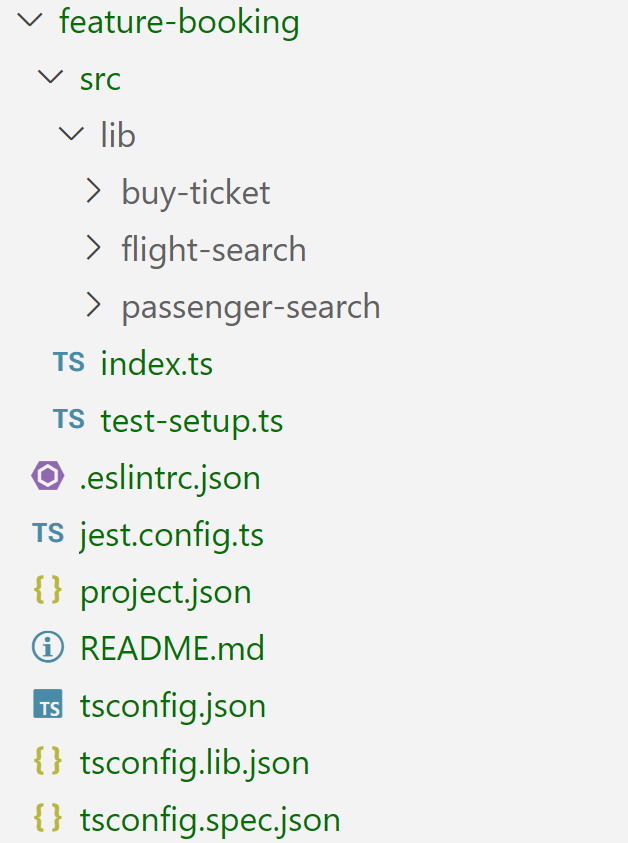
Even though these files are generated by Nx, developers frequently view them as unnecessary overhead that gets in the way of their actual work. This is exactly the pain point that implicit libraries address. The concept was introduced by Angular GDE and Nx Champion Younes Jaaidi, who explains it in depth in a blog post and also provides a step by step guide. His solution is to derive each library's configuration through conventions, thereby eliminating the need for all those files.
This piece will dive into that idea and demonstrate it within an architecture that we see frequently in practice. The accompanying example, which builds on the approach from the blog post referenced above, lives in my GitHub repository. Since no npm package currently implements implicit libraries, I also incorporated source files from the original linked example with a few adjustments. Younes is considering publishing an official library once he gathers some initial feedback, which would make adopting implicit libraries considerably simpler.
Architecture Matrix
Large Nx projects are frequently structured along both vertical and horizontal axes:
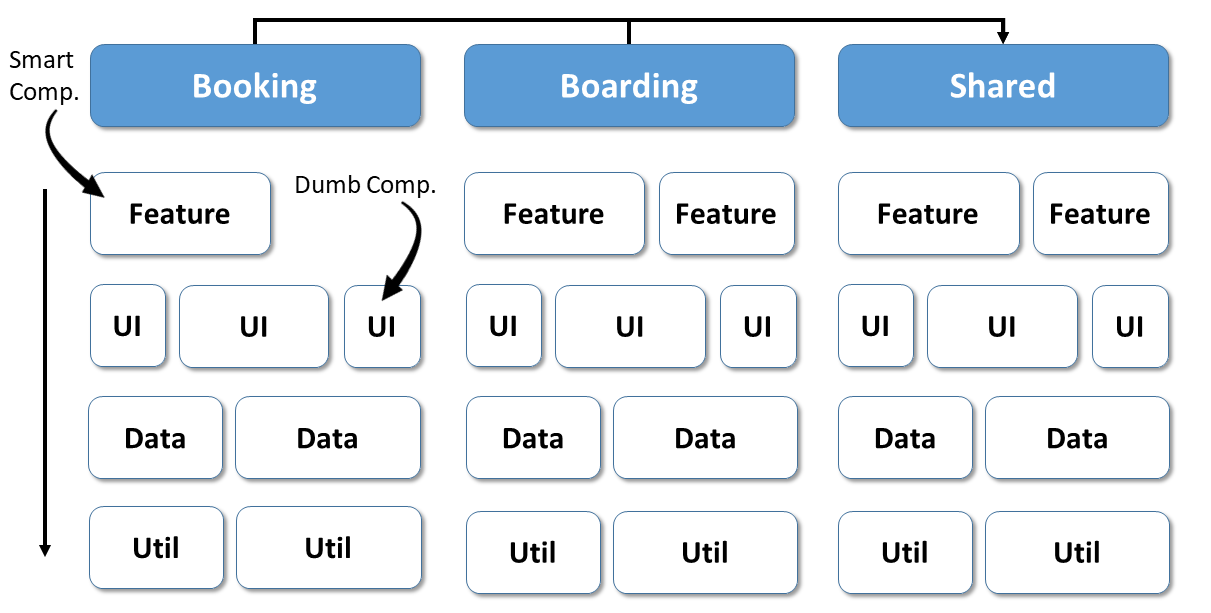
The vertical division creates application areas, such as subdomains. The horizontal division defines technical layers. Depending on the particular project, additional dimensions might be considered too, including a split between server-side and client-side code.
This structure brings more organization to the codebase and cuts down on debates about where different pieces belong. It also enables architectural constraints, such as each layer being allowed to depend only on layers below it. Another possible rule is that a subdomain may only consume its own libraries and those within the shared area. A linting rule included with Nx can enforce these boundaries.
Every intersection in the matrix above maps to its own Nx library:

Implicit Libraries via Project Crystal
To spare each library from receiving the extensive configuration files mentioned before, the implicit libraries approach relies on an Nx plugin that computes the configurations automatically. This is achievable through what's known as Project Crystal, an Nx feature that lets project configurations be expressed programmatically as a graph.
Plugins can live inside npm packages or directly within the Nx project itself. The example covered here goes with the latter approach, keeping the plugin at tools/plugins/implicit-libs/src/index.ts. This file exports a tuple called createNodesV2, which Nx uses to detect the implicit libraries and their configurations:
export const createNodesV2: CreateNodesV2 = [
    'libs/**/index.ts',
    async (indexPathList, _, { workspaceRoot }): Promise<CreateNodesResultV2> => {

        […]

    }
];
The first entry is a glob pattern. Every file that matches is treated as an entry point into a library, meaning a library is simply a folder under libs containing an index.ts.
The second entry is a function. Nx passes the discovered entry points via the first parameter indexPathList. The workspaceRoot variable points to the top-level directory of the entire Nx workspace.
This function's job is to build the configurations for all libraries and return them in a CreateNodesResultV2 object. In the linked example, each library gets configured with eslint and vitest for running unit tests.
It also infers categorizations for the libraries based on the folder layout, reflecting their position in the architecture matrix shown earlier. As an example, a feature library located within the Tickets domain is labelled with both type:feature and scope:tickets.
The categories generated this way serve as the foundation for the architectural rules checked by the linter. These rules are defined in the root-level eslint configuration file for the Nx workspace:
rules: {
  '@nx/enforce-module-boundaries': [
    'error',
    {
      enforceBuildableLibDependency: true,
      allow: [],
      depConstraints: [
        {
          sourceTag: 'scope:checkin',
          onlyDependOnLibsWithTags: [
            'scope:checkin',
            'scope:shared'
          ]
        },
        {
          sourceTag: 'scope:luggage',
          onlyDependOnLibsWithTags: [
            'scope:luggage',
            'scope:shared'
          ]
        },
        {
          sourceTag: 'scope:tickets',
          onlyDependOnLibsWithTags: [
            'scope:tickets',
            'scope:shared'
          ]
        },
        {
          sourceTag: 'type:feature',
          onlyDependOnLibsWithTags: [
            'type:feature',
            'type:ui',
            'type:domain',
            'type:util'
          ]
        […]
    ]
  }
}
[…]
For Nx to recognise the plugin, it must be referenced in the nx.json file, also located at the monorepo's root:
"plugins": [
    "./tools/plugins/implicit-libs/src/index.ts"
]
Beyond the plugin itself, the sample includes a generator that sets up path mappings for every implicit library:
nx g @demo/implicit-libs:update-tsconfig-pathsFor the reason pointed out earlier, this generator comes from the original example as well. The mappings it creates let the libraries be imported using logical names:
import { TicketsService } from '@demo/tickets-data' ;Angular Architecture Workshop (online, interactive, advanced)
Take your skills to an enterprise level and build maintainable Angular applications with our Angular Architecture workshop!
All Details (English Workshop) | All Details (German Workshop)
Disabling daemon and cache
Nx makes all project configurations and dependency information available via a daemon. It also stores the output of build tasks in a cache.
Although these features greatly boost Nx's performance, they can cause trouble during plugin development. To keep plugin outputs out of the cache while working, it's wise to switch both off. Setting the environment variables NX_DAEMON and NX_CACHE to false accomplishes this. On Windows, these commands can be used:
set NX_DAEMON=false
set NX_CACHE=false
Implicit Libraries in Action
Creating an implicit library is as straightforward as making a folder under libs and adding an index.ts file:

To confirm that Nx picks up the implicit library, generating a dependency graph is a useful check:
ng graphAlternatively, you can ask Nx to output the names of all libraries to the console:
nx show projectsTo see exactly how the plugin has configured each library, this command comes in handy:
nx show project tickets feature bookingNx then generates a page with the derived configuration details:
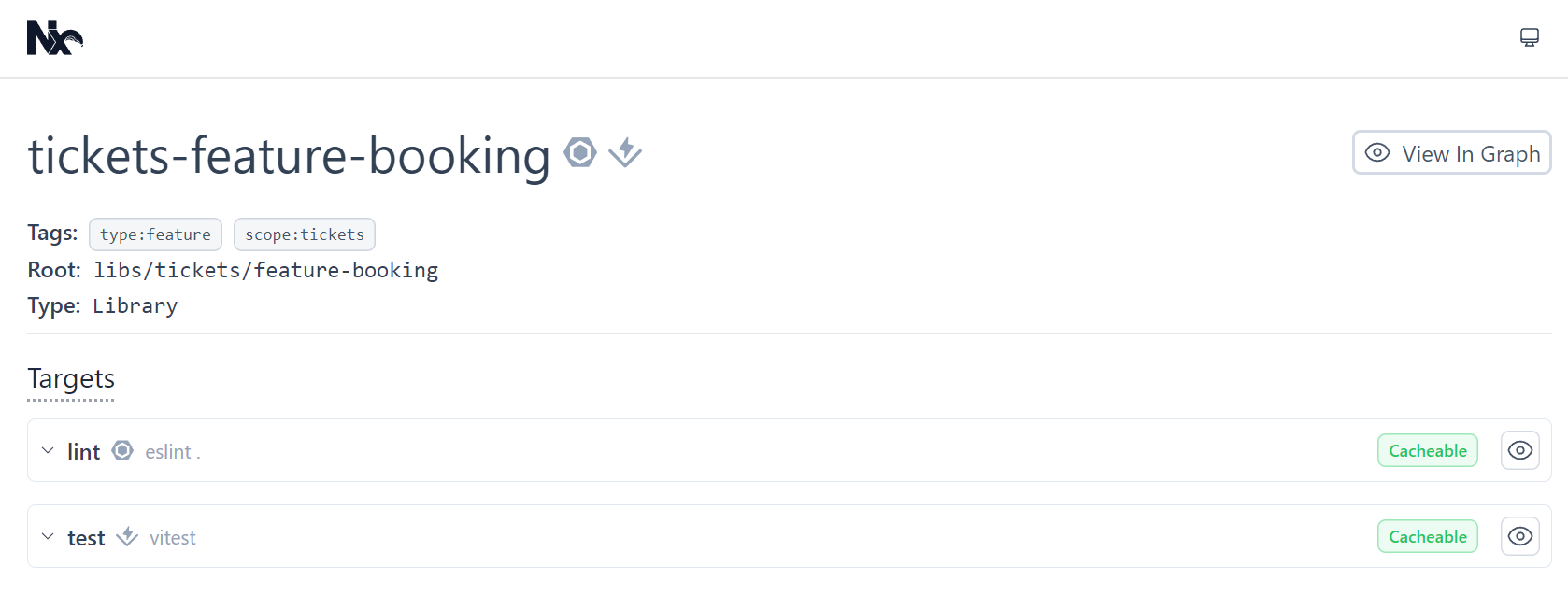
For example, it shows that the tickets-feature-booking library has received the tags type:feature and scope:tickets, along with support for linting and unit testing. Consequently, the following commands are available:
nx lint tickets-feature-booking
nx test shared-ui-common
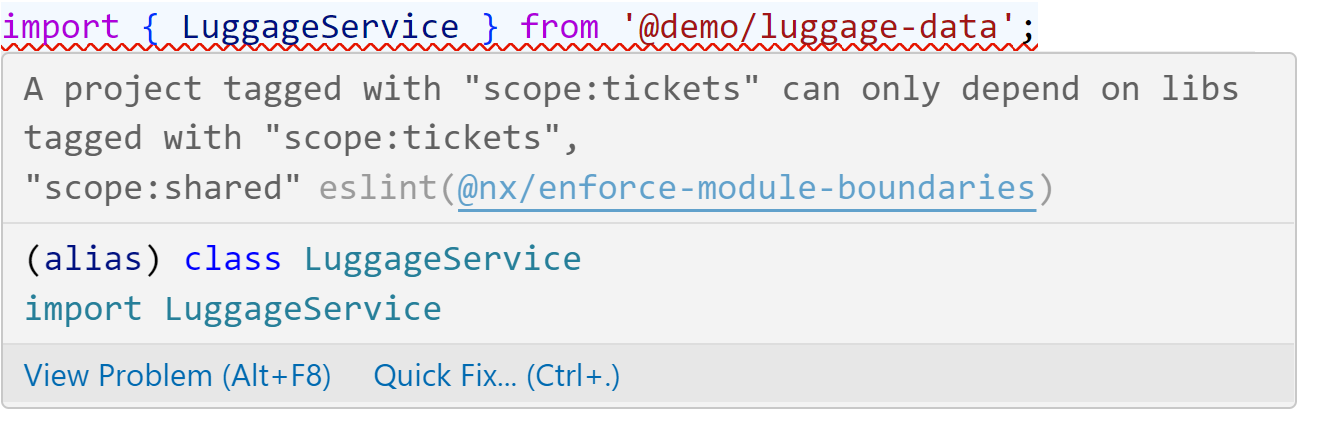
The tags feed into the linting rules, which enforce the architectural constraints. As a demonstration, attempting to import from the Luggage domain while inside the Ticketing domain results in an error:
No Silver Bullet
Like anything else, Implicit Libraries are not a silver bullet. Younes notes in his blog post that most Nx plugins rely on the project.json file to configure targets, so you'll likely have to adjust the Implicit Libraries plugin accordingly. Moreover, controlling every tool-related option through target configurations can get tricky, such as setting Vitest's cache directory, which might create problems in specific setups.
Conclusion and Outlook
Implicit libraries, where an Nx plugin derives configurations from conventions, significantly ease how you work with Nx. A new library is nothing more than a folder with an index.ts. Project Crystal, which allows Nx projects to be defined as a graph, is what makes this possible.
Alongside our linter Sheriff, Implicit libraries offer another way to put into practice the idea of breaking large-scale applications into loosely-connected sub-domains that separate teams can handle. Eventually, an npm package implementing this concept should arrive, making it more accessible for everyone.