
The Nrwl Feature Shell Library Explained
In their freely available publication "Enterprise Angular Monorepo Patterns", the authors from Nrwl describe a feature-shell as:
_feature-shell_is the app-specific feature library
That definition leaves much to be desired in terms of clarity. The ambiguity stems from missing context. Let's break it down piece by piece.
The initial segment tells us that a feature-shell is tied to a specific application. This means it cannot be meaningfully discussed without referencing the application it belongs to.
The Nrwl publication uses an airline company as a case study. This company runs multiple applications, including a Booking Application. This booking application serves as a domain-level abstraction that combines two real-world products: the Booking Web Application and the Booking Mobile Application. The assumption here is that both products will share identical functionality and user-facing features.
In this specific scenario, the feature-shell would take the form of a booking-feature-shell library.
So, a feature-shell is inherently linked to a domain-level application concept.
The remaining part of the definition is that a feature-shell belongs to the category of feature libraries.
Following Nrwl's terminology, a feature library holds the code that defines a business use case or a specific page within an application. This includes smart container components, routed components, page-level components, and any presentational components that are specific to that use case. In short, it houses all business-related UI pieces.
In the booking example, alongside the booking-feature-shell, there are other feature libraries such as flight search, passenger information, and seatmap. Each handles a distinct page. One could argue these represent sub-domains.
How do these concepts connect? The Nx publication provides another piece of the puzzle.
export const routes: Routes = [
  {
    path: '',
    pathMatch: 'full',
    component: FlightSearchComponent
  },
  {
    path: 'passenger',
    loadChildren: () =>
      import('@nrwl-airlines/booking/feature-passenger-info').then(
        m => m.BookingFeaturePassengerInfoModule
      )
  },
  {
    path: 'seatmap',
    loadChildren: () =>
      import('@nrwl-airlines/shared/seatmap/feature-seat-listing').then(
        m => m.SharedSeatmapFeatureSeatListingModule
      )
  }
];
Listing 1. Booking routes.
The code in Listing 1 shows how navigation is set up inside the Booking Application. However, we have established that the Booking Application is an abstract representation of a domain, not a concrete codebase.
So, where do these routes live? Both of the concrete applications.
If we placed these route definitions inside one of the Booking products, we would have to copy them into the other. That leads to code duplication, with multiple independent copies that must be kept in perfect sync. This is a classic violation of the DRY (Don't Repeat Yourself) principle.
The natural fix is to move this "routing and initialization" code into a shared library that both concrete applications can import.
Keep in mind this approach assumes both applications have identical routes and behave in the same manner.
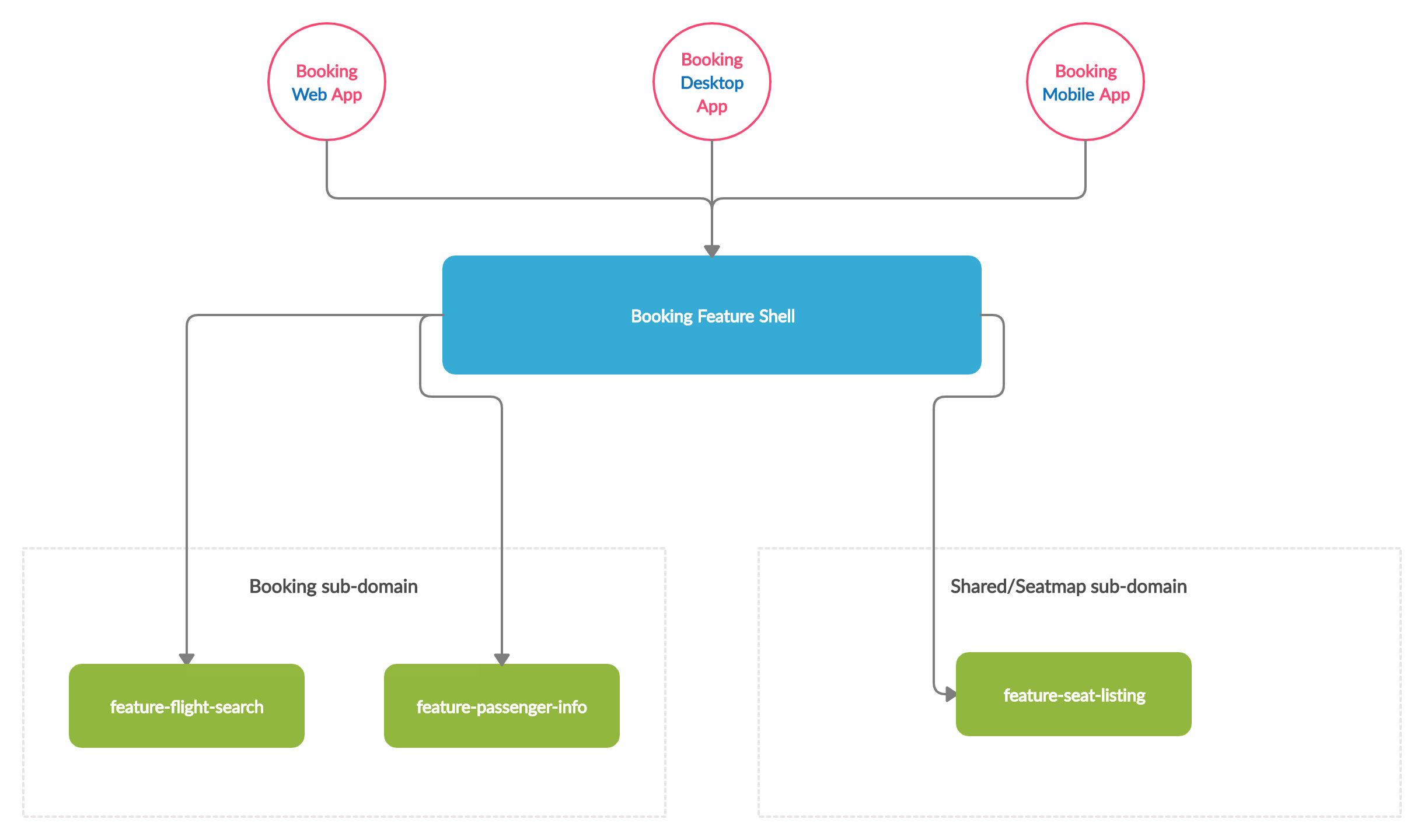
Figure 1. Nx booking feature shell library. Made with https://creately.com/
It becomes clear that the feature-shell is responsible for coordinating the top-level routes of the application, which map to sub-domains or primary pages. A direct consequence of this is that each domain-wise application gets exactly one feature-shell library.
Each domain-wise application has one
feature-shelllibrary.
A domain-wise application is the aggregation of all concrete applications that share identical routes, behavior, and features. In Figure 1, the Booking Application is the combination of the Booking Web Application, the Booking Desktop Application, and the Booking Mobile Application.
A major source of confusion is that feature-shell libraries are often categorized as a special kind of feature library, even though their actual responsibilities are quite distinct.
When to use a feature shell library
Given this understanding of what a feature-shell is, we need to evaluate its practical value. Is it a pattern for every project?
Based on my observation, this particular feature-shell approach is suitable in a narrow set of situations. Let's look for a concrete scenario.
To benefit from the Nrwl approach, you need at least two applications that are identical in terms of their navigation, sub-domains, and features. The main difference between them would be the deployment platform. However, since we are dealing with JavaScript libraries, both applications must be built with a framework that supports the same routing mechanism.
For this discussion, we will stick to Angular, though the same logic applies to frameworks such as React.
To share code through a feature-shell, we need a platform strategy that works with Angular. Here are some common options:
- Ionic
Build the desktop version as a standard web application and host it online, while using a hybrid mobile approach for distribution through app stores. - NativeScript
Share the bulk of the code and rely on NativeScript's build pipeline to generate platform-specific templates for web and native mobile environments. - Electron
Use a regular web application for mobile and wrap the same codebase in an Electron container for a hybrid desktop application.
There are limitations, however. Nx lacks built-in support for these technologies. Electron integration is on the roadmap but not yet implemented.
There is a community package that provides Electron support for Nx.
Furthermore, all three frameworks (Electron, NativeScript, and Ionic) can be used with Nx via xplat.
It is evident that a feature-shell library is not universally applicable.
For the majority of projects, keeping "initialization and routing setup" within the application itself makes more sense. Using an AppRoutingModule for route declarations and a CoreModule for app-wide configuration is a recommended practice. This is a well-known convention that eases onboarding and reinforces the Single Responsibility Principle.
A practical feature shell library
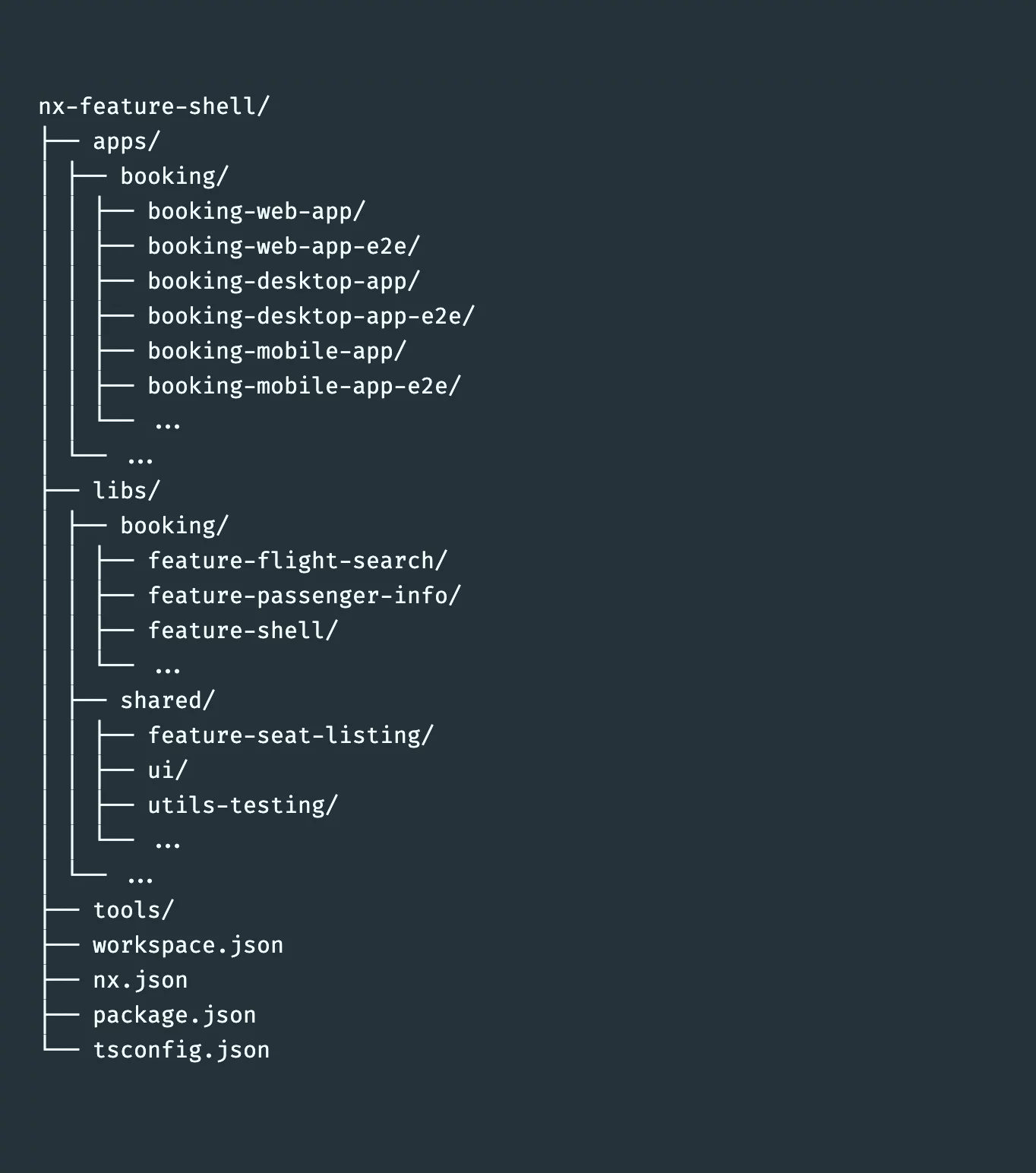
Example file layout for an Nx feature-shell.
The feature-shell library handles the orchestration of the top-level routes.
import { NgModule } from '@angular/core';
import { CommonModule } from '@angular/common';
import { RouterModule, Routes } from '@angular/router';

import { TranslocoConfigModule } from '@nx-feature-shell-variation/shared/utils-transloco-config';

const routes: Routes = [
  {
    path: 'search',
    loadChildren: () =>
      import('@nx-feature-shell-variation/booking/feature-flight-search').then(
        m => m.BookingFeatureFlightSearchModule
      )
  },
  {
    path: 'passenger',
    loadChildren: () =>
      import('@nx-feature-shell-variation/booking/feature-passenger-info').then(
        m => m.BookingFeaturePassengerInfoModule
      )
  },
  {
    path: 'seatmap',
    loadChildren: () =>
      import('@nx-feature-shell-variation/shared/feature-seat-listing').then(
        m => m.SharedFeatureSeatListingModule
      )
  }
];

@NgModule({
  imports: [
    CommonModule,
    RouterModule.forRoot(routes),
    TranslocoConfigModule.forRoot()
  ],
  exports: [RouterModule]
})
export class BookingFeatureShellModule {}
The Booking Feature Shell Library.
The app.module remains largely identical across the Web, Mobile, and Desktop applications. It simply imports the feature-shell and applies any platform-specific setup.
import { NgModule } from '@angular/core';
import { BrowserModule } from '@angular/platform-browser';

import { BookingFeatureShellModule } from '@nx-feature-shell-variation/booking/feature-shell';

import { AppComponent } from './app.component';

@NgModule({
  declarations: [AppComponent],
  imports: [BrowserModule, BookingFeatureShellModule],
  bootstrap: [AppComponent]
})
export class AppModule {}
This represents the AppModule for the Booking Web Application.
The Manfred Steyer Shell Library
In his book Enterprise Angular and across his published articles, Manfred Steyer offers this definition:
shell: For an application that contains multiple domains, a shell provides the entry point for a domain
With permission, I am adapting Steyer's wording to better reflect how I interpret Domain-Driven Design.
shell: For an application domain, a shell provides the entry point for each Bounded Context.
These two statements are essentially equivalent. But what do they mean in practice?
Within DDD, the term domain refers to the scope of the business problem that software aims to solve.
Consider the Airlines example: the domain encompasses the entire airline business. Yet within that domain, you'll find multiple sub-domains, each with its own unique challenges, vocabulary, and conventions. The Bounded Contexts represent these sub-domains partially or fully within the codebase. A Bounded Context establishes a logical boundary in a system where a shared, ubiquitous language is spoken. The practice of determining where each Bounded Context begins and ends is called Strategic Design in Domain-Driven Design. The airlines industry might have Booking, Check-in, and Flight Tracking as its Bounded Contexts.
So how does the shell library pattern relate?
Following Manfred Steyer's architectural guidance, the shell acts as the coordinator that assembles all features belonging to a specific bounded context.
Figure 2 illustrates the concept.
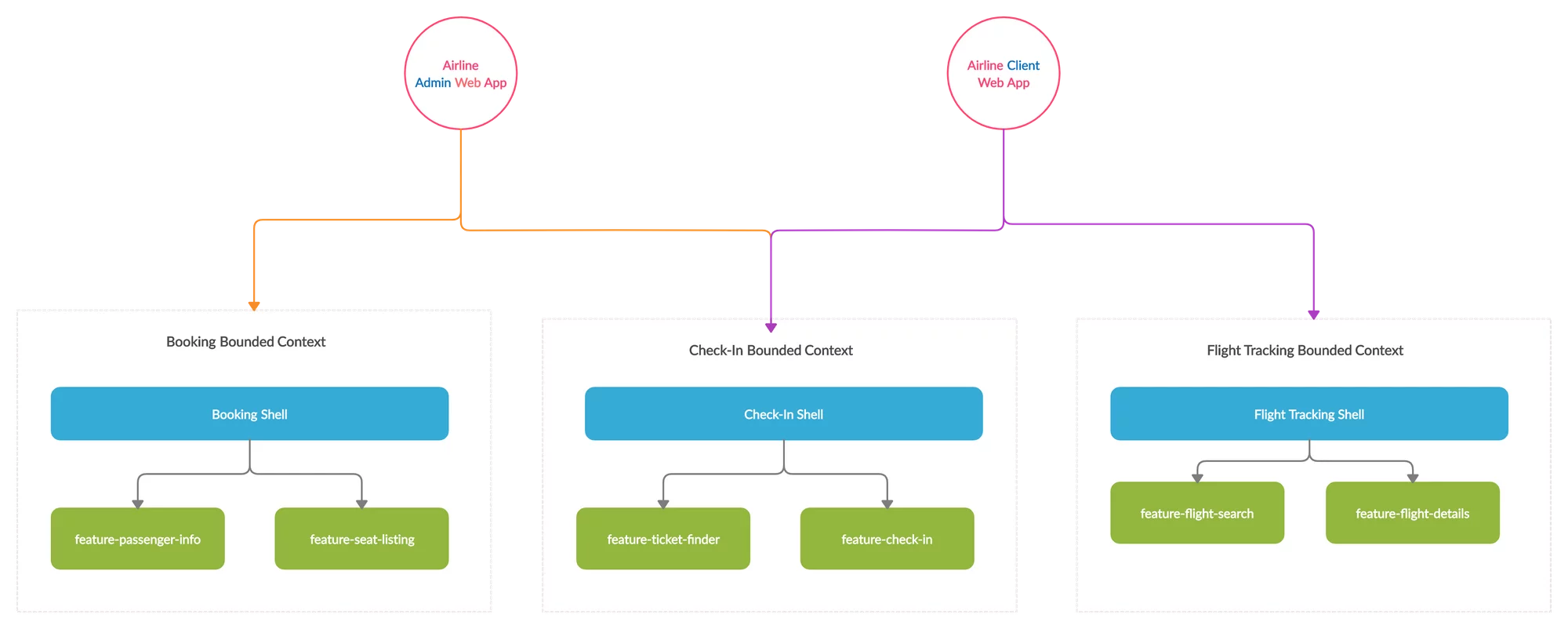
Figure 2. Manfred Steyer shell libraries. Made with https://creately.com
Rather than explaining the rationale behind every choice in this particular example, let's look at how the shell operates and where it proves beneficial.
That said, it's important to note the guidance Manfred Steyer offers in his book:
a
_shell_only accessesfeatures
This differs from the Nrwl concept of feature-shell. Manfred's shell libraries don't take charge of the entire application's routing and feature set. Instead, they focus solely on coordinating the routes and features within a single Bounded Context. The application itself is responsible for incorporating the parts of each domain it requires.
This distinction significantly influences how applications are structured. Given that one of the primary goals of a Monorepo is to maximize code reuse, this strategy allows different applications to share substantial functionality through a unified interface.
When to use a shell library
While this approach provides greater flexibility in how applications are assembled, it still depends on compelling use cases to be practical.
The optimal scenario is having multiple applications within the same domain, where each one is built by combining Bounded Contexts that their respective shells have already set up.
However, conversations with my colleague Lars Gyrup Brink Nielsen revealed that the granularity of these shells can sometimes be a disadvantage.
The reason is that even if two applications theoretically share a Bounded Context, they might not require identical feature sets. This could suggest that our Bounded Context lacks proper cohesion. Yet, the pursuit of a single, universally-sized Bounded Context across all applications could lead to endless refactoring, potentially undermining the appropriate cohesion for each individual application.
A shell library in practice
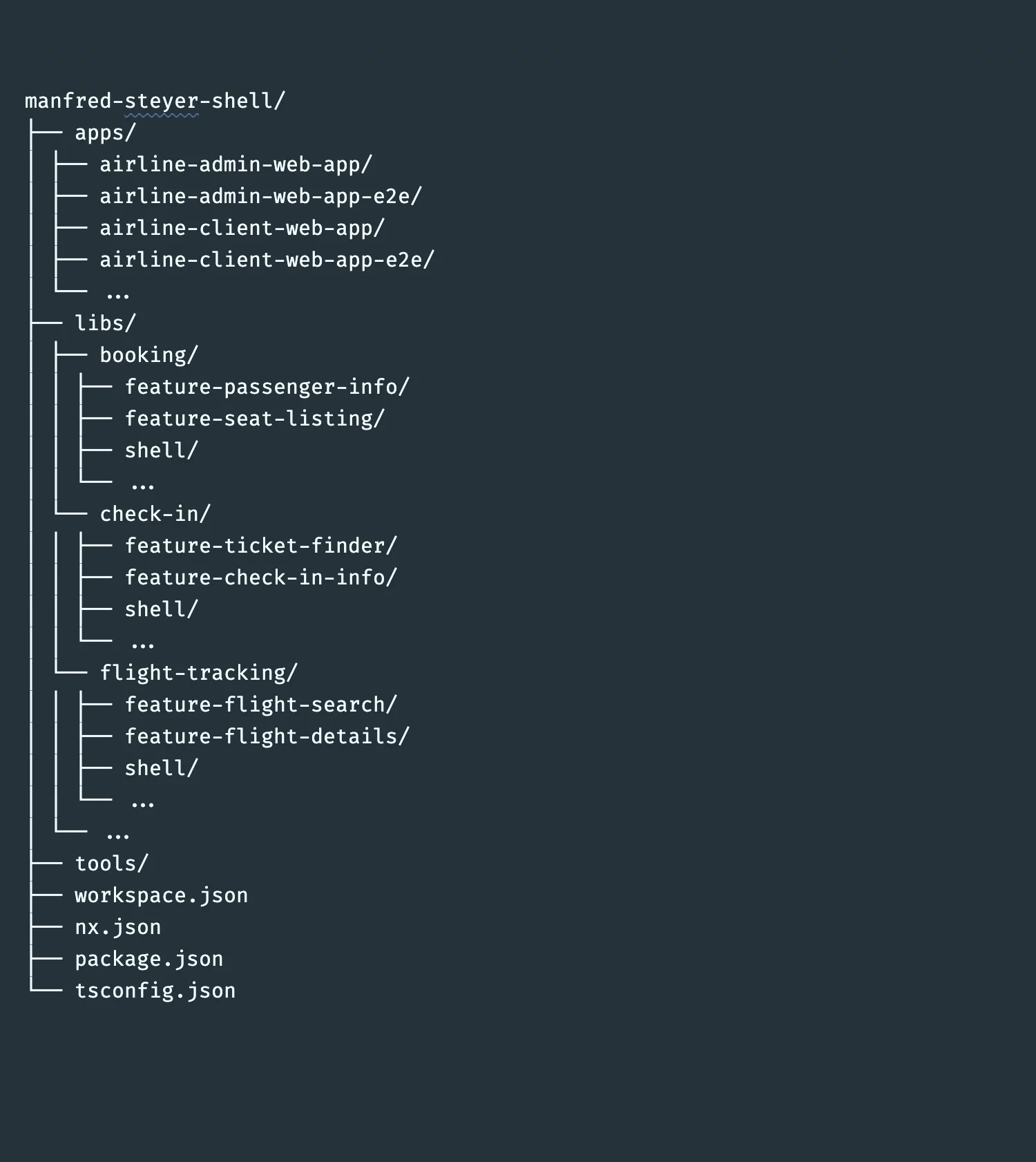
Manfred Steyer shell file structure example.
The shell libraries defined by Manfred Steyer handle the routing orchestration for their respective Bounded Context.
import { CommonModule } from '@angular/common';
import { NgModule } from '@angular/core';
import { RouterModule, Routes } from '@angular/router';

const routes: Routes = [
  {
    path: 'seat-listing',
    loadChildren: () =>
      import('@steyer-shell-variation/booking/feature-seat-listing').then(
        m => m.BookingFeatureSeatListingModule
      )
  },
  {
    path: 'passenger-info',
    loadChildren: () =>
      import('@steyer-shell-variation/booking/feature-passenger-info').then(
        m => m.BookingFeaturePassengerInfoModule
      )
  }
];

@NgModule({
  imports: [RouterModule.forChild(routes)]
})
export class BookingShellModule {}
The Booking Shell Library.
import { CommonModule } from '@angular/common';
import { NgModule } from '@angular/core';
import { RouterModule, Routes } from '@angular/router';

const routes: Routes = [
  {
    path: 'flight-details',
    loadChildren: () =>
      import(
        '@steyer-shell-variation/flight-tracking/feature-flight-details'
      ).then(m => m.FlightTrackingFeatureFlightDetailsModule)
  },
  {
    path: 'flight-search',
    loadChildren: () =>
      import(
        '@steyer-shell-variation/flight-tracking/feature-flight-search'
      ).then(m => m.FlightTrackingFeatureFlightSearchModule)
  }
];

@NgModule({
  imports: [RouterModule.forChild(routes)]
})
export class FlightTrackingShellModule {}
The Flight Tracking Shell Library.
import { CommonModule } from '@angular/common';
import { NgModule } from '@angular/core';
import { RouterModule, Routes } from '@angular/router';

const routes: Routes = [
  {
    path: 'check-in-info',
    loadChildren: () =>
      import('@steyer-shell-variation/check-in/feature-check-in-info').then(
        m => m.CheckInFeatureCheckInInfoModule
      )
  },
  {
    path: 'ticket-finder',
    loadChildren: () =>
      import('@steyer-shell-variation/check-in/feature-ticket-finder').then(
        m => m.CheckInFeatureTicketFinderModule
      )
  }
];

@NgModule({
  imports: [RouterModule.forChild(routes)]
})
export class CheckInShellModule {}
The Check-in Shell Library.
Each application incorporates the full capability of the Bounded Contexts it needs by wiring up their routes through the shell libraries.
import { AppComponent } from './app.component';
import { environment } from '../environments/environment';

const routes: Routes = [
  {
    path: 'booking',
    loadChildren: () =>
      import('@steyer-shell-variation/booking/shell').then(
        m => m.BookingShellModule
      )
  },
  {
    path: 'check-in',
    loadChildren: () =>
      import('@steyer-shell-variation/check-in/shell').then(
        m => m.CheckInShellModule
      )
  }
];

@NgModule({
  declarations: [AppComponent],
  imports: [
    BrowserModule,
    RouterModule.forRoot(routes),
    HttpClientModule,
    TranslocoConfigModule.forRoot(environment.production)
  ],
  bootstrap: [AppComponent]
})
export class AppModule {}
The Airline Admin web Application.
import { HttpClientModule } from '@angular/common/http';
import { NgModule } from '@angular/core';
import { BrowserModule } from '@angular/platform-browser';
import { RouterModule, Routes } from '@angular/router';

import { TranslocoConfigModule } from '@steyer-shell-variation/shared/utils-transloco-config';

import { environment } from '../environments/environment';
import { AppComponent } from './app.component';

const routes: Routes = [
  {
    path: 'flight-tracking',
    loadChildren: () =>
      import('@steyer-shell-variation/flight-tracking/shell').then(
        m => m.FlightTrackingShellModule
      )
  },
  {
    path: 'check-in',
    loadChildren: () =>
      import('@steyer-shell-variation/check-in/shell').then(
        m => m.CheckInShellModule
      )
  }
];

@NgModule({
  declarations: [AppComponent],
  imports: [
    BrowserModule,
    RouterModule.forRoot(routes),
    HttpClientModule,
    TranslocoConfigModule.forRoot(environment.production)
  ],
  bootstrap: [AppComponent]
})
export class AppModule {}
The Airline Client web Application.
With shell libraries, the responsibility of initialization and configuration rests with the applications themselves, since an application can host multiple shell libraries.
Composite Shell Libraries
We've now examined two distinct shell library patterns, each with their own advantages, scenarios, and drawbacks. However, we are not obligated to choose just one. As professionals, it's our responsibility to find creative solutions and adapt our tools to suit our requirements.
Building on my discussions with Lars Gyrup Brink Nielsen, we developed a different shell library strategy. This approach advocates for one shell library per application, using the Bounded Context as the foundation, as demonstrated in Figure 3. This guarantees that each application receives precisely the features it requires, and the size of our Bounded Context aligns with the appropriate level of cohesion for the business logic. In this model, the feature libraries are shared across the Bounded Context, which maximizes code sharing while preserving cohesion.
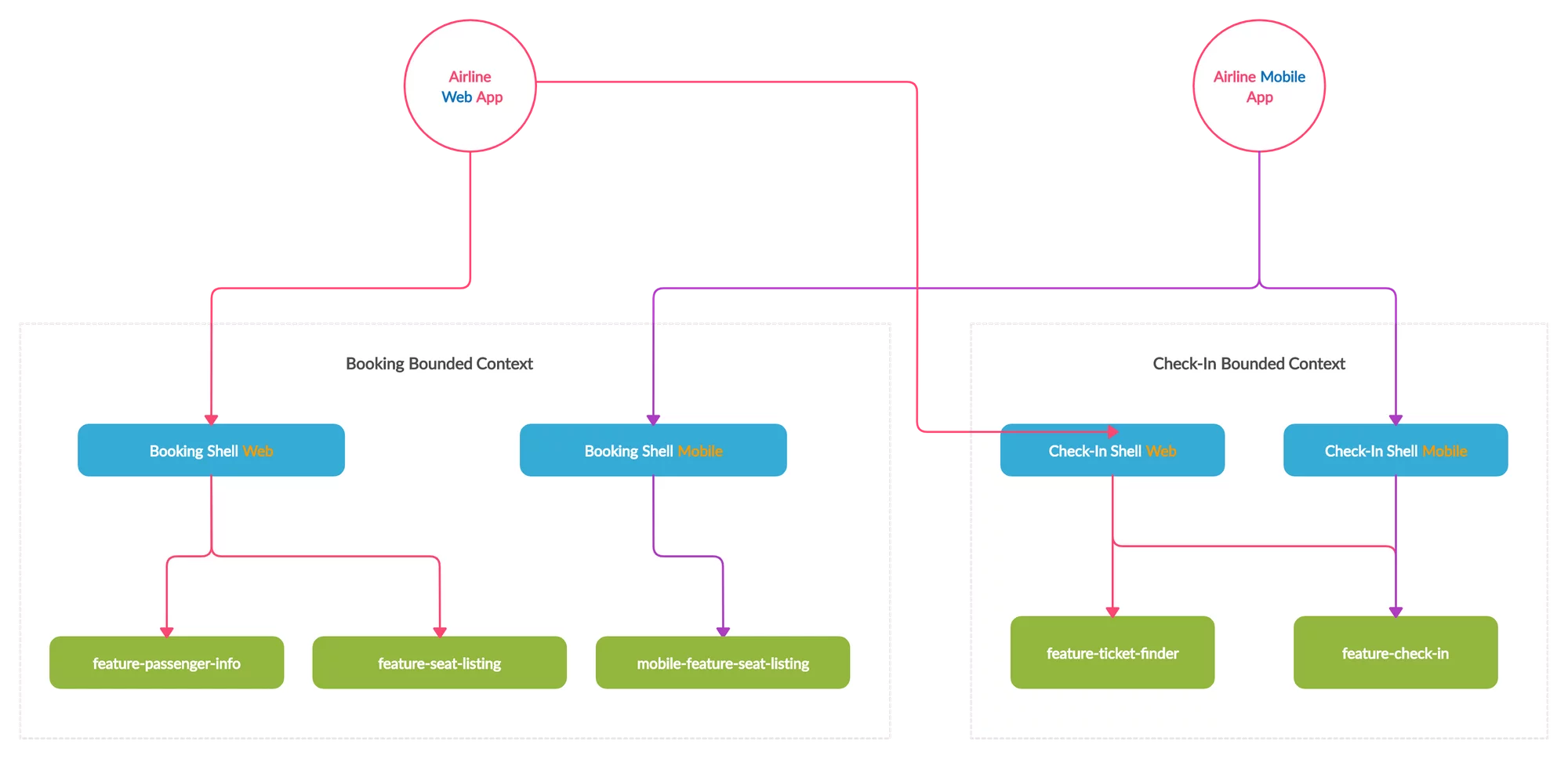
Figure 3. Booking and check-in Composite shell libraries. Made with https://creately.com
Composite shell use cases
The Composite Shell library offers more adaptability than the previous patterns, so its potential applications largely depend on your project's specific needs.
For our purposes, the primary scenario involves having two or more applications that each use only a subset of features from a given Bounded Context. A classic example is a full-featured Web/Desktop application paired with a more limited Mobile application. Each would have its own shell libraries handling routing and configuration for the specific slice of the Bounded Context it requires.
Another practical case involves applications with differing duties within the same domain. For example, an admin application might be responsible for data entry, while a user-facing application is responsible for presenting that data to customers. A shell library arrangement here could include an admin-shell that incorporates certain end-user feature libraries**,** enabling administrators to preview how the data appears to the end user.
Composite shell example
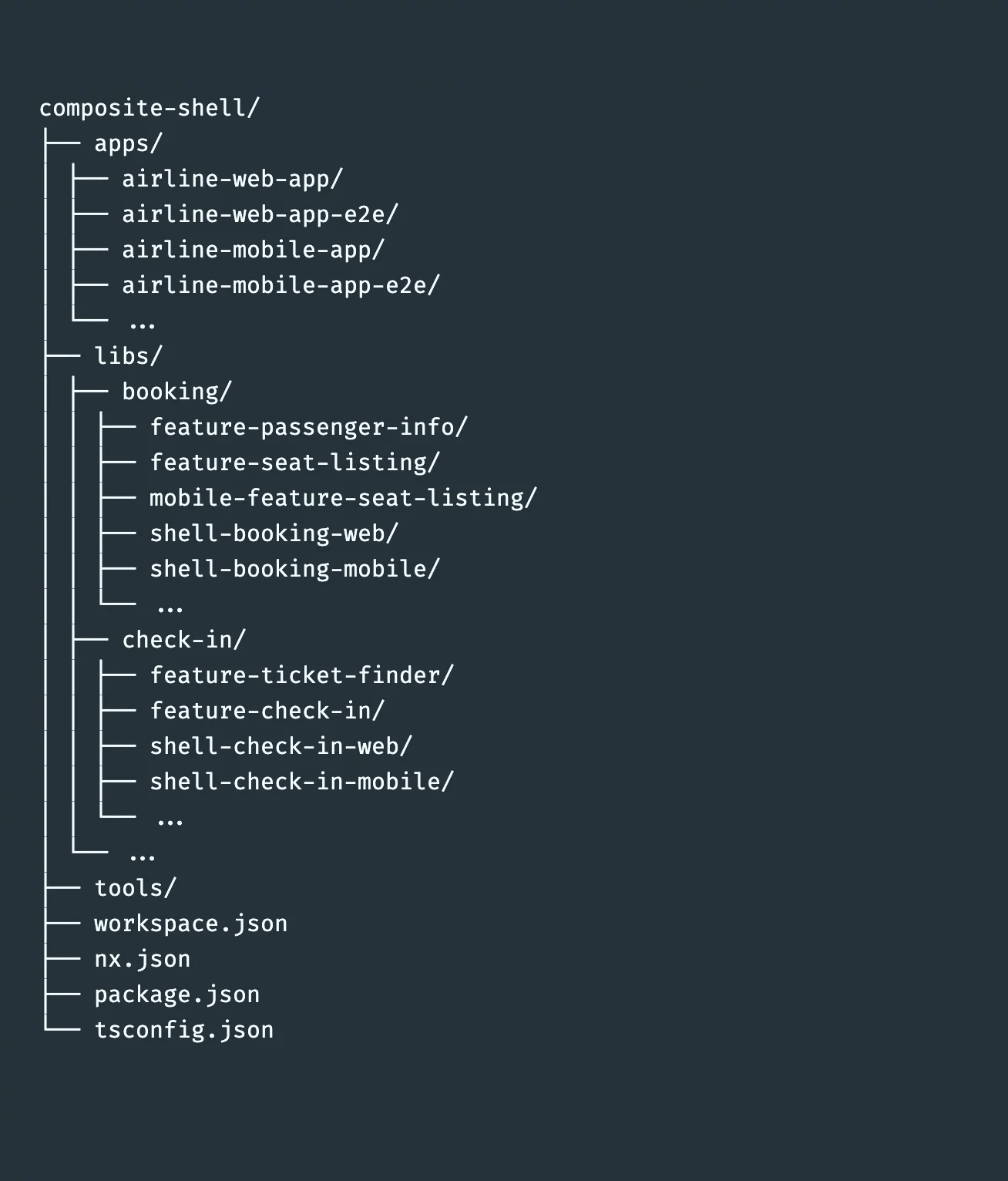
Composite shell file structure example.
A Composite Shell library handpicks the features from our Bounded Contexts that an application requires. It represents a tailored set of functionality, bundled into a shell library that orchestrates a specific subset of a Bounded Context's capabilities.
import { CommonModule } from '@angular/common';
import { NgModule } from '@angular/core';
import { RouterModule, Routes } from '@angular/router';

const routes: Routes = [
  {
    path: 'passenger-info',
    loadChildren: () =>
      import('@composite-shell-variation/booking/feature-passenger-info').then(
        m => m.BookingFeaturePassengerInfoModule
      )
  },
  {
    path: 'passenger-info',
    loadChildren: () =>
      import('@composite-shell-variation/booking/feature-seat-listing').then(
        m => m.BookingFeatureSeatListingModule
      )
  }
];

@NgModule({
  imports: [RouterModule.forChild(routes)]
})
export class BookingShellWebModule {}
The Booking Shell (web) Library.
import { CommonModule } from '@angular/common';
import { NgModule } from '@angular/core';
import { RouterModule, Routes } from '@angular/router';

const routes: Routes = [
  {
    path: 'check-in',
    loadChildren: () =>
      import('@composite-shell-variation/check-in/feature-check-in').then(
        m => m.CheckInFeatureCheckInModule
      )
  }
];

@NgModule({
  imports: [RouterModule.forChild(routes)]
})
export class CheckInShellMobileModule {}
The Check-in Shell (mobile) Library.
import { CommonModule } from '@angular/common';
import { NgModule } from '@angular/core';
import { RouterModule, Routes } from '@angular/router';

const routes: Routes = [
  {
    path: 'check-in',
    loadChildren: () =>
      import('@composite-shell-variation/check-in/feature-check-in').then(
        m => m.CheckInFeatureCheckInModule
      )
  },
  {
    path: 'ticket-finder',
    loadChildren: () =>
      import('@composite-shell-variation/check-in/feature-ticket-finder').then(
        m => m.CheckInFeatureTicketFinderModule
      )
  }
];

@NgModule({
  imports: [RouterModule.forChild(routes)]
})
export class CheckInShellWebModule {}
The Check-in Shell (web) Library.
Each application brings the customized functionality of the desired Bounded Contexts by configuring their routes through the shell libraries.
import { NgModule } from '@angular/core';
import { BrowserModule } from '@angular/platform-browser';
import { RouterModule, Routes } from '@angular/router';

import { TranslocoConfigModule } from '@composite-shell-variation/shared/utils-transloco-config';

import { environment } from '../environments/environment';
import { AppComponent } from './app.component';

const routes: Routes = [
  {
    path: 'booking',
    loadChildren: () =>
      import('@composite-shell-variation/booking/shell-mobile').then(
        m => m.BookingShellMobileModule
      )
  },
  {
    path: 'check-in',
    loadChildren: () =>
      import('@composite-shell-variation/check-in/shell-mobile').then(
        m => m.CheckInShellMobileModule
      )
  }
];

@NgModule({
  declarations: [AppComponent],
  imports: [
    BrowserModule,
    RouterModule.forRoot(routes),
    TranslocoConfigModule.forRoot(environment.production)
  ],
  bootstrap: [AppComponent]
})
export class AppModule {}
The Airline Mobile Application.
import { HttpClientModule } from '@angular/common/http';
import { NgModule } from '@angular/core';
import { BrowserModule } from '@angular/platform-browser';
import { RouterModule, Routes } from '@angular/router';

import { TranslocoConfigModule } from '@composite-shell-variation/shared/utils-transloco-config';

import { environment } from '../environments/environment';
import { AppComponent } from './app.component';

const routes: Routes = [
  {
    path: 'booking',
    loadChildren: () =>
      import('@composite-shell-variation/booking/shell-web').then(
        m => m.BookingShellWebModule
      )
  },
  {
    path: 'check-in',
    loadChildren: () =>
      import('@composite-shell-variation/check-in/shell-web').then(
        m => m.CheckInShellWebModule
      )
  }
];

@NgModule({
  declarations: [AppComponent],
  imports: [
    BrowserModule,
    RouterModule.forRoot(routes),
    HttpClientModule,
    TranslocoConfigModule.forRoot(environment.production)
  ],
  bootstrap: [AppComponent]
})
export class AppModule {}
The Airline Web Application.
Bonus – Shells for Microfrontends
There is another context in which Manfred Steyer discusses the shell in his book: as the orchestrator for several micro-frontend applications. In this setup, each micro-frontend is an actual application implementing a Bounded Context, as opposed to an isolated library.
While this technique parallels the library patterns we've explored, it does not involve a library, and therefore falls outside the scope of this analysis. For more information, please consult Manfred Steyer’s free e-book.
Credits
This article owes its existence to the invaluable contribution of my friend Lars Gyrup Brink Nielsen. Our discussions sparked the original idea. Without his encouragement, guidance, and mentorship, this piece would likely never have been created.
I am grateful to Alexander Poshtaruk for his cheerful review and insightful feedback.
Thanks to Max Koretskyi for his unwavering support of the Angular inDepth writing community and for motivating all of us.
And thanks to Manfred Steyer for his review and for shedding light on architectural best practices for the community.
Final Thoughts
Contemporary software architecture is increasingly moving toward partitioning an organization's codebase into highly cohesive libraries to improve code reuse and maintainability.
Approaches vary from managing separate repositories with distributable libraries to establishing massive Monorepos where applications and libraries coexist. Front-end development is no exception, and we've seen these principles applied through frameworks like Domain-Driven Design and Clean Architecture, concepts once thought exclusive to server-side programming.
Throughout this article, we've explored the distinctions, applications, and constraints of the Manfred Steyer and Nrwl/Nx versions of the shell library pattern.
By examining the various use-case combinations for these two patterns, we conceived the Composite Shell library. This new shell approach offers a different way to assemble applications, prioritizing flexibility through composition.
Treat these ideas as a starting point and tailor them to fit your projects. Mix, rename, and reshape the shell library patterns we've discussed, or devise your own. Their true worth is determined by the value they deliver to your team and your software.
Further Reading
- Enterprise Angular Monorepo Patterns
- Enterprise Angular by Manfred Steyer
- Effective React Development with Nx
- Strategic Domain-Driven Design by Manfred Steyer
- Using Nx at Enterprises
- Sustainable Angular Architectures Part 1
- Sustainable Angular Architectures Part 2
- Domain-Driven Design (The Blue Book)
- Domain-Driven Design Distilled