
The experimental httpResource introduced in Angular 19.2 brings data fetching into the reactive flow. This write-up demonstrates it by building a small app that scrolls through levels in the spirit of the classic Super Mario game.
Each level is made up of tiles that come in four styles — Overworld, Underground, Underwater, and Castle — and we get to pick freely:
The 📂 source code includes the component that is responsible for loading level files (JSON) and tiles via httpResource. For handling the rendering and animation of the levels, the code also includes a basic "engine" that this article treats as a black box.
Level Files
JSON files represent the individual levels. These files define which tiles — like a floor piece or a cloud — appear at which coordinates:
{
  "levelId": 1,
  "backgroundColor": "#9494ff",
  "items": [
    { "tileKey": "floor", "col": 0, "row": 13, [...] },
    { "tileKey": "cloud", "col": 12, "row": 1, [...] },
    [...]
  ]
}
Coordinates indicate the position inside a matrix of blocks that are 16x16 pixels each. Alongside the level files, an overview.json lists the available levels:
{
  "levels": [
 {
      "levelKey": "01",
      "title": "Level 1"
 },
 {
      "levelKey": "02",
      "title": "Level 2"
 },
 [...]
 ]
}
Loading JSON with ngResource
Wrapping the data access in a service is a sensible approach, as it keeps the creation of the httpResource behind a clean interface:
@Injectable({ providedIn: 'root' })
export class LevelLoader {
  getLevelOverviewResource(): HttpResourceRef<LevelOverview> {
    return httpResource<LevelOverview>(() => '/levels/overview.json', {
      defaultValue: initLevelOverview,
    });
  }

  getLevelResource(levelKey: () => string | undefined): HttpResourceRef<Level> {
    return httpResource<Level>(() => !levelKey() ? undefined : `/levels/${levelKey()}.json`, {
      defaultValue: initLevel,
    });
  }

 [...]
}
The options object you pass as the second argument lets you set a default value that remains in effect until the resource finishes loading.
To specify the level that gets loaded, getLevelResource takes a Signal that resolves to a level key. From that key, the service determines the file name. This read-only Signal, represented by the general abstraction () => string | undefined, drives the resource.
Pay attention to the fact that the URL handed to getLevelResource is given as a lambda expression. That is deliberate, because it enables the resource to recalculate the URL automatically whenever the embedded levelKey Signal changes. Beneath the surface, httpResource uses this lambda to build a Computed Signal that serves as the trigger: when that trigger updates, the resource loads the new URL.
In order to keep the httpResource from being triggered, the expression must return undefined. This becomes important when the application wants to defer loading until certain parameters, such as the levelKey, have arrived.
More Options with Explicit HttpResourceRequest
If you need finer control over the HTTP request, you can pass an HttpResourceRequest instead of just a URL:
getLevelResource(levelKey: () => string) {
  return httpResource<Level>(
    () => ({
      url: `/levels/${levelKey()}.json`,
      method: "GET",
      headers: {
        accept: "application/json",
      },
      params: {
        levelId: levelKey(),
      },
      reportProgress: false,
      body: null,
      transferCache: false,
      withCredentials: false,
    }),
    { defaultValue: initLevel }
  );
}
This HttpResourceRequest can also be supplied as a lambda expression, which the httpResource uses internally to construct a Computed Signal.
It is worth keeping in mind that the httpResource is meant for fetching data only, despite the fact that you can set a method (HTTP verb) other than GET and provide a body as the payload. That functionality exists so you can consume Web APIs that don't follow the usual semantics of HTTP verbs. By default, the given body gets converted to JSON. Still, this is not designed for persisting data back to the server — the httpResource does not cover writes. In addition, while the automatic switchMap behavior fits well for reads, it is very likely the wrong choice when writing data to the server.
With the reportProgress option, you can ask the resource to provide progress updates about the ongoing operation. This is particularly handy when you are transferring larger files. The section below shows an example of that.
More on this: Angular Architecture Workshop (Remote, Interactive, Advanced)
Our Angular Architecture workshop helps you become skilled at building enterprise-scale, maintainable Angular applications!
English Version | German Version
Parsing and Validating the Received Data
By design, the httpResource expects JSON that matches the type parameter you provide. Therefore, once the retrieved JSON is parsed, it simply applies a type assertion so that TypeScript believes the result is of the specified type.
Nevertheless, you can tap into this process to add custom validation for the raw value and to convert it into the type declared by the type parameter. To do so, supply a parse function in the options object:
getLevelResourceAlternative(levelKey: () => string) {
  return httpResource<Level>(() => `/levels/${levelKey()}.json`, {
    defaultValue: initLevel,
    parse: (raw) => {
      return toLevel(raw);
    },
  });
}
The httpResource turns the received JSON into an object of type unknown and hands that to parse. In our scenario, a small hand-crafted function named toLevel does the job. However, parse can also connect the resource to a dedicated schema validation library such as Zod.
Loading Data Beyond JSON
Although the default assumption for the httpResource is JSON that becomes a JavaScript object, you can ask for other data representations:
httpResource.textgives you plain texthttpResource.blobreturns the fetched data as a BlobhttpResource.arrayBufferdelivers the data as an ArrayBuffer
To illustrate this, the example fetches an image containing all the available tiles as a Blob. From this sheet, you can extract the particular tiles needed for the chosen level style.
The image below shows a part of that tiles map and demonstrates how the app can move between different styles horizontally or vertically:
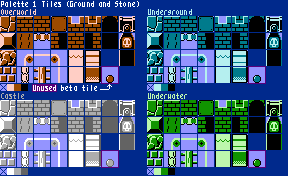
The tiles map originates from this source. For loading the tiles map, a TilesMapLoader delegates to httpResource.blob:
@Injectable({ providedIn: "root" })
export class TilesMapLoader {
  getTilesMapResource(): HttpResourceRef<Blob | undefined> {
    return httpResource.blob(() => {
      url: "/tiles.png",
      reportProgress: true,
    });
  }
}
This resource is also set up to report progress, which the app uses to show download information on the left side of the dropdowns.
Side Note: HttpClient Under the Covers Allows to Use Interceptors
Right now, the new httpResource relies on the HttpClient underneath. Because of that, you need to register the HttpClient, typically with provideHttpClient when bootstrapping. As a result, any configured HttpInterceptors are automatically picked up by the httpResource as well.
Keep in mind, though, that using the HttpClient is an internal detail that could be replaced with a different implementation later.
Putting Everything Together: Reactive Flow
With factories for all the httpResources in place, you can now build the reactive graph:
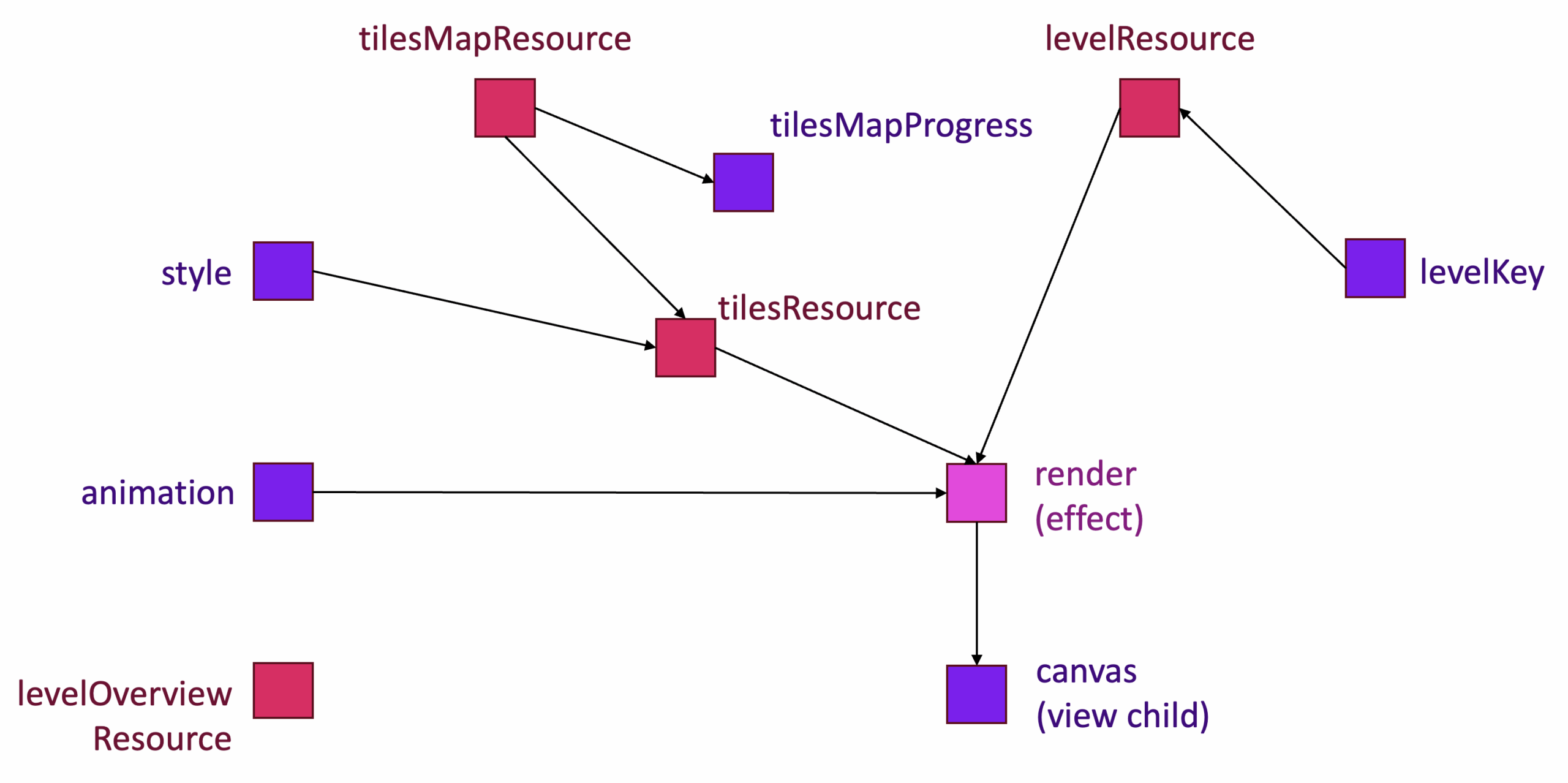
The Signals levelKey, style, and animation reflect the user's input. The first two are linked to the dropdown fields at the top. The Signal animation stores a boolean that says whether the animation has been activated via the Toggle Animation button (visible in the screenshot above).
Sitting in the upper middle, the tilesResource is a classic resource that computes the individual tiles for the selected style. For that, it delegates to a function offered by the game "engine", which is a black box in this context.
Rendering gets triggered by an effect, since drawing the level cannot be done directly through data binding. The effect draws or animates the level on a canvas exposed as a Signal-based viewChild. It runs every time the level (which comes from the levelResource), the style, the animation flag, or the canvas changes.
A computed tilesMapProgress Signal turns the progress data from the tilesMapResource into a displayable percentage for the download. To load the list of levels, the app relies on a levelOverviewResource, which is not part of the reactive graph described so far.
The listing below shows the members of the LevelComponent that embody this reactive flow:
export class LevelComponent implements OnDestroy {
  private tilesMapLoader = inject(TilesMapLoader);
  private levelLoader = inject(LevelLoader);

  canvas = viewChild<ElementRef<HTMLCanvasElement>>("canvas");

  levelKey = linkedSignal<string | undefined>(() => this.getFirstLevelKey());
  style = signal<Style>("overworld");
  animation = signal(false);

  tilesMapResource = this.tilesMapLoader.getTilesMapResource();
  levelResource = this.levelLoader.getLevelResource(this.levelKey);
  levelOverviewResource = this.levelLoader.getLevelOverviewResource();

  tilesResource = createTilesResource(this.tilesMapResource, this.style);

  tilesMapProgress = computed(() =>
    calcProgress(this.tilesMapResource.progress())
  );

  constructor() {
    [...]
    effect(() => {
      this.render();
    });
  }

  reload() {
    this.tilesMapResource.reload();
    this.levelResource.reload();
  }

  private getFirstLevelKey(): string | undefined {
    return this.levelOverviewResource.value()?.levels?.[0]?.levelKey;
  }

  [...]
}
Using a linkedSignal for the levelKey lets us set the first level as the default once the level list is available. The helper getFirstLevelKey pulls that out of the levelOverviewResource.
The rendering effect essentially reads the mentioned values and forwards them to the engine's animateLevel or rederLevel method:
private render() {
  const tiles = this.tilesResource.value();
  const level = this.levelResource.value();
  const canvas = this.canvas()?.nativeElement;
  const animation = this.animation();

  if (!tiles || !canvas) {
    return;
  }

  if (animation) {
    animateLevel({
      canvas,
      level,
      tiles,
    });
  } else {
    renderLevel({
      canvas,
      level,
      tiles,
    });
  }
}
Resources and Missing Parameters
The tilesResource in the diagram above delegates to the asynchronous extractTiles function, which also comes from the game "engine":
function createTilesResource(
  tilesMapResource: HttpResourceRef<Blob | undefined>,
  style: () => Style
) {
  const tilesMap = tilesMapResource.value();

  // undefined prevents the resource from beeing triggered
  const params = computed(() =>
    !tilesMap
      ? undefined
      : {
          tilesMap: tilesMap,
          style: style(),
        }
  );

  return resource({
    params,
    loader: (loaderParams) => {
      const { tilesMap, style } = loaderParams.params;
      return extractTiles(tilesMap, style);
    },
  });
}
One detail in this simple resource stands out: until the tile map has loaded, the tilesMapResource's value stays undefined. But without a tilesMap, calling extractTiles is impossible, so the tilesResource would have nothing to do. The params Signal honors that by also returning undefined in this situation, which means the loader will not be invoked.
Displaying the Progress
As mentioned, the tilesMapResource is configured to surface download progress via its progress Signal. A computed Signal inside the LevelComponent projects that into a readable string:
function calcProgress(progress: HttpProgressEvent | undefined): string {
  if (!progress) {
    return "-";
  }

  if (progress.total) {
    const percent = Math.round((progress.loaded / progress.total) * 100);
    return percent + "%";
  }

  const kb = Math.round(progress.loaded / 1024);
  return kb + " KB";
}
When the server sends the total file size, the calculation shows the downloaded percentage. If the size is not available, it simply reports the number of kilobytes downloaded so far. Before the download begins, there is no progress data, so a dash is displayed.
To try this out, throttle the network in the browser's dev tools, then hit the reload button to call the resource's reload method.
Status, Headers, Error and Beyond
When the application needs access to the response status code or the headers that were returned, httpResource exposes dedicated Signals for these purposes:
console.log("status", this.levelOverviewResource.status());
console.log("statusCode", this.levelOverviewResource.statusCode());
console.log("headers", this.levelOverviewResource.headers()?.keys());
In addition, httpResource offers all the capabilities we are familiar with from standard resources. This includes an error Signal that reports any issues that arise, as well as the ability to update the value Signal, which acts as a local working copy. It is important to note that this local update is not automatically synchronized back to the server; persisting those changes still requires the conventional approach.
Wrapping Up
The newly introduced httpResource adds another piece to Angular's modern reactivity toolkit. It enables loading data directly inside the reactive graph. At present, it relies on HttpClient under the hood, an implementation choice that could potentially be swapped for a different solution in the future.
Although the HTTP resource supports HTTP verbs other than GET—such as POST—for data fetching, its purpose is not to persist changes back to the server. That operation continues to be handled through the established patterns.