TL;DR: Angular Signals may simplify tracking every expression used in a view — whether it belongs to a Component or an EmbeddedView — and allow scheduled custom render strategies with surgical precision. That unlocks some very interesting optimizations.
Frameworks and libraries continue to improve at detecting changes in a granular way and syncing those updates to the DOM. Even so, there are cases where the costly part is the DOM update itself.
This post looks at how Angular Signals could open the door to custom rendering strategies that target and resolve such bottlenecks.
🔄 From Tick to Signal
The Angular team has been investigating alternative reactivity models for quite some time — far longer than one might expect. They've searched for a middle ground between raw Zone.js (Zone.js without OnPush, in other words) and a Zoneless Angular paired with specialized pipes and directives, such as those found in RxAngular.
…and then Pawel Kozlowski joined the Angular core team full time. Together with Alex Rickabaugh, they became the duo known as Pawælex.
Meanwhile, Ryan Carniato kept reminding everyone that he didn't invent Signals — but there's no denying he played a crucial role in making them relevant across the JavaScript world (see The Evolution of Signals in JavaScript). That momentum, in turn, shaped the direction Angular eventually took.
That's how Pawælex and colleagues — Andrew, Dylan, and Jeremy — brought the Angular Signals RFC to life.
💸 DOM Updates Come at a Cost
The beauty of Signals is the way frameworks like Angular, SolidJS, Preact, and Qwik seem to "magically" observe changes and rerender the necessary parts, requiring far less boilerplate than more manual approaches.
However, there's a catch: what do you do when the bottleneck is precisely that rerendering step?
Imagine updating 10,000 elements every 100ms...
@Component({
  ...
  template: `
    <div *ngFor="let _ of lines">{{ count() }}</div>
  `,
})
export class CounterComponent implements OnInit {
  count = signal(0);
  lines = Array(10_000);

  ngOnInit() {
    setInterval(() => this.count.update(value => value + 1), 100);
  }
}
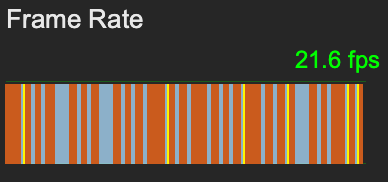
Suddenly, rendering consumes well over 90% of the total time...

...and you'll notice the frame rate drops to around 20fps.
😌 A More Measured Approach
Perhaps the simplest idea is to limit when a Signal actually updates. But that gets messy — you'd end up writing extra code, like creating intermediate Signals (which aren't computed Signals, by the way). Here's what a throttled Signal might look like:
@Component({
  ...
  template: `{{ throttledCount() }}`
})
class MyCmp {
  count = signal(0);
  throttledCount = throttleSignal(this.count, {duration: 1000});
  ...
}
Check out throttleSignal() for the implementation.
But this approach has drawbacks:
- 🐞 If a single unthrottled Signal is used in the same view, it undermines all the effort.
- ⏱️ When scheduled updates from intermediate Signals aren't properly coalesced, you risk introducing inconsistencies and compromising the glitch-free guarantees Signals normally provide.
📺 Rendering Only What's Visible
Imagine if the browser could speak up: "I'm tired of rendering things no one ever sees. From now on, I'll only work when you're actually looking."
That's a fair deal, isn't it?
After all, why keep updating elements below the fold? Or any element outside the viewport, for that matter?
One way to achieve this is to use an intermediate Signal that calls a function doing the viewport check. That function, though, would need a reference to the DOM element to determine its visibility:
lazyCount = applyViewportStrategy(this.count, {element});
This becomes quite verbose. Plus, since the same Signal can be used in many places, you'd need an intermediate Signal for each consumer — that's a lot of scaffolding.
You might think a structural directive would solve this. But that would just end up polluting the template:
template: `
  <span *lazyViewportSignal="count(); let countValue">{{ countValue }}</span>
  <span> x 2 = </span>
  <span *lazyViewportSignal="double(); let doubleValue">{{ doubleValue }}</span>
`
…which is hardly elegant.
🤔 What About Eventual Consistency for DOM Updates?
Another route involves working at the change detection level. If we can alter the render strategy, then we can defer rendering until content is actually near the viewport.
Specifically, we could simply skip updating off-screen content until it scrolls into view.
The idea of intentionally letting the view drift out of sync with the state might seem dangerous. But if done with care, it's merely Eventual Consistency — a guarantee that, in time, they'll come together.
In a way, this brings us to a principle clearly inspired by the CAP Theorem:
Keeping the state and the view synchronized cannot guarantee both consistency and availability at the same time.
Influenced by the efforts of my colleagues at RxAngular, I wondered if merging custom render strategies with the track-and-detect system behind Signals could give us both advantages, in a nearly invisible way.
The result might look like this:
@Component({
  ...
  template: `
    <div *viewportStrategy>
      <span>{{ count() }}</span>
      <span> x 2 = </span>
      <span>{{ double() }} </span>
    </div>
  `,
})
export class CounterComponent implements OnInit {
  count = Signal(0);
  double = computed(() => count());
}
👨🏻🍳 Slipping Between Signals & Change Detection
Naturally, the first thing I did was reach out to the Angular team (specifically, my good friend Alex, now part of Pawælex as I mentioned earlier) to ask whether there was any intention of exposing an API that would let developers customize how Signals drive Change Detection.
Alex replied: no.
I interpreted: not yet.
So I said: thanks.
And we both said: bye.
That was the moment I rolled up my sleeves and started experimenting with some fairly naive approaches.
The first attempt was essentially something along these lines:
/**
 * This doesn't work as expected!
 */
const viewRef = vcr.createEmbeddedView(templateRef);
viewRef.detach();
effect(() => {
  console.log('Yeay! we are in!'); // if called more than once
  viewRef.detectChanges();
});
... and it didn't work.
The reasoning was straightforward: if
effect()can track Signal invocations, anddetectChanges()needs to call the Signals in the view synchronously, then the effect ought to execute again whenever a Signal changes.
That's when I realized we should be grateful this approach fails — if it succeeded, any Signal mutation anywhere in a child or deeply nested component would end up triggering Change Detection on our view.
Some mechanism at the view level was intercepting Signal propagation and serving as a barrier. I had to track it down, which meant diving into the Angular source code.
(Yes, I know... I have a habit of trying random things first 😬)
🔬 The Reactive Graph
For Signals to detect changes, Angular constructs a reactive graph. Each node in this graph extends the ReactiveNode abstract class.
Currently, there are four categories of reactive nodes:
-
Writable Signals:
signal() -
Computed Signals:
computed() -
Watchers:
effect() - The Reactive Logical View Consumer: the unique node we need 😉 (Signal-based components will likely introduce additional node types, such as component inputs)
Every ReactiveNode tracks both its consumers and producers (all of which are ReactiveNodes). This is essential for Angular Signals' push/pull glitch-free behavior.
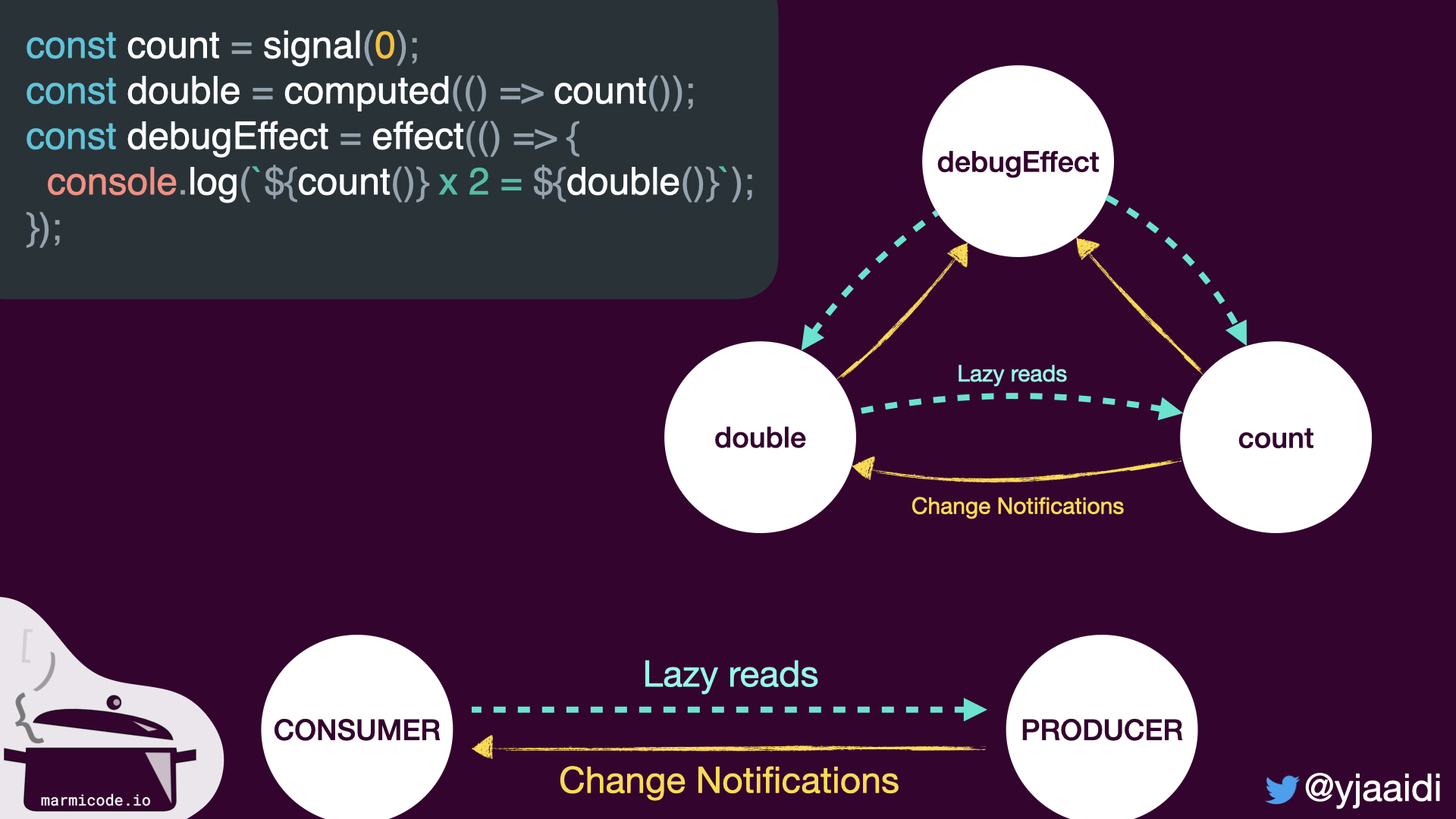
This graph is assembled via the setActiveConsumer() function, which stores the currently active consumer in a global variable that the producer reads when invoked in the same call stack.
Finally, when a reactive node suspects a modification, it alerts its consumers through their onConsumerDependencyMayHaveChanged() method.
🎯 The Reactive Logical View Consumer
While digging through the code (and getting my apron filthy), I came across an unexpected reactive node type living in the Ivy renderer implementation: the ReactiveLViewConsumer.
Writable Signals sit at the leaf edges of the reactive graph, while Reactive Logical View Consumers occupy the root positions.
Like every reactive node, this one implements onConsumerDependencyMayHaveChanged(), but unlike the others, it's tied to a view and can dictate Change Detection behavior. And it does — by flagging the view as dirty whenever a producer notifies it:
onConsumerDependencyMayHaveChanged() {
  ...
  markViewDirty(this._lView);
}
🐘 Slipping (with all the subtlety of an elephant) between Signals & Change Detection
Regrettably, there's no neat, sanctioned way to alter the standard behavior that marks a view for checking when Signals emit a change notification...
...but with my coding apron on, I'm perfectly willing to get my hands dirty.
1. Create the embedded view
Let's begin with a standard structural directive so we can create and control the embedded view.
@Directive({
  standalone: true,
  selector: '[viewportStrategy]',
})
class ViewportStrategyDirective {
  private _templateRef = inject(TemplateRef);
  private _vcr = inject(ViewContainerRef);

  ngOnInit() {
    const viewRef = this._vcr.createEmbeddedView(this._templateRef);
  }
}
2. Trigger change detection once
The ReactiveLViewConsumer appears to be instantiated after the first Change Detection pass. My apron was beyond saving at that point, so I didn't dig further, but I suspect it's lazily created only when Signals are involved, in the interest of performance.
The simplest workaround is to run Change Detection a single time before detaching the change detector:
viewRef.detectChanges();

viewRef.detach();
Ah-ha! As I was writing this up, I noticed this comment in the source... so my hunch was right! Finally got one right! Yes!
3. Grab the ReactiveLViewConsumer
🙈
const reactiveViewConsumer = viewRef['_lView'][REACTIVE_TEMPLATE_CONSUMER /* 23 */];
4. Monkey-patch the Signal notification handler
Now that we hold the ReactiveLViewConsumer instance, we can let the hacker inside us take over the onConsumerDependencyMayHaveChanged() method and trigger, skip, or defer Change Detection according to whatever strategy we prefer — like a simple throttle:
let timeout;
reactiveViewConsumer.onConsumerDependencyMayHaveChanged = () => {
  if (timeout != null) {
    return;
  }

  timeout = setTimeout(() => {
    viewRef.detectChanges();
    timeout = null;
  }, 1000);
};
... or we could rely on RxJS, which remains one of the most convenient tools for timing-related strategies (and is practically bundled in nearly every app already 😉)
See ThrottleStrategyDirective & ViewportStrategyDirective
🚀 It Works!
Time to give it a spin!
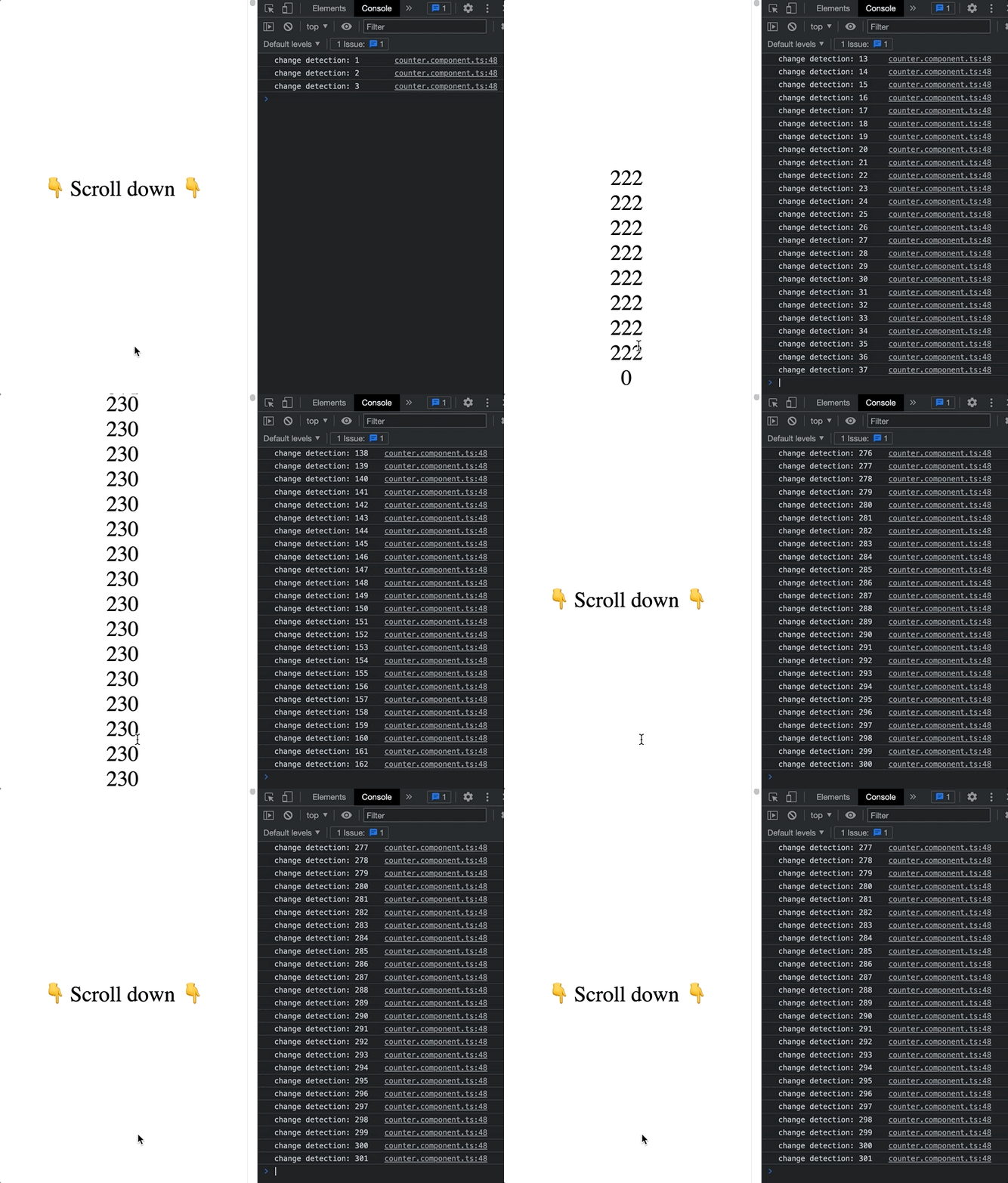
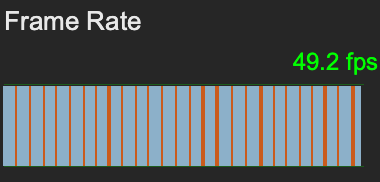
The improvement is striking — roughly 5 times faster... (even given that detecting when an element enters the viewport is a fairly costly operation)

And the frame rate holds up well:
However, a word of caution:
This approach relies on internals that could shift in any upcoming Angular release (minor or major). Proceed with care — maybe leave this one out of production code.
Additionally, this only manages the view that the directive is bound to. It won't automatically detach or monitor nested views or child components.
🔮 Looking Ahead
🚦 RxAngular + Signals
The strategies shown in this demo are intentionally basic and would benefit from smarter scheduling and coalescing to cut down on reflows and repaints.
Rather than reinventing that wheel, this concept could be paired with RxAngular Render Strategies... a nod to my RxAngular colleagues! 😉
🅰️ We Might Need More Low-Level Angular APIs
Getting this to work required reaching into Angular's internals — APIs that may change without warning in future releases.
If Angular were to expose something like:
interface ViewRef {
  /* This doesn't exist. */
  setCustomSignalChangeHandler(callback: () => void);
}
... or something a bit terser 😅, we could pair that with ViewRef.detach() to slot smoothly between Signals and change detection.
Signal-Based Components
Signal-based components aren't available yet, so there's no certainty this would hold up — the implementation details are likely to evolve.
⚛ Custom Render Strategies in Other Libraries & Frameworks
How do other libraries handle this?
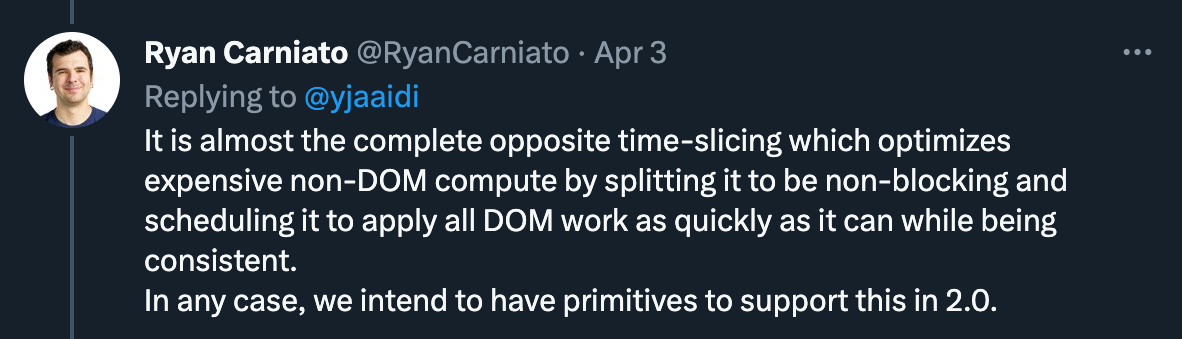
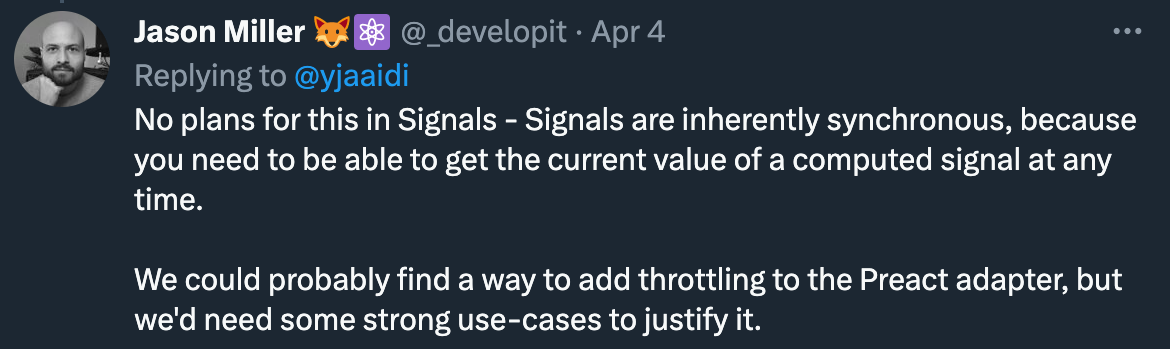
I couldn't resist asking, so I put the question out there and got useful responses from SolidJS's Ryan Carniato and Preact's Jason Miller:
SolidJS
Preact
React
In React, Signals or not, you could build a Higher Order Component that chooses whether to actually render or return a memoized value based on its strategy.
const CounterWithViewportStrategy = withViewportStrategy(() => <div>{count}</div>);

export function App() {
  ...
  return <>
    {items.map(() => <CounterWithViewportStrategy count={count}/>}
  </>
}
See the React Custom Render Strategies Demo
This might get even more efficient with Signals by intercepting React.createElement as the Preact Signals integration does and swapping in a custom strategy instead of the default one.
Alternatively, a custom hook leveraging useSyncExternalStore() could do the trick.
Vue.js
With JSX, you could wrap render() much like withMemo() does:
defineComponent({
  setup() {
    const count = ref(0);

    return viewportStrategy(({ rootEl }) => (
      <div ref={rootEl}>{ count }</div>
    ));
  },
})
Check out the throttle example on Stackblitz
Still, I'm curious how this could apply in Single File Components without introducing a compiler transform to turn something like v-viewport-strategy into a wrapper. 🤔
Qwik
This one needs deeper exploration 😅, and I'm not certain overriding the default render strategy is currently possible.
That said, my first instinct is that this could be "qwikly" added on top of the framework.
For instance, an API that toggles a "DETACHED" flag on a component could prevent render scheduling in notifyRender().
👨🏻🏫 Closing Thoughts
☢️ Please, Don't Do This at Work!
The approach outlined here depends on internal APIs that could break at any point — even in a minor or patch Angular release.
So why document it? The intent is to highlight new possibilities unlocked by Signals, all while aiming to enhance the Developer Experience.
Want Custom Render Strategies Before Moving to Signals?
Take a look at RxAngular's template
Conclusion
While custom render strategies can provide immediate performance gains in certain scenarios, the bottom line is to focus on minimizing the number of DOM elements and limiting how often updates occur.
Essentially, keep your applications straightforward (where possible), well-structured, and ensure your data flow is efficient by design through fine-grained reactivity (whether that's RxJS-based or Signals).
🔗 Links & Upcoming Workshops
👨🏻🏫 Workshops