What This Solution Requires
We need a configuration file that our Angular code can read at runtime — meaning it must live inside the dist folder we plan to deploy. That location is essential because we want the deployment tool to swap the environment variables in that file with values tied to the specific target environment.
Why Angular’s Environment Files Fall Short
Suppose we rely on the environment files for our configuration, as outlined here. When we execute ng build and inspect the dist folder, none of the environment files appear there. Since this is a compile-time mechanism, the configuration values from those files get bundled into the minified JS chunks inside dist. If our build tool cannot be pointed at a physical file to modify, we have no way to adjust those variables easily. In essence, this does not align with the "build once, deploy anywhere" paradigm. For that model to work, our application must resolve configuration data at runtime rather than at build time.
The Implementation Path
Fortunately, a straightforward workaround exists. The steps are:
- Place a JSON configuration file in the
srcdirectory - Adjust the angular/webpack settings so the file ends up in the
distfolder - Create a minimal configuration service that fetches the data from the JSON file
- Leverage
APP_INITIALIZERto call that fetch method during the bootstrap sequence
Note: Using a JSON file for our configuration makes the deployment tool’s job easier, since many tools (Octopus, for instance) come with built-in support for replacing values within JSON files.
Creating the Config File
This step is simple. We create a file called app-config.json and fill it with the JSON shown below.
{
    "api" : "http://localhost:5000/"
}
Getting the Config File into the dist Folder
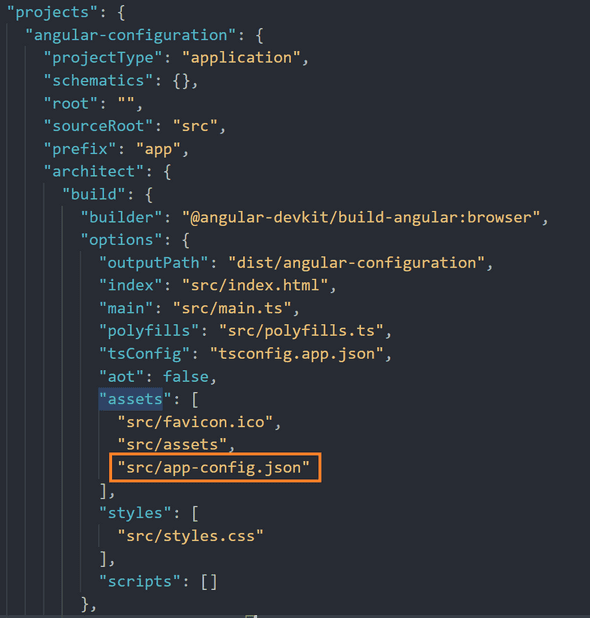
To make that happen, we must modify the webpack configuration inside the angular.json file. Specifically, we add the path to our config file into the assets array of the webpack build configuration.
Writing the Service
This is a lightweight service holding a private field and two functions — one for storing the data and another for exposing it to the rest of the application. We can use an interface to type the config object, giving us some confidence that the data from the JSON file matches our expectations.
@Injectable({
  providedIn: 'root'
})
export class ConfigService {

  private configuration: AppConfig;

  constructor(
    private httpClient: HttpClient
  ) { }

  setConfig(): Promise<AppConfig> {
    return this.httpClient
      .get<AppConfig>('./app-config.json')
      .toPromise()
      .then(config => this.configuration = config);
  }

  readConfig(): AppConfig {
    return this.configuration;
  }
}
Notice that the setConfigData method returns a promise. The application’s initialization will pause until every promise settles, so by returning a promise here we guarantee the config data is ready before the rest of the app loads and starts using it.
Examining the Setup
With the service in place, we now wire up the APP_INITIALIZER. Per the documentation, APP_INITIALIZER is an injection token that lets us execute functions during the app’s bootstrapping phase. We accomplish this by registering both the ConfigService and the APP_INITIALIZER token as providers in app.module.ts.
const appInitializerFn = (configService: ConfigService) => {
  return () => {
    return configService.setConfig();
  };
};

@NgModule({
  declarations: [
    AppComponent
  ],
  imports: [
    BrowserModule,
    AppRoutingModule,
    HttpClientModule
  ],
  providers: [
    ConfigService,
    {
      provide: APP_INITIALIZER,
      useFactory: appInitializerFn,
      multi: true,
      deps: [ConfigService]
    }
  ],
  bootstrap: [AppComponent]
})
export class AppModule { }
It is important to use a factory function here to instantiate our ConfigService and invoke the setConfig() method on it.
To verify everything works, we can inject the ConfigService into the AppComponent and use the readConfig() method to pull the config object.
@Component({
  selector: 'app-root',
  templateUrl: './app.component.html',
  styleUrls: ['./app.component.scss']
})
export class AppComponent implements OnInit {

  config: AppConfig;

  constructor(private configService: ConfigService) {}

  ngOnInit(): void {
    this.config = this.configService.readConfig();
  }
}
In the app.component.html file, we strip out the default boilerplate and add the following markup to render our configuration data.
Running the app locally with ng serve should display the JSON configuration object directly on the page.
<div>{{ config | json }}</div>
For a live demonstration, check the GitLab Repo.
Limitations of This Strategy
There are some caveats to keep in mind with this method. Since we load the config data as a provider in the AppModule, we cannot access it until the app finishes bootstrapping. In practical terms, the data is available for the application to use as demonstrated above, but it won't be accessible if we need it to load a module during startup. That is precisely the obstacle Tim Deschryver encountered when attempting to load an ApplicationInsightsModule at startup that relied on config data. If that sounds like your situation, check out how he tackled it in his article, angular-build-once-deploy-to-multiple-environments.
A second downside is that our AppModule cannot finish initializing until the config service resolves its promise with the data. Depending on network latency, this could result in a noticeable delay before the web app appears for the end user. If you don't need config data during bootstrapping and your landing page makes no network calls, you might instead load the config when that landing page kicks off to reduce initial load times.
Summary
In short, environment files work well for build-time settings, but they are not suited for the runtime configuration required by a "build once, deploy anywhere" CI/CD pipeline. To get around this, we introduced a JSON config file, made sure it gets copied to the dist folder, built a service to pull the config data, and set it up to be fetched while the AppModule initializes.
This approach is simple to adopt using Angular’s built-in features, but, as with any technique, we must stay mindful of its trade-offs. Most importantly, if you must load a module at startup that depends on config data, this pattern won’t fit your needs. Happy coding!