The @angular/forms package offers a wide range of features, and despite its popularity, a few behaviors remain puzzling. This article focuses on explaining the root cause of a specific issue and how to address it. A solid grasp of Angular Forms is beneficial, so reading A thorough exploration of Angular Forms is recommended, though not strictly required, since the necessary topics are revisited below.
The inspiration for this piece comes from this Stack Overflow question.
The issue
Imagine building a directive that applies transformations to user input so the bound FormControl ends up with the adjusted value.
Such a directive could look like this:
@Directive({
  selector: '[myDirective]'
})
export class Mydirective {
  constructor(private control: NgControl) { }

  processInput(value: any) {
    return value.toUpperCase();
  }

  @HostListener('ngModelChange', ['$event'])
  ngModelChange(value: any) {
    this.control.valueAccessor.writeValue(this.processInput(value));
  }
}
and it might be applied in the following way:
<hello name="{{ name }}"></hello>
<input class="form-control" id="label" [(ngModel)]='modelValue' required myDirective>

Model: {{ modelValue }}
The syntax used here is the familiar banana in a box, which is equivalent to: [ngModel]='modelValue' (ngModelChange)='modelValue = $event'.
You can try it out in this StackBlitz:
The problem becomes noticeable the moment you begin typing.
What's actually happening
Note: ControlValueAccessor here refers not to a specific object (like an interface) but to the underlying concept.
Angular provides default value accessors for various elements, such as input type='text', input type='checkbox', and so on.
A ControlValueAccessor acts as the bridge between the VIEW layer and the MODEL layer. When a user types, the VIEW alerts the ControlValueAccessor, which then updates the MODEL.
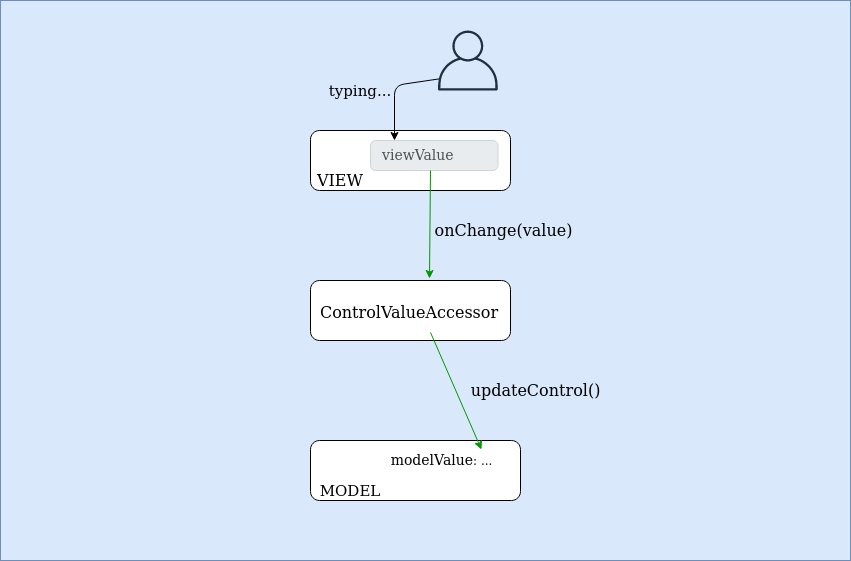
For example, on an input event, the ControlValueAccessor's onChange method is triggered. This is how onChange is defined for all ControlValueAccessors:
function setUpViewChangePipeline(control: FormControl, dir: NgControl): void {
  dir.valueAccessor!.registerOnChange((newValue: any) => {
    control._pendingValue = newValue;
    control._pendingChange = true;
    control._pendingDirty = true;

    if (control.updateOn === 'change') updateControl(control, dir);
  });
}
The key logic is in updateControl:
function updateControl(control: FormControl, dir: NgControl): void {
  if (control._pendingDirty) control.markAsDirty();
  control.setValue(control._pendingValue, {emitModelToViewChange: false});

  // !
  dir.viewToModelUpdate(control._pendingValue);
  control._pendingChange = false;
}
[dir.viewToModelUpdate(control._pendingValue);](https://github.com/angular/angular/blob/master/packages/forms/src/directives/ng_model.ts#L276-L279) is what fires the ngModelChange event in the custom directive.
/* ... */

@Output('ngModelChange') update = new EventEmitter();

/* ... */

viewToModelUpdate(newValue: any): void {
  this.viewModel = newValue;
  this.update.emit(newValue);
}

/* ... */
In essence, the model value is the input's content (converted to lowercase). Since ControlValueAccessor.writeValue only updates the VIEW, there is a gap between the VIEW's content and the MODEL's value. Here is the definition of DefaultValueAccessor.writeValue():
  writeValue(value: any): void {
    const normalizedValue = value == null ? '' : value;
    this._renderer.setProperty(this._elementRef.nativeElement, 'value', normalizedValue);
  }
It's important to note that calling FormControl.setValue(val) affects both the VIEW and MODEL, but doing so here would cause an infinite loop. This is because setValue() internally triggers viewToModelUpdate (to keep the MODEL in sync, like the modelValue in [(ngModel)]='modelValue'), and viewToModelUpdate in turn calls setValue() again.
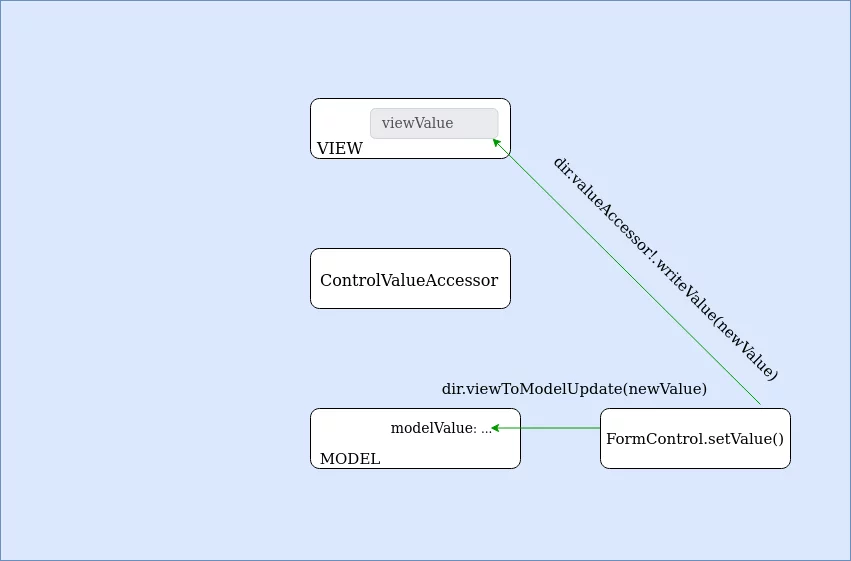
Below is the code that the image above illustrates:
function setUpModelChangePipeline(control: FormControl, dir: NgControl): void {
  control.registerOnChange((newValue: any, emitModelEvent: boolean) => {
    // control -> view
    dir.valueAccessor!.writeValue(newValue);

    // control -> ngModel
    if (emitModelEvent) dir.viewToModelUpdate(newValue);
  });
}
The fix
One effective way to resolve this is by adding the following to the directive:
ngOnInit () {
  const initialOnChange = (this.ngControl.valueAccessor as any).onChange;

  (this.ngControl.valueAccessor as any).onChange = (value) => initialOnChange(this.processInput(value));
}
This approach adjusts the data at the VIEW level, before it reaches the ControlValueAccessor.
You can rely on the fact that onChange is present on every built-in ControlValueAccessor:
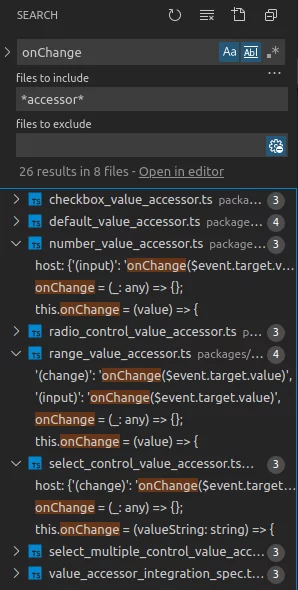
If you create a custom one, just ensure it includes an onChange property—TypeScript can assist with that.
Wrap-up
A ControlValueAccessor ensures that the VIEW and MODEL layers stay in sync. By digging into some of the internals of Angular Forms, we've seen the reason behind the issue and a clear path to resolving it.
Thanks for reading!