
Fetching Configuration Over HTTP with the APP_INITIALIZER Token
Embedded environment variables become part of the bundle, making it impossible to reuse the same build across different servers. By moving configuration outside the compiled code, a single build can serve many deployment scenarios.
Picture this typical infrastructure:
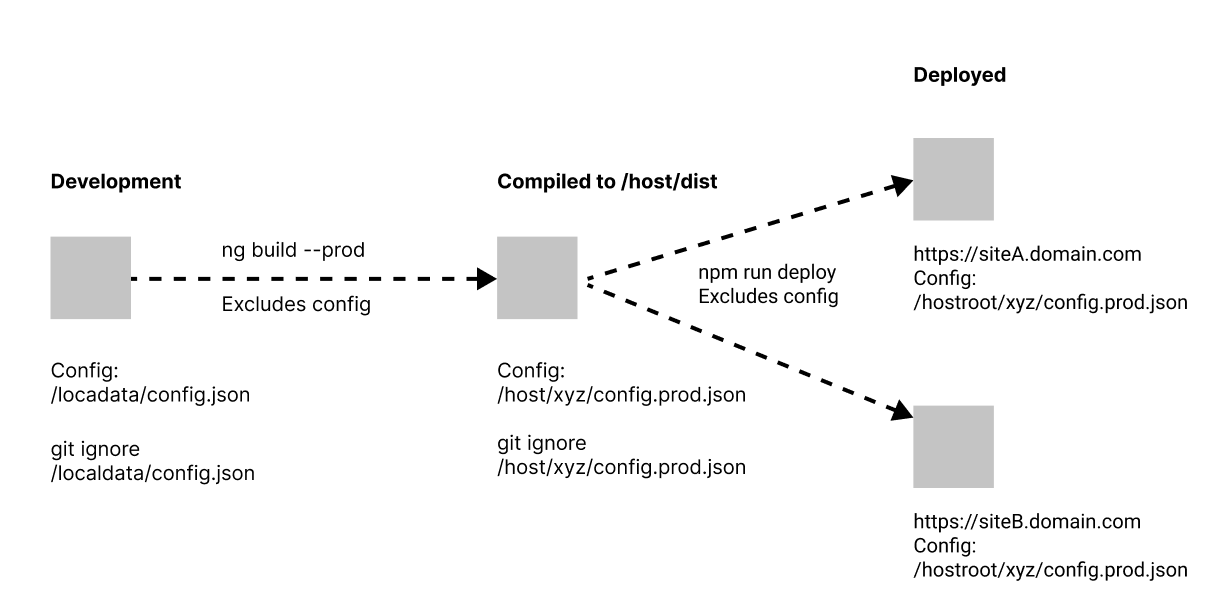
The traditional approach involves baking environment-specific values into the build. Two environments means two separate builds. But with externally loaded configuration, just one build is necessary, and the hosting server supplies the appropriate config file at runtime. This cuts down both build time and resource overhead.
All the environment file has to do now is point to where the config file lives.
On top of that, a single deployment can serve different configuration files based on the requested route. This is especially handy for international sites—for instance, the app under /en-us/ might need different settings than the one under /en-au/.
You could even push this further: deploy the same bundle across multiple servers but omit the config file entirely, letting each remote host provide its own. That's an extreme case, but it's used when deploying tailored software per client.
The trade-off, predictably, is manual upkeep of those files.
This guide looks at several strategies for loading external configuration, the common issues you may face, and how to address them.
Part I
Defining the Problem Scope
A simple JSON file with a few properties is a good starting point for configuration:
Find the complete project on StackBlitz
{
  "API": {
   "apiRoot": "<http://localhost:8888/.netlify/functions>"
  },
  "MyKey": "MyValue"
}
The target is to read the configuration either as a service property, or even as a static member of the service, like so:
constructor(private configService: ConfigService) {
}
ngOnInit(): void {
    const myValue = this.configService.Config.MyKey;
    // or
    const myStaticValue  = ConfigService.Config.MyKey;
}
Using APP_INITIALIZER
Inside the root AppModule, the APP_INITIALIZER token lets us hook in an HTTP request to pull the JSON file. Here's the module setup (for a deeper dive on Angular's initialization tokens, check out this reference):
@NgModule({
  imports: [BrowserModule, HttpClientModule, CommonModule],
  declarations: [AppComponent, HelloComponent],
  bootstrap: [AppComponent],
  providers: [
    {
      // TODO: create ConfigService and configFactory
      provide: APP_INITIALIZER,
      useFactory: configFactory,
      multi: true,
      deps: [ConfigService]
    },
  ],
})
export class AppModule {}
Let's craft the ConfigService and place the HTTP call there, then examine what we can do with the response.
export const configFactory = (config: ConfigService): (() => Observable<boolean>) => {
  return () => config.loadAppConfig();
};

@Injectable({
  providedIn: 'root',
})
export class ConfigService {
  constructor(private http: HttpClient) {

  }
  // return observable, right now just http.get
  loadAppConfig(): Observable<boolean> {
    return this.http.get(environment.configUrl).pipe(
      map((response) => {
        // do something to reflect into local model
        this.CreateConfig(response);
        return true;
      }),
      catchError((error) => {
        // if in error, set default fall back from environment
         this.CreateConfig(defaultConfig);
        return of(false);
      })
    );
  }
}
During development, evironment.configUrl will reference a local, relative path. We'll return to the question of where this file should live a bit later.
The IConfig interface is defined as follows:
export interface IConfig {
  API: {
    apiRoot: string;
  };
  MyKey: string;
}
The private casting method should also deliver a default configuration if something goes wrong. It's worth noting that the remote configuration isn't required to strictly adhere to IConfig; it can have extra properties.
Inside app/config.ts, the fallback looks like this:
import { environment } from '../environments/dev.env';

export const Config = {
  API: {
    apiRoot: environment.apiRoot,
  },
  MyKey: 'default value',
  ExtraKeys: 'wont harm',
};
Within the service, CreateConfig just casts the result and stores it in a public field. It will turn out this approach has a flaw, but let's proceed anyway.
export class ConfigService {
  constructor(private http: HttpClient) {}

  private _createConfig(config: any): IConfig {
    // cast all keys as are
    const _config = { ...(<IConfig>config) };
    return _config;
  }
  // public property
  public Config: IConfig;

  loadAppConfig(): Observable<boolean> {
    return this.http.get(environment.configUrl).pipe(
      map((response) => {
        // set to public property
        this.Config = this._createConfig(response);
        return true;
      }),
      catchError((error) => {
        // if in error, return fall back from Config
        this.Config = Config;
        return of(false);
      })
    );
  }
}
The Router's Own Initialization Catching Us Off Guard
As shown in the Angular 13 source, the Router Module itself uses APP_INITIALIZER, and all initializer functions are executed concurrently, as noted in the core code. If a module relies on both configuration and routing, you have a problem: there is no guarantee about which one finishes first. This ordering issue is already a known weakness.
Route guards or resolvers can execute before the configuration HTTP call completes. Here are the extreme conditions I found after testing various scenarios:
- The config file is hosted remotely, making it inherently slower to arrive than a local file
- The routing option
InitialNavigationis configured toenabledBlocking, which the docs indicate is needed for server-side rendering.
A cautionary note: if you keep InitialNavigation at its default enabledNonBlocking, the resolve service behaves unpredictably. Trying to filter out config that isn't ready defeats the purpose of "non-blocking" navigation. Take note of the code comments as you follow along.
Let's build an app routing module and add a router resolve to demonstrate this issue.
// the routing module
const routes: Routes = [
  {
    path: 'project',
    component: ProjectComponent,
    resolve: {
      // add a project resolve
      ready: ProjectResolve,
    },
  },
 // ...
];

@NgModule({
  imports: [
    RouterModule.forRoot(routes, {
      // enabledBlocking for SSR, but also enabledNonBlocking is not as good as it sounds in this setup
      initialNavigation: 'enabledBlocking',
    }),
  ],
  exports: [RouterModule],
})
export class AppRoutingModule {}
After adding the AppRoutingModule to the root module and creating a project component, we can define the project resolver to return an Observable of Boolean.
@Injectable({ providedIn: 'root' })
export class ProjectResolve implements Resolve<boolean> {
  // inject the service
  constructor(private configService: ConfigService) {}
  resolve(route: ActivatedRouteSnapshot, state: RouterStateSnapshot): Observable<boolean> {
    // log the value of the configuration here
    // if this is too soon, the result is undefined
    console.log('on resolve', this.configService.Config);

    return of(true);
  }
}
Run the code on this Stackblitz example, navigate to /project, and examine the console. You'll see "undefined" logged, proving that the routing resolve executed before the config was fetched via HTTP. Approaching this from the other direction, the proper solution becomes clear:
"pause until this.configService.Config is available"
The answer is RxJS observables. I'll head back to ConfigService and establish an observable from an internal subject.
// config service
export class ConfigService {
  constructor(private http: HttpClient) {}

  // keep track of config, initialize with fall back Config
  private config = new BehaviorSubject<IConfig>(Config as IConfig);
  config$: Observable<IConfig> = this.config.asObservable();

  private _createConfig(config: any): IConfig {
    // cast all keys as are
    const _config = { ...(<IConfig>config) };
    return _config;
  }

  loadAppConfig(): Observable<boolean> {
    return this.http.get(environment.configUrl).pipe(
      map((response) => {
        const config = this._createConfig(response);

        // here next
        this.config.next(config);
        return true;
      }),
      catchError((error) => {
        // if in error, return fall back from Config
        this.config.next(Config);
        console.log(error);
        return of(false);
      })
    );
  }
}
In the resolve service, just listening for updates isn't enough; you need the stream to end so the guard can proceed. RxJS take(1) often comes up, but you must exclude configurations that aren't finalized before that first emission, or you'll get the fallback values. That's why enabledNonBlocking doesn't work here—the resolve mechanism will block no matter what.
I've written three resolver variations below. The first leverages take(1), the second uses filter before taking, and the final one combines both with the first operator.
// in resolver, need to take 1 and return
// This is the first attempt
 return this.configService.config$.pipe(
  take(1),
  map(n => {
      if (n.MyKey === 'default') {
        // the first one will actually be the fallback
          return false;
      }
      return true;
  }));

// attempt two: filter before you take
return this.configService.config$.pipe(
  filter(n => n['somevalue to distinguish remote config'])
  take(1),
  map(n => {
      if (n.MyKey === 'default') {
          return false;
      }
      // it will be true for sure
      return true;
  }));

// last attempt, two in one:
return this.configService.config$.pipe(
  first(n => n['somevalue to distinguish remote config']
  map(n => {
      // it will be true for sure
      return true;
  }));
To differentiate a remote configuration from the local fallback, I've introduced a property called isServed. It's simply a Boolean, set to true only in the remote file.
// config json
{
  "isServed": true,
  "API": {
    "apiRoot": "<http://localhost:8888/server/app>"
  },
  "MyKey": "MyValue"
}
Both the IConfig model and the default Config object need this new field.
// config model:
export interface IConfig {
  isServed: boolean;
  API: {
    apiRoot: string;
  };
  MyKey: string;
}

// the default Config with isServed: false
export const Config = {
  isServed: false,
  API: {
    apiRoot: environment.apiRoot,
  },
  MyKey: 'default value',
  ExtraKeys: 'wont harm',
};
Our resolve service is now fully furnished:
@Injectable({ providedIn: 'root' })
export class ProjectResolve implements Resolve<boolean> {

  constructor(private configService: ConfigService) {}

  resolve(
    route: ActivatedRouteSnapshot,
    state: RouterStateSnapshot
  ): Observable<boolean> {

    // watch it until it's served
    return this.configService.config$.pipe(
      first((n) => n.isServed),
      map((n) => true)
    );
  }
}
Given this setup, the observable will emit two values, the initial one having isServed equal to false. Reading the configuration in a component is done like this:
@Component({
  template: `Project page with resolve
  <p>
  {{ config$ | async | json}}
  </p>`
})
export class ProjectComponent implements OnInit {
  config$: Observable<IConfig>;

  constructor(private configService: ConfigService) {
  }

  ngOnInit(): void {
       this.config$ = this.configService.config$;
  }
}
For situations where you'd rather not inject the service, adding a static getter helps access the config's value:
// config service

// make a static member
private static _config: IConfig;

// and a static getter with fallback
static get Config(): IConfig {
  return this._config || Config;
}

private _createConfig(config: any): IConfig {
  const _config = { ...(<IConfig>config) };
  // set static member
  ConfigService._config = _config;
  return _config;
}

// ...

// This can be used directly, for example in a template
// {{ ConfigService.Config.isServed }}
Common Obstacles
- If the remote file omits any keys present in the interface, those properties will be set to "null". The workaround is extending the default configuration with a shallow clone.
private _createConfig(config: any): IConfig {
	// shallow extension of fallback
    const _config = {...Config, ...(config) };
    ConfigService._config = _config;
    return _config;
}
2. Mistaking the default Config object for ConfigService.Config could inadvertently use the fallback. To prevent this, you might create a separate fallback for remote configs, or be extra careful. Making the default a private member, or always going through the service, are other valid strategies. Choose what fits your project.
3. If the config file is unreachable when a Route Resolve or Guard needs it, the app can get stuck. Keeping the file on the same server, combining RxJS operators, or adding an error flag in the configuration are all potential fixes. The last approach is one we'll revisit.
4. The location of the config file can never be one of its own keys!
5. If your HTTP interceptor adds a URL prefix based on configuration, ensure it doesn't also prepend that to the config file request itself.
Determining Where the Config File Should Reside
The goal here is simple: keep environment-specific settings outside the build, so they're available to tweak on a whim. It's a taboo to touch production builds, but there will be emergencies where you need to change a value quickly.
What's the best spot for this file during active development?
- A remote machine. This could be an in-house server or your staging area.
- A mock server, perhaps a small Node.js process you kick off before running Angular.
- In a top-level folder like "configs", exposed through the
angular.json assetsconfiguration. Please note this copies the file into the production bundle as well, and if that's not desired, you must remove that asset entry for production builds.
// add this to assets in angular.json
 "assets": [
  {
    "glob": "*.json",
    "input": "configs",
    "output": "/localdata"
  }
]
// now, every ./configs/*.json will be accessed as /localdata/*.json
Whatever your hosting choice, make sure the environments files all point to the correct location.
Part II
External Configuration for Angular Universal
Now we'll put the configuration through its paces in a Server-Side Rendering setup and see what breaks.
Handling Remote Configurations
Building on the StackBlitz Token Test Project, we change the config URL to a remote HTTP endpoint and build locally to test the server. The results were consistent: the project resolve succeeded. The one glaring issue surfaced when the remote URL was unreachable—the app simply stalled. That's the primary risk with remote configurations. A workaround looks like this:
A Minor Configuration Adjustment
We still want to differentiate between served and fallback configs, but we won't let a failure freeze the UI. For example, project resolve should have the power to act on an error:
return this.configService.config$.pipe(
      first((n) => n.isServed),
      map((n) => {
        // if served with error, reroute or notify user, but do not block user
        console.log(n.withError); // let's introduce this property
        return true;
      })
    );
In ConfigService, both success and failure outcomes will now be tagged as served. A new property, withError, flags when things go wrong.
// after defining withError property in IConfig...
private _createConfig(config: any, withError: boolean): void {
    // cast all keys as are
    const _config = { ...Config, ...(<IConfig>config) };

    // is served, always
    _config.isServed = true;

    // with error
    _config.withError = withError;

    // set static member
    ConfigService._config = _config;

    // next, always next the subject
    this.config.next(config);
  }

  loadAppConfig(): Observable<boolean> {
    return this.http.get(environment.configUrl).pipe(
      map((response) => {
        // create with no errors
        this._createConfig(response, false);
        return true;
      }),
      catchError((error) => {
        // if in error, return fall back from environment
        // and create with errors
        this._createConfig(Config, true);
        return of(false);
      })
    );
  }
This solves the blocking issue, but be aware: if the initial HTTP call fails on the server, the client will retry it after hydration completes.
Handling Local Configurations
We shift the files to the localdata folder, as defined in the angular.json assets:
"assets": [
  {
    "glob": "*.json",
    "input": "configs",
    "output": "/localdata"
  }
]
The reference to the file becomes localdata/config.json, which is a relative path.
From a rather specific Angular Documentation:
"If you are using one of the
@nguniversal/*-enginepackages (such as@nguniversal/express-engine), this is taken care of for you automatically. You don't need to do anything to make relative URLs work on the server."
My experience disagrees, producing this error:
GET localdata/config.prod.json NetworkError
From what I gather, you're safe if you adopt their specific rendering engine pattern, like this:
server.get('*', (req, res) => {
  res.render(indexHtml, {
      req,
      providers: [{ provide: APP_BASE_HREF, useValue: req.baseUrl }]
  });
});
But I've chosen a different path. I’ll explain my reasoning and the remedy for resolving these relative URLs.
Separating the server from the application
The official Angular documentation for SSR with Angular Universal guides you to place the server code inside the src directory and produce the server bundle as part of the build pipeline. That arrangement bothers me. Coming from a more traditional background, I cannot rest easy knowing my server code lives alongside the client source. When the server misbehaves, do I really need to rebuild and retest every time? No, thanks.
A particularly useful case is serving a multilingual Angular app from a single build.
Let's trim down the server.ts from the Angular docs to just the ngExpressEngine, export that piece, and put it into its own express app.
// server.ts
// export the ngExpressEngine
export const AppEngine = ngExpressEngine({
  bootstrap: AppServerModule
});
The SSR build configuration in angular.json looks like this:
// ... angular.json
"architect": {
     // ...
    "server": {
        "builder": "@angular-devkit/build-angular:server",
        "options": {
            // choose the output path where the main.js will end up
            "outputPath": "./host/server",
            "main": "server.ts",
            "tsConfig": "tsconfig.server.json"
        },
        "configurations": {
            "production": {
                // don't delete because there will be other files
                "deleteOutputPath": false
                // ...
            }
        }
    }
}
The generated main.js lands in the configured outputPath. We create a server there that imports the exported AppEngine.
// host/server.js
const express = require('express');

// express app
const app = express();

// setup express
require('./server/express')(app);

// setup routes
require('./server/routes')(app);

// other stuff is up to you

// listen
const port = process.env.PORT || 1212;
app.listen(port, function (err) {
  console.log('started to listen to port: ' + port);
  if (err) {
      console.log(err);
      return;
  }
});
The express module itself is straightforward — see it on StackBlitz. The real logic sits in routes.js:
Heads up: StackBlitz may not allow testing this directly; consider using __dirname for reliable paths
const express = require('express');

// ngExpressEngine from compiled main.js
const ssr = require('./main');

// setup the routes
module.exports = function (app) {
  // set engine, we called it AppEngine in server.ts
  app.engine('html', ssr.AppEngine);

  // set view engine
  app.set('view engine', 'html');

  // set views directory, the clientside build output
  app.set('views', '../client');

  // expose the configs path as localdata (or whatever you choose to name it)
  app.use('/localdata', express.static('../localdata', { fallthrough: false }));

  // expose client folder
  app.use(express.static('../client'));

  // now THIS
  app.get('/*', (req, res) => {
    // point to your index.html
    res.render(`../client/index.html`, {
      req, // pass request
      res, // pass response
      // here, we can provide things for ssr
    });
  });
};
Inside res.render, I pass the response and request objects along, just in case Angular ever needs them. It's uncommon, but not unheard of. So that explains the what and the why.
Making local URLs absolute
A local request is something like our localdata/config.prod.json. To make it work, the server URL must be added as a prefix. The ConfigService should wind up looking like this:
 loadAppConfig(): Observable<boolean> {
    // fix url first if its on server
    let url = environment.configUrl;
    if (serverUrlExsits) {
      url = serverUrl + url;
    }
    return this.http.get(url).pipe(
     // ... etc
    );
  }
On the server, the URL is put together with the REQUEST injection token, as described in the npm docs.
// change ConfigService
// for this line to work, install @types/express
import { Request } from 'express';
import { REQUEST } from '@nguniversal/express-engine/tokens';

@Injectable()
export class ConfigService {
  // make it Optional to work on browser platform as well
  constructor(@Optional() @Inject(REQUEST) private request: Request) {}

 loadAppConfig(): Observable<boolean> {
    // fix url first if its on server
    let url= environment.configUrl;
    if (this.request) {
      // on ssr get a full url of current server
      url = `${this.request.protocol}://${this.request.get('host')}/${url}`;
    }
 // ... etc
  }
}
Because we already supply req in the res.render invocation, that's all that's needed. But the code is not exactly pretty. An HTTP interceptor targeting localdata would make this reusable for any similar path. Before that, though:
The reverse proxy quirk
Without going too deep, production setups with reverse proxies and load balancers commonly convert https into http and swap real.host.com for localhost. We've handled the hostname part via req.get('host'), which reads the header. For the protocol, we can read another header: x-forwarded-proto.
Here's an Azure-hosted example I put together; the header values differ from the plain ones because of the cloud setup:
aumet.azurewebsites.net/webinfo
{
    "request": {
        "headers": {
            "host": "aumet.azurewebsites.net",
            "disguised-host": "aumet.azurewebsites.net",
            "x-original-url": "/webinfo",
            "x-forwarded-for": "client-ip-address-here",
            "x-forwarded-proto": "https"
        },
       // on other servers this could be localhost
        "hostname": "aumet.azurewebsites.net",
        "path": "/webinfo",
        // don't read this value
        "protocol": "http",
   }
}
But before wiring that into the Angular app — and staying true to my separation of concerns habit — this is not an Angular problem, so it doesn't belong in the app. I'd rather build the correct URL on the server and hand it over. Like this:
// in host/server/routes.js
// change the final get
  app.get('/*', (req, res) => {

    // fix and provide actual url
    let proto = req.protocol;
    if (req.headers && req.headers['x-forwarded-proto']) {
        // use this instead
        proto = req.headers['x-forwarded-proto'].toString();
    }
    // also, always use req.get('host')
    const url= `${proto}://${req.get('host')}`;

    res.render(`../client/index.html`, {
      req,
      res,
      // here, provide it
      providers: [
        {
          provide: 'serverUrl',
          useValue: url,
        },
      ],
    });
  });
Back in Angular, we can now write a proper HTTP interceptor that catches localdata requests:
// Angular interceptor
@Injectable()
export class LocalInterceptor implements HttpInterceptor {
  constructor(
    // inject our serverUrl
    @Optional() @Inject('serverUrl') private serverUrl: string
  ) {}
  intercept(req: HttpRequest<any>,next: HttpHandler): Observable<HttpEvent<any>> {
    // if request does not have 'localdata' ignore
    if (req.url.indexOf('localdata') < 0) {
      return next.handle(req);
    }

    let url= req.url;
    if (this.serverUrl) {
      // use the serverUrl if it exists
      url= `${this.serverUrl}/${req.url}`;
    }

    const adjustedReq = req.clone({ url: url});
    return next.handle(adjustedReq);
  }
}
Register the HttpInterceptor in AppModule
// app.module.ts
providers: [
    {
      provide: APP_INITIALIZER,
      useFactory: configFactory,
      multi: true,
      deps: [ConfigService],
    },
    // provide http interceptor here
    {
      provide: HTTP_INTERCEPTORS,
      useClass: LocalInterceptor,
      multi: true,
    },
  ],
And strip any server references out of ConfigService. Build, test, done.
The config.prod.json on the server can be tweaked without a restart and without leaking into other environments or servers. Sleep is much better now.
Handing config directly to the server
Given that the server is now standalone and the config is no longer fetched remotely, why not just provide the config and have it injected into ConfigService?
// host/server/routes.js
// require the json file sitting in localdata
const localConfig = require('../localdata/config.prod.json');

// setup the routes
module.exports = function (app) {
   // ...
   res.render(`../client/index.html`, {
      req,
      res,
      // also provide the localConfig
      providers: [
        {
          provide: 'localConfig',
          useValue: localConfig
        }
        // though don't lose the serverUrl, it's quite handy
      ]
    });
  });
};
Inside ConfigService
constructor(
    private http: HttpClient,
    // optional injector for localConfig
    @Optional() @Inject('localConfig') private localConfig: IConfig
  ) {}

    loadAppConfig(): Observable<boolean> {
    // if on server, grab config without HTTP call
    if (this.localConfig) {
      this._createConfig(this.localConfig, true);
      return of(true);
    }

    return this.http.get(environment.configUrl).pipe(
     // ...
    );
  }
This approach is the quickest and least fragile way for the server to obtain configuration. But it might be more than some setups need. Best of luck.
Earlier, we leaned on the APP_INITLIZER token to pull external config over HTTP. This time, we're moving the config closer, skipping the network call entirely. But how can we embed JSON into HTML inside an Angular app?
The solution has to satisfy two constraints:
- The configuration stays out of the compiled bundle, so it cannot be imported — not directly, not indirectly — via TypeScript.
That rules out a local import like:
import * as WebConfig from '/localdata/config.json';
Or a module script such as:
<script type="module" src="/localdata/config.js">
Or dynamic module loading.
import('./localdata/config.js')
.then((config) => {
  // do something with config
});
- Keep the typing, so
Configcan't be touched before it's properly cast.
Since JSON in HTML is blocked by security safeguards, I'll build the configuration as a script instead:
// configs/config.js file, named it "WebConfig" to avoid confusion
const WebConfig = {
  isServed: true,
  API: {
    apiRoot: 'url/server/app',
  },
  MyKey: 'MyValue',
};
Injecting a script
The one place where a JavaScript config can be loaded without being part of the build is directly inside the HTML head. That's the only spot that isn't validated at compile time — though a missing file yields a silent 404 at runtime.
Here's the approach.
<script src="localdata/config.js"></script>
For that path to resolve, angular.json assets need an update:
I tend to name the output differently as a reminder that this rule exists.
{ //... angular.json
"assets": [
  {
    "glob": "*",
    "input": "configs",
    "output": "/localdata"
  }
Implementing APP_INITIALIZER
Let's create an APP_INITIALIZER that returns void at minimum. Here's the ConfigService:
// declare WebConfig
declare const WebConfig: any;

export const configFactory = (config: ConfigService): (() => void) => {
    return () => config.loadAppConfig();
};

@Injectable({
  providedIn: 'root',
})
export class ConfigService {
  constructor() {}

 // set a static member for easier handling
 private static _config: IConfig;

 static get Config(): IConfig {
    return this._config || Config;
  }

  private _createConfig(config: any): IConfig {
    // cast all keys as are, extend local Config
    const _config = { ...Config, ...(<IConfig>config) };
    // set static member
    ConfigService._config = _config;
    return _config;
  }

  loadAppConfig(): void {
    // here is the JavaScript variable... is it ready?
    if (WebConfig?.isServed) {
      this._createConfig(WebConfig);
    } else {
      // not loaded? fall back
      console.log('error');
      this._createConfig(Config);
    }
  }
}
Issues:
First, WebConfig needs a type declaration. Add a const in the same service file:
declare const WebConfig: any;
Second, there's the edge case of a slow config load. If the script carries a defer attribute it won't block rendering, and since localdata is served from the same host, it should be fast enough. On StackBlitz, though, it's painfully slow. I won't chase that rabbit hole — if waiting for local config becomes a concern, the HTTP approach is the better fit.
To tie off the loose ends, the slow case reproduces locally when:
- The config is pulled from a remote host
- An
asyncattribute is present - And the script sits near the end of the body
<script src="https://saphire.sekrab.com/localdata/config.js" async></script>
When that runs, WebConfig is not yet defined, so an "undefined" error gets thrown. The fix is a small patch in index.html or in any JavaScript that's already part of the code.
<script>
  window.WebConfig = {
    isServed: false
  };
</script>
Implementing PLATFORM_INITIALIZER
Since the token's return value doesn't matter, we could load the config even earlier via the Platform Initializer. Just be careful — stick with defer and keep it local. (Note: this path won't work on StackBlitz.)
export const platformFactory = (): (() => void)  => {
    ConfigService.loadAppConfig(); // static element
    return () => null;
};
In main.ts
platformBrowserDynamic([
    {
          provide: PLATFORM_INITIALIZER,
          useFactory: platformFactory,
          multi: true,
     }
 ]).bootstrapModule(AppBrowserModule)
This token carries no dependencies, so ConfigService becomes a collection of static members — no need to register it as a provider anywhere. Let me rewrite and run a test.
// notice it no longer needs to be injected
export class ConfigService {
  private static _config: IConfig;

  static get Config(): IConfig {
    return this._config || Config;
  }

  private static _createConfig(config: any): IConfig {
    // cast all keys as are
    const _config = { ...Config, ...(<IConfig>config) };
    // set static member
    ConfigService._config = _config;
    return _config;
  }

  static loadAppConfig(): void {
    if (WebConfig?.isServed) {
      this._createConfig(WebConfig);
    } else {
     // error
     this._createConfig(Config);
    }
  }
}
And keep it local:
<script src="localdata/config.js" defer></script>
Using the value is as simple as referencing the static member wherever needed.
ConfigService.Config.isServed
Router guards and resolves pass the test too, since defer loads the JavaScript after parsing but before DOMContentLoaded. Everything works on the browser platform. Now for the server side.
Server platform
With APP_INITIALIZER (built on static methods), the token is still supplied in AppModule, which both platforms share. With PLATFORM_INITIALIZER, it's wired into platformBrowserDynamic, which executes only in the browser. For SSR, the token must be registered on the server platform.
In server.ts, AppServerModule bootstraps via the ngExpressEngine options. That same options object accepts a providers array, and that's where the token gets provided:
// in server.ts, or where you create the ngExpressEngine
export const AppEngine = ngExpressEngine({
    bootstrap: AppServerModule,
    // pass provider here
    providers:[
        {
            provide: PLATFORM_INITIALIZER,
            useFactory: platformFactory,
            multi: true,
        }
    ]
});
Still not done. On the server, WebConfig is undefined.
Inside the server output folder post-build, where the express app lives, the WebConfig variable has to exist on the global object. In NodeJs (who isn't on it these days?) that's just global.WebConfig
global.WebConfig = require('./localdata/config.js');
Here, localdata is a server folder containing the server's config.js file.
But hold on — for that require call to work, the config file needs an exports statement. And yet, that same exports line would break browser execution after hydration!
How do we reconcile that? Check for a property that's null on one platform but defined on the other. The easiest candidate is window. (You could invent another one, but it takes five times the code to maintain.)
First, in your express server file, assign global.window = undefined.
Then, inside the host config file server/localdata/config.js:
// in config.js add the following lines
if (!window) {
    module.exports = WebConfig;
}
And that's it. The config file now works on both the browser and server platforms.
Challenges
- The script must live in HTML — so if you split
config.jsfromconfig.prod.js, you'll needindex.dev.htmland the productionindex.html. - JSON won't work; use a JS const instead.
- It must be served locally — remote sources are slow and fail on the server platform.
- SSR brings extra baggage that must be managed.
Thanks for sticking around — leave a comment if we stepped in something rotten.