Example Application in Focus
The sample app used throughout this discussion is intentionally minimal: it lets you modify a single flight record that has been fetched from a backend.
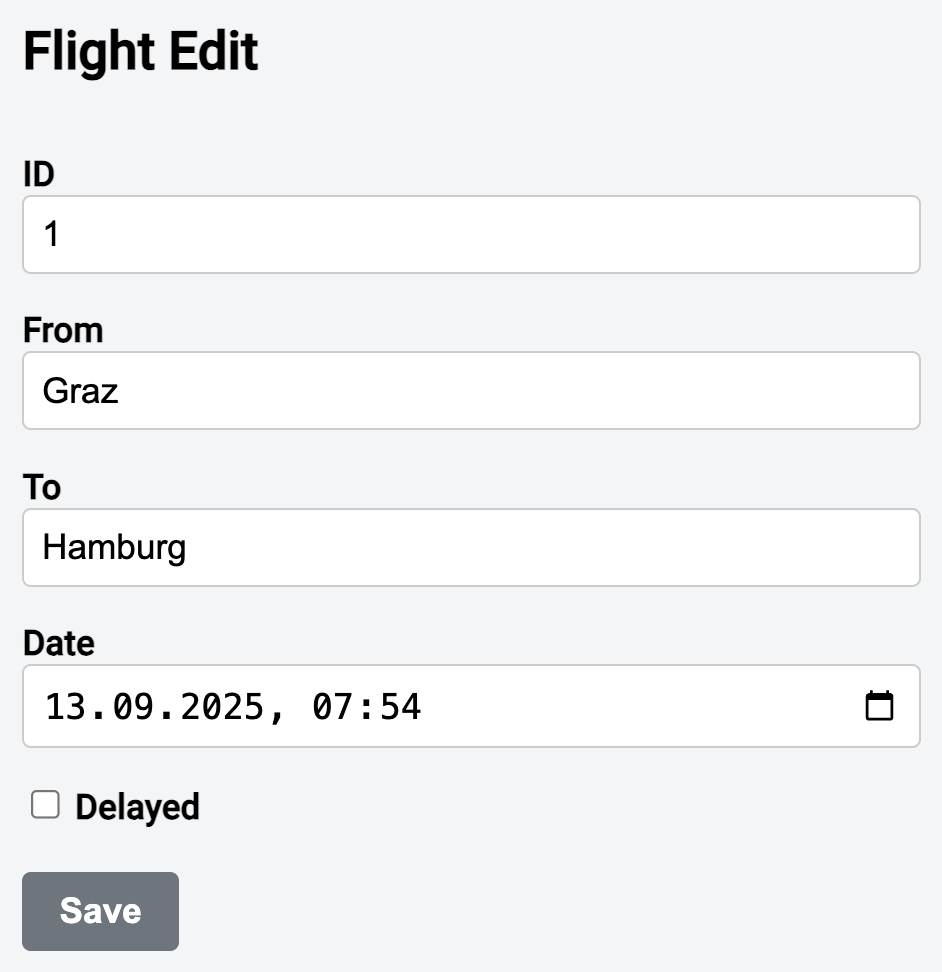
Beneath this straightforward interface, the data flow is fully reactive, covering both retrieval and persistence. An NgRx Signal Store delegates to the Resource API for loading and to the Mutation API from the NgRx Toolkit for saving:

The resource and the mutation each expose Signals that the store propagates to the component layer. These Signals carry the fetched data, status flags like isLoading and isProcessing, as well as any error payloads. The Signal Form displays the data supplied by the store and acts as the entry point for pushing modifications back via a mutation.
Fetching Data with the Resource API
A dedicated data access service is responsible for instantiating resources and mutations. For loading, it relies on an httpResource:
@Injectable({
  providedIn: 'root',
})
export class FlightService {
  […]

  findResourceById(id: Signal<number>) {
    return httpResource<Flight>(
      () =>
        !id()
          ? undefined
          : {
              url: 'https://demo.angulararchitects.io/api/flight',
              params: {
                id: id(),
              },
            },
      {
        defaultValue: initFlight,
      }
    );
  }
}
Whenever the id inside the provided Signal changes, the Resource rebuilds its request configuration and fetches the corresponding flight. There is one notable exception: if the id is falsy (for instance, 0), the request object is set to undefined. By design, the Resource will not issue a request in that case. This approach defers loading until a legitimate id becomes available.
To prevent the Resource from yielding undefined prior to the first successful response, a defaultValue is supplied. The initFlight object serves as a Null Object in this scenario.
Persisting Data with the Mutation API
The Mutation API from the NgRx Toolkit complements Angular's Resource API for write operations. While rxMutation handles arbitrary operations that return Observables, the httpMutation is tailored for changes that map naturally to HTTP requests:
import { httpMutation } from '@angular-architects/ngrx-toolkit';

[…]

@Injectable({
  providedIn: 'root',
})
export class FlightService {
  […]

  createSaveMutation(options: Partial<HttpMutationOptions<Flight, Flight>>) {
    return httpMutation({
      ...options,
      request: (flight) => ({
        url: 'https://demo.angulararchitects.io/api/flight',
        method: 'POST',
        body: flight,
      }),
      operator: concatOp
    });
  }

  […]
}
Here again, the data access service acts as the factory. The service itself takes charge of the core HTTP request details, while callers can supply additional configuration—such as success or error callbacks—via a partial options object.
The type signature HttpMutationOptions<Flight, Flight> indicates that the mutation accepts a Flight as input and returns a Flight as output. The returned Flight corresponds to the persisted resource, including server-generated fields such as the id.
Optionally, you can select the semantics for overlapping invocations to avoid race conditions. The operator property accepts one of the provided strategies: switchOp, mergeOp, concatOp, or exhaustOp, which mirror the well-known flattening operators from RxJS. If no operator is specified, concatOp is applied by default, meaning overlapping requests are queued and executed sequentially.
The mutation returned by the API is a callable function and also carries state as Signals. The following example shows a component consuming the mutation directly:
export class HomeComponent {
  private flightService = inject(FlightService);

  private saveFlight = this.flightService.createSaveMutation({ … })

  private saveFlightIsPending = this.saveFlight.isPending;
  private saveFlightError = this.saveFlight.error;
  private saveFlightValue = this.saveFlight.value;
  private saveFlightParams = this.saveFlight.isSuccess;

  save(): void {
    this.saveFlight({
      id: 0,
      from: 'Graz',
      to: 'Hamburg',
      date: new Date().toISOString(),
      delayed: false,
    });
  }
}
Deeper Dive: Angular Architecture Workshop (Remote, Interactive, Advanced)
Take your Angular skills to the enterprise level with our Angular Architecture workshop.

English Version | German Version
Integrating Resources and Mutations via the Signal Store
To manage application state and keep the reactive pipeline tidy, the example wraps the Resource and Mutation inside an NgRx Signal Store. To bridge these pieces with the store, the NgRx Toolkit offers the withMutations and withResource features:
import {
  withMutations,
  withResource,
} from '@angular-architects/ngrx-toolkit';

[…]

export const FlightDetailStore = signalStore(
  { providedIn: 'root' },

  withState({
    filter: {
      id: 0,
    },
  }),

  withProps(() => ({
    _flightService: inject(FlightService),
    _snackBar: inject(MatSnackBar),
  })),

  withResource((store) => ({
    flight: store._flightService.findResourceById(store.filter.id),
  })),

  withMutations((store) => ({
    saveFlight: store._flightService.createSaveMutation({
      onSuccess(flight: Flight) {
        patchState(store, { flightValue: flight });
        store._snackBar.open('Flight saved', 'OK');
      },
      onError(error: unknown) {
        store._snackBar.open('Error saving flight!', 'OK');
        console.error(error);
      },
    }),
  })),

  withMethods((store) => ({
    updateFilter: signalMethod((id: number) => {
      if (id !== store.filter.id()) {
        patchState(store, {
          filter: {
            id,
          },
        });
      }
    }),
  }))
);
The withResource feature links a name used by the store to the resource returned from the data access service. Pay close attention to this line:
patchState ( store , { flightValue: flight });At this point, you might ask where the flightValue property originates. In fact, it is introduced by withResource itself. By convention, any property starting with the name given to withResource will hold the retrieved value. As will be shown shortly, the store gains several related properties following this pattern, including flightIsLoading and flightError.
The withMutations feature works similarly, while also taking success and error handlers. It creates properties such as saveFlightIsPending and saveFlightError.
The updateFilter method assigns the id held by the store and thereby activates the Resource. Notice that this method is configured as a signalMethod in the store. This lets the id be passed not only as a plain number, but also as a Signal<number> or even an Observable<number>. In the latter two cases, the signalMethod will re-run the logic whenever a new value is emitted.
The Store and Signal Forms
The component obtains the store via dependency injection and sets up a Signal Form for editing the flight it received:
import { Control, form, required, submit } from '@angular/forms/signals';

[…]

export class FlightEditComponent {
  private store = inject(FlightDetailStore);

  id = input.required({
    transform: numberAttribute,
  });

  isPending = this.store.saveFlightIsPending;
  error = this.store.saveFlightError;

  flight = linkedSignal(() => normalize(this.store.flightValue()));

  flightForm = form(this.flight, (schema) => {
    required(schema.from);
    required(schema.to);
    required(schema.date);
  });

  constructor() {
    this.store.updateFilter(this.id);
  }

  save(): void {
    submit(this.flightForm, async (form) => {
      const result = await this.store.saveFlight(form().value());

      if (result.status === 'error') {
        return {
          kind: 'processing_error',
            // ^^^ try to be more specfic
          error: result.error,
        }
      }
      return null;
    });
  }
}
Coordinating between the store and the form introduces a minor design consideration: while the form is meant to modify the loaded data, the store exposes that data as read-only to maintain consistency. The store only permits changes through its defined methods.
This implies that the data coming from the store must be copied into a local working model. That is exactly what linkedSignal accomplishes here. Think of it as a computed that also holds a working copy, which the form can bind to and modify. Additionally, the call to linkedSignal delegates to a helper function called normalize (not covered in detail here), which converts the flight date into a format compatible with an <input type="datetime-local">.
To turn the resulting flight into a Signal Form, the component passes it to the built-in form function. The second argument provides a schema of validation rules. This yields the flightForm property, which exposes individual flight fields—such as from and to—for binding to form controls.
For saving, the component invokes the submit function from Signal Forms. The lambda expression supplied delegates to the saveFlight mutation and, if the server reports an error, returns a validation result. Signal Forms treats this validation result the same way it treats any other validation outcome produced by the schema.
Apart from the error state, a mutation can end in two other states. The obvious one is success, but a mutation may also cancel an ongoing operation when using switch or exhaust semantics to avoid concurrent races. The aborted state represents this case.
The listing below binds the individual controls of flightForm to inputs and prints any validation messages:
@if (flightForm.id().value() !== 0) {
<pre>Form-level errors: {{ flightForm().errors() | json }}</pre>
<form class="flight-form" (ngSubmit)="save()">

  <div class="form-group">
    <label for="flight-from">From</label>
    <input
      class="form-control"
      [control]="flightForm.from"
      id="flight-from"
      name="from"
    />
    <pre>Field-level Errors: {{ flightForm.from().errors | json }}</pre>
  </div>

  […]

  <div class="mt-20">
    <button
        class="btn btn-default"
        type="button"
        (click)="save()">Save</button>
  </div>

</form>
}
For clarity, the component renders validation errors as raw JSON. In a real-world setting, you would likely create a dedicated component to display and format these errors appropriately.
Wrapping Up
With the Resource API, Mutations, and Signal Forms, Angular now offers a coherent reactive data path from start to finish—covering loading, editing, and saving. The NgRx Signal Store provides the structure to bring these pieces together consistently. As a result, the reactive loop is fully closed, giving you a clear and dependable model for both state and form management that remains both robust and extensible.