With the rise of Redux, immutable update patterns have gained significant traction. Essentially, instead of mutating an existing object when an update is needed, you generate a fresh object. In the context of Angular applications, immutability is frequently discussed in connection with the OnPush change detection strategy as a means to boost runtime performance.
Yet, opting for mutable update patterns doesn’t just block you from reducing the scope of the component tree that goes through change detection; it also introduces subtle bugs and pitfalls that are difficult to trace.
This post explores the outcomes of neglecting the recommended practice of using immutable data structures.
Scenario
Imagine you need to display a list of developers, each possessing these attributes:
export interface Dev {
  id: number;
  name: string;
  skill: number;
}
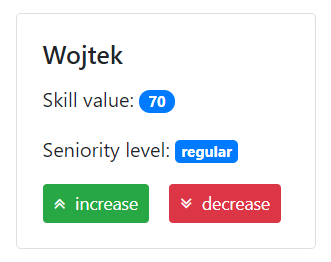
For each developer, you must show name, skill, and a seniority level computed from the skill value:
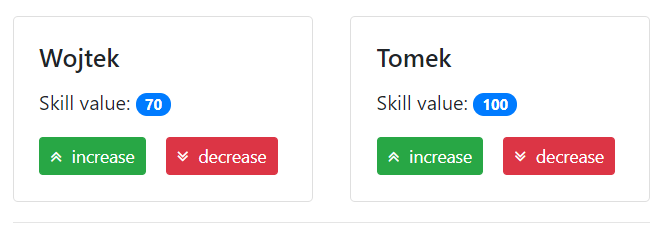
Furthermore, you have action buttons that allow modifying the skill attribute:
<div class="card-deck">
  <app-dev-card-v1 class="card" *ngFor="let dev of devs" [dev]="dev">
    <app-dev-actions (skillChange)="onSkillChange(dev.id, $event)">
    </app-dev-actions>
  </app-dev-card-v1>
</div>
By default, the update happens in a mutable fashion:
import { Component } from "@angular/core";

import { Dev } from "../../dev.model";

@Component({
  selector: "app-devs-list",
  templateUrl: "./devs-list.component.html"
})
export class DevsListComponent {
  public immutableUpdatesActive = false;
  public devs: Dev[] = [
    { id: 1, name: "Wojtek", skill: 50 },
    { id: 2, name: "Tomek", skill: 80 }
  ];

  private skillDelta = 10;

  public onSkillChange(devId: number, increase: boolean): void {
    if (this.immutableUpdatesActive) {
      this.immutableChange(devId, increase);
    } else {
      this.mutableChange(devId, increase);
    }
  }

  private immutableChange(devId: number, increase: boolean): void {
    const multiplier = increase ? 1 : -1;

    this.devs = this.devs.map(dev =>
      dev.id === devId
        ? {
            ...dev,
            skill: dev.skill + multiplier * this.skillDelta
          }
        : dev
    );
  }

  private mutableChange(devId: number, increase: boolean): void {
    const dev = this.devs.find(({ id }) => id === devId);

    if (dev) {
      const multiplier = increase ? 1 : -1;

      dev.skill = dev.skill + multiplier * this.skillDelta;
    }
  }
}
Change detection mode
For simplicity, let’s focus on rendering just the skill value, leaving out the seniority level:
With the Default change detection strategy (which, as the name implies, is active by default), everything functions as anticipated: the view refreshes as soon as the model changes when you click the buttons ✔️.
import { Component, Input } from "@angular/core";

import { Dev } from "../../../dev.model";

@Component({
  selector: "app-dev-card-v2",
  templateUrl: "./dev-card-v2.component.html"
})
export class DevCardV2Component {
  @Input() public dev: Dev;
}
However, if you rely on mutable data structures, you won’t be able to leverage the OnPush change detection strategy:
import { Component, Input, ChangeDetectionStrategy } from "@angular/core";

import { Dev } from "../../../dev.model";

@Component({
  selector: "app-dev-card-v1",
  templateUrl: "./dev-card-v1.component.html",
  changeDetection: ChangeDetectionStrategy.OnPush
})
export class DevCardV1Component {
  @Input() public dev: Dev;
}
Consequently, the card’s template won’t update after you change a developer’s skill value, because it’s still the same JavaScript object that the dev input property references. Angular checks references, so from its perspective nothing has shifted, making action unnecessary.
ngOnChanges lifecycle hook
Sometimes, you need to calculate a view model when input data changes. Angular offers the ngOnChanges lifecycle hook ⚓ for such cases:
import { Component, Input, OnChanges, SimpleChanges } from "@angular/core";

import { Dev, SeniorityLevel } from "../../../dev.model";

@Component({
  selector: "app-dev-card-v3",
  templateUrl: "./dev-card-v3.component.html"
})
export class DevCardV3Component implements OnChanges {
  @Input() public dev: Dev;

  public seniorityLevel: SeniorityLevel;

  private get skill(): number {
    return this.dev.skill;
  }

  ngOnChanges(simpleChanges: SimpleChanges) {
    if (!simpleChanges.dev) {
      return;
    }

    this.seniorityLevel = this.getSeniorityLevel();
  }

  private getSeniorityLevel(): SeniorityLevel {
    if (this.skill < 40) {
      return SeniorityLevel.Junior;
    }

    if (this.skill >= 40 && this.skill < 80) {
      return SeniorityLevel.Regular;
    }

    return SeniorityLevel.Senior;
  }
}
Even when using the Default change detection strategy, if you alter the dev input property in a mutable way, the ngOnChanges hook won’t fire. Here again, Angular does a referential check for performance reasons, which can result in outdated data appearing in the view.
Setter for Input property
Instead of relying on the ngOnChanges lifecycle hook, you can turn an input property into a setter and run calculations whenever a new value arrives:
import { Component, Input, OnChanges, SimpleChanges } from "@angular/core";

import { Dev, SeniorityLevel } from "../../../dev.model";

@Component({
  selector: "app-dev-card-v4",
  templateUrl: "./dev-card-v4.component.html"
})
export class DevCardV4Component {
  @Input() public set dev(val: Dev) {
    this._dev = val;
    this.seniorityLevel = this.getSeniorityLevel();
  }

  public get dev(): Dev {
    return this._dev;
  }

  public seniorityLevel: SeniorityLevel;

  private _dev: Dev;

  private get skill(): number {
    return this.dev.skill;
  }

  private getSeniorityLevel(): SeniorityLevel {
    if (this.skill < 40) {
      return SeniorityLevel.Junior;
    }

    if (this.skill >= 40 && this.skill < 80) {
      return SeniorityLevel.Regular;
    }

    return SeniorityLevel.Senior;
  }
}
Unfortunately, the same issues emerge as with the ngOnChanges hook. The setter won’t be triggered because the referential check for a property updated mutably suggests no change has occurred.
Getter for view model data
If switching to immutable patterns isn’t straightforward, one workaround for stale data is to compute view model data on the fly with getters:
import { Component, Input, OnChanges, SimpleChanges } from "@angular/core";

import { Dev, SeniorityLevel } from "../../../dev.model";
@Component({
  selector: "app-dev-card-v5",
  templateUrl: "./dev-card-v5.component.html"
})
export class DevCardV5Component {
  @Input() public dev: Dev;

  public get seniorityLevel(): SeniorityLevel {
    console.log("seniorityLevel getter called");

    return this.getSeniorityLevel();
  }

  private get skill(): number {
    return this.dev.skill;
  }

  private getSeniorityLevel(): SeniorityLevel {
    if (this.skill < 40) {
      return SeniorityLevel.Junior;
    }

    if (this.skill >= 40 && this.skill < 80) {
      return SeniorityLevel.Regular;
    }

    return SeniorityLevel.Senior;
  }
}
Nevertheless, you still can’t apply the OnPush strategy to this component. Additionally, the getter runs on every change detection cycle, so for heavy computations, it’s wise to employ memoization.
ngDoCheck lifecycle hook
Another possibility is doing calculations within the ngDoCheck hook. This is often viewed as a last resort because, much like getters, it runs during each change detection cycle:
import { Component, DoCheck, Input } from "@angular/core";

import { Dev, SeniorityLevel } from "../../../dev.model";

@Component({
  selector: "app-dev-card-v6",
  templateUrl: "./dev-card-v6.component.html"
})
export class DevCardV6Component implements DoCheck {
  @Input() public dev: Dev;

  public seniorityLevel: SeniorityLevel;

  private get skill(): number {
    return this.dev.skill;
  }

  ngDoCheck() {
    console.log("ngDoCheck called");

    this.seniorityLevel = this.getSeniorityLevel();
  }

  private getSeniorityLevel(): SeniorityLevel {
    if (this.skill < 40) {
      return SeniorityLevel.Junior;
    }

    if (this.skill >= 40 && this.skill < 80) {
      return SeniorityLevel.Regular;
    }

    return SeniorityLevel.Senior;
  }
}
It’s worth noting that the ngDoCheck hook is also invoked for components with OnPush strategy. Yet, it still can’t be applied to the card component, as its template won’t refresh — for DOM bindings to update, the component must be part of the change detection process.
Pure pipes
Using a pure pipe (the default) is the most effective way to derive view model values. You gain built-in memoization and can easily share computation logic across your app:
import { Pipe, PipeTransform } from "@angular/core";

import { SeniorityLevel } from "../../dev.model";

@Pipe({
  name: "seniorityLevel"
})
export class SeniorityLevelPipe implements PipeTransform {
  transform(skill: number): SeniorityLevel {
    return this.getSeniorityLevel(skill);
  }

  private getSeniorityLevel(skill: number): SeniorityLevel {
    if (skill < 40) {
      return SeniorityLevel.Junior;
    }

    if (skill >= 40 && skill < 80) {
      return SeniorityLevel.Regular;
    }

    return SeniorityLevel.Senior;
  }
}
This makes the card component very lean:
import { Component, Input } from "@angular/core"; import { Dev } from "../../../dev.model"; @Component({ selector: "app-dev-card-v7", templateUrl: "./dev-card-v7.component.html" }) export class DevCardV7Component { @Input() public dev: Dev; }<div class="card-body"> <h5 class="card-title">{{dev.name}}</h5> <p class="card-text"> Skill value: <span class="badge badge-pill badge-primary">{{dev.skill}}</span> </p> <p class="card-text"> Seniority level: <span class="badge badge-primary"> {{dev.skill | seniorityLevel}} </span> </p> <ng-content></ng-content> </div>This method avoids needless computations because the transform method only executes when the skill value actually changes. However, OnPush change detection still remains off-limits.
Wrap-up
Clearly, embracing immutable data structures in Angular apps is the way to go. It not only enables better runtime performance via OnPush, but also helps avoid the headache of displaying stale data.
Still, there might be times when you need a quick fix and a full refactor to immutability isn’t feasible. In those cases, keep getters, the ngDoCheck hook, and pure pipes in mind. Alternatively, you could pre-compute the view model and pass precisely tailored data down to the component.
Feel free to experiment with the examples:
Thanks for reading, and I hope you picked up something new.
Immutability importance in Angular applications
Struggling with stale data and performance in Angular? Learn why using immutable update patterns is essential for OnPush optimization.