The view as the building block
Tutorials often describe an Angular application as a hierarchy of components. Internally, however, Angular operates on a more fundamental construct called a view. There is a one-to-one mapping between components and views — every component instance is tied to exactly one view, and that view maintains a reference to its component class instance via the component property. Operations such as property checking and DOM updates are executed on views, so it is more accurate to say that Angular builds a tree of views, with components acting as a higher-level abstraction above them. The source code describes views as follows:
A View is a fundamental building block of the application UI. It is the smallest grouping of Elements which are created and destroyed together.
Properties of elements in a View can change, but the structure (number and order) of elements in a View cannot. Changing the structure of Elements can only be done by inserting, moving or removing nested Views via a ViewContainerRef. Each View can contain many View Containers.
Throughout this discussion, I will treat the terms component view and component as interchangeable.
A common point of confusion is that online discussions and StackOverflow answers frequently refer to this view as a Change Detector Object or ChangeDetectorRef. In reality, there is no standalone change detection entity; the view itself is where change detection is performed.
Each view exposes a nodes property that links it to its child views, enabling actions to be propagated down the hierarchy.
View state and its significance
A view carries a state value that determines whether Angular processes change detection for that view as well as every descendant view, or skips them entirely. While the full set of states is extensive, the ones most relevant here are:
- FirstCheck
- ChecksEnabled
- Errored
- Destroyed
When ChecksEnabled is set to false, or the view is in the Errored or Destroyed state, change detection is bypassed for both the view and its subtree. By default, every view starts with ChecksEnabled active, unless the ChangeDetectionStrategy.OnPush strategy is applied — more on that shortly. Flags are combinable, for instance, a view may simultaneously have FirstCheck and ChecksEnabled enabled.
A number of higher-level abstractions exist to manipulate views; I have covered some in this write-up. One such abstraction is ViewRef, which wraps the underlying component view and provides the aptly named detectChanges method. When any asynchronous event fires, Angular initiates change detection on the top-most ViewRef, which, after processing its own checks, proceeds to its child views.
This viewRef instance is accessible inside a component’s constructor by injecting the ChangeDetectorRef token:
export class AppComponent {
    constructor(cd: ChangeDetectorRef) { ... }
The class definitions confirm this relationship:
export declare abstract class ChangeDetectorRef {
    abstract checkNoChanges(): void;
    abstract detach(): void;
    abstract detectChanges(): void;
    abstract markForCheck(): void;
    abstract reattach(): void;
}
export abstract class ViewRef extends ChangeDetectorRef {
   ...
}
Inside the change detection flow
A detailed walkthrough of Ivy's change detection operations can be found in this updated article.
The core routine that drives change detection for any given view lives inside the checkAndUpdateView function. Much of what this function does targets the child component views. The function recurses through every component, beginning with the host component, so each child becomes the parent in the next iteration as the recursion unwinds.
When invoked for a specific view, the following sequence of actions takes place:
- establishes
ViewState.firstCheckastruefor an initial check, orfalseon subsequent checks - validates and applies input property updates on a child component or directive instance
- adjusts the change detection state for child views (this ties into the change detection strategy)
- triggers change detection for embedded views (repeating all steps in this list)
- invokes
OnChangeson a child component when its bindings have changed - calls
OnInitandngDoCheckon a child component (OnInitonly fires on the first check) - refreshes the
ContentChildrenquery list on the child view's component instance - fires
AfterContentInitandAfterContentCheckedon the child component instance (the former only during the first check) - syncs DOM interpolations for the current view when properties on its component instance have changed
- runs change detection for child views (looping back through these very steps)
- updates the
ViewChildrenquery list on the current view's component instance - invokes
AfterViewInitandAfterViewCheckedon the child component instance (AfterViewInitonly on first check) - turns off checks for the current view (part of the change detection strategy handling)
Several takeaways emerge from this operation list.
First, onChanges fires on a child component before its view gets checked, and it runs even when the child view's change detection is skipped. That distinction matters, and we'll see how to exploit it in the next section.
Second, DOM updates happen during the very check of that view. If a component is never checked, its DOM stays stale—even when template-bound properties change. Initial rendering occurs before the first check, though; what gets refreshed during each cycle is only the interpolated parts. For instance, with <span>some {{name}}</span>, the span element is created upfront, and only {{name}} is re-rendered per check.
Another notable point: a child view's state can shift mid-change-detection. As noted, all views start with ChecksEnabled by default, but under OnPush, the check gets disabled right after the first cycle (step 9 above):
if (view.def.flags & ViewFlags.OnPush) {
  view.state &= ~ViewState.ChecksEnabled;
}
Thus, in the next round, that view and its entire subtree are skipped. The OnPush docs say such a component is only checked when its bindings change—so the check must be re-enabled. That's exactly what happens here (step 2):
if (compView.def.flags & ViewFlags.OnPush) {
  compView.state |= ViewState.ChecksEnabled;
}
This state flip only occurs when parent view bindings have changed and the child view was created with ChangeDetectionStrategy.OnPush.
Lastly, the current view's check is what kicks off detection for downstream views (step 8). Here, the child view's state is inspected, and if ChecksEnabled is set, that view gets its own detection pass. Relevant code below:
viewState = view.state;
...
case ViewAction.CheckAndUpdate:
  if ((viewState & ViewState.ChecksEnabled) &&
    (viewState & (ViewState.Errored | ViewState.Destroyed)) === 0) {
    checkAndUpdateView(view);
  }
}
So view state dictates whether detection runs for a view and its descendants—and we can control it. That's the focus of the remainder of this article.
Some lifecycle hooks fire pre-DOM-update (steps 3, 4, 5) while others fire after (step 9). For a hierarchy like A -> B -> C, the sequence of hooks and binding updates looks like this:
A: AfterContentInit
A: AfterContentChecked
A: Update bindings
    B: AfterContentInit
    B: AfterContentChecked
    B: Update bindings
        C: AfterContentInit
        C: AfterContentChecked
        C: Update bindings
        C: AfterViewInit
        C: AfterViewChecked
    B: AfterViewInit
    B: AfterViewChecked
A: AfterViewInit
A: AfterViewChecked
Putting theory into practice
Consider a component tree like this:
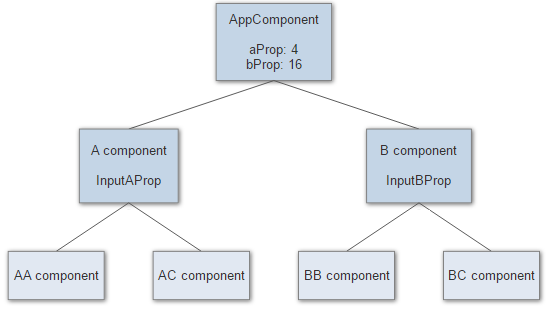
Each component pairs with a view, initialized with ViewState.ChecksEnabled, so Angular would normally check every node in the tree.
Now, imagine we want to freeze change detection for AComponent and everything beneath it. The direct approach is clearing the ViewState.ChecksEnabled flag, but that's low-level. Angular exposes public methods via the ChangeDetectorRef token, which each component can inject to reach its own view. The documented interface looks like this:
class ChangeDetectorRef {
  markForCheck() : void
  detach() : void
  reattach() : void

  detectChanges() : void
  checkNoChanges() : void
}
Let's see how to bend it to our will.
detach
The detach method is the simplest lever—it turns off checks for the current view:
detach(): void { this._view.state &= ~ViewState.ChecksEnabled; }
Here's a practical usage example:
export class AComponent {
  constructor(public cd: ChangeDetectorRef) {
    this.cd.detach();
  }
After this, any subsequent change detection run will skip the left branch starting at AComponent (the orange nodes stay untouched):
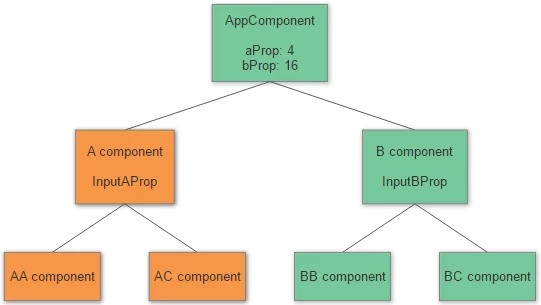
Two things stand out. First, even though we only toggled the state on AComponent, every child view under it also stops being checked. Second, because no detection occurs in that branch, the DOM for those templates won't update either. A quick demo proves it:
@Component({
  selector: 'a-comp',
  template: `<span>See if I change: {{changed}}</span>`
})
export class AComponent {
  constructor(public cd: ChangeDetectorRef) {
    this.changed = 'false';

    setTimeout(() => {
      this.cd.detach();
      this.changed = 'true';
    }, 2000);
  }
Initially, the span renders the text See if I change: false. Two seconds later, when changed flips to true, the span text stays frozen. Remove the this.cd.detach() line, though, and the update happens normally.
reattach
As we covered earlier, OnChanges still reaches AComponent when the bound input aProp from AppComponent changes. That's our cue: upon hearing about input changes, we can re-enable the change detector, run a cycle, and then detach again on the next tick. The pattern looks like this:
export class AComponent {
  @Input() inputAProp;

  constructor(public cd: ChangeDetectorRef) {
    this.cd.detach();
  }

  ngOnChanges(values) {
    this.cd.reattach();
    setTimeout(() => {
      this.cd.detach();
    })
  }
Since reattach just sets the ViewState.ChecksEnabled bit:
reattach(): void { this._view.state |= ViewState.ChecksEnabled; }
This behavior closely mirrors OnPush: disable after the first check, re-enable when a parent-bound property shifts, disable again post-run.
Bear in mind, OnChanges only fires for the top-most component in a disabled branch—not for every node below it.
markForCheck
reattach only re-enables checks for the current component. If its parent is still disabled, the effect is moot—so it's only meaningful on the top-most node of a disabled branch.
What we often need is a way to re-enable checks all the way up to the root. That's the job of markForCheck:
let currView: ViewData|null = view;
while (currView) {
  if (currView.def.flags & ViewFlags.OnPush) {
    currView.state |= ViewState.ChecksEnabled;
  }
  currView = currView.viewContainerParent || currView.parent;
}
As the implementation shows, it walks up the tree, turning on checks for each ancestor until it reaches the root.
When would that come in handy? Like ngOnChanges, ngDoCheck is invoked even under OnPush, and also only on the branch's top-most component. We can leverage it to run custom logic and flag our component for one extra detection pass. Because Angular compares object references, we could implement manual dirty tracking on some object's property:
Component({
   ...,
   changeDetection: ChangeDetectionStrategy.OnPush
})
MyComponent {
   @Input() items;
   prevLength;
   constructor(cd: ChangeDetectorRef) {}

   ngOnInit() {
      this.prevLength = this.items.length;
   }

   ngDoCheck() {
      if (this.items.length !== this.prevLength) {
         this.cd.markForCheck();
         this.prevLenght = this.items.length;
      }
   }
detectChanges
There's also a way to force a one-off detection run for the current component plus all its children. That's the detectChanges method. It performs the check on the current view irrespective of its state, so the view can stay detached for future cycles. Example:
export class AComponent {
  @Input() inputAProp;

  constructor(public cd: ChangeDetectorRef) {
    this.cd.detach();
  }

  ngOnChanges(values) {
    this.cd.detectChanges();
  }
The DOM refreshes on input changes even though the change detector reference remains detached.
checkNoChanges
The last public method on the change detector, checkNoChanges, asserts that no changes occur during the ongoing cycle. It essentially runs steps 1, 7, and 8 from the earlier list, and raises an error if it spots a changed binding or determines a DOM update is necessary.