
Understanding Angular's Change Detection
Angular's change detection is far more straightforward and logical than what we saw in AngularJs. Even so, there are moments—particularly when we're tuning performance—where a deep understanding of the inner workings becomes essential. Let's explore how change detection truly functions by looking at these key areas:
- The underlying implementation of change detection
- What a change detector looks like and whether we can observe it
- The mechanics of the default change detection strategy
- How to disable change detection or invoke it manually
- Why change detection loops happen and the role of Production versus Development mode
- The real behavior of the
OnPushstrategy - Leveraging Immutable.js for cleaner Angular applications
- A final summary of everything covered
For a deeper dive into the OnPush strategy specifically, check out the article Angular OnPush Change Detection and Component Design - Avoid Common Pitfalls.
The Mechanics of Change Detection
Angular has the ability to recognize when a component's data shifts and subsequently refresh the view to match the new state. The question is, how does it manage this after something as fundamental and location-agnostic as a button click anywhere on the page?
To grasp this, we first need to acknowledge that JavaScript is designed with an overridable runtime. It's possible to replace functions on built-in objects like String or Number.
Patching Browser APIs at Startup
During its initialization, Angular patches a number of low-level browser APIs. One key example is addEventListener, the standard function for registering events like click handlers. Angular swaps out the original addEventListener for a custom version that does more than just invoke the callback. This new version also provides an opportunity for Angular to run change detection and update the UI accordingly.
How Runtime Patching Works Under the Hood
The task of patching browser APIs is handled by a library that comes bundled with Angular, known as Zone.js. It's helpful to understand what a zone actually represents.
A zone is simply an execution context that remains active across different JavaScript VM turns. It's a versatile tool for extending browser functionality. While Angular uses zones to kick off change detection, other potential uses include performance profiling or maintaining extensive stack traces that span multiple VM turns.
Browser APIs that Trigger Change Detection
A few of the most common browser features are patched to ensure change detection runs:
- All kinds of browser events such as clicks, mouseovers, and keyups
- The
setTimeout()andsetInterval()functions - AJAX HTTP requests
Zone.js actually patches a much wider range of APIs to transparently support change detection, including Websockets. For a full list, you can look at the Zone.js test specifications.
It's important to note that this mechanism has a limitation: if an asynchronous browser API isn't patched by Zone.js, change detection won't be triggered by it. IndexedDB callbacks are one such example.
This explains how the process starts, but what happens after it's initiated?
Navigating the Change Detection Tree
Each component in an Angular application has its own change detector, which is created when the app first starts up. Consider a TodoItem component as an example:
This component takes a Todo object as input and emits an event when its status is toggled. To make things more complex, the Todo class also contains a nested object:
The Todo has a property called owner, which is itself an object with firstname and lastname properties.
Inspecting the Todo Item Change Detector
We have the ability to see the change detector at runtime! To do this, we can add a breakpoint in the Todo class that triggers when a specific property is accessed.
When this breakpoint is hit, we can navigate the stack trace to see change detection live in action:
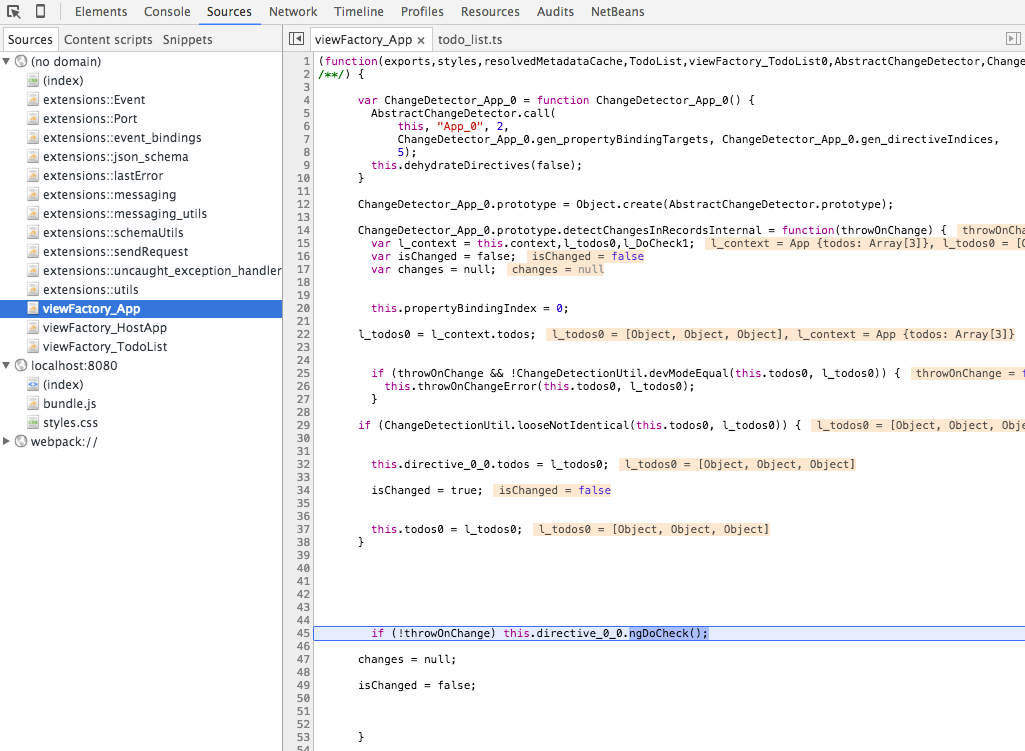
There's no need to worry about ever having to debug this internal code—it's just plain JavaScript created at startup, not magic. But what is it doing?
How the Default Change Detection Works
At first, this method might seem confusing with all its variable names. But looking more closely, it's doing something quite straightforward: for each expression in the template, it checks the current property value against the previous one.
If the value has changed, it sets isChanged to true and stops. Almost. It uses a method called looseNotIdentical() to compare values, which is essentially a strict === equality check with special handling for NaN values (see the implementation here).
How are Nested Objects Handled?
In the change detector code, we can see that the properties of the nested owner object are also being examined. However, only the firstname property is compared—not lastname. The reason is that lastname isn't used in the component's template! Similarly, the top-level id property is also skipped for the same reason.
We can therefore conclude:
By default, Angular's change detection operates by comparing the value of template expressions for changes. This is performed on all components.
We can also assert that:
In its default mode, Angular avoids deep object comparisons. It solely considers properties that are used in the template.
The Rationale Behind Default Change Detection
A primary goal for Angular is to be predictable and user-friendly, preventing developers from having to debug the framework to use it effectively.
If you're familiar with AngularJs, think about the pitfalls associated with $digest() and $apply(). One of Angular's main objectives is to eliminate that complexity.
What About Comparing by Reference?
Javascript objects are mutable, and Angular aims to support them seamlessly out of the box. Consider the consequences if change detection were based on comparing component input references rather than values. Even a simple TODO app would become tricky to build, forcing developers to constantly create new Todo objects instead of just updating props.
However, as we'll see later, the change detection is customizable when the need arises.
Performance Considerations
Notice how the change detector for the todo list component explicitly references the todos property. An alternative would be to loop through the component's properties dynamically, creating a more generic detection code. But that would mean building a change detector per component is unnecessary. So, why is this approach taken?
A Peek Inside the JavaScript VM
The answer lies in how JavaScript virtual machines operate. Code that dynamically compares properties, though generic, is not easily optimized into native machine code by the JIT compiler.
In contrast, the specific change detector code explicitly accesses each component's inputs. This code looks like something we would write ourselves, and the VM can easily translate it into fast native code.
The outcome of using these generated, explicit detectors is a change detection system that is extremely fast (outperforming AngularJs), stable, and easy to understand.
But what if we encounter a performance bottleneck? Is there a way to fine-tune change detection?
The OnPush Change Detection Strategy
For a very large Todo list, we could configure the TodoList component to only update when the list itself changes. This is achieved by setting its change detection strategy to OnPush:
Now, let's add two buttons to the app: one to toggle the first item in the list by mutating it directly, and another to add a new Todo to the end of the list. The code is as follows:
Let's see how these two buttons are supposed to behave:
- The "Toggle First Item" button effects no change! It fails because the
toggleFirst()method changes an element in the list directly. TheTodoListcomponent doesn't see this change, as itstodosreference remains the same. - On the other hand, the second button functions correctly. The
addTodo()method creates a copy of the list, adds a new item to it, and then assigns this new copy as the component'stodosproperty. This triggers change detection because the component receives a brand new list and sees its input reference change. - It's crucial to understand that simply mutating the existing list in the second case would be futile. We must create a new list.
Is OnPush Only About Input References?
This is far from the truth. When you click on a todo item to toggle it, it still works! This holds true even if you also set TodoItem's strategy to OnPush. The reason is that OnPush is not solely about checking component inputs—component event emissions also trigger change detection.
With OnPush detectors, the framework checks a component when any of its input properties change, when it emits an event, or when an Observable used in the template emits a value.
While OnPush improves performance, it introduces significant complexity, especially when dealing with mutable objects. This could lead to bugs that are tricky to track down and reproduce. However, there's a way to use OnPush safely and manageably.
Building Angular Apps with Immutable.js
By constructing our application solely with immutable objects and lists, we can apply OnPush everywhere without encountering unexpected change detection issues. This is because the only possible way to "modify" data is to create a new immutable object, replacing the old one. This guarantees:
- A new immutable object will *always* trigger
OnPushchange detection. - It's impossible to create a bug by forgetting to create a new copy, since new objects are the only way to change data.
Immutable.js is a great library for this. It provides immutable primitives like Maps (objects) and Lst (lists) to build applications.
The library also supports type safety; you can see an example in this previous post.
Preventing Change Detection Loops: Development vs. Production Mode
A key feature of Angular's change detection is its enforcement of a uni-directional data flow, unlike AngularJs. When the data in our component classes is updated, change detection runs and updates the view. The view update, in turn, does not trigger further changes that cause another cycle of updates, avoiding the AngularJs "$digest cycle."
What Causes a Change Detection Loop?
One way to create a loop is through lifecycle callbacks. For example, in the TodoList component, we can trigger a callback on another component that changes a binding used in a template expression:
This will log an error message to the console:
EXCEPTION: Expression '{{message}} in App@3:20' has changed after it was checked
This error is exclusive to development mode. What happens when production mode is enabled?
In production, the error isn't thrown, and the issue would go unnoticed.
How Likely is a Change Detection Issue?
It's actually quite difficult to accidentally create a change detection loop. Still, it's wise to use development mode during development to catch any such issues.
This safety measure comes at a cost: in development mode, Angular always runs change detection twice to detect these problems. In production, it runs only once.
How to Control Change Detection: Detach and Re-Trigger
There may be situations where you'll want to turn change detection off. For instance, when a large volume of data is arriving via a websocket, and you only want to update a part of the UI every 5 seconds. To do this, you would inject the change detector into your component:
In this set-up, we detach the change detector to disable it. Then, we simply trigger it manually at the 5-second interval using detectChanges().
Let's now review all the key facts about Angular change detection: its core concept, its inner workings, and the available strategies.
Angular change detection is an internal framework feature that automatically synchronizes a component's data with its HTML template.
It operates by monitoring standard browser events like clicks, HTTP requests, and other events, then deciding if any component's view needs updating.
There are two main change detection strategies:
- Default change detection: Angular checks all template expressions on all components in the tree, before and after an event, to determine if there are changes.
- OnPush change detection: This occurs when new data is explicitly pushed into a component, either via an input property or an Observable used with the async pipe.
The Angular default strategy is conceptually similar to its predecessor. It compares the values of template expressions before and after a browser event, applying this check to all components. But there are major differences.
First, there are no change detection loops or a "$digest" cycle. You can understand each component by simply looking at its template and class.
Second, the process is significantly faster because of how the change detectors are constructed.
Finally, unlike AngularJs, the mechanism is highly customizable.
How Much Do You Really Need to Know?
For over 95% of applications, Angular's change detection works without any intervention, and many developers can go about their business without a second thought. However, understanding it is still valuable for several reasons:
- It explains some common development errors, such as the change detection loop message.
- It demystifies stack traces, which are peppered with entries like
zone.afterTurnDone(). - It helps with performance tuning when you're dealing with a very large dataset and need to optimize your components.
For more advanced Angular Core features like change detection, you might consider the Angular Core Deep Dive course, which goes into more detail.
If you're just starting with Angular, you might want to check out our Angular for Beginners Course.

Additional Angular Content
If you found this discussion useful, the following articles from our blog might also interest you:
- Angular Router - How To Build a Navigation Menu with Bootstrap 4 and Nested Routes
- Angular Router - Extended Guided Tour, Avoid Common Pitfalls
- Angular Components - The Fundamentals
- How to run Angular in Production Today
- How to build Angular apps using Observable Data Services - Pitfalls to avoid
- Introduction to Angular Forms - Template Driven, Model Driven or In-Between
- Angular ngFor - Learn all Features including trackBy, why is it not only for Arrays?
- Angular Universal In Practice - How to build SEO Friendly Single Page Apps with Angular