Key Zone APIs at a Glance
Before diving deep, it's helpful to review the core methods that developers will interact with when using Zones. The Zone class exposes an interface like the one below:
class Zone {
  constructor(parent: Zone, zoneSpec: ZoneSpec);
  static get current();
  get name();
  get parent();

  fork(zoneSpec: ZoneSpec);
  run(callback, applyThis, applyArgs, source);
  runGuarded(callback, applyThis, applyArgs, source);
  wrap(callback, source);

}
The idea of the current zone is foundational to how Zones work. This is the zone that is associated with the currently executing stack frame or async task, and it propagates along with all asynchronous operations. You can retrieve this value at any time using the static getter Zone.current.
While the name property of a zone is primarily for debugging and tooling, the following methods are what you'll use for programmatic control:
z.run(callback, ...)invokes the provided function synchronously while treatingzas the current zone. The current zone reverts to its prior value when the function completes. This act is commonly called "entering" the zone.z.runGuarded(callback, ...)functions likerun, but it also catches runtime errors, allowing a zone to intercept them. If no parent zone handles the error, it gets re-thrown to the environment.z.wrap(callback)creates a new function that encapsulates the original callback. When this new function is called, it internally executesz.runGuarded(callback). This ensures the callback always runs in thezzone, even if passed to a different zone'srun. Conceptually, it's similar to usingFunction.prototype.bindto lock in the context.
We will examine the fork method in more detail shortly. There are also several other methods within the Zone class specifically for running, scheduling, and cancelling tasks:
class Zone {
  runTask(...);
  scheduleTask(...);
  scheduleMicroTask(...);
  scheduleMacroTask(...);
  scheduleEventTask(...);
  cancelTask(...);
}
These lower-level APIs take care of task lifecycle management and are mostly used internally by Zone.js, so we won't focus heavily on them. From a developer's perspective, scheduling a task usually just means triggering a standard asynchronous operation like `setTimeout`.
Carrying the Zone Across the Call Stack
When the JavaScript virtual machine executes code, each function invocation generates its own stack frame. In a simple example like the one below:
function c() {
    // capturing stack trace
    try {
        new Function('throw new Error()')();
    } catch (e) {
        console.log(e.stack);
    }
}

function b() { c() }
function a() { b() }

a();
The call stack visible from inside the c function would look like this:
at c (index.js:3)
at b (index.js:10)
at a (index.js:14)
at index.js:17
The method I used for capturing this stack trace in the c function is well documented on the MDN website.
We can visualize this call stack as follows:
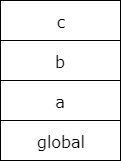
Notice that we have separate frames for each function call and a base frame for the global context.
In a standard JavaScript runtime, the stack frame of function c has no conceptual link to the frame of function a. This is where Zones change the game: they allow us to tag these individual stack frames with a specific zone. If we wanted, we could target just the frames for a and c with the same zone value, bringing them into the same context. The outcome would look like this:
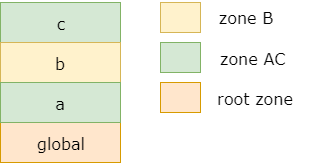
Let's explore how to achieve this linking.
Building Child Zones with zone.fork
One of the most common operations with Zones is creating a new zone via the fork method. This establishes a hierarchical relationship, setting the new zone's parent to the original zone on which fork was called:
const c = z.fork({name: 'c'});
console.log(c.parent === z); // true
Internally, the fork method just instantiates a new zone object using the same `Zone` class:
new Zone(targetZone, zoneSpec);
So, to associate the a and c functions with the same environment, we first need to create it. The fork method is the way to go:
const zoneAC = Zone.current.fork({name: 'AC'});
The argument you pass to fork is referred to as a zone specification (ZoneSpec), which has a specific set of fields:
interface ZoneSpec {
    name: string;
    properties?: { [key: string]: any };
    onFork?: ( ... );
    onIntercept?: ( ... );
    onInvoke?: ( ... );
    onHandleError?: ( ... );
    onScheduleTask?: ( ... );
    onInvokeTask?: ( ... );
    onCancelTask?: ( ... );
    onHasTask?: ( ... );
}
The name field simply names the zone, and properties is used to store data alongside it. The other fields act as interception hooks, letting the parent zone supervise what its child zones do. Keep in mind that this creates a tree structure of zones, and the methods on the Zone class can be intercepted by ancestors in this tree. We will see how to use `properties` and the hooks for tasks like tracking later on.
Let's multiply the setup by creating another child zone:
const zoneB = Zone.current.fork({name: 'B'});
With these two zones available, we can now invoke functions specifically within one of them using the zone.run() method.
Entering Zones with zone.run
To actually assign a zone to a specific stack frame, you run the function with run. As mentioned, this executes the callback synchronously in the target zone and then restores the previous zone upon completion.
Let's make our example more concrete by integrating these concepts:
function c() {
    console.log(Zone.current.name);  // AC
}
function b() {
    console.log(Zone.current.name);  // B
    zoneAC.run(c);
}
function a() {
    console.log(Zone.current.name);  // AC
    zoneB.run(b);
}
zoneAC.run(a);
Now, each call stack is associated with a specific zone:
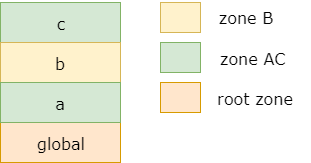
In this snippet, we used the run method to explicitly select the zone for each function. But what is the default behavior if you don't call run?
The rule is straightforward: functions and any async tasks created from within a given function will inherit the zone that is currently active.
Since the environment provides a root zone by default, any function running outside a specific zone.run block will be in this root zone. The following example confirms this:
function c() {
    console.log(Zone.current.name);  // <root>
}

function b() {
    console.log(Zone.current.name);  // <root>
    c();
}

function a() {
    console.log(Zone.current.name);  // <root>
    b();
}

a();
And the visualization shows it clearly:
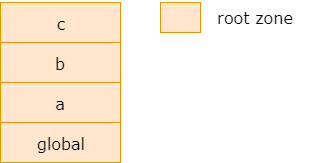
If we insert a single zoneAB.run call at the start of the a function, the entire call chain from there, including b and c, will execute in the AB zone:
const zoneAB = Zone.current.fork({name: 'AB'});

function c() {
    console.log(Zone.current.name);  // AB
}

function b() {
    console.log(Zone.current.name);  // AB
    c();
}

function a() {
    console.log(Zone.current.name);  // <root>
    zoneAB.run(b);
}

a();
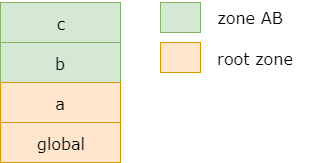
Here, we only explicitly invoked b within the AB zone. However, since b calls c internally, c runs in the same AB zone context without further effort.
Maintaining the Zone Through Async Tasks
The asynchronous nature of JavaScript is a key differentiator, often tackled early on with setTimeout to delay code. Inside Zone, an operation scheduled by setTimeout is classified as a macrotask. There's also the microtask category, which covers things like promise.then. This terminology comes from the browser's internals, and Jake Archibald has a well-known article, Tasks, microtasks, queues and schedules, that dives deep into this difference.
The core question is: how does Zone deal with async tasks? Let's modify our earlier example. Instead of calling c synchronously, we postpone it using setTimeout. This function will now run in its own call stack after roughly 2 seconds:
const zoneBC = Zone.current.fork({name: 'BC'});

function c() {
    console.log(Zone.current.name);  // BC
}

function b() {
    console.log(Zone.current.name);  // BC
    setTimeout(c, 2000);
}

function a() {
    console.log(Zone.current.name);  // <root>
    zoneBC.run(b);
}

a();
We established previously that function calls inherit the zone of their caller. This rule extends gracefully to async operations as well. When you schedule a task with a callback, that callback will run in the zone that was current at the moment the task was set up.
This sequence would look like:
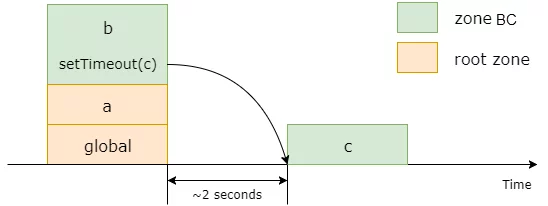
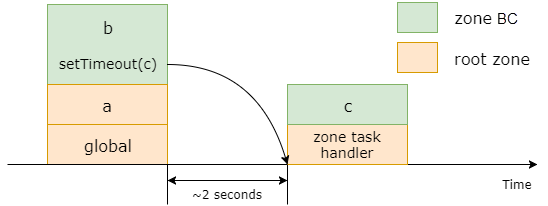
This high-level view is helpful, but it masks what happens behind the scenes. Zone.js doesn't magically keep the context. Instead, it has to recreate the zone when the task executes. This is done by storing a reference to the correct zone directly on the task object. When the timer handler fires, Zone.js uses this stored zone to set up the context before the actual target function is executed.
Practically, this means every async task's call stack starts with the root zone, which checks the loaded task and restores the appropriate zone before delegating. Here's a more faithful diagram of the process:
Sharing Data Across Async Boundaries
Among the interesting features Zones provide is context propagation. This allows you to bind specific data to a zone and have it available within any task running in that zone, effectively creating a shared, asynchronous-safe data bag.
Returning to our last example, let's see how to pass data through a setTimeout. As we know, forking allows us to pass a zone spec. Within it, we can define the properties for the new zone:
const zoneBC = Zone.current.fork({
    name: 'BC',
    properties: {
        data: 'initial'
    }
});
On the other side, you can retrieve this value using the zone.get method:
function a() {
    console.log(Zone.current.get('data')); // 'initial'
}

function b() {
    console.log(Zone.current.get('data')); // 'initial'
    setTimeout(a, 2000);
}

zoneBC.run(b);
However, the object referenced by the `properties` field is shallow-immutable. This means you can't easily add or remove top-level properties because Zone doesn't offer methods for that. In our example, setting `properties.data` to a new value gets complicated. To allow changes, we can point `properties.data` to an actual object rather than a primitive:
const zoneBC = Zone.current.fork({
    name: 'BC',
    properties: {
        data: {
            value: 'initial'
        }
    }
});

function a() {
    console.log(Zone.current.get('data').value); // 'updated'
}

function b() {
    console.log(Zone.current.get('data').value); // 'initial'
    Zone.current.get('data').value = 'updated';
    setTimeout(a, 2000);
}

zoneBC.run(b);
An important aspect of the fork mechanism is that child zones automatically inherit these properties from their ancestors:
const parent = Zone.current.fork({
    name: 'parent',
    properties: { data: 'data from parent' }
});

const child = parent.fork({name: 'child'});

child.run(() => {
    console.log(Zone.current.name); // 'child'
    console.log(Zone.current.get('data')); // 'data from parent'
});
Monitoring pending operations
A more compelling feature is the capacity to monitor asynchronous micro and macro tasks that remain unfinished. Zone maintains a queue of all such tasks. To receive notifications whenever this queue’s status changes, the onHasTask hook from the zone spec can be utilized. Below is its defined signature:
onHasTask(delegate, currentZone, targetZone, hasTaskState);
Because parent zones can intercept events originating from child zones, Zone offers both currentZone and targetZone arguments to help differentiate between the zone whose task queue has changed and the zone that is catching the event. For instance, to verify you are handling the event for the present zone, a simple zone comparison is needed:
// We are only interested in event which originate from our zone
if (currentZone === targetZone) { ... }
The final argument passed to this hook is hasTaskState, which details the current condition of the task queue. Its signature is as follows:
type HasTaskState = {
    microTask: boolean;
    macroTask: boolean;
    eventTask: boolean;
    change: 'microTask'|'macroTask'|'eventTask';
};
When setTimeout is invoked within a zone, you will receive a hasTaskState object containing these properties:
{
    microTask: false;
    macroTask: true;
    eventTask: false;
    change: 'macroTask';
}
This indicates that a macrotask is waiting in the queue, and that the change is attributed to the macrotask category.
Let’s put this into practice:
const z = Zone.current.fork({
    name: 'z',
    onHasTask(delegate, current, target, hasTaskState) {
        console.log(hasTaskState.change);          // "macroTask"
        console.log(hasTaskState.macroTask);       // true
        console.log(JSON.stringify(hasTaskState));
    }
});

function a() {}

function b() {
    // synchronously triggers `onHasTask` event with
    // change === "macroTask" since `setTimeout` is a macrotask
    setTimeout(a, 2000);
}

z.run(b);
The resulting output is shown below:
macroTask
true
{
    "microTask": false,
    "macroTask": true,
    "eventTask": false,
    "change": "macroTask"
}
Once the two-second timeout completes, the onHasTask hook fires once more:
macroTask
false
{
    "microTask": false,
    "macroTask": false,
    "eventTask": false,
    "change": "macroTask"
}
There is a limitation, though. The onHasTask hook can only be used to observe whether the entire task queue is either `empty` or `non-empty`. It is not suitable for monitoring individual tasks. If you execute the following snippet:
let timer;

const z = Zone.current.fork({
    name: 'z',
    onHasTask(delegate, current, target, hasTaskState) {
        console.log(Date.now() - timer);
        console.log(hasTaskState.change);
        console.log(hasTaskState.macroTask);
    }
});

function a1() {}
function a2() {}

function b() {
    timer = Date.now();
    setTimeout(a1, 2000);
    setTimeout(a2, 4000);
}

z.run(b);
you will get this output:
1
macroTask
true

4006
macroTask
false
Notice that no event is emitted for the setTimeout task that finishes in 2 seconds. The onHasTask hook triggers once when the first setTimeout is scheduled, as the queue state flips from non-empty to empty, and it triggers a second time at the 4-second mark when the final setTimeout callback finishes.
For tracking individual tasks, the onSheduleTask and onInvoke hooks are the appropriate tools.
Using onSheduleTask and onInvokeTask
The zone spec defines two hooks designed for monitoring specific tasks:
- onScheduleTask
fires when an asynchronous operation, such assetTimeout, is first encountered - onInvokeTask
fires when the callback passed to an asynchronous operation, likesetTimeout(callback), is actually executed
Below is an example of employing these two hooks to track individual tasks:
let timer;

const z = Zone.current.fork({
    name: 'z',
    onScheduleTask(delegate, currentZone, targetZone, task) {
      const result = delegate.scheduleTask(targetZone, task);
      const name = task.callback.name;
      console.log(
          Date.now() - timer,
         `task with callback '${name}' is added to the task queue`
      );
      return result;
    },
    onInvokeTask(delegate, currentZone, targetZone, task, ...args) {
      const result = delegate.invokeTask(targetZone, task, ...args);
      const name = task.callback.name;
      console.log(
        Date.now() - timer,
       `task with callback '${name}' is removed from the task queue`
     );
     return result;
    }
});

function a1() {}
function a2() {}

function b() {
    timer = Date.now();
    setTimeout(a1, 2000);
    setTimeout(a2, 4000);
}

z.run(b);
The anticipated output is:
1 "task with callback ‘a1’ is added to the task queue"
2 "task with callback ‘a2’ is added to the task queue"
2001 "task with callback ‘a1’ is removed from the task queue"
4003 "task with callback ‘a2’ is removed from the task queue"
Detecting zone entry with onInvoke
Entering a zone can happen either explicitly via z.run() or implicitly when a task is invoked. While the previous section discussed the onInvokeTask hook for intercepting zone entry during internal callback execution for an async task, there is also an onInvoke hook. The latter is used to be alerted when the zone is entered through a z.run() call.
An example of this is provided here:
const z = Zone.current.fork({
    name: 'z',
    onInvoke(delegate, current, target, callback, ...args) {
        console.log(`entering zone '${target.name}'`);
        return delegate.invoke(target, callback, ...args);
    }
});

function b() {}

z.run(b);
Here is the corresponding output:
entering zone ‘z’
Internal mechanics of `Zone.current`
The current zone is monitored via a variable named _currentZoneFrame, which is captured in a closure as shown here and is exposed through the Zone.current getter. Thus, to switch the active zone, one only needs to update this variable. As previously noted, zone switching happens during a z.run() call or a task invocation.
The run method performs the update at this location:
class Zone {
   ...
   run(callback, applyThis, applyArgs,source) {
      ...
      _currentZoneFrame = {parent: _currentZoneFrame, zone: this};
Similarly, the runTask method adjusts the variable here:
class Zone {
   ...
   runTask(task, applyThis, applyArgs) {
      ...
      _currentZoneFrame = { parent: _currentZoneFrame, zone: this };
The runTask method gets invoked from the invokeTask method found on each task:
class ZoneTask {
    invokeTask() {
         _numberOfNestedTaskFrames++;
      try {
          self.runCount++;
          return self.zone.runTask(self, this, arguments);
Every task, at the moment of its creation, stores its originating zone in the zone property. This stored zone is exactly what runTask uses inside invokeTask (where self points to the task instance):
self.zone.runTask(self, this, arguments);