
Understanding the Background
Fiber's architecture splits into two primary phases: reconciliation/render and commit. In the source code, the reconciliation phase is typically called the "render phase." During this phase, React traverses the component tree and performs the following actions:
- refreshes state and props,
- triggers lifecycle hooks,
- obtains the children from the component,
- compares them against the previous children,
- and determines which DOM updates are necessary.
All of these operations are what Fiber refers to as work. The exact kind of work required hinges on the type of React Element involved. For instance, a Class Component needs an instance created, whereas a Functional Component does not. If you're curious, you can find every work target type in Fiber here. These are the precise activities Andrew refers to in his explanation:
When dealing with UIs, the problem is that if too much work is executed all at once, it can cause animations to drop frames…
But let's unpack that 'all at once' aspect. Fundamentally, if React were to walk the entire component tree synchronously and perform work for each node, it could easily exceed the 16 ms window available for application logic. That overshoot would lead to dropped frames and, consequently, noticeable stutter in the UI.
So, is there a remedy?
Newer browsers (and React Native) implement APIs that help address this exact problem…
The new API in question is the requestIdleCallback global function. It lets you schedule a callback to run during the browser's idle periods. Here's a standalone usage example:
requestIdleCallback((deadline)=>{
    console.log(deadline.timeRemaining(), deadline.didTimeout)
});
If I execute that snippet in the console now, Chrome outputs 49.9 false. This essentially indicates I have 49.9 ms available for my work and haven't consumed the entire allocation—otherwise, deadline.didTimeout would read true. Remember that timeRemaining can shift the moment the browser has new tasks, so it needs constant re-checking.
requestIdleCallbackturns out to be a bit too restrictive and doesn't fire frequently enough for smooth UI rendering, so the React team built their own version.
Now, if we bundle all the actions React performs on a component into a function called performWork and leverage requestIdleCallback to schedule it, the code could resemble this:
requestIdleCallback((deadline) => {
    // while we have time, perform work for a part of the components tree
    while ((deadline.timeRemaining() > 0 || deadline.didTimeout) && nextComponent) {
        nextComponent = performWork(nextComponent);
    }
});
We handle one component, then hand back a reference to the next one for processing. This approach could work—except for a single hurdle. You cannot process the entire component tree synchronously, as in the previous reconciliation algorithm. That's the exact issue Andrew highlights here:
in order to use those APIs, you need a way to break rendering work into incremental units
To address this, React had to overhaul its tree-walking algorithm, shifting from a synchronous, recursive model built on the native stack to an asynchronous one using linked lists and pointers. This is what Andrew discusses:
If you rely only on the [built-in] call stack, it will keep doing work until the stack is empty…Wouldn't it be great if we could interrupt the call stack at will and manipulate stack frames manually? That's the purpose of React Fiber.Fiber is re-implementation of the stack, specialized for React components. You can think of a single fiber as a virtual stack frame.
That's precisely what I'll walk through next.
A Quick Note on the Stack
I'll assume you're comfortable with the concept of a call stack—it's what you see in browser debugging tools when you pause at a breakpoint. Here are some pertinent quotes and diagrams from Wikipedia:
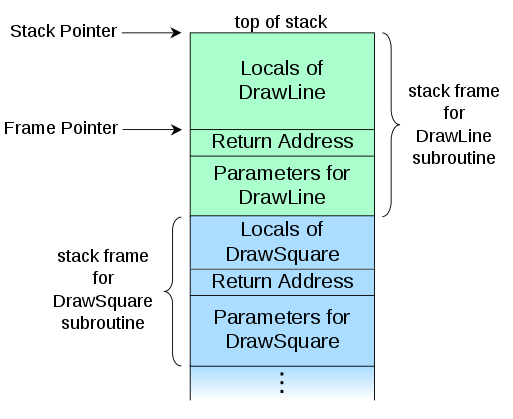
In computer science, a call stack is a stack data structure that stores information about the active subroutines of a computer program… the main reason for having call stack is to keep track of the point to which each active subroutine should return control when it finishes executing… A call stack is composed of stack frames… Each stack frame corresponds to a call to a subroutine which has not yet terminated with a return. For example, if a subroutine named
DrawLineis currently running, having been called by a subroutineDrawSquare, the top part of the call stack might be laid out like in the adjacent picture.
Why Does the Stack Matter to React?
As outlined in the first section, React walks the component tree during the reconciliation/render phase and performs work on each node. The earlier reconciler used a synchronous recursive pattern, leaning on the native stack for traversal. The official reconciliation docs describe this process extensively, touching on recursion:
By default, when recursing on the children of a DOM node, React just iterates over both lists of children at the same time and generates a mutation whenever there's a difference.
Consider this: each recursive call pushes a new frame onto the stack, and it does so synchronously. Imagine we have the following component tree:
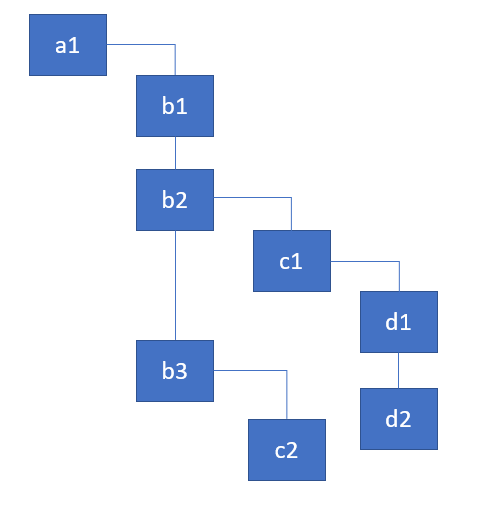
Represented as objects featuring a render function. You can treat these as component instances:
const a1 = {name: 'a1'};
const b1 = {name: 'b1'};
const b2 = {name: 'b2'};
const b3 = {name: 'b3'};
const c1 = {name: 'c1'};
const c2 = {name: 'c2'};
const d1 = {name: 'd1'};
const d2 = {name: 'd2'};

a1.render = () => [b1, b2, b3];
b1.render = () => [];
b2.render = () => [c1];
b3.render = () => [c2];
c1.render = () => [d1, d2];
c2.render = () => [];
d1.render = () => [];
d2.render = () => [];
React needs to traverse this tree, executing work for each component. For simplicity, let's say the work involves logging the current component's name and fetching its children. Here's how that looks with recursion.
Recursive Traversal
The core function that loops over the tree is dubbed walk in the implementation below:
walk(a1);

function walk(instance) {
    doWork(instance);
    const children = instance.render();
    children.forEach(walk);
}

function doWork(o) {
    console.log(o.name);
}
Here's the resulting output:
a1, b1, b2, c1, d1, d2, b3, c2
If recursion feels shaky, check out my in-depth article on recursion.
The recursive method is straightforward and fits tree traversal naturally. Yet, as we've seen, it carries constraints. The main drawback is the inability to split work into incremental pieces. You can't halt processing at a given component and pick it up later. With recursion, React just keeps going until every component is handled and the stack empties out.
So, how does React achieve tree traversal without recursion? It employs a singly linked list traversal algorithm. This design permits pausing the walk and prevents the stack from expanding.
Walking the tree with linked lists
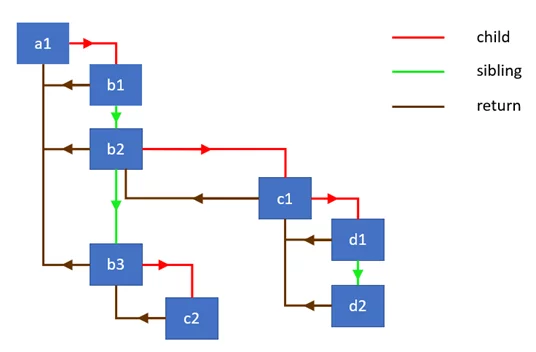
Sebastian Markbåge sketched out the core idea of this algorithm in a GitHub issue, and I found it quite illuminating. To put it into practice, we need a node structure that carries three references:
child— points to the first child nodesibling— points to the next sibling nodereturn— points back to the parent node
In React’s modern reconciliation engine, a node with these exact fields is what we call a Fiber. Internally, it serves as the runtime representation of a React Element, carrying along a queue of pending work. I’ll dive deeper into that in a follow-up piece.
The diagram below illustrates how these nodes connect through the linked list, showing the different kinds of links between them:
Let’s start by setting up a basic constructor for our node type:
class Node {
    constructor(instance) {
        this.instance = instance;
        this.child = null;
        this.sibling = null;
        this.return = null;
    }
}
Next, we’ll create a utility that takes an array of nodes and wires them up as siblings. We’ll rely on this to chain together the children produced by a component’s render method:
function link(parent, elements) {
    if (elements === null) elements = [];

    parent.child = elements.reduceRight((previous, current) => {
        const node = new Node(current);
        node.return = parent;
        node.sibling = previous;
        return node;
    }, null);

    return parent.child;
}
This function walks through the array from the tail end, stitching each node to its predecessor to form a singly linked list. The first sibling in the resulting chain is what gets returned. A quick demo to see it in action:
const children = [{name: 'b1'}, {name: 'b2'}];
const parent = new Node({name: 'a1'});
const child = link(parent, children);

// the following two statements are true
console.log(child.instance.name === 'b1');
console.log(child.sibling.instance === children[1]);
We’ll also need a helper that carries out a unit of work for a given node. In this simple case, it logs the component’s name. Beyond that, though, it pulls up the node’s children and links them together using the function above:
function doWork(node) {
    console.log(node.instance.name);
    const children = node.instance.render();
    return link(node, children);
}
Now for the main event: the traversal routine itself. This is a depth-first walk that prioritizes the parent before diving into children. Here’s the implementation, annotated for clarity:
function walk(o) {
    let root = o;
    let current = o;

    while (true) {
        // perform work for a node, retrieve & link the children
        let child = doWork(current);

        // if there's a child, set it as the current active node
        if (child) {
            current = child;
            continue;
        }

        // if we've returned to the top, exit the function
        if (current === root) {
            return;
        }

        // keep going up until we find the sibling
        while (!current.sibling) {

            // if we've returned to the top, exit the function
            if (!current.return || current.return === root) {
                return;
            }

            // set the parent as the current active node
            current = current.return;
        }

        // if found, set the sibling as the current active node
        current = current.sibling;
    }
}
While the logic isn't overly complex, it might take a bit of tinkering to fully internalize — feel free to experiment in this interactive sandbox. The core principle is tracking the current node, updating that reference as we move down a branch until we reach a dead end, and then using the return link to climb back to the nearest common ancestor.
If we inspect the call stack during this traversal, here's what shows up:

Notice that the stack depth stays flat even as we descend further into the tree. However, if you set a breakpoint inside the doWork function and log each node's name, the output reveals a different picture:

It mirrors what a typical call stack looks like in the browser. By adopting this strategy, we're essentially swapping the native call stack for one of our own devising. Andrew puts it this way:
Fiber is re-implementation of the stack, specialized for React components. You can think of a single fiber as a virtual stack frame.
Because we now maintain our own stack by holding onto a node that represents the current top frame:
function walk(o) {
    let root = o;
    let current = o;

    while (true) {
            ...

            current = child;
            ...

            current = current.return;
            ...

            current = current.sibling;
    }
}
we gain the ability to pause the traversal at any given moment and pick it back up later. That's precisely the flexibility we need to leverage the requestIdleCallback API effectively.
React's internal work loop
The work loop in React's source looks like this:
function workLoop(isYieldy) {
    if (!isYieldy) {
        // Flush work without yielding
        while (nextUnitOfWork !== null) {
            nextUnitOfWork = performUnitOfWork(nextUnitOfWork);
        }
    } else {
        // Flush asynchronous work until the deadline runs out of time.
        while (nextUnitOfWork !== null && !shouldYield()) {
            nextUnitOfWork = performUnitOfWork(nextUnitOfWork);
        }
    }
}
As you can see, it aligns neatly with the traversal approach I outlined earlier. The nextUnitOfWork variable holds onto the current fiber, functioning as that top frame reference.
This loop can process the component tree in a synchronous manner, executing work for each fiber it encounters (tracked via nextUnitOfWork). That tends to be the case for interactive updates — think click events or input changes. Alternatively, it can proceed asynchronously, checking whether there's still budget left after handling a fiber. The shouldYield function consults deadlineDidExpire and deadline, both of which are refreshed continuously as work progresses on each fiber.
A thorough walkthrough of performUnitOfWork is available in this detailed article.