Bridging Signal Forms and Reactive Forms
Angular’s new Signal Forms implementation introduces a modern approach to form management. Still, Reactive Forms remain fully supported and are widely used in existing codebases. To ease migration, both systems can coexist within a single application—and even within the same form structure. This interoperability lets teams adopt Signal Forms incrementally while preserving working code.
Angular ships two interop helpers for this purpose: SignalFormControl and compatForm. The former embeds Signal Forms logic inside a Reactive Forms hierarchy, while the latter brings Reactive Forms controls into a Signal Forms context. Below, I demonstrate how each bridge operates and how they can be combined in a single form.
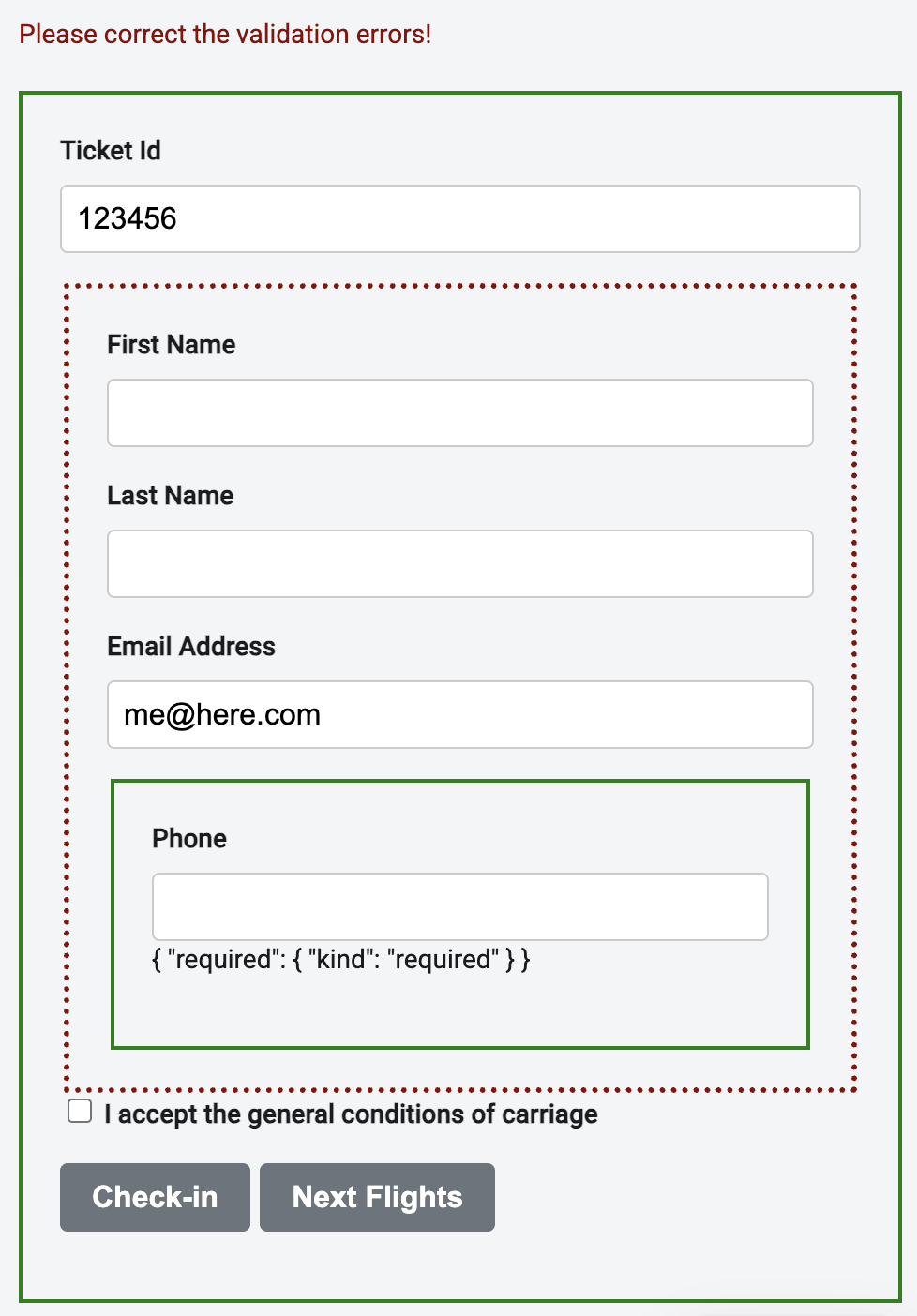
The diagram below illustrates the sample used throughout this discussion. Solid outlines represent Signal Forms elements, while dashed outlines mark the Reactive Form boundary:
Using SignalFormControl Inside Reactive Forms
SignalFormControl—available since Angular 21.2—functions as a regular form control within a Reactive Form, but its validation logic comes from a Signal Forms schema. It acts as an adapter that connects both form paradigms.
This class is instantiated similarly to a FormControl, yet it accepts a Signal Forms schema rather than reactive validators:
protected readonly phoneNumber = new SignalFormControl('', (path) => {
  required(path);
});
Like any standard control, it slots directly into a FormGroup:
protected readonly passengerGroup = this.formBuilder.nonNullable.group({
  firstName: '',
  lastName: '',
  email: 'me@here.com',
  phoneNumber: this.phoneNumber,
});
From the FormGroup’s perspective, SignalFormControl behaves like a typical AbstractControl implementation. Consequently, its state influences the parent group. For instance, when the SignalFormControl is invalid, the entire FormGroup is marked invalid as well.
This propagation also applies to the value property. In the provided example, logging the passengerGroup value reveals that it includes the data from the phoneNumber SignalFormControl:
{
  "passenger": {
      "firstName": "John",
      "lastName": "Doe",
      "email": "john@doe.com",
      "phoneNumber": "133"
  }
}
Within the template, SignalFormControl is bound exactly like an ordinary FormControl:
<fieldset [formGroup]="passengerGroup">
    <input formControlName="firstName" id="firstName" />
    <input formControlName="lastName" id="lastName" />
    <input formControlName="email" id="email" />

    <!-- Signal Form (SignalFormControl) -->
    <fieldset>
       <input formControlName="phoneNumber" id="phoneNumber" />
    </fieldset>

</fieldset>
Internally, this control is backed by a signal. It can be retrieved via the sourceValue property:
protected readonly fullPhoneNumber = computed(
  () => '+43 ' + this.phoneNumber.sourceValue());
Embedding Reactive Forms with compatForm
While SignalFormControl moves Signal Forms into Reactive Forms, the compatForm helper does the reverse. Available since Angular 21.0, it wraps Reactive Forms controls so they participate in a Signal Forms structure. Both bridges can be combined when migrating a larger form incrementally.
Modern Angular
Additional details on Signal Forms appear in the book Modern Angular - Architecture, Concepts, Implementation. It covers all the essentials for delivering contemporary business applications with Angular—from Signals and state management patterns to architecture, AI assistants, testing, and practical guidance for real-world scenarios.
To apply this approach, start by placing the passengerGroup from the prior section into a signal:
protected readonly checkinFormModel = signal({
  ticketId: '',
  conditionsAccepted: false,
  passenger: this.passengerGroup,
});
This signal then serves as the foundation for a Signal Form. Rather than calling the form function directly, pass the signal to compatForm so it honors the existing FormGroup:
protected readonly checkinForm = compatForm(this.checkinFormModel, (path) => {
  required(path.ticketId);
});
Individual form fields can now be bound using the usual directives from both Signal Forms and Reactive Forms:
<!-- Signal Form (compatForm) -->
<form>
    <input [formField]="checkinForm.ticketId" />

    <!-- Reactive Form -->
    <fieldset [formGroup]="passengerGroup">
        <input formControlName="firstName" id="firstName" />
        <input formControlName="lastName" id="lastName" />
        <input formControlName="email" id="email" />

        <!-- Signal Form (SignalFormControl) -->
        <fieldset>
          <input formControlName="phoneNumber" id="phoneNumber" />
        </fieldset>

    </fieldset>
    [...]
</form>
State propagation works as expected—if phoneNumber or firstName is invalid, the whole form becomes invalid.
One caveat: the resulting Signal-based form model contains a FormGroup. To obtain a plain JavaScript object representing the form data, replace that FormGroup with its value:
const { passenger, ...header } = this.checkinFormModel();

const checkinInfo = {
  ...header,
  passenger: {
    ...passenger.value,
  },
};
Wrapping Up
With Signal Forms, Angular provides a contemporary and flexible alternative to Reactive Forms. The built-in bridges enable smooth coexistence of both systems, supporting gradual migration of existing applications. This approach balances modernization with continuity, allowing teams to move forward without discarding proven capabilities.