
Loading Microfrontends in Angular Without Webpack 5
Since I started writing about Module Federation, the feedback has been overwhelmingly positive. This shows that many teams genuinely need the ability to load code that has been compiled and deployed independently. Because current bundlers — including the one behind the Angular CLI — don't support this pattern, Module Federation represents a major shift.
That said, Module Federation relies on webpack 5, which is still in beta and won't reach the Angular CLI until later this year. While time will eventually solve this problem, some developers are looking for ways to get similar behavior right now.
Several options exist, and one of them is what I'd like to walk through here: loading separately compiled UMD bundles. You can find the complete source code on GitHub.
This technique draws on ideas from Victor Savkin and a useful discussion I had with Rob Wormald a while back.
The Example Setup
Everything shown here runs straight on Angular and the Angular CLI, but I've chosen an Nx workspace because it offers helpful tooling for large systems broken into small pieces. Among other things, it can visualize the relationships between projects:
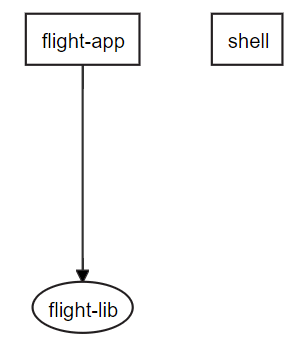
In this demo, the shell app can load separately built and deployed libraries, such as flight-lib:
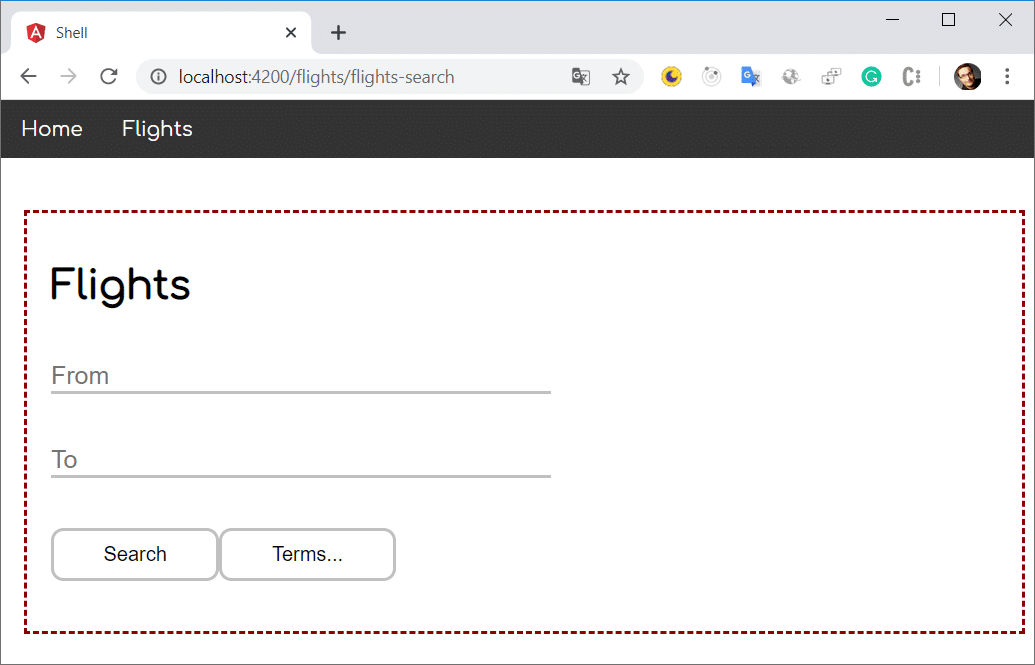
When you need to run flight-lib on its own, the flight-app references it directly and serves as the standalone mode.
Avoiding Redundant Dependencies with UMD
Naturally, when the shell pulls in flight-lib, we don't want to fetch Angular and other shared packages a second time. The goal is to reuse the already loaded instance of Angular. To make this work, we use UMD bundles, which fall back to the global namespace when no module loader is present.
UMD bundles can also expose their exports on the global object. The shell takes advantage of this to access dynamically loaded libraries.
As for producing UMD bundles: the Angular build already does this automatically. The official Angular Package Format requires it, along with other outputs like ES5 and ES2015 bundles built as EcmaScript modules.
Building the Library
The flight-lib here is a standard feature library containing child routes:
@NgModule({
  imports: [
    CommonModule,
    RouterModule.forChild([
      { path: 'flights-search', component: FlightComponent  },
      [...]
    ])
  ],
  declarations: [FlightComponent]
})
export class FlightLibModule {}
Nothing about it is special. After running ng build flight-lib, the output includes several folders:
dist/libs/flight-lib
├───bundles
├───esm2015
├───esm5
├───fesm2015
├───fesm5
└───lib
Each folder corresponds to a different module format. The UMD bundles live in the bundles folder:
18.767 flights-flight-lib.umd.js
30.145 flights-flight-lib.umd.js.map
 5.923 flights-flight-lib.umd.min.js
17.766 flights-flight-lib.umd.min.js.map
If you check the size of the minified file, you'll notice it only includes our code — none of the referenced dependencies. All you have to do now is deploy these files, or at least the minified bundle, to any webserver. For this demo, I've simply copied it into the shell's assets folder.
Setting Up the Shell
The shell is also a plain Angular application. The only difference is that it uses two helper functions to load the separately compiled UMD bundle and to share libraries like Angular with it. Let's first treat those helpers as a black box and examine their internal logic afterwards.
To load the UMD bundle, the shell leverages the router's lazy loading mechanism:
@NgModule({
  declarations: [AppComponent, HomeComponent],
  imports: [
    BrowserModule,
    RouterModule.forRoot([
      {
        path: '',
        component: HomeComponent
      },
      {
        path: 'flights',
        loadChildren: () => loadModule('assets/flights-flight-lib.umd.min.js')
                              .then(g => g.flights['flight-lib'].FlightLibModule)
      }
    ])
  ],
  providers: [],
  bootstrap: [AppComponent]
})
export class AppModule {}
At first glance, this resembles conventional lazy loading. However, instead of a dynamic import, the code calls the helper loadModule. This deviation is necessary because webpack and the Angular CLI assume that anything you import dynamically is available at compile time. That assumption doesn't hold here, since we're bringing in code built independently.
Once loaded, the then handler grabs the FlightLibModule from the global namespace. It's not placed directly at the root though; it's nested under flights, and then under flight-lib. These are essentially nested JavaScript objects. Since flight-lib includes a dash, the bracket syntax is required to reference it.
Here,
flightsis the name of the Angular project in the Nx workspace, whileflight-libis the library's name. If these names aren't obvious, check the first few lines of your UMD bundle.
Any dependencies the bundle expects must also be placed on the global object. For that, the helper function is invoked:
initExternals(environment.production);This call happens in main.ts, before the application bootstraps.
Inside the Helpers
Now let's open up those two helper functions. The loadModule function dynamically inserts a script tag to load the specified UMD bundle:
const moduleMap = {};

export function loadModule(umdFileName: string): Promise<any> {
    return new Promise<any>((resolve, reject) => {

        if (moduleMap[umdFileName]) {
            resolve(window);
            return;
        }

        const script = document.createElement('script');
        script.src = umdFileName;

        script.onerror = reject;

        script.onload = () => {
            moduleMap[umdFileName] = true;
            resolve(window); // window is the global namespace
        }

        document.body.append(script);
    });
}
This pattern for dynamic script loading is common and typically hidden inside utility libraries. The moduleMap guarantees that a given bundle is only fetched once. Also note that the promise resolves with the window object, which represents the global namespace in browsers.
On the other hand, initExternals simply places the shared libraries into the global namespace, right where the separately compiled UMD bundles look for them:
declare const require: any;

export function initExternals(production: boolean) {
    (window as any).ng = {};
    (window as any).ng.core = require('@angular/core');
    (window as any).ng.forms = require('@angular/forms');
    (window as any).ng.common = require('@angular/common');
    (window as any).ng.router = require('@angular/router');
    (window as any).ng.platformBrowser = require('@angular/platform-browser');

    if (!production) {
        (window as any).ng.platformBrowserDynamic = require('@angular/platform-browser-dynamic');
        (window as any).ng.compiler = require('@angular/compiler');
    }
}
To determine the correct position — say ng.core or ng.common — inspect the UMD bundle of the library in question. The relevant references appear in the first few lines.
Wrapping Up
The approach described here is straightforward and works with Angular libraries already today. The bundles stay small because they omit dependencies and only include the lazy loaded code. All dependencies are shared with the shell.
One limitation is that the shell must provide every dependency the loaded library requires. Those dependencies either need to be bundled upfront and exposed, or loaded together with the library itself. Additionally, traditional lazy loading inside a UMD bundle won't work — the CLI doesn't split UMD output. However, the shell can lazy load normally, and a UMD bundle can still load further UMD bundles using the technique shown.
The upcoming Webpack 5 Module Federation will offer significantly more convenience out of the box. For one, it removes the need to extract microfrontends into separate libraries. Each microfrontend can also ship with its own dependencies. Both sides get to decide which dependencies to share, and if the shell lacks a particular one, the microfrontend can fall back to loading it directly. On top of that, Module Federation is configured declaratively.
An advantage of the approach presented here is that the number of microfrontends doesn't need to be known at compile time. A runtime configuration file could specify how many microfrontends exist and where to find them. Eventually, a corresponding webpack plugin should bring the same flexibility to Module Federation.
If you want to get started today, the "light" approach described here is probably the best available option. At the same time, watch closely how Module Federation evolves and how it gets integrated into the Angular CLI.
Want to go deeper on Angular architecture for enterprise or industrial projects? Check out our advanced online workshop:

Reserve your seat now, or ask about an in-house workshop for your team!