
"No Required Version Specified" and Secondary Entry Points
For the first pitfall, let's examine the shell's webpack.config.js. Let's also strip down the shared node like this:
 shared: {
   "@angular/core": { singleton: true, strictVersion: true },
   "@angular/common": { singleton: true, strictVersion: true },
   "@angular/router": { singleton: true, strictVersion: true },
   "@angular/common/http": { singleton: true, strictVersion: true },
 },
Notice that we no longer specify a requiredVersion. Normally, this isn't necessary because webpack Module Federation is quite clever about determining which version you're using.
However, when we now compile the shell with ng build shell, the following error shows up:
shared module @angular/common - Warning: No required version specified and unable to automatically determine one. Unable to find required version for "@angular/common" in description file (C:\Users\Manfred\Documents\artikel\ModuleFederation-Pitfalls\example\node_modules\@angular\common\package.json). It need to be in dependencies, devDependencies or peerDependencies.
The culprit here is the secondary entry point @angular/common/http, which behaves somewhat like an npm package nested inside another npm package. Technically speaking, it's just another file that the npm package @angular/common exposes.
Not surprisingly, @angular/common/http depends on @angular/common, and webpack is aware of this relationship. Therefore, webpack wants to determine the version of @angular/common in use. To achieve this, it examines the npm package's package.json (specifically @angular/common/package.json) and searches through the dependencies listed there. Yet, @angular/common isn't listed as a dependency of itself, so the version information can't be located.
This same challenge appears with other packages that use secondary entry points, such as @angular/material.
One way around this is to manually assign versions to all shared libraries:
 shared: {
   "@angular/core": { singleton: true, strictVersion: true, requiredVersion: '12.0.0' },
   "@angular/common": { singleton: true, strictVersion: true, requiredVersion: '12.0.0' },
   "@angular/router": { singleton: true, strictVersion: true, requiredVersion: '12.0.0' },
   "@angular/common/http": { singleton: true, strictVersion: true, requiredVersion: '12.0.0' },
 },
Obviously, that approach gets tedious quickly, which is why we devised an alternative. Starting with version 12.3, @angular-architects/module-federation includes a modest-looking helper function named shared. If your webpack.config.js was generated with this version or later, it already makes use of this helper.
 [...]

 const mf = require("@angular-architects/module-federation/webpack");
 [...]
 const share = mf.share;

 [...]

 shared: share({
   "@angular/core": { singleton: true, strictVersion: true, requiredVersion: 'auto' },
   "@angular/common": { singleton: true, strictVersion: true, requiredVersion: 'auto' },
   "@angular/router": { singleton: true, strictVersion: true, requiredVersion: 'auto' },
   "@angular/common/http": { singleton: true, strictVersion: true, requiredVersion: 'auto' },
   "@angular/material/snack-bar": { singleton: true, strictVersion: true, requiredVersion:'auto' },

 })
As demonstrated here, the share function wraps the object containing shared libraries. It supports requiredVersion: 'auto' and translates the value auto into the version found in your shell's (or micro frontend's) package.json.
Subtle Version Mismatches: Peer Dependency Troubles
Have you ever brushed off a peer dependency warning without a second thought? Honestly, we've all been there. And frequently, ignoring them is acceptable because at runtime everything works fine. Unfortunately, such situations can throw webpack Module Federation off course when it attempts to auto-detect the required versions of peer dependencies.
To illustrate, let's install @angular/material and @angular/cdk in a version that lags at least two major versions behind our Angular version. This should trigger peer dependency warnings.
In my case, the installation looks like this:
npm i @angular/material@10
 npm i @angular/cdk@10
Next, we'll navigate to the Micro Frontend's (mfe1) FlightModule and import the MatSnackBarModule:
 [...]
 import { MatSnackBarModule  } from '@angular/material/snack-bar';
 [...]

 @NgModule({
   imports: [
     [...]
     // Add this line
     MatSnackBarModule,
   ],
   declarations: [
     [...]
   ]
 })
 export class FlightsModule { }
To use the snack bar within the FlightsSearchComponent, we inject it into the constructor and invoke its open method:
 [...]
 import { MatSnackBar } from '@angular/material/snack-bar';

 @Component({
   selector: 'app-flights-search',
   templateUrl: './flights-search.component.html'
 })
 export class FlightsSearchComponent {
   constructor(snackBar: MatSnackBar) {
     snackBar.open('Hallo Welt!');
   }
 }
For this experiment, ensure that the webpack.config.js in the mfe1 project does not explicitly define versions for the shared dependencies:
 shared: {
   "@angular/core": { singleton: true, strictVersion: true },
   "@angular/common": { singleton: true, strictVersion: true },
   "@angular/router": { singleton: true, strictVersion: true },
   "@angular/common/http": { singleton: true, strictVersion: true },
 },
Leaving these versions unspecified forces Module Federation to attempt automatic detection. However, the peer dependency conflict makes things difficult, resulting in this error:
Unsatisfied version 12.0.0 of shared singleton module @angular/core (required ^10.0.0 || ^11.0.0-0) ; Zone:
; Task: Promise.then ; Value: Error: Unsatisfied version 12.0.0 of shared singleton module @angular/core (required ^10.0.0 || ^11.0.0-0)
While @angular/material and @angular/cdk formally require @angular/core 10, the rest of the application already runs on @angular/core 12. This clearly shows that webpack inspects the package.json files of all shared dependencies to figure out the necessary versions.
To fix this, you can either set the versions manually or employ the share helper function, which picks up the version from your project's package.json:
 [...]

 const mf = require("@angular-architects/module-federation/webpack");
 [...]
 const share = mf.share;

 [...]

 shared: share({
   "@angular/core": { singleton: true, strictVersion: true, requiredVersion: 'auto' },
   "@angular/common": { singleton: true, strictVersion: true, requiredVersion: 'auto' },
   "@angular/router": { singleton: true, strictVersion: true, requiredVersion: 'auto' },
   "@angular/common/http": { singleton: true, strictVersion: true, requiredVersion: 'auto' },
   "@angular/material/snack-bar": { singleton: true, strictVersion: true, requiredVersion:'auto' },
 })
Problems with Sharing Code and Data
In our example, the shell and the micro frontend mfe1 both share the auth-lib. Its AuthService holds the current user name. Consequently, the shell can set the user name, and the lazy-loaded mfe1 can retrieve it:
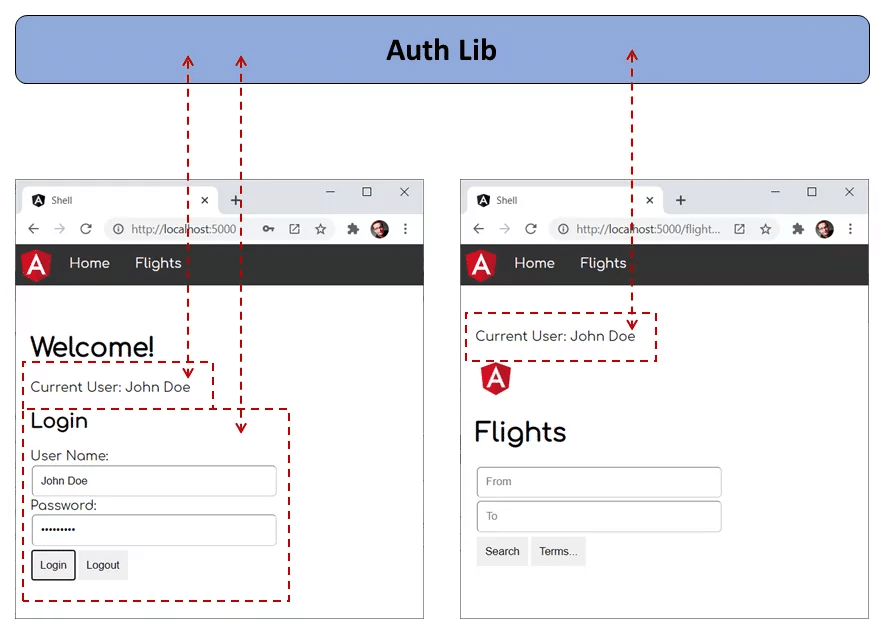
If auth-lib were a conventional npm package, registering it as a shared library with module federation would be straightforward. But in our case, auth-lib is merely a library inside our monorepo. Such libraries are essentially just folders containing source code.
To make this folder resemble an npm package, a path mapping exists for it in the tsconfig.json:
 "paths": {
   "auth-lib": [
     "projects/auth-lib/src/public-api.ts"
   ]
 }
Note that we're directly pointing to the src folder of auth-lib. Nx handles this by default. If you're working with a traditional CLI project, you'll need to modify this manually.
Fortunately, Module Federation accounts for these scenarios. To simplify configuration and prevent issues with the Angular compiler, @angular-architects/module-federation offers a configuration property called:
 module.exports = withModuleFederationPlugin({

     // Shared packages:
     shared: [...],

     // Explicitly share mono-repo libs:
     sharedMappings: ['auth-lib'],

 });
Important: Since Version 14.3, the withModuleFederationPlugin helper automatically shares all mapped paths if you don't use the property
sharedMappingsat all. Hence, the issue described here, will not happen.
Naturally, if you don't opt into sharing the library across all projects, each project will obtain its own copy of auth-lib, making it impossible to share the user name.
However, there's a constellation stemming from the same underlying issue that's far from obvious. To set up this scenario, let's introduce another library to our monorepo:
ng g lib other-libWe also need a path mapping for it that points to its source code:
 "paths": {
   "other-lib": [
     "projects/other-lib/src/public-api.ts"
   ],
 }
Let's assume we also want to keep the current user name in this library:
 import { Injectable } from '@angular/core';

 @Injectable({
   providedIn: 'root'
 })
 export class OtherLibService {

   // Add this:
   userName: string;

   constructor() { }

 }
And let's suppose the AuthLibService delegates to this property:
 import { Injectable } from '@angular/core';
 import { OtherLibService } from 'other-lib';

 @Injectable({
   providedIn: 'root'
 })
 export class AuthLibService {

   private userName: string;

   public get user(): string {
     return this.userName;
   }

   public get otherUser(): string {
     // DELEGATION!
     return this.otherService.userName;
   }

   constructor(private otherService: OtherLibService) { }

   public login(userName: string, password: string): void {
     // Authentication for **honest** users TM. (c) Manfred Steyer
     this.userName = userName;

     // DELEGATION!
     this.otherService.userName = userName;
   }

 }
The shell's AppComponent simply calls the login method:
 import { Component } from '@angular/core';
 import { AuthLibService } from 'auth-lib';

 @Component({
   selector: 'app-root',
   templateUrl: './app.component.html'
 })
 export class AppComponent {
   title = 'shell';

   constructor(
     private service: AuthLibService
     ) {

     this.service.login('Max', null);
   }

 }
Now, however, the Micro Frontend has three ways to access the defined user name:
 import { HttpClient } from '@angular/common/http';
 import {Component} from '@angular/core';
 import { AuthLibService } from 'auth-lib';
 import { OtherLibService } from 'other-lib';

 @Component({
   selector: 'app-flights-search',
   templateUrl: './flights-search.component.html'
 })
 export class FlightsSearchComponent {
   constructor(
     authService: AuthLibService,
     otherService: OtherLibService) {

     // Three options for getting the user name:
     console.log('user from authService', authService.user);
     console.log('otherUser from authService', authService.otherUser);
     console.log('otherUser from otherService', otherService.userName);

   }
 }
At first glance, all three options should yield the same result. Yet, if we only share auth-lib but not other-lib, we end up with the following outcome:

Because other-lib isn't shared, both auth-lib and the micro frontend each receive their own separate copy of it. As a result, we have two instances in play. The first one is aware of the user name, while the second one isn't.
What lesson can we draw from this? Well, it's wise to also share the dependencies of our shared libraries — whether we're dealing with monorepo libraries or traditional npm packages.
This principle extends to secondary entry points that belong to our shared libraries as well.
Hint: @angular-architects/module-federation includes a helper function shareAll for sharing every dependency listed in your project's package.json:
 shared: {
   ...shareAll({
       singleton: true,
       strictVersion: true,
       requiredVersion: 'auto'
   }),
 }
This at least reduces the pain in such scenarios, particularly for prototyping. Additionally, you can make share and shareAll include all secondary entry points by using the includeSecondaries property:
 shared: share({
     "@angular/common": {
         singleton: true,
         strictVersion: true,
         requiredVersion: 'auto',
         includeSecondaries: {
             skip: ['@angular/http/testing']
         }
     },
     [...]
 })
NullInjectorError: Missing Service in the Parent (Root) Scope
After that heavier topic, let’s look at something more straightforward. You might have encountered an error similar to this one:
ERROR Error: Uncaught (in promise): NullInjectorError: R3InjectorError(FlightsModule)[HttpClient -> HttpClient -> HttpClient -> HttpClient]:
   NullInjectorError: No provider for HttpClient!
 NullInjectorError: R3InjectorError(FlightsModule)[HttpClient -> HttpClient -> HttpClient -> HttpClient]:
   NullInjectorError: No provider for HttpClient!
It looks like the loaded Micro Frontend mfe1 is unable to resolve the HttpClient. Interestingly, this might work fine when mfe1 runs on its own.
This usually happens when the Micro Frontend isn't fully exposed through Module Federation, but only pieces of it are—for example, feature modules that contain child routes:
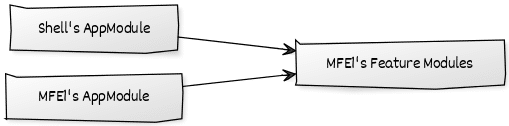
In other words, keep the Micro Frontend's AppModule private. However, if that AppModule was responsible for registering global services like the HttpClient, those need to be set up in the shell's AppModule as well:
 // Shell's AppModule
 @NgModule({
   imports: [
     [...]
     // Provide global services your micro frontends expect:
     HttpClientModule,
   ],
   [...]
 })
 export class AppModule { }
Multiple Root Scopes
In a basic setup, you might be tempted to directly expose the Micro Frontend's AppModule.

Notice that the shell's AppModule now imports the Micro Frontend's AppModule. When the router is involved, you'll quickly run into conflicts: each root module needs its own RouterModule.forRoot call, but Angular only allows that call once.
If you only share components or services, things might seem fine initially. The real problem, however, is that Angular establishes a separate root scope for every root module. So, you end up with two distinct root scopes, which is unexpected behavior.
What's more, this duplicates all services registered for the root scope—for example, those using providedIn: 'root'. Both the shell and the Micro Frontend end up with their own instances, which is almost certainly not what you intended.
A straightforward but not ideal workaround is to shift your shared services to the platform scope:
 // Don't do this at home!
 @Injectable({
   providedIn: 'platform'
 })
 export class AuthLibService {
 }
That scope, though, is generally reserved for Angular's internal mechanisms. The proper solution is to avoid exposing the AppModule altogether and instead share only lazy-loaded feature modules. This way, those modules behave consistently whether they run in the shell or as a standalone application.
Angular Version Conflicts
Here’s another trap that’s a bit harder to spot:
 node_modules_angular_core___ivy_ngcc___fesm2015_core_js.js:6850 ERROR Error: Uncaught (in promise): Error: inject() must be called from an injection context
 Error: inject() must be called from an injection context
     at pr (node_modules_angular_core___ivy_ngcc___fesm2015_core_js.2fc3951af86e4bae0c59.js:1)
     at gr (node_modules_angular_core___ivy_ngcc___fesm2015_core_js.2fc3951af86e4bae0c59.js:1)
     at Object.e.ɵfac [as factory] (node_modules_angular_core___ivy_ngcc___fesm2015_core_js.2fc3951af86e4bae0c59.js:1)
     at R3Injector.hydrate (node_modules_angular_core___ivy_ngcc___fesm2015_core_js.js:11780)
     at R3Injector.get (node_modules_angular_core___ivy_ngcc___fesm2015_core_js.js:11600)
     at node_modules_angular_core___ivy_ngcc___fesm2015_core_js.js:11637
     at Set.forEach (<anonymous>)
     at R3Injector._resolveInjectorDefTypes (node_modules_angular_core___ivy_ngcc___fesm2015_core_js.js:11637)
     at new NgModuleRef$1 (node_modules_angular_core___ivy_ngcc___fesm2015_core_js.js:25462)
     at NgModuleFactory$1.create (node_modules_angular_core___ivy_ngcc___fesm2015_core_js.js:25516)
     at resolvePromise (polyfills.js:10658)
     at resolvePromise (polyfills.js:10610)
     at polyfills.js:10720
     at ZoneDelegate.invokeTask (polyfills.js:10247)
     at Object.onInvokeTask (node_modules_angular_core___ivy_ngcc___fesm2015_core_js.js:28753)
     at ZoneDelegate.invokeTask (polyfills.js:10246)
     at Zone.runTask (polyfills.js:10014)
     at drainMicroTaskQueue (polyfills.js:10427)
When Angular reports inject() must be called from an injection context, it usually means multiple copies of Angular are active simultaneously.
You can trigger this by modifying your shell's webpack.config.js like this:
shared: share({
   "@angular/core": { requiredVersion: 'auto' },
   "@angular/common": { requiredVersion: 'auto' },
   "@angular/router": { requiredVersion: 'auto' },
   "@angular/common/http": { requiredVersion: 'auto' },
 })
Note that these libraries are no longer marked as singletons now. As a result, Module Federation can load more than one version if there's no highest compatible version present.
Also, remember that the shell's package.json pins Angular to 12.0.0 without any caret or tilde, so that exact version is mandatory.
If the Micro Frontend depends on a different Angular version, Module Federation will fall back to loading both versions side by side—one for the shell and one for the Micro Frontend. You can test this by adjusting the shell's app.routes.ts:
 {
   path: 'flights',
   loadChildren: () => loadRemoteModule({
       remoteEntry: 'https://brave-plant-03ca65b10.azurestaticapps.net/remoteEntry.js',
       remoteName: 'mfe1',
       exposedModule: './Module'
     })
     .then(m => m.AppModule)
 },
To make experimentation easier, this Micro Frontend is hosted on an Azure Static Web App at the URL shown.
Launching the shell and loading that Micro Frontend will produce the error.
What’s the takeaway? For stateful, core frameworks like Angular, it’s wise to designate them as singletons. I’ve gathered more details on this and on handling version mismatch strategies.
If mixing Angular versions is an absolute must, I’ve covered that in this article and with this library. But remember the old saying: be careful what you wish for.
Bonus: Duplicate Bundles
Let’s wrap up with a phenomenon that looks alarming but is actually harmless. You might have noticed Module Federation producing duplicate bundles with slightly varying names:

This duplication occurs because Module Federation generates a bundle for each shared library, for each consumer. Here, a consumer means a federated project (shell or Micro Frontend) or a shared library. This acts as a fallback for resolving version incompatibilities. It’s a sensible approach in general, even if it doesn’t add value in this particular situation.
As long as your configuration is correct, only one member of each duplicate pair should be loaded at runtime. If that holds true, there’s nothing to worry about.
Looking Ahead: Architectural Considerations
So far, Module Federation appears to be a direct way to build Micro Frontends with Angular. Still, it brings up a number of related questions:
- What criteria should guide the splitting of a large application into Micro Frontends?
- What access control policies make sense?
- Which established patterns should we adopt?
- How do we steer clear of common pitfalls with Module Federation?
- What advanced use cases are achievable?
Our free eBook (roughly 100 pages) addresses all of these and beyond:
Go ahead and grab your copy here!
Summary
Module Federation is quite adept at automatically detecting details and handling version differences. But its effectiveness depends on the quality of the metadata supplied. To keep things running smoothly, keep these points in mind:
- requiredVersion: Specify
requiredVersionmanually, especially with secondary entrypoints or when peer dependency warnings appear. The@angular-architects/module-federationplugin supports this via itssharehelper, which offers arequiredVersion: 'auto'option that reads the version from yourpackage.json. - Share dependencies of shared libraries as well, particularly if they’re used elsewhere. Don’t forget secondary entry points.
- Have the shell supply global services that your Micro Frontends rely on, like the
HttpClientthrough theHttpClientModule. - Refrain from exposing the
AppModulevia Module Federation. It’s better to expose lazy feature modules instead. - Set
singleton:truefor Angular and other stateful frameworks or libraries. - Don’t be concerned about duplicate bundles provided only one version loads at runtime.